
Glossary
What Is Duplicate Content? (A Complete SEO Guide)

Duplicate content is a technical SEO condition in which identical or near-identical text is accessible at more than one URL, forcing search engines to choose which version to rank. Google does not apply an automated penalty for it; instead, Google filters the duplicate URLs and selects one canonical version to show in search results, excluding the rest.
- Search engines select one canonical URL to rank and filter the rest
- Wasted crawl budget and diluted link equity are the main ranking risks
- Keyword cannibalization involves separate original pages competing for intent, not shared text
- An e-commerce product page that only changes the color attribute is a near-duplicate example
Duplicate content is one of the most misunderstood topics in SEO. Estimates suggest that 25 to 30 percent of the web consists of duplicate content, yet most site owners are not penalized for it. Understanding what duplicate content actually is, how it affects your site, and how to fix it can save you hours of unnecessary worry and help you make smarter technical SEO decisions.
This guide covers everything: what counts as duplicate content, how it impacts rankings, why the "penalty" is mostly a myth, the 15 most common causes, and step-by-step fixes for each.
- Quick answer: Duplicate content is content that appears at more than one URL. Google does not penalize it. It selects one version to rank and filters the rest.
- Main causes: URL variations (http vs https, www vs non-www), tracking parameters, faceted navigation, CMS archive pages, and content syndication.
- Best fixes: rel=canonical for most cases; 301 redirect when merging URLs permanently; noindex for archive pages.
What Is Duplicate Content?
Duplicate content is content that appears at more than one URL on the internet. When the same or very similar text can be found at multiple web addresses, search engines have to decide which version to show in search results.
The key word is "URL." Duplicate content is not about writing style or topic similarity. It is about identical or near-identical content being accessible at two or more distinct addresses.
Internal vs. External Duplicate Content
Duplicate content can be internal or external.
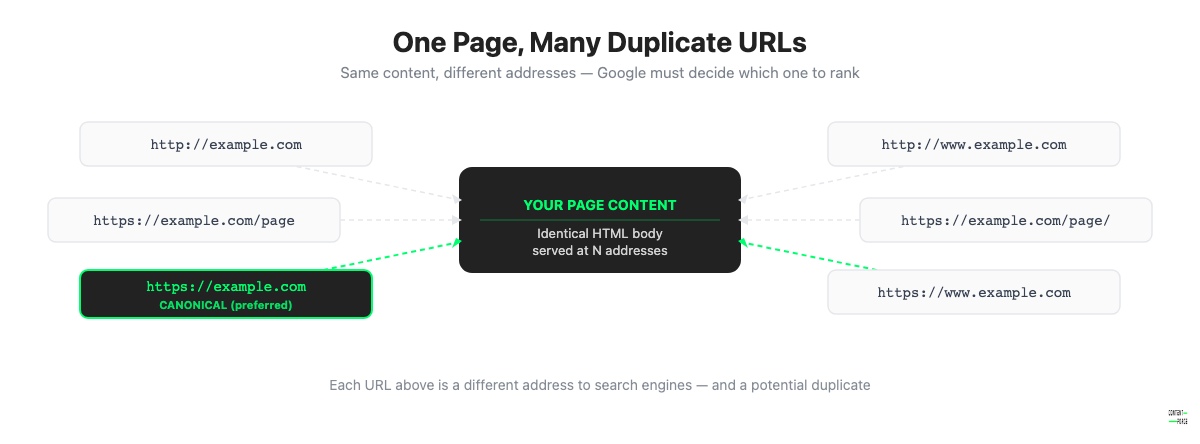
Internal duplicate content exists within a single website. For example, if your homepage is accessible at both https://example.com and https://www.example.com, you have internal duplicate content. The same page is served at two different URLs.
External duplicate content exists across different websites. If another site copies your article and publishes it verbatim, or if you syndicate your content to a third-party publication, search engines will encounter the same content on multiple domains.
Both types create the same core problem: search engines must decide which version to rank.
Exact vs. Near-Duplicate Content
Exact duplicates are word-for-word copies. Near-duplicates are pages that share most of their content but differ in minor ways, such as an e-commerce product page that changes only the color attribute while keeping the same description, or a location page that swaps "New York" for "Chicago" in an otherwise identical template.
Both exact and near-duplicate content can cause indexing and ranking confusion, though near-duplicates are often harder to detect.
How Does Duplicate Content Affect SEO?
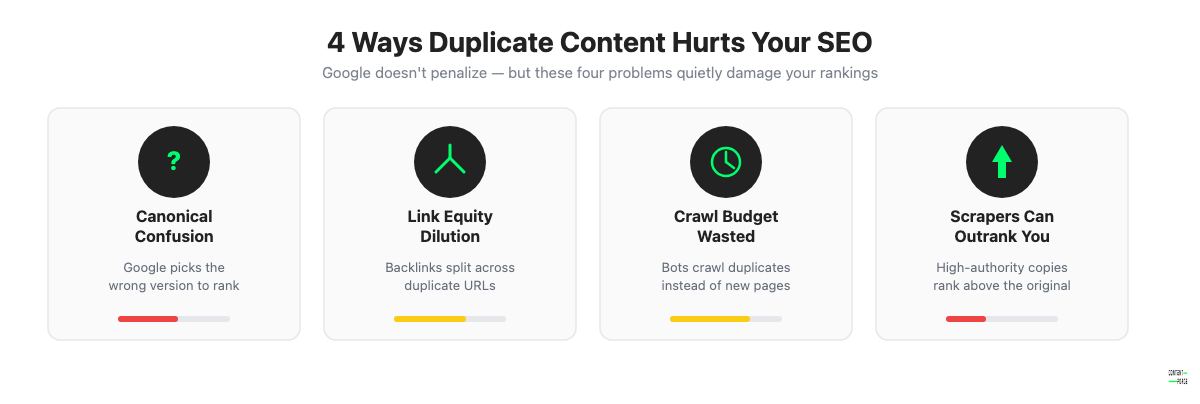
Duplicate content does not result in a penalty in most cases, but it does create several problems that can quietly damage your search performance. This is a distinct issue from keyword cannibalization, where two original pages compete for the same query and intent without any shared text.
1. Search Engines Struggle to Pick a Canonical Version
When two URLs contain identical content, Google has to decide which one to show in search results. Sometimes Google picks the wrong one, meaning your preferred URL may not be the one that ranks. In the best case, Google consolidates signals onto one version. In the worst case, it splits signals across both, weakening each one.
2. Link Equity Gets Diluted
If external sites link to different versions of the same page, the ranking signals from those backlinks are split. Instead of all the link authority flowing to one strong URL, it is divided between two or more URLs that all serve the same content. This makes each version weaker than it would be if all links pointed to a single canonical URL.
3. Crawl Budget Is Wasted
Search engine crawlers have a finite budget for crawling your site. If they encounter dozens of duplicate URLs, they spend that budget on redundant pages instead of on new or important content. For large sites, this can mean that valuable pages get crawled less frequently or not at all.
4. Scraped Copies Can Outrank You
If another site copies your content and has stronger authority or better link equity, Google may choose to rank their copy instead of your original. This is especially problematic for smaller sites. If a high-authority publication scrapes your article without permission, they can end up outranking you for your own content.
SEO Title Generator: eight title tag variations, sized for the SERP and intent-matched. Free, no signup.
Does Google Have a Duplicate Content Penalty?
No. Google does not have an automated penalty for duplicate content.
Google's official guidance on this topic is clear: duplicate content is not grounds for a manual action in most cases. What Google actually does is filter duplicate URLs and choose one version to show in search results. The other versions are typically not indexed or are ranked far lower.
The confusion around "duplicate content penalties" comes from a misunderstanding of what filtering means. When Google filters out one of two duplicate pages, the filtered page will not appear in search results. Site owners interpret this disappearance as a penalty. It is not a penalty. It is normal deduplication behavior.
The one exception is intentional, manipulative duplication created to deceive users or game search results, such as large-scale content scraping, automatically generated doorway pages, or content spinning. These practices can result in a manual action from Google's spam team. But that is a spam enforcement action, not a duplicate content penalty.
For the vast majority of sites, duplicate content caused by technical issues, CMS behavior, or URL variations is something Google handles algorithmically without any punitive action.
Common Causes of Duplicate Content
Most duplicate content is unintentional and results from how websites are built, hosted, or managed. Here are the 15 most common causes.
1. HTTP vs. HTTPS Versions
If your site is accessible at both http://example.com and https://example.com, both versions may be indexed as separate URLs. Even after migrating to HTTPS, the HTTP version can remain accessible unless you set up a redirect. This is one of the most common sources of internal duplicate content for established sites that migrated to HTTPS without properly cleaning up the old protocol.
2. WWW vs. Non-WWW
Similar to the HTTP/HTTPS problem, many sites serve content at both https://www.example.com and https://example.com. These are technically different URLs. Without a canonical tag or redirect, search engines may index both and split signals between them.
3. Trailing Slash vs. No Trailing Slash
https://example.com/page/ and https://example.com/page are different URLs. Most servers handle this consistently, but without explicit configuration, both versions can be live. This is a common source of duplicate content in WordPress sites and other CMS platforms where URL normalization is not enforced by default.
4. URL Parameters (Tracking, Filtering, Sorting)
URL parameters are one of the biggest sources of large-scale duplicate content. When a user filters a category page on an e-commerce site, the resulting URL often looks like https://shop.example.com/shoes?color=blue&size=10. The content may be identical or nearly identical to https://shop.example.com/shoes. If these parameter URLs are indexable, you can end up with hundreds or thousands of near-duplicate pages.
Analytics parameters like UTM codes (?utm_source=email&utm_medium=newsletter) also create duplicate URLs if they are crawlable and indexable.
5. Session IDs in URLs
Some older websites and e-commerce platforms append a unique session ID to every URL to track user sessions. For example: https://example.com/product?sid=abc123. Each visitor gets a different session ID, which means every page generates a unique URL with identical content. This can create thousands of near-duplicate pages in Google's index.
6. Faceted Navigation (E-commerce)
Faceted navigation lets users filter products by attributes like color, size, brand, or price range. Each combination of filters typically generates a unique URL. A site with 10 attributes and 5 values each can produce thousands of filter combinations, most of which serve near-identical product listings with slightly different subsets. Without proper canonicalization, these pages flood search engines with duplicate content.
7. Pagination Pages
When a blog or product category spans multiple pages, each page in the series is a separate URL: /blog/, /blog/page/2/, /blog/page/3/. While each page contains different posts, the surrounding template, navigation, sidebar, and footer content is identical. In some cases, thin category pages with similar post excerpts are flagged as near-duplicates.
8. Printer-Friendly Page Versions
Some websites generate a separate printer-friendly version of every page, typically at a URL like /print/article-name/ or with a query parameter like ?format=print. These printer versions contain the same body content as the original but with a different layout. Without canonicalization or noindex, they create exact duplicate content.
9. Mobile Subdomain (m.) Versions
Sites that serve a mobile-specific version at a subdomain like m.example.com may have duplicate content issues if both the desktop and mobile versions are indexable. Modern responsive design has largely eliminated this problem, but legacy mobile subdomains on older sites still cause issues.
10. Staging or Development Environments
Staging, development, or testing versions of a website are often hosted at a different URL (staging.example.com or dev.example.com). If these environments are publicly accessible and not protected by authentication or a noindex directive, search engines will crawl them and index the same content that lives on the production site. This is a surprisingly common oversight.
11. Content Syndication
Content syndication means distributing your articles to other publications. When the same article appears verbatim on your site and on a partner site, Google must decide which version is canonical. If the syndicated copy is on a higher-authority domain, it may outrank the original. This does not always happen, but the risk is real, especially when the syndicated copy is published before your original or without a canonical tag pointing back to your site.
12. Scraped or Copied Content
When other websites copy your content without permission, you end up with external duplicates you did not create. Google is generally good at identifying the original source, especially if your content is well-established. But scrapers with high authority can sometimes outrank the original, particularly if they publish the copied content quickly after it goes live on your site.
13. Tag and Category Archive Pages (CMS)
WordPress and similar CMS platforms automatically create archive pages for every tag and category. A post tagged with five different tags appears in five different archive pages, each of which may also show the full post content. This creates a web of near-duplicate archive URLs that serve overlapping content from the same posts.
14. Localization and Regional URL Variants
Sites targeting multiple countries or languages often create regional variants of pages: /en-us/page/, /en-gb/page/, /en-au/page/. If the content is not genuinely localized, these pages may be near-identical except for minor differences like currency symbols or date formats. Without hreflang implementation and proper canonicalization, these pages can compete with each other in search results.
15. Boilerplate or Near-Duplicate Product or Location Pages
Large e-commerce sites often use templates where each product page is identical except for the product name and SKU number. Local business sites may have location pages that differ only in the city name. These near-duplicate pages are a known problem for programmatic SEO at scale. Without meaningful unique content on each page, they are likely to be filtered or ranked poorly.
How to Find Duplicate Content
Before you can fix duplicate content, you need to know where it exists on your site. These four methods will help you identify it.
Google Search Console
Google Search Console is the best starting point. Go to the Page indexing report (Search Console > Indexing > Pages, formerly called the Coverage report) and look for:
- Excluded URLs: Pages listed as "Duplicate, submitted URL not selected as canonical" or "Duplicate, Google chose different canonical than user" indicate duplicate content that Google has already identified and filtered.
- Canonical signals: The URL Inspection tool shows which URL Google considers the canonical version for any given page. If it differs from what you intended, you have a canonicalization problem.
Review both the Page indexing and URL Inspection sections regularly, especially after site migrations or structural changes.
The site: Operator
Use Google's site: search operator to check how many pages are indexed and whether unexpected versions appear in results. For example:
- Search
site:example.comto see all indexed pages - Search for an exact phrase from your homepage title in quotes to check if it appears on multiple URLs
- Compare the indexed page count to your actual page count to spot large discrepancies
This method is manual and imprecise, but it is useful for quick spot-checks without needing a paid tool.
Site Audit Tools
Dedicated crawl tools will give you a complete picture of duplicate content across your site. The most widely used options are:
- Screaming Frog: Identifies duplicate and near-duplicate pages using exact URL matching and content hash comparison. The free tier covers up to 500 URLs.
- Ahrefs Site Audit: Flags duplicate pages, missing canonical tags, and conflicting canonical signals. Shows which pages have no canonical tag and which have canonical chains.
- Sitebulb: Provides a visual duplicate content audit with priority scoring based on impact.
Run a full site crawl and filter for "duplicate content" or "canonical" issues in the results. These tools will surface problems that Google Search Console misses because they crawl all accessible URLs, not just indexed ones.
Checking for Scraped Copies
To check whether your content has been copied by other sites:
- Use Copyscape to search for verbatim copies of your content across the web
- Set up Google Alerts for unique sentences or phrases from your most important articles
- Periodically search for a distinctive sentence from your content in quotes in Google to see if it appears on other domains
If you find scrapers outranking you, the solution is not to change your content. Instead, strengthen your canonical signals and build more links to the original page.
How to Fix Duplicate Content
The right fix depends on the cause of the duplication. Here is a breakdown of the six main methods.
Use Canonical Tags (rel=canonical)
When to use: Use a canonical tag when you want to keep multiple URLs accessible but tell search engines which one to treat as the primary version. This is the right choice for URL parameter variations, pagination, printer-friendly pages, and syndicated content.
How to implement: Add a <link rel="canonical"> tag in the <head> section of the duplicate page, pointing to the preferred URL:
<link rel="canonical" href="https://example.com/preferred-page/" />Important caveat: Google describes rel=canonical as a "strong hint," not a directive. In most cases Google respects it, but it may override your canonical tag if it determines another URL is more authoritative or more appropriate for users. This is why pairing canonical tags with consistent internal linking and sitemaps strengthens the signal.
Best practices for canonical tags:
- Use absolute URLs, not relative paths
- Every page should have a canonical tag, even if it is self-referencing
- Make sure the canonical URL is live and returns a 200 status code
- Avoid canonical chains (a canonical pointing to another URL that also has a canonical tag)
Set Up 301 Redirects
When to use: Use a 301 redirect when you want to permanently merge two URLs into one and you do not need both to remain accessible. This is the right choice for HTTP to HTTPS migrations, www to non-www normalization, trailing slash enforcement, and consolidating outdated content.
How to implement in Apache (.htaccess):
RewriteEngine On
RewriteCond %{HTTPS} off
RewriteRule ^ https://%{HTTP_HOST}%{REQUEST_URI} [L,R=301]
How to implement in Nginx:
server {
    listen 80;
    server_name example.com www.example.com;
    return 301 https://example.com$request_uri;
}
A 301 redirect passes nearly all link equity from the old URL to the new one and is the strongest canonicalization signal available. Unlike a canonical tag, it is not a hint to search engines. It is a hard directive.
Add Noindex Tags
When to use: Use noindex when you want a page to remain accessible to users but you do not want it to appear in search results. This is the right choice for tag and category archive pages in WordPress, internal search result pages, and user-account pages.
How to implement: Add a robots meta tag in the <head> section:
<meta name="robots" content="noindex, follow" />Using follow alongside noindex allows search engines to follow links on the page, which helps distribute link equity even if the page itself is not indexed.
Do not use noindex as a substitute for a 301 redirect when the goal is to consolidate two URLs. Noindex removes the page from search results but does not redirect users or consolidate link signals.
Handle URL Parameters Without the Retired Search Console Tool
When to use: Use this for parameter-based duplicates generated by filtering, sorting, or tracking parameters.
Google retired the URL Parameters tool in Search Console in 2022. Google's crawlers now auto-detect useful vs. useless URL parameters on their own, so no manual configuration there is needed or possible anymore.
For real control over parameter duplicates, use a rel="canonical" tag on each parameter URL pointing to the clean version, or a 301 redirect if the parameter version should not exist at all.
Consolidate Thin or Similar Pages
When to use: Use consolidation when you have multiple pages covering the same topic or serving nearly identical content, and a 301 redirect or canonical tag alone is not sufficient because the content itself needs to be rewritten or merged.
Consolidation works by:
- Identifying pages that overlap in topic and search intent
- Creating one comprehensive version that covers the topic better than any individual page did
- Redirecting the weaker pages to the new canonical version
This is especially useful for old blog posts that covered the same topic multiple times, location pages with boilerplate content, or product pages with near-identical descriptions.
Manage Content Syndication Correctly
When to use: Use this when you intentionally publish your content on other sites and want to prevent those copies from competing with your original.
Best practices for syndication:
- Ask partner sites to add a
rel="canonical"tag pointing back to your original URL - Alternatively, ask them to use a
noindextag on the syndicated copy - Publish the original on your site first and ensure it is indexed before the syndicated version goes live
- If the partner site cannot add a canonical tag, weigh the SEO risk of syndication against the exposure benefit
Canonical vs. Redirect vs. Noindex: When to Use Each
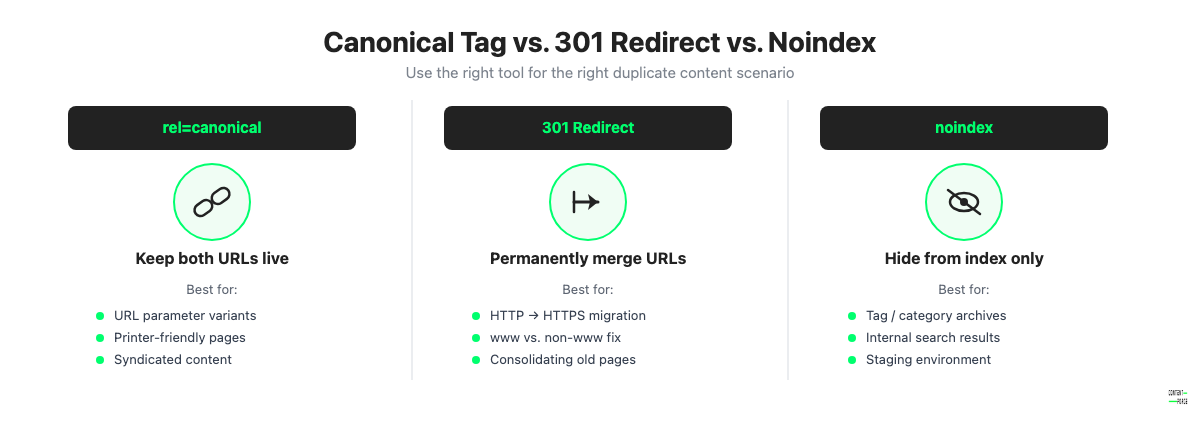
| Situation | Best fix | Why |
|---|---|---|
| URL parameter variants | Canonical tag | Keeps the parameter URL accessible; consolidates signals to the preferred URL |
| HTTP to HTTPS migration | 301 redirect | Permanently merges the old protocol URL; passes full link equity |
| WWW vs. non-WWW | 301 redirect | Same reason; eliminates the duplicate at the server level |
| Printer-friendly pages | Canonical tag or noindex | Keeps the page accessible; removes it from the index or consolidates signals |
| Tag and category archive pages | Noindex | Keeps archives usable for site navigation without polluting the index |
| Staging environment | Noindex on staging and password protection | Removes staging from the index; prevents accidental crawling |
| Syndicated content | Canonical tag on syndicated copy | Tells Google the original is authoritative |
| Duplicate product pages | Canonical tag or consolidation | Depends on whether you want to keep the variants accessible |
| Old redundant pages | 301 redirect or consolidation | Merges pages and their link equity into one stronger page |
Duplicate Content Prevention Checklist
Use this checklist when launching a new site, completing a migration, or auditing an existing site for duplicate content risks.
- Enforce a single preferred protocol. Redirect all HTTP traffic to HTTPS at the server level and verify that Google Search Console is configured for the HTTPS property.
- Enforce www or non-www consistently. Pick one, redirect the other at the server level with a 301, and reinforce it with rel="canonical" tags. Google Search Console's old preferred domain setting was removed in 2019 and no longer exists.
- Normalize trailing slashes. Configure your server to enforce a consistent URL format (with or without a trailing slash) and add canonical tags that match the enforced format.
- Add self-referencing canonical tags to every page. Even pages with no duplicate should have a canonical tag pointing to themselves. This prevents future duplicate issues if the URL becomes accessible via a parameter.
- Block or canonicalize URL parameter combinations. Identify all parameters used on your site (filtering, sorting, tracking) and either block them in Google Search Console or add canonical tags to parameterized URLs.
- Noindex or password-protect staging environments. Never allow a staging site to be publicly accessible without a noindex directive or access restriction.
- Audit tag and category archive pages in your CMS. Add noindex to archive pages that only aggregate content available elsewhere, or make them genuinely useful with unique introductory copy and curated selections.
- Set canonical tags before syndicating content. Establish the original as canonical on your site before any syndication deal goes live. Include a canonical tag requirement in syndication agreements.
- Run a site crawl quarterly. Use Screaming Frog or Ahrefs Site Audit at least once per quarter to catch new duplicate content introduced by CMS updates, new URL patterns, or parameter changes.
- Check Google Search Console's Page indexing report monthly. Look for newly excluded pages that appear as duplicate variants and investigate whether they signal a new technical issue.
Frequently Asked Questions
Is duplicate content always bad?
No. Most duplicate content is harmless in practice. Google handles it by selecting one canonical version to rank and filtering the others. The main risk is that Google might not choose the version you want, or that link equity gets split across multiple URLs. Intentional duplicate content created to manipulate search results is a different matter and can trigger a manual action, but that is rare and distinct from accidental technical duplication.
How much duplicate content is too much?
There is no official threshold. What matters is whether duplicate URLs are competing for the same rankings and whether they are wasting crawl budget. For most sites, isolated instances of duplication such as a few parameter variants or www/non-www issues will not cause noticeable problems. For large sites with thousands of product or location pages, uncontrolled duplication can significantly damage crawl efficiency and ranking performance.
Does duplicate content affect paid search?
No. Google Ads operates independently of organic search indexing and ranking. Duplicate content does not affect your Quality Score, ad rank, or paid search performance. The only scenario where content-related issues affect paid search is if your landing pages violate Google Ads policies, which is an entirely separate issue from organic duplicate content.
Can internal linking fix duplicate content?
Indirectly, yes. If you consistently link to the canonical version of a page from your internal links, you reinforce which version is preferred. Google treats internal links as a weak canonicalization signal. However, internal linking alone is not sufficient to fix a duplicate content problem. It supports the signals sent by canonical tags and redirects but cannot replace them.