
Glossary
What Is Duplicate Content? (A Complete SEO Guide)

Duplicate content is content that appears at more than one URL, either on the same site or across different domains. Google doesn't penalize it in the normal case: it groups the duplicate URLs, picks one version for results and filters the rest. The fix depends on the cause, usually rel=canonical, a 301 redirect or noindex.
- Duplicate URLs are grouped into a cluster and only one version is picked for results, which can cost you control over which page ranks
- Common causes include http and https versions, www and non-www, tracking parameters, faceted navigation and syndicated copies
- Rel=canonical suits most cases, a 301 redirect merges retired URLs and noindex keeps partner copies out of results
- Google can ignore a canonical, so check the URL Inspection tool before changing anything else
Duplicate content is one of the most misunderstood topics in SEO. Google's Matt Cutts said in 2013 that somewhere between 25 and 30 percent of the web is duplicate content (an informal estimate from a video, not a measured study), and Google still doesn't treat that as spam by default. Here's the thing: understanding what duplicate content actually is, how it affects your site, and how to fix it can save you hours of unnecessary worry and help you make smarter technical SEO decisions.
This guide covers everything you'll need: what counts as duplicate content, how it impacts rankings, why the "penalty" is mostly a myth, the 15 most common causes, and step-by-step fixes for each.
- Quick answer: Duplicate content is content that appears at more than one URL. Google doesn't penalize it in the normal case. It groups the duplicate URLs, picks one to show, and filters the rest.
- Main causes: URL variations (http vs https, www vs non-www), tracking parameters, faceted navigation, CMS archive pages, and content syndication.
- Best fixes: rel=canonical for most cases; 301 redirect when merging URLs permanently; noindex for archive pages and for syndicated copies on partner sites.
What Is Duplicate Content?
Duplicate content is content that appears at more than one URL on the internet. When the same or very similar text can be found at multiple web addresses, search engines have to decide which version to show in search results.
The key word is "URL," and that's easy to miss. Duplicate content isn't about writing style or topic similarity. It's about identical or near-identical content being accessible at two or more distinct addresses.
Internal vs. External Duplicate Content
Duplicate content can be internal or external.
Internal duplicate content exists within a single website. For example, if your homepage is accessible at both https://example.com and https://www.example.com, you've internal duplicate content. The same page is served at two different URLs.
External duplicate content exists across different websites. If another site copies your article and publishes it verbatim, or if you syndicate your content to a third-party publication, search engines will encounter the same content on multiple domains.
Both types create the same core problem, and it's simple: search engines must decide which version to rank.
Exact vs. Near-Duplicate Content
Exact duplicates are word-for-word copies, so there's little to argue about. Near-duplicates are pages that share most of their content but differ in minor ways, such as an e-commerce product page that changes only the color attribute while keeping the same description, or a location page that swaps "New York" for "Chicago" in an otherwise identical template.
Both exact and near-duplicate content can clearly cause indexing and ranking confusion, though near-duplicates are often harder to detect.
Duplicate Content Examples
Here's what four common cases look like:
- Same page, several URLs:
/shoes,/shoes/,/shoes?utm_source=newsletterandhttp://www.example.com/shoesall return the same page. - Same text, several pages: a printer version at
/print/shoes/carries the full body copy of/shoes/. - Same text, several sites: a partner publishes your guide word for word, or a scraper copies it.
- Template pages: 200 city pages that differ only in the city name.
How Does Duplicate Content Affect SEO?
Duplicate content doesn't result in a penalty in most cases, but it does create several problems that can quietly damage your search performance. It's a distinct issue from keyword cannibalization, where two original pages compete for the same query and intent without any shared text.
1. Search Engines Struggle to Pick a Canonical Version
When Google detects duplicates, it groups the duplicate URLs into a cluster, selects what it considers the best URL to represent the cluster, and consolidates signals such as link popularity onto that URL, as Google explains on its Search Central blog. Sometimes Google picks the wrong one, and that's the real risk, meaning your preferred URL may not be the one that ranks. In the best case, Google consolidates signals onto one version. In the worst case, it splits signals across both, weakening each one.
2. Link Equity Gets Diluted
If external sites link to different versions of the same page, the ranking signals from those backlinks are split. Instead of all the link authority flowing to one strong URL, it's divided between two or more URLs that all serve the same content. This makes each version much weaker than it would be if all links pointed to a single canonical URL.
3. Crawl Budget Is Wasted
Search engine crawlers have a finite budget for crawling your site, and they don't spend it evenly. If they encounter dozens of duplicate URLs, they spend that budget on redundant pages instead of on new or important content. Googlebot has to crawl each of those URLs before it can tell that they hold the same content. For large sites, this can mean that valuable pages get crawled less frequently or not at all. A crawl budget is mostly a concern for very large sites; a 50-page blog rarely hits it.
4. Scraped Copies Can Outrank You
If another site copies your content and has stronger authority or better link equity, Google may choose to rank their copy instead of your original. This is especially problematic for smaller sites. If a high-authority publication scrapes your article without permission, they can end up outranking you for your own content.
SEO Title Generator: eight title tag variations, sized for the SERP and matched to your topic. Free, no signup.
Does Google Have a Duplicate Content Penalty?
No. Google doesn't have an automated penalty for duplicate content, so you can relax about that.
Google's own wording is that duplicate content on a site isn't grounds for action unless the intent appears to be deceptive and to manipulate search results. That has been Google's position since its 2008 post on the "duplicate content penalty". What Google actually does is filter duplicate URLs and choose one version to show in search results. The other versions are typically not indexed or are ranked far lower.
Here's where the confusion comes from. The confusion around "duplicate content penalties" comes from a misunderstanding of what filtering means. When Google filters out one of two duplicate pages, the filtered page won't appear in search results. Site owners interpret this disappearance as a penalty. It isn't a penalty. It's normal deduplication behavior.
The one exception is intentional, manipulative duplication created to deceive users or game search results, such as large-scale content scraping, automatically generated doorway pages, or content spinning. Those practices can result in a manual action from Google's spam team. But that's a spam enforcement action, not a duplicate content penalty.
For the vast majority of sites, duplicate content caused by technical issues, CMS behavior, or URL variations is something Google handles algorithmically without any punitive action.
Common Causes of Duplicate Content
Most duplicate content is unintentional, which is why it's so easy to miss and results from how websites are built, hosted, or managed. Here are the 15 most common causes.
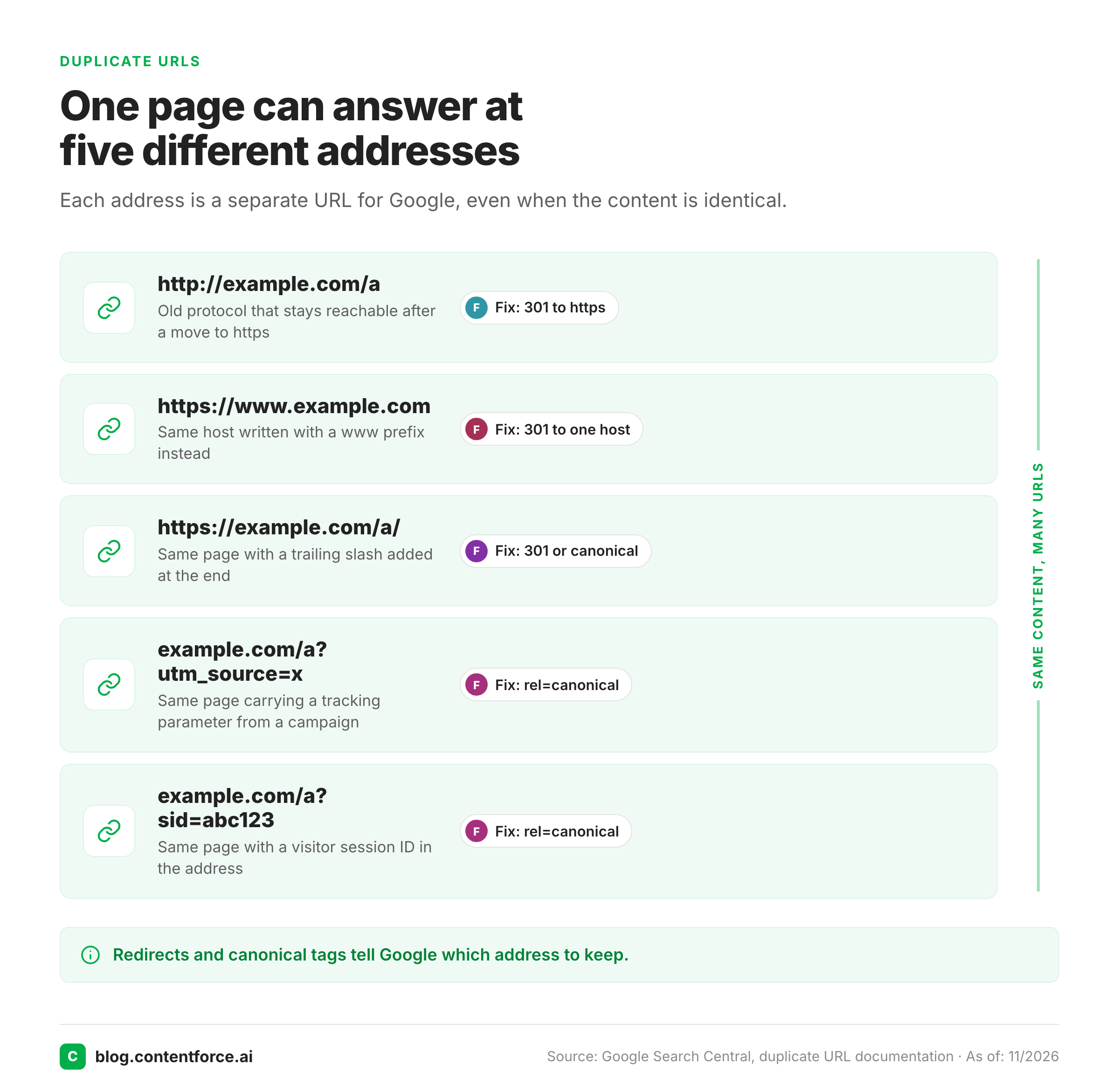
1. HTTP vs. HTTPS Versions
If you've got a site that's accessible at both http://example.com and https://example.com, both versions may be indexed as separate URLs. Even after migrating to HTTPS, the HTTP version can remain accessible unless you set up a redirect. This is one of the most common sources of internal duplicate content for established sites that migrated to HTTPS without properly cleaning up the old protocol.
2. WWW vs. Non-WWW
It's the same story as HTTP/HTTPS: many sites serve content at both https://www.example.com and https://example.com. These are technically different URLs. Without a canonical tag or redirect, search engines may index both and split signals between them.
3. Trailing Slash vs. No Trailing Slash
https://example.com/page/ and https://example.com/page are different URLs. Most servers handle this consistently, but you shouldn't count on it, because without explicit configuration, both versions can be live. This is a common source of duplicate content in WordPress sites and other CMS platforms where URL normalization isn't enforced by default.
4. URL Parameters (Tracking, Filtering, Sorting)
URL parameters are one of the biggest sources of large-scale duplicate content. When a user filters a category page on an e-commerce site, the resulting URL often looks like https://shop.example.com/shoes?color=blue&size=10. The content may be identical or nearly identical to https://shop.example.com/shoes. If these parameter URLs are indexable, you can end up with hundreds or thousands of near-duplicate pages.
Analytics parameters like UTM codes (?utm_source=email&utm_medium=newsletter) also create duplicate URLs if they're crawlable and indexable.
5. Session IDs in URLs
Some older websites and e-commerce platforms append a unique session ID to every URL to track user sessions. For example: https://example.com/product?sid=abc123. Each visitor gets a different session ID, which means every page generates a unique URL with identical content. This can create thousands of near-duplicate pages in Google's index.
6. Faceted Navigation (E-commerce)
Faceted navigation lets users filter products by attributes like color, size, brand, or price range. Each combination of filters typically generates a unique URL. A site with 10 attributes and 5 values each can produce thousands of filter combinations, most of which serve near-identical product listings with slightly different subsets. Without proper canonicalization, these pages flood search engines with duplicate content.
7. Pagination Pages
When a blog or product category spans multiple pages, each page in the series is a separate URL: /blog/, /blog/page/2/, /blog/page/3/. While each page contains different posts, the surrounding template, navigation, sidebar, and footer content is identical. In some cases, thin category pages with similar post excerpts are flagged as near-duplicates.
8. Printer-Friendly Page Versions
Some websites generate a separate printer-friendly version of every page, typically at a URL like /print/article-name/ or with a query parameter like ?format=print. These printer versions contain the same body content as the original but with a different layout. Without canonicalization or noindex, they create exact duplicate content.
9. Mobile Subdomain (m.) Versions
Sites that serve a mobile-specific version at a subdomain like m.example.com may have duplicate content issues if both the desktop and mobile versions are indexable. Modern responsive design has largely eliminated this problem, so it's rare today, but legacy mobile subdomains on older sites still cause issues.
10. Staging or Development Environments
Staging, development, or testing versions of a website are often hosted at a different URL (staging.example.com or dev.example.com). If these environments are publicly accessible and not protected by authentication or a noindex directive, search engines will crawl them and index the same content that lives on the production site. This is a surprisingly common oversight, and it really does happen to careful teams.
11. Content Syndication
Content syndication means distributing your articles to other publications. When the same article appears verbatim on your site and on a partner site, Google must decide which version is canonical. If the syndicated copy is on a higher-authority domain, it may outrank the original. This doesn't always happen, but the risk is real, especially when the syndicated copy is published before your original. Google notes that a canonical link is often not practical for syndication partners, because their pages tend to look very different from yours; the most effective fix is for the partner to block indexing of your content (see the fix section below).
12. Scraped or Copied Content
When other websites copy your content without permission, it's not your doing, but it's still your problem: you end up with external duplicates you didn't create. Google's generally very good at identifying the original source, especially if your content is well-established. But scrapers with high authority can sometimes outrank the original, particularly if they publish the copied content quickly after it goes live on your site.
13. Tag and Category Archive Pages (CMS)
WordPress and similar CMS platforms automatically create archive pages for every tag and category. A post tagged with five different tags appears in five different archive pages, each of which may also show the full post content. This creates a web of near-duplicate archive URLs that serve overlapping content from the same posts.
14. Localization and Regional URL Variants
Sites targeting multiple countries or languages often create regional variants of pages: /en-us/page/, /en-gb/page/, /en-au/page/. If the content isn't genuinely localized, these pages may be near-identical except for minor differences like currency symbols or date formats. Without hreflang annotations, these pages can compete with each other in search results. Google's guidance on localized versions of a page adds that every canonical you set should point to a page in the same language (or the closest available substitute), so don't canonicalize your German page to the English one.
15. Boilerplate or Near-Duplicate Product or Location Pages
Large e-commerce sites often use templates where each product page is identical except for the product name and SKU number. Local business sites may have location pages that differ only in the city name. These near-duplicate pages are a known problem for programmatic SEO at scale. Without meaningful unique content on each page, they're likely to be filtered or ranked poorly.
How to Find Duplicate Content
Before you can fix duplicate content, you need to know where it exists on your site. These four methods will help you identify it.
Google Search Console
Google Search Console is the best starting point, and it's free. Go to the Page indexing report (Search Console > Indexing > Pages, formerly called the Coverage report) and look for:
- Excluded URLs: Pages listed as "Duplicate, submitted URL not selected as canonical" or "Duplicate, Google chose different canonical than user" indicate duplicate content that Google has already identified and filtered.
- Canonical signals: The URL Inspection tool shows which URL Google considers the canonical version for any given page. If it differs from what you intended, you've a canonicalization problem.
Review both the Page indexing and URL Inspection sections regularly; it's worth a monthly look, especially after site migrations or structural changes. For the wider picture of where Search Console fits into a crawl review, see our technical SEO audit guide.
The site: Operator
Use Google's site: search operator to check how many pages are indexed and whether unexpected versions appear in results. For example:
- Search
site:example.comto see all indexed pages - Search for an exact phrase from your homepage title in quotes to check if it appears on multiple URLs
- Compare the indexed page count to your actual page count to spot large discrepancies
This method is manual and imprecise, so don't treat it as an audit, but it's useful for quick spot-checks without needing a paid tool.
Site Audit Tools
Dedicated crawl tools will give you a complete picture of duplicate content across your site. The most widely used options are:
- Screaming Frog: Identifies duplicate and near-duplicate pages using exact URL matching and content hash comparison. The free tier covers up to 500 URLs.
- Ahrefs Site Audit: Flags duplicate pages, missing canonical tags, and conflicting canonical signals. Shows which pages have no canonical tag and which have canonical chains.
- Siteliner: A web-based scanner that checks a site for duplicate content and broken links; useful for a quick look at a small site.
- Sitebulb: Provides a visual duplicate content audit with priority scoring based on impact.
Run a full site crawl and filter for "duplicate content" or "canonical" issues in the results. These tools will surface problems that Google Search Console misses because they crawl all accessible URLs, not just indexed ones.
Checking for Scraped Copies
To check whether your content has been copied by other sites:
- Use Copyscape to search for verbatim copies of your content across the web
- Set up Google Alerts for unique sentences or phrases from your most important articles
- Every so often, search for a distinctive sentence from your content in quotes in Google to see if it appears on other domains
If you find scrapers outranking you, the solution isn't to change your content. Strengthen your canonical signals and build more links to the original page. If another site copies your content in violation of copyright law, you can contact its host to request removal, and you can file a DMCA request with Google to remove the infringing page from search results.
How to Fix Duplicate Content
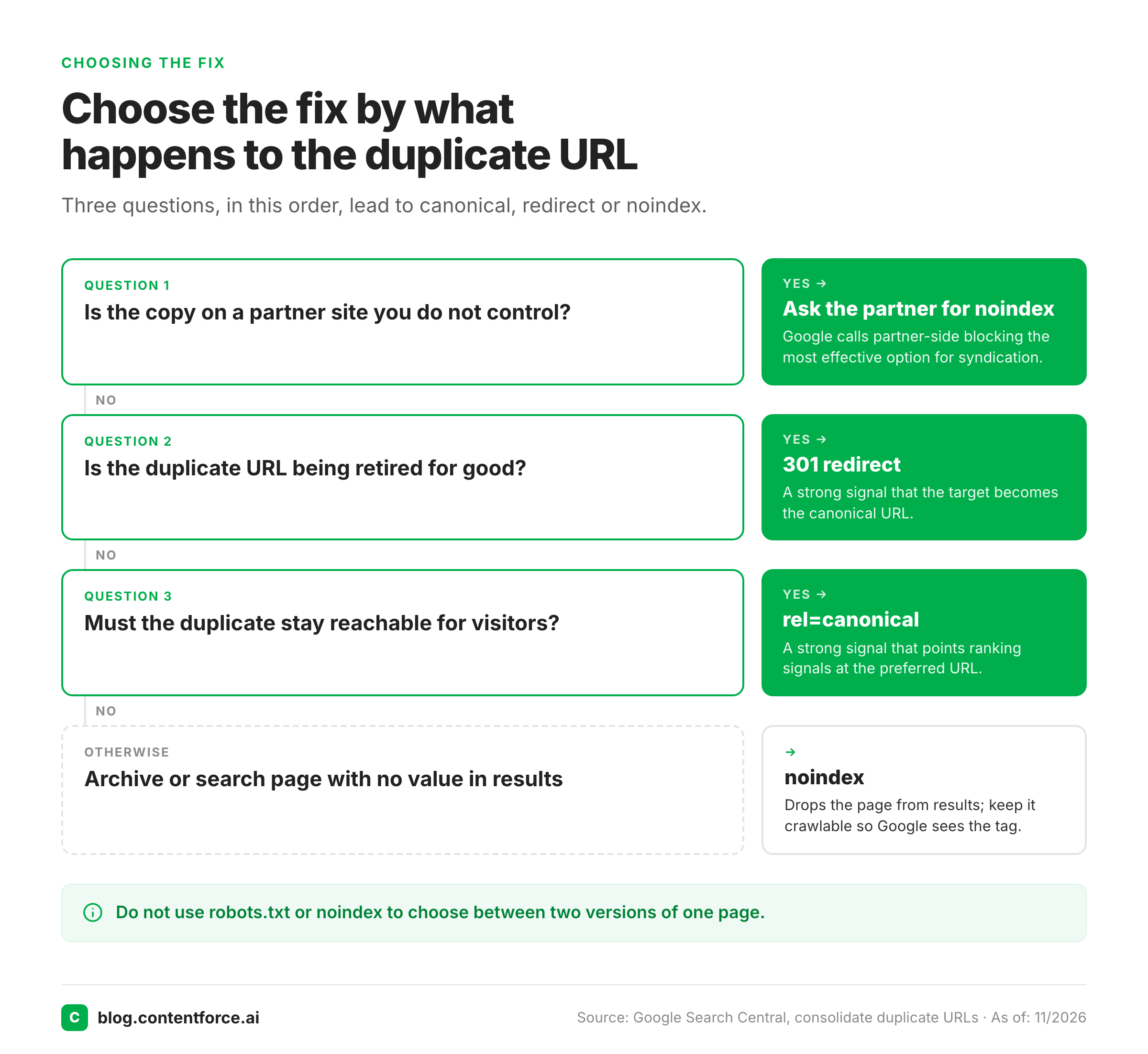
The right fix depends on the cause of the duplication, so don't reach for one tool every time. Here is a breakdown of the six main methods.
Use Canonical Tags (rel=canonical)
When to use: Use a canonical tag when you want to keep multiple URLs accessible but tell search engines which one to treat as the primary version. This is the right choice for URL parameter variations, pagination, printer-friendly pages, and syndicated content.
How to implement: Add a <link rel="canonical"> tag in the <head> section of the duplicate page, pointing to the preferred URL:
<link rel="canonical" href="https://example.com/preferred-page/" />Important caveat: Google calls rel=canonical a strong signal, not a directive, so it's not a guarantee, and ranks the common methods by strength: redirects and rel=canonical are strong signals, sitemap inclusion is a weak one. Google may still choose a different canonical if the content or technical signals point elsewhere. Methods stack, so don't rely on just one: combine the canonical tag with internal links to the canonical URL and with the URL in your sitemap.
Best practices for canonical tags:
- Use absolute URLs, not relative paths; they're safer
- Every page should have a canonical tag; it's cheap insurance, even if it's self-referencing
- Make sure the canonical URL's live and returns a 200 status code
- Avoid canonical chains (a canonical pointing to another URL that also has a canonical tag)
- Don't mix signals: if the sitemap lists one URL and the canonical tag names another, Google gets conflicting instructions
- For PDFs and other non-HTML files, send the canonical as an HTTP header (
Link: <https://example.com/preferred.pdf>; rel="canonical"); pick either the tag or the header, not both - Never use
noindexor robots.txt to choose between two versions of the same page on your own site
Set Up 301 Redirects
When to use: Use a 301 redirect when you want to permanently merge two URLs into one and you don't need both to remain accessible. This is the right choice for HTTP to HTTPS migrations, www to non-www normalization, trailing slash enforcement, and consolidating outdated content.
How to implement in Apache (.htaccess):
RewriteEngine On
RewriteCond %{HTTPS} off
RewriteRule ^ https://%{HTTP_HOST}%{REQUEST_URI} [L,R=301]
How to implement in Nginx:
server {
    listen 80;
    server_name example.com www.example.com;
    return 301 https://example.com$request_uri;
}
Google treats a permanent redirect as a strong signal that the target should become the canonical URL. It's the right tool when the duplicate has no reason to stay reachable, because visitors and crawlers both land on the preferred URL. Use it only when you're retiring the duplicate.
Add Noindex Tags
When to use: Use noindex when you'd like a page to remain accessible to users but you don't want it to appear in search results. This is the right choice for tag and category archive pages in WordPress, internal search result pages, and user-account pages.
How to implement: Add a robots meta tag in the <head> section:
<meta name="robots" content="noindex" />Once Googlebot crawls the page and reads the tag, Google drops it from search results entirely, no matter who links to it. That only works if the page isn't blocked in robots.txt: a crawler that can't fetch the page never sees the noindex rule, and the URL can still show up in results.
Don't use noindex to choose between two versions of the same page. Google recommends rel=canonical for that, because noindex blocks the page from search completely. Noindex also doesn't redirect users or consolidate link signals.
Handle URL Parameters Without the Retired Search Console Tool
When to use: Use this for parameter-based duplicates generated by filtering, sorting, or tracking parameters.
Google retired the URL Parameters tool in Search Console in 2022. Google's crawlers now auto-detect useful vs. useless URL parameters on their own, so no manual configuration there's needed or possible anymore.
For real control over parameter duplicates, use a rel="canonical" tag on each parameter URL pointing to the clean version, or a 301 redirect if the parameter version shouldn't exist at all.
Consolidate Thin or Similar Pages
When to use: Use consolidation when you've got multiple pages covering the same topic or serving nearly identical content, and a 301 redirect or canonical tag alone isn't sufficient because the content itself needs to be rewritten or merged.
Consolidation works by:
- Identifying pages that overlap in topic and purpose
- Creating one comprehensive version that covers the topic better than any individual page did
- Redirecting the weaker pages to the new canonical version
That's especially useful for old blog posts that covered the same topic multiple times, location pages with boilerplate content, or product pages with near-identical descriptions.
Manage Content Syndication Correctly
When to use: Use this when you intentionally publish your content on other sites and want to prevent those copies from competing with your original.
Best practices for syndication:
- Ask partner sites to use a
noindextag on the syndicated copy; Google calls this the most effective option - If the partner prefers it, ask for a
rel="canonical"tag pointing back to your original URL, and accept that Google doesn't always honor it for pages that differ a lot - Publish the original on your site first and ensure it's indexed before the syndicated version goes live
- If the partner can do neither, weigh the SEO risk of syndication against the exposure benefit
When Google Ignores Your Canonical
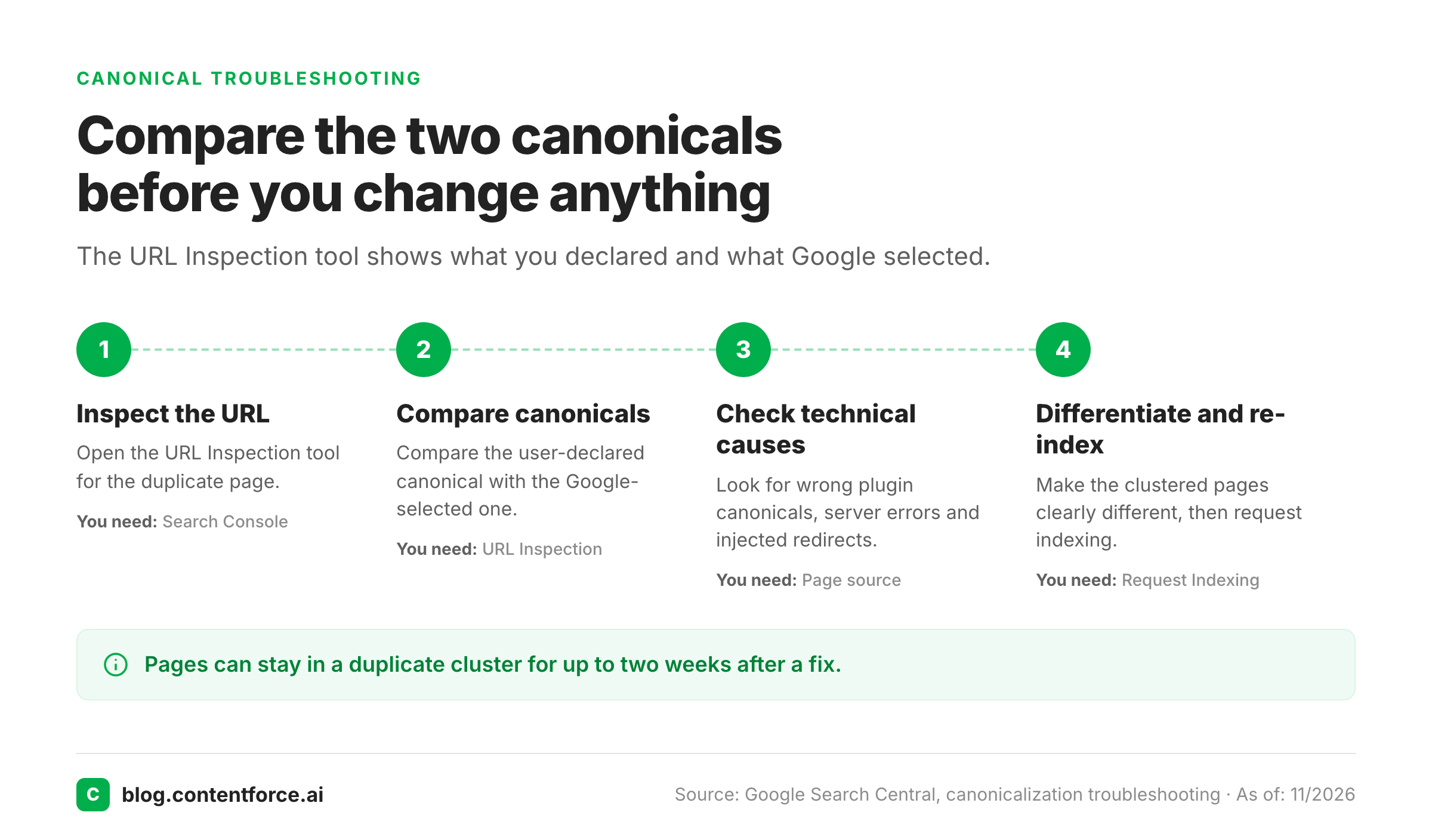
Here's the first check: open the URL Inspection tool in Search Console and compare "User-declared canonical" with "Google-selected canonical". If they differ, work through the causes covered in Google's canonicalization troubleshooting guide:
- Wrong canonical elements: a CMS or plugin points to an unwanted URL. Check the rendered HTML in your browser's developer tools.
- Server misconfiguration: a server returns content for the wrong host, or unrelated servers return identical soft 404 pages.
- Hacked pages: injected redirects or cross-domain canonicals that point to spam.
- Pages that are too similar: if the clustered pages aren't clearly different, Google keeps them together. Make the content distinct, then use Request Indexing for your most important URLs.
Google may hold pages in a duplicate cluster for up to two weeks after you fix the content, so don't judge the result too early.
Do Not Use robots.txt to Fix Duplicates
Blocking duplicate URLs in robots.txt looks like a quick fix, but it isn't one, but Google advises against using it for canonicalization: a disallowed URL can still be indexed without its content, and Google can never see a canonical or noindex tag on a page it can't crawl. Pair the fix with the right tool, because it's the pairing that works from the table below instead. If you also maintain XML sitemaps, list only the canonical URLs (see our sitemap guide).
Canonical vs. Redirect vs. Noindex: When to Use Each
| Situation | Best fix | Why |
|---|---|---|
| URL parameter variants | Canonical tag | Keeps the parameter URL accessible; consolidates signals to the preferred URL |
| HTTP to HTTPS migration | 301 redirect | Permanently merges the old protocol URL; passes full link equity |
| WWW vs. non-WWW | 301 redirect | Same reason; eliminates the duplicate at the server level |
| Printer-friendly pages | Canonical tag | Keeps the page accessible and points signals at the main version |
| Tag and category archive pages | Noindex | Keeps archives usable for site navigation without polluting the index |
| Staging environment | Password protection (HTTP authentication) | Crawlers cannot fetch the pages at all; noindex only works if the page is reachable |
| Syndicated content | Noindex on the partner copy (canonical if the partner agrees) | Google calls partner-side blocking the most effective option |
| Duplicate product pages | Canonical tag or consolidation | Depends on whether you want to keep the variants accessible |
| Old redundant pages | 301 redirect or consolidation | Merges pages and their link equity into one stronger page |
Duplicate Content Prevention Checklist
Use this checklist when you're launching a new site, completing a migration, or auditing an existing site for duplicate content risks.
- Enforce a single preferred protocol. Redirect all HTTP traffic to HTTPS at the server level and verify that Google Search Console is configured for the HTTPS property.
- Enforce www or non-www consistently. Pick one, redirect the other at the server level with a 301, and reinforce it with rel="canonical" tags. Google Search Console's old preferred domain setting was removed in 2019 and no longer exists.
- Normalize trailing slashes. Configure your server to enforce a consistent URL format (with or without a trailing slash) and add canonical tags that match the enforced format.
- Add self-referencing canonical tags to every page. Even pages with no duplicate should have a canonical tag pointing to themselves. This prevents future duplicate issues if the URL becomes accessible via a parameter.
- Canonicalize URL parameter combinations. Identify all parameters used on your site (filtering, sorting, tracking) and point each parameterized URL to the clean version with a canonical tag. The Search Console URL Parameters tool no longer exists.
- Password-protect staging environments. Never leave a staging site publicly reachable; HTTP authentication keeps crawlers out entirely.
- Audit tag and category archive pages in your CMS. Add noindex to archive pages that only aggregate content available elsewhere, or make them genuinely useful with unique introductory copy and curated selections.
- Agree on indexing before syndicating content. Put the partner-side noindex (or a canonical back to your URL) into the syndication agreement before the copy goes live.
- Run a site crawl quarterly. Use Screaming Frog or Ahrefs Site Audit at least once per quarter to catch new duplicate content introduced by CMS updates, new URL patterns, or parameter changes.
- Check Google Search Console's Page indexing report monthly. Look for newly excluded pages that appear as duplicate variants and investigate whether they signal a new technical issue.
Frequently Asked Questions
Is duplicate content always bad?
No. Most duplicate content is harmless in practice, and that's the main point of this guide. Google handles it by selecting one canonical version to rank and filtering the others. The main risk is that Google might not choose the version you want, or that link equity gets split across multiple URLs. Intentional duplicate content created to manipulate search results is a different matter and can trigger a manual action, but that's rare and distinct from accidental technical duplication.
How much duplicate content is too much?
There's no official threshold. What matters is whether duplicate URLs are competing for the same rankings and whether they're wasting crawl budget. For most sites, isolated instances of duplication such as a few parameter variants or www/non-www issues won't cause noticeable problems. For large sites with thousands of product or location pages, uncontrolled duplication can significantly damage crawl efficiency and ranking performance.
Does duplicate content affect paid search?
No. Google Ads operates independently of organic search indexing and ranking. Duplicate content doesn't affect your Quality Score, ad rank, or paid search performance. The only scenario where content-related issues affect paid search is if your landing pages violate Google Ads policies, which is an entirely separate issue from organic duplicate content.
How long does it take Google to recognize a duplicate content fix?
Google says pages can stay in a duplicate cluster for up to two weeks after you change the content, and that they split out faster when the difference between pages is clear. Request Indexing in the URL Inspection tool is subject to quotas, so reserve it for your most important URLs.
Can internal linking fix duplicate content?
Indirectly, yes, and it's cheap to do. If you consistently link to the canonical version of a page from your internal links, you reinforce which version is preferred. Google treats internal links as a weak canonicalization signal. However, internal linking alone isn't sufficient to fix a duplicate content problem. It supports the signals sent by canonical tags and redirects but can't replace them.