

Rich snippets are search results that display extra information beyond the standard title, URL, and meta description. That extra information (star ratings, prices, cooking times, event dates, product availability) comes from structured data markup you add to your page’s HTML. When Google reads that markup and decides to surface it visually, your result takes up more space, stands out from the plain blue links around it, and typically earns a higher click-through rate.
The mechanism is consistent: you label your content with a standardized vocabulary called schema markup, and Google optionally uses that label to enhance your appearance in search results.
What Are Rich Snippets?
Rich snippets are enhanced search results that show additional data pulled from structured data on your page. Common examples include star ratings, prices, cooking times, and product availability.
A standard search result shows three pieces of information: a blue title link, a URL, and a short description. A rich snippet shows those same three pieces plus at least one additional visual element drawn from structured data in your page’s code.
A recipe page with proper schema markup might show a star rating, cooking time, and calorie count directly in the search result before anyone clicks. A product page might show a price and stock status. A local business result might show opening hours and a phone number.
Rich snippets do not require a special relationship with Google. You add the structured data, Google crawls it, and Google decides whether to display it. There is no application or approval process. Eligibility is not guaranteed because Google evaluates content quality and markup completeness together.
Rich Snippets vs. Rich Results vs. SERP Features: What’s the Difference?
These three terms get used interchangeably, but they refer to different things.
| Term | What it means | Examples |
|---|---|---|
| Rich snippet | An individual standard search result enhanced with extra data | Star rating on a product listing, cooking time on a recipe result |
| Rich result | Google’s current umbrella term for all enhanced search appearances | Product carousels, image thumbnails, review stars, FAQ dropdowns |
| SERP feature | Any non-standard element on a search results page | Featured snippets, People Also Ask boxes, Knowledge Panels, AI Overviews, local packs |
All rich snippets are rich results, but not all rich results are snippets. Some are carousels, image results, or inline expansions. SERP features is the broadest category and includes things you cannot directly control with structured data, such as Featured Snippets and AI Overviews.
Google officially replaced the term “rich snippet” with “rich result” in its documentation, but “rich snippet” is still the dominant term among SEOs and content marketers.
Types of Rich Snippets (with Examples)
Google supports a range of structured data types that produce rich results. The following overview shows the six most widely used types and what each surfaces in search results.
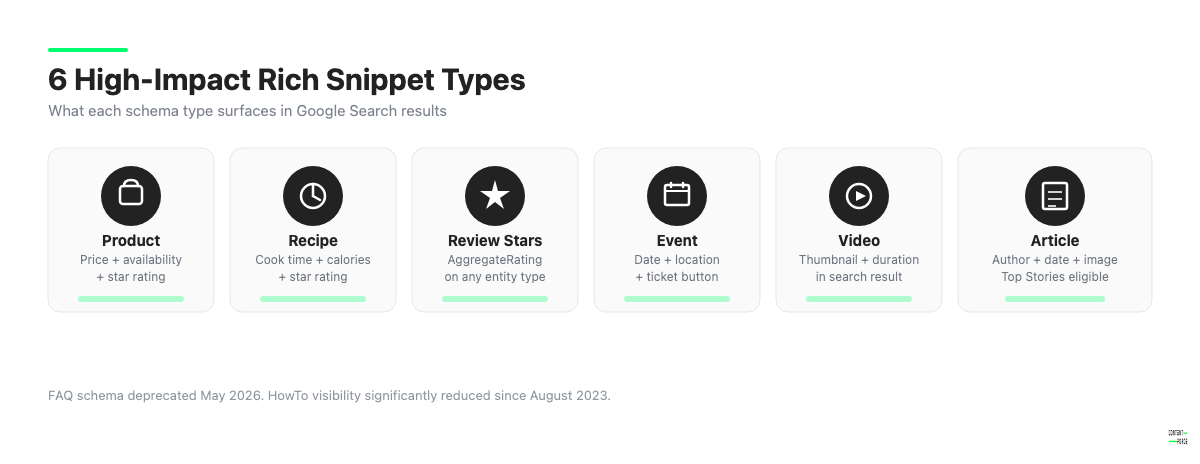
Here is a summary of the most widely used types and their current status in 2026:
| Schema type | What it shows in search | Best for |
|---|---|---|
| Product | Price, availability, rating stars | E-commerce product pages |
| Review / AggregateRating | Star rating with review count | Products, services, recipes, courses |
| Recipe | Cooking time, calories, rating | Food and recipe blogs |
| Event | Date, location, ticket status | Event listings and ticketing pages |
| Article / NewsArticle | Author, publish date, image | News publishers and editorial blogs |
| Video | Video thumbnail, duration | Pages with embedded video as main content |
| Organization | Name, logo, social links | Brand homepages |
| HowTo | Numbered steps | Tutorial pages (reduced visibility post-2023) |
| Breadcrumb | URL breadcrumb trail | Any multi-level site |
| Sitelinks Searchbox | Search box in result | High-authority brand homepages |
Product
Product schema shows price, availability, and review stars directly in the search result. For e-commerce pages, this is often the highest-return schema type because it places decision-relevant information in front of users before they click.
Review and Rating Stars
Star ratings appear when you use AggregateRating schema nested inside a Product, Recipe, Course, LocalBusiness, or similar entity type. Standalone Review schema does not produce stars on its own. The rating must be associated with a specific entity.
Review stars are one of the most visually prominent rich result types and produce higher click-through rates in testing.
Recipe
Recipe schema produces results showing cooking time, calorie count, star rating, and sometimes a food image directly in the SERP. For recipe-focused content, this schema type is close to mandatory.
Event
Event schema displays the event name, date, and location in search results. For events with ticket links, Google may also show a “Tickets” button. This is useful for any page listing a specific event with a defined date.
Article and NewsArticle
Article schema helps Google identify the author, publication date, and featured image for editorial content. For news publishers, NewsArticle schema is required to be eligible for Top Stories carousels.
Video
VideoObject schema surfaces a thumbnail image next to your result along with duration. Pages where a video is the primary subject are the best candidates.
HowTo
HowTo schema previously displayed numbered steps with images directly in the search result. In August 2023, Google significantly reduced the visibility of HowTo rich results, making them appear primarily on desktop only and in specific contexts. As of 2026, HowTo schema is worth implementing but should not be relied on for consistent visible rich results across most queries.
2026 Update: FAQ Rich Results Are Deprecated
As of May 7, 2026, FAQ rich results no longer appear in Google Search. Google dropped support for the search appearance, with full API support removal completing in August 2026.
If you have FAQPage schema on your pages, it will not produce visible rich results. It does not actively harm your pages, but building a content strategy around FAQ schema for SERP visibility is no longer viable. Remove or repurpose any FAQ schema you added specifically to gain dropdown-style rich results in the SERP.
Do Rich Snippets Affect SEO Rankings?
Rich snippets are not a direct Google ranking factor. Google’s official position is that adding structured data does not improve your position in search results.
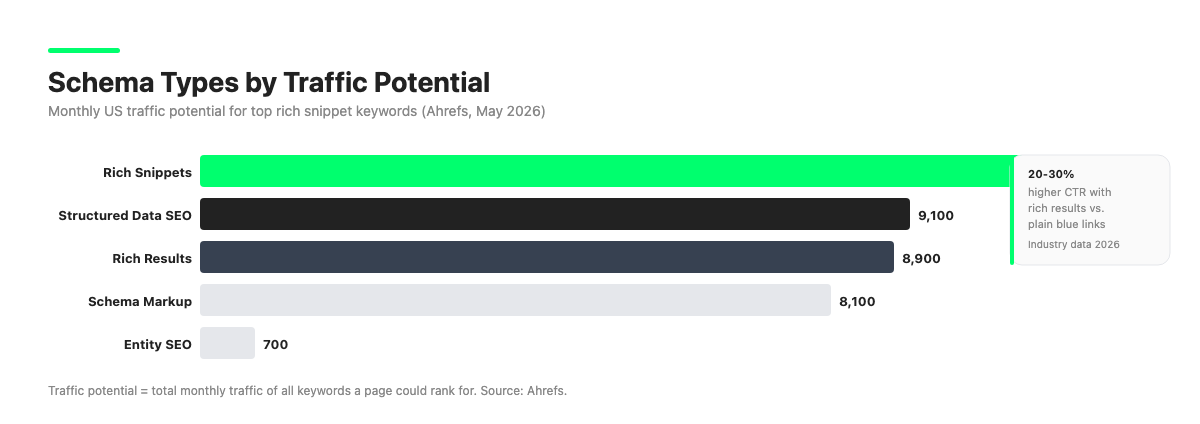
The indirect SEO impact is still real, however. Pages with rich snippets consistently earn 20 to 30 percent higher CTR compared to equivalent pages without them. More clicks at the same ranking position sends positive engagement signals to Google.
There is a second indirect channel worth noting. Pages with complete, accurate schema markup are more likely to be cited in Google’s AI Overviews. Industry research from 2026 suggests pages with thorough structured data are approximately 36 percent more likely to appear in AI-generated summaries.
Structured data also helps Google understand the entities and relationships on your page, which can improve query-to-content matching across a wider range of search terms.
The better question to ask is not “will this help me rank higher?” but “will this get more clicks from where I already rank?” For rich snippets, the answer is almost always yes.
How to Get Rich Snippets: Step-by-Step
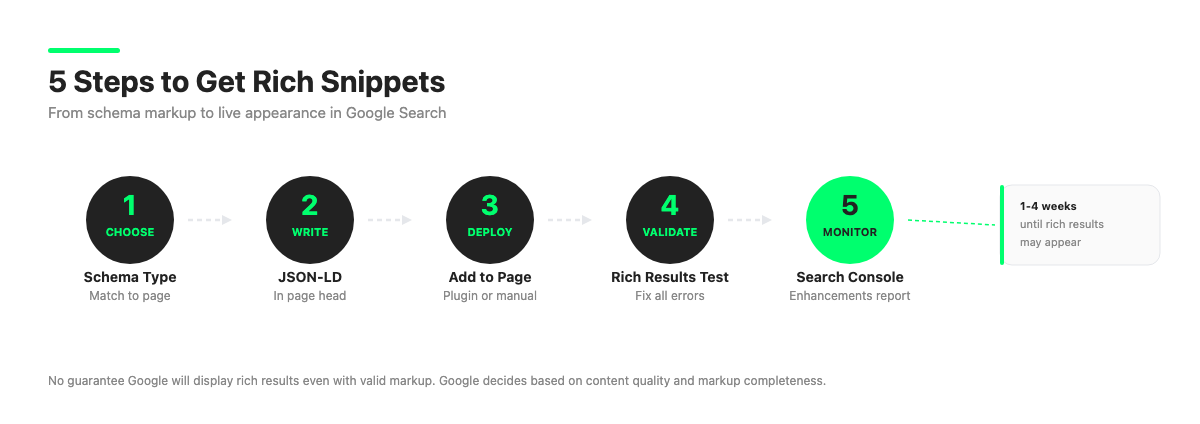
Step 1: Choose Your Rich Snippet Type
Match your structured data type to the primary content of the page. Do not add multiple unrelated schema types hoping one will trigger. Focus on the type that most accurately describes what the page is about:
- Product page: Product plus AggregateRating
- Recipe: Recipe plus AggregateRating
- Blog post or guide: Article
- Event page: Event
- Local business: LocalBusiness
- Tutorial page: HowTo (note the reduced visibility since 2023)
Step 2: Write Your Structured Data in JSON-LD
JSON-LD is Google’s recommended format. It is a JavaScript Object Notation block placed in a script tag in your page’s head or body. It does not require changes to your visible HTML, which makes it easier to implement and maintain than Microdata or RDFa.
Here is a minimal Product schema example in JSON-LD:

<script type="application/ld+json">
{
  "@context": "https://schema.org",
  "@type": "Product",
  "name": "Example Product Name",
  "description": "A brief description of the product.",
  "image": "https://example.com/product-image.jpg",
  "brand": {
    "@type": "Brand",
    "name": "Example Brand"
  },
  "aggregateRating": {
    "@type": "AggregateRating",
    "ratingValue": "4.5",
    "reviewCount": "128"
  },
  "offers": {
    "@type": "Offer",
    "price": "49.00",
    "priceCurrency": "USD",
    "availability": "https://schema.org/InStock"
  }
}
</script>
Use Schema.org as your vocabulary reference for property names. Use Google’s structured data documentation to confirm which properties are required versus recommended for each type.
Step 3: Add the Schema to Your Page
Place the JSON-LD block in the head of your page if possible, or anywhere in the body. CMS plugins such as Rank Math and Yoast SEO for WordPress can auto-generate schema for common post types, which reduces the need to write JSON-LD manually.
Step 4: Validate with Google’s Rich Results Test
Before deploying, validate your structured data at search.google.com/test/rich-results. Paste your page URL (if the page is live) or your HTML directly. The screenshot below shows what the tool looks like.
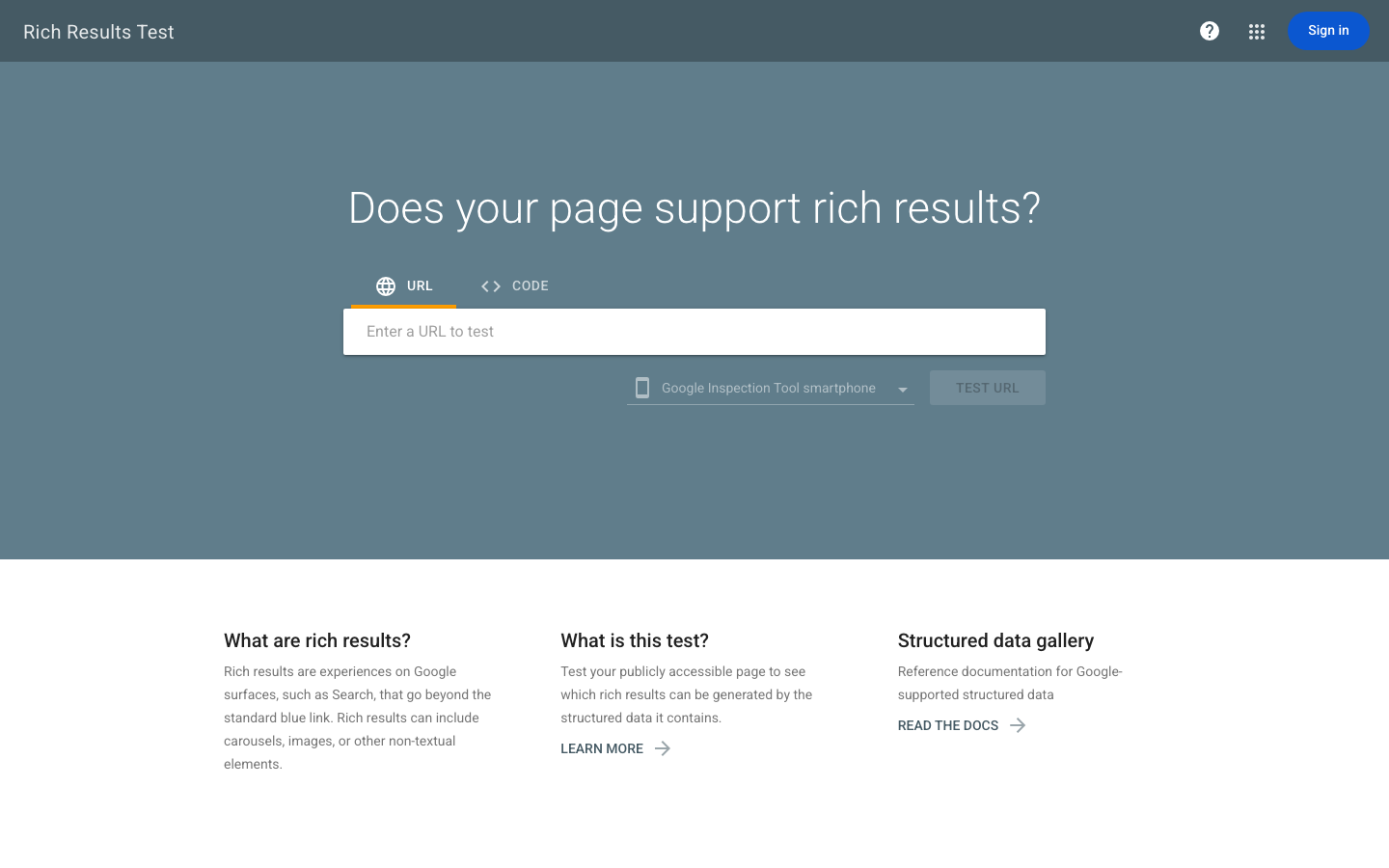
The tool will report:
- Whether your page is eligible for rich results
- Which rich result types were detected
- Any errors or warnings in the markup
Fix all errors before going live. Warnings are not blocking issues but should be reviewed.
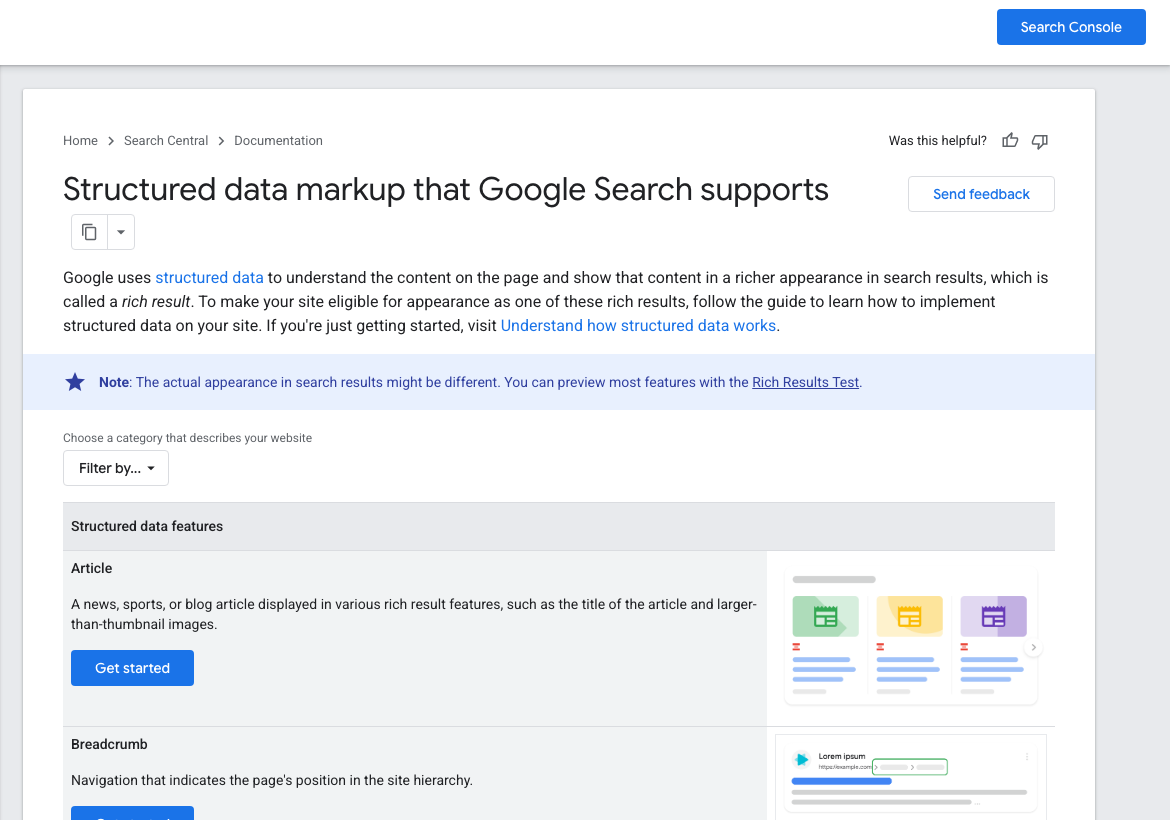
Google’s Search Central documentation lists all currently supported structured data types. The screenshot below shows the gallery view with Article and Breadcrumb entries.
Step 5: Submit to Google Search Console
After deploying, submit your URL for indexing via Google Search Console using the URL Inspection tool. Monitor the Enhancements report in Search Console for your schema type. It shows detected items, valid items, and any issues Google found during crawling.
Rich snippets typically appear within one to four weeks after Google crawls and indexes the page with valid structured data. There is no guarantee Google will display them even when markup is technically valid.
Rich Snippets and AI Search Visibility in 2026
Structured data has taken on new strategic importance in 2026 because of AI-powered search features. Google’s AI Overviews, AI Mode, and Gemini-powered answers rely on entity signals to decide what content to surface and cite. Schema markup is one of the clearest entity signals you can provide.
When your page includes accurate, complete schema markup, you give AI systems explicit facts about the content’s subject, author, date, and relationships to other entities. This makes your content easier to cite and summarize.
Pages with thorough schema markup are approximately 36 percent more likely to appear in AI-generated summaries, according to 2026 industry research. Beyond Google, tools like ChatGPT and Perplexity also benefit from content with clear entity structure and schema labeling.
Schema markup is no longer purely a rich snippet tactic. It is part of the foundational infrastructure for AI search visibility. Sites that treat structured data as infrastructure (complete, accurate, and maintained) are better positioned across both traditional and AI-powered search surfaces.
Common Rich Snippet Mistakes to Avoid
- Marking up content not visible on the page. Google requires all schema properties to correspond to content visible to users. Marking up a star rating that does not appear on the page violates Google’s structured data policies and can result in rich result removal.
- Using deprecated schema types. FAQPage schema no longer produces rich results as of May 2026. Do not build a visibility strategy around schema types Google has phased out.
- Mismatched schema and page content. If your JSON-LD says the product costs $49 but the page shows $79, Google may ignore the markup or suppress the rich result.
- Not validating before deployment. Small syntax errors in JSON-LD can prevent the entire schema block from being parsed. Always validate with the Rich Results Test before going live.
- Applying schema to the wrong page type. Putting Product schema on a category page or adding Recipe schema to a food blog post that is not actually a recipe will not produce rich results.
- Treating rich snippets as a ranking strategy. Structured data improves your visibility at your current ranking position. It will not rescue a poorly written page that ranks on page three.
Frequently Asked Questions About Rich Snippets
How long does it take for rich snippets to appear? Rich snippets typically appear within one to four weeks after Google crawls and indexes your page with valid structured data. Using the URL Inspection tool in Google Search Console to request a fresh crawl can speed up initial indexing.
Can any website get rich snippets? Any website with valid structured data is technically eligible. However, Google evaluates page quality and E-E-A-T signals alongside the markup. Pages with thin content or policy violations may not receive rich results even with technically correct schema.
What happened to FAQ rich snippets? Google deprecated FAQ rich results. As of May 7, 2026, FAQ-style expandable question-and-answer results no longer appear in Google Search. FAQPage schema still exists in the Schema.org vocabulary, but it will not produce visible rich results in the SERP.
Are rich snippets free? Yes. Adding structured data is free. You do not pay Google for rich results. The only cost is your time or developer time to implement and maintain the markup.
Do I need a plugin to add schema markup? No. You can add JSON-LD directly to your page’s HTML. However, CMS plugins like Rank Math for WordPress automate schema generation for standard post types, which is more practical for larger sites.
