
Glossary
Rich Snippets: What They Are, Types, and How to Get Them

Rich snippets are search results that display extra information, such as star ratings, prices, cooking times or event dates, beyond the standard title, URL and meta description. The extra information comes from structured data markup on the page. Google decides whether to show it, and display is never guaranteed.
- Structured data markup in JSON-LD labels page content with the Schema.org vocabulary
- Rich snippets are not a direct ranking factor but can earn more clicks at the same position
- Rich results are Google's umbrella term, while SERP features include Featured Snippets and AI Overviews
- A recipe page with schema markup can show star rating, cooking time and calorie count
Rich snippets are search results that display extra information beyond the standard title, URL, and meta description. That extra information (star ratings, prices, cooking times, event dates, product availability) comes from structured data markup you add to your page's HTML. When Google reads that markup and decides to show it, your result takes up more space and stands out from the plain blue links around it.
For blog posts the picture is narrower than for shops or recipe sites. Google supports Article, Breadcrumb, Video, image and review markup for editorial pages, but display is never guaranteed, and two formats bloggers used to rely on, FAQ and HowTo, no longer appear at all. This guide shows which rich snippets a blog post can realistically get, how to add them, and what to check when nothing shows up.
The mechanism is consistent: you label your content with a standardized vocabulary called schema markup, and Google optionally uses that label to enhance your appearance in search results.
What Are Rich Snippets?
Rich snippets are search results enhanced with extra data from the structured data on your page, such as star ratings, prices, cooking times or product availability, shown beneath the title link.
A standard search result shows three pieces of information: a blue title link, a URL, and a short description. A rich snippet shows those same three pieces plus at least one additional visual element drawn from structured data in your page's code.
A recipe page with proper schema markup might show a star rating, cooking time, and calorie count directly in the search result before anyone clicks. A product page might show a price and stock status. A local business result might show opening hours and a phone number.
Rich snippets do not require a special relationship with Google. You add the structured data, Google crawls it, and Google decides whether to display it. There is no application or approval process. Eligibility is not guaranteed because Google evaluates content quality and markup completeness together.
Rich Snippets vs. Rich Results vs. SERP Features: What's the Difference?
A rich snippet is one search result enhanced with extra data, a rich result is Google's umbrella term for every enhanced appearance, and a SERP feature is any non-standard element on the results page.
| Term | What it means | Examples |
|---|---|---|
| Rich snippet | An individual standard search result enhanced with extra data | Star rating on a product listing, cooking time on a recipe result |
| Rich result | Google's current umbrella term for all enhanced search appearances | Product carousels, image thumbnails, review stars, recipe cards |
| SERP feature | Any non-standard element on a search results page | Featured snippets, People Also Ask boxes, Knowledge Panels, AI Overviews, local packs |
All rich snippets are rich results, but not all rich results are snippets. Some are carousels, image results, or inline expansions. SERP features is the broadest category and includes things you cannot directly control with structured data, such as Featured Snippets and AI Overviews.
Google's documentation uses the term "rich result", but "rich snippet" is still the dominant term among SEOs and content marketers.
FAQ Generator: 6 to 8 question-answer pairs in People-Also-Ask phrasing, schema-ready. Free, no signup.
Types of Rich Snippets (with Examples)
Google supports a range of structured data types that produce rich results. The following overview shows the six most widely used types and what each surfaces in search results.
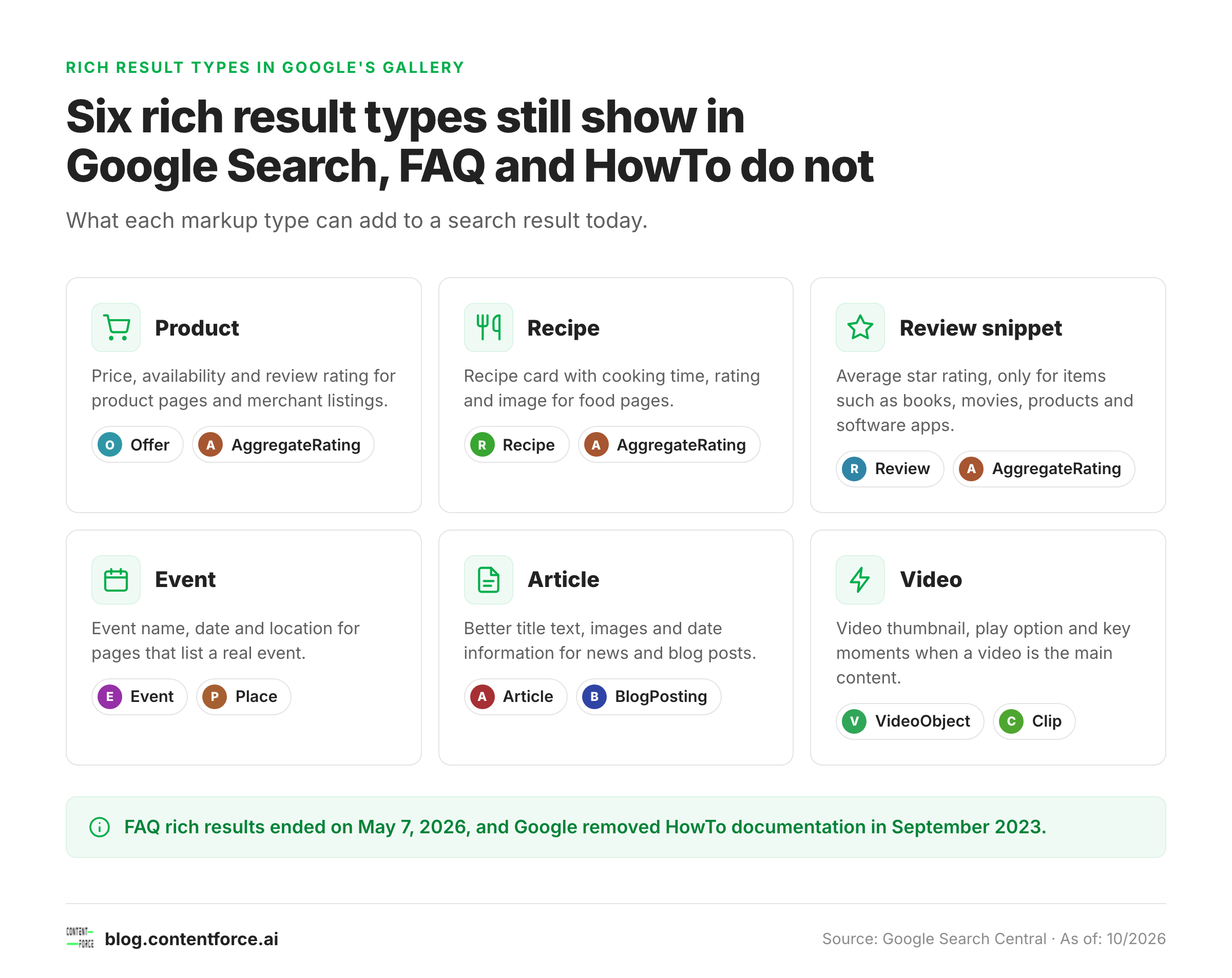
Here is a summary of the most widely used types and their status as of October 2026:
| Schema type | What it shows in search | Best for |
|---|---|---|
| Product | Price, availability, rating stars | E-commerce product pages |
| Review / AggregateRating | Star rating with review count | Items Google names: books, recipes, movies, products, software apps, local businesses |
| Recipe | Cooking time, calories, rating | Food and recipe blogs |
| Event | Date, location, ticket status | Event listings and ticketing pages |
| Article / BlogPosting | Better title text, images and date information | News publishers and editorial blogs |
| Video | Video thumbnail, duration | Pages with embedded video as main content |
| Organization | Name, logo, social links | Brand homepages |
| HowTo | Nothing (removed from Google Search) | Do not use for search appearance |
| Breadcrumb | URL breadcrumb trail | Any multi-level site |
Product
Product schema shows price, availability, and review stars directly in the search result. For e-commerce pages, this is often the highest-return schema type because it places decision-relevant information in front of users before they click.
Review and Rating Stars
Star ratings can appear when AggregateRating or Review markup is attached to a specific item that Google's review snippet documentation covers, such as a Book, Recipe, Movie, Product, Software App or local business. Ratings must describe that item and come from real reviews that are visible on the page. A blog post that simply rates itself doesn't qualify.
Review stars are one of the most visually prominent rich result types, which is why Google restricts them to the item types it names.
Recipe
Recipe schema produces results showing cooking time, calorie count, star rating, and sometimes a food image directly in the SERP. For recipe-focused content, this schema type is close to mandatory.
Event
Event schema displays the event name, date, and location in search results. This is useful for any page listing a specific event with a defined date.
Article and NewsArticle
Article markup (Article, NewsArticle or BlogPosting) tells Google the headline, author, publication date and image of an editorial page. Google says it can use this to show better title text, images and date information in search results. It adds no stars or badge of its own. The next section explains what that means for a blog.
Video
VideoObject schema surfaces a thumbnail image next to your result along with duration. Pages where a video is the primary subject are the best candidates, and a video sitemap helps Google find them.
HowTo (No Longer Shown)
Google removed its HowTo structured data documentation in September 2023 because the rich result no longer appears in search results on desktop or mobile. Adding HowTo markup to a tutorial won't produce numbered steps in the results. Write the steps as clear headings and a numbered list on the page instead.
2026 Update: FAQ Rich Results Are Gone
Google stopped showing FAQ rich results on May 7, 2026, and has since removed the FAQ rich result documentation from Search Central. FAQPage markup on your pages no longer produces expandable questions in the results.
Existing FAQPage markup can stay if it matches the visible questions on the page. Don't add new FAQPage markup for search appearance, though. Keep the questions and answers as visible text on the page, where readers and AI answer systems can still use them.
Which Rich Snippets Can Blog Posts Get?
A blog post can be eligible for Article, Breadcrumb, Video, image metadata and, in narrow cases, review snippet results. Article markup changes the title text, image and date Google shows rather than adding a visible badge.
The table below follows Google's structured data gallery and says when an ordinary blog qualifies for each feature.
| Markup | What Google may show | When a blog post qualifies |
|---|---|---|
| Article / BlogPosting | Better title text, larger images, date information | Every editorial post. Needs headline, image, dates and author. |
| Breadcrumb | The page's position in the site hierarchy instead of the raw URL | Blogs with a category or section path |
| Video | Video thumbnail, play option, key moments | Posts where an embedded video is the main content |
| Image metadata | Creator, credit and license details in Google Images | Original photos and graphics you want credited |
| Review snippet | Average star rating in the result | Posts that review a book, recipe, movie, product or software app, with real reviews on the page |
| Recipe | Recipe card with time, rating and image | Food blogs with a full recipe in the post |
| Organization / Profile page | Logo, name and author or brand details | Site-wide, set once on the homepage or author pages |
Most bloggers will see the effect of Article and Breadcrumb markup in the quiet details of a result: a cleaner title, a fresh date and a thumbnail. Don't expect stars on a how-to post or opinion piece. Google reserves them for items it can compare, and FAQ and HowTo results are gone.
Do Rich Snippets Affect SEO Rankings?
Rich snippets are not a direct Google ranking factor. Google's official position is that adding structured data does not improve your position in search results.
The indirect effect is on clicks. A result that shows useful extra detail can earn more clicks at the same position, because readers see more of what the page offers before they click. Google's own guidance suggests testing this on your site by comparing pages with and without markup in Search Console.
Structured data is also not a shortcut into AI answers. Google's guidance for generative AI features states that structured data is not required and that there is no special schema.org markup to add. It still recommends keeping markup that matches the visible text, because it helps with eligibility for rich results.
Structured data also helps Google understand the entities and relationships on your page, which can improve query-to-content matching across a wider range of search terms.
The better question to ask is not "will this help me rank higher?" but "will this get more clicks from where I already rank?" For rich snippets, the answer is almost always yes.
How to Get Rich Snippets: Step-by-Step

Step 1: Choose Your Rich Snippet Type
Match your structured data type to the primary content of the page. Do not add multiple unrelated schema types hoping one will trigger. Focus on the type that most accurately describes what the page is about:
- Product page: Product plus AggregateRating
- Recipe: Recipe plus AggregateRating
- Blog post or guide: Article (or BlogPosting)
- Event page: Event
- Local business: LocalBusiness
- Tutorial page: no HowTo markup; use visible numbered steps
Step 2: Write Your Structured Data in JSON-LD
JSON-LD is Google's recommended format. It is a JavaScript Object Notation block placed in a script tag in your page's head or body. It does not require changes to your visible HTML, which makes it easier to implement and maintain than Microdata or RDFa.
Here is a BlogPosting example in JSON-LD, modeled on Google's Article documentation. Replace every value with the real details of your post:
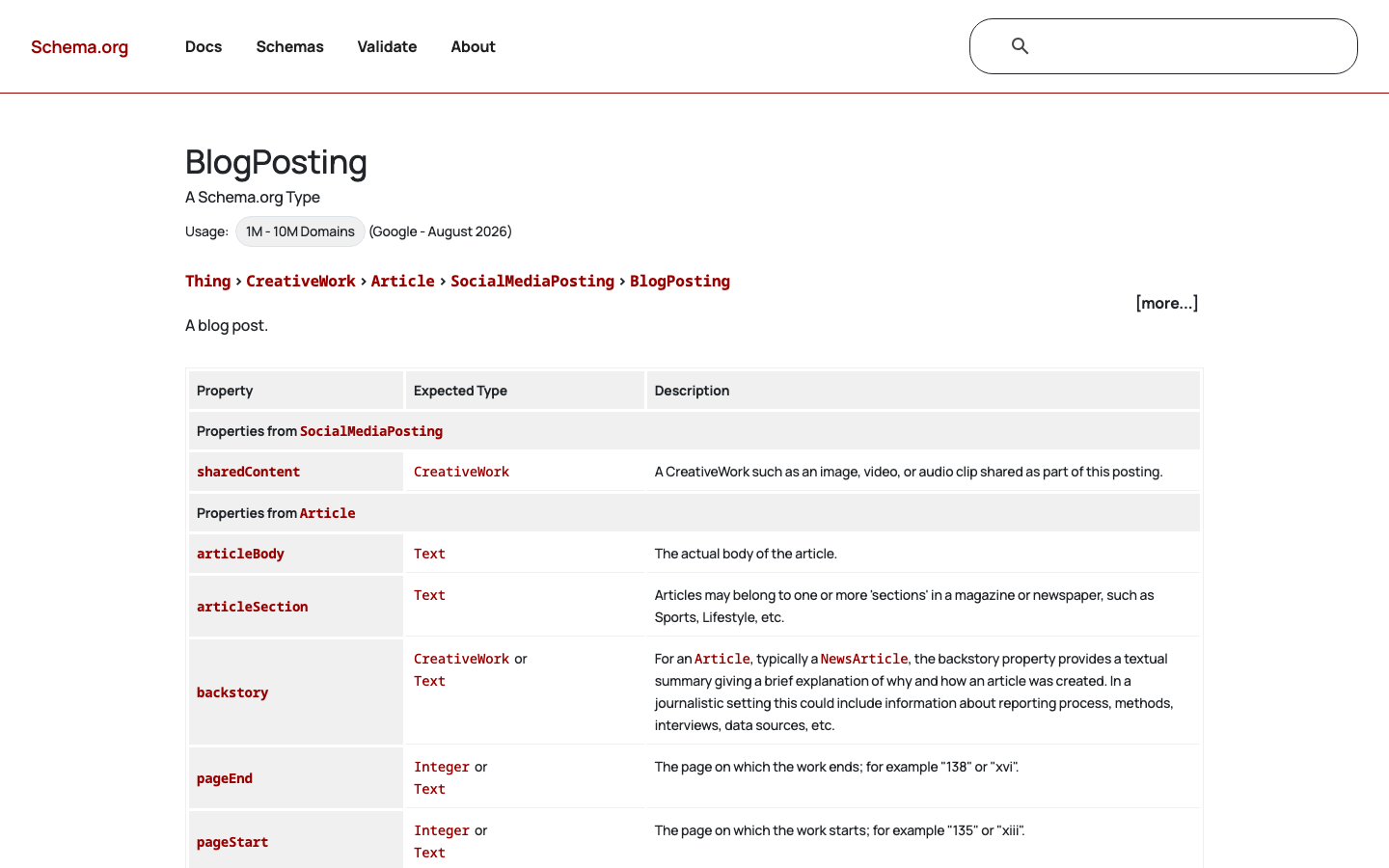
The Schema.org BlogPosting type lists every property with its expected type. Source: schema.org. <script type="application/ld+json"> { "@context": "https://schema.org", "@type": "BlogPosting", "headline": "Rich Snippets: What They Are, Types, and How to Get Them", "image": [ "https://example.com/photos/1x1/photo.jpg", "https://example.com/photos/16x9/photo.jpg" ], "datePublished": "2026-05-10T08:00:00+00:00", "dateModified": "2026-10-17T09:00:00+00:00", "author": [{ "@type": "Person", "name": "Jane Doe", "url": "https://example.com/authors/jane-doe" }] } </script>Use Schema.org as your vocabulary reference for property names. Use Google's structured data documentation to confirm which properties are required versus recommended for each type. If the post also carries a recipe or a review of a product, add that type as a separate block and keep every value identical to what readers see on the page.
Step 3: Add the Schema to Your Page
Place the JSON-LD block in the head of your page if possible, or anywhere in the body. On WordPress, SEO plugins such as Rank Math and Yoast SEO output Article schema for posts automatically, so for a standard blog the job is mostly checking that author, image and dates are filled in. Write JSON-LD by hand only for types the plugin does not cover.
Step 4: Validate with Google's Rich Results Test
Before deploying, validate your structured data at search.google.com/test/rich-results. Paste your page URL (if the page is live) or your HTML directly. The screenshot below shows what the tool looks like.
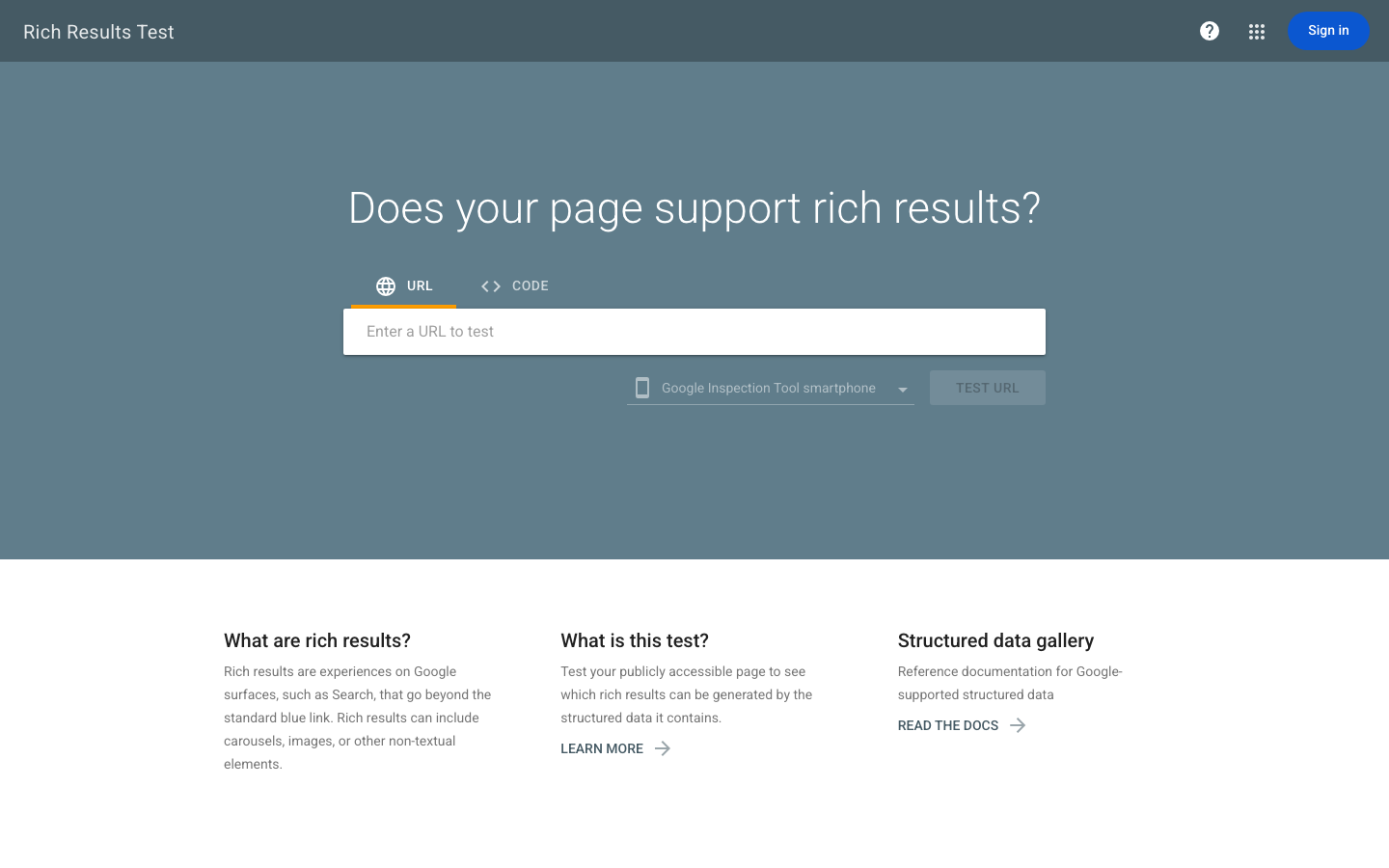
Google's Rich Results Test accepts a URL or raw HTML and reports which rich result types were detected along with any errors. Source: google.com. The tool reports:
- Whether your page is eligible for rich results
- Which rich result types were detected
- Any errors or warnings in the markup
Fix all errors before going live. Warnings are not blocking issues but should be reviewed.
Google's Search Central documentation lists all currently supported structured data types. The screenshot below shows the gallery view with Article and Breadcrumb entries.
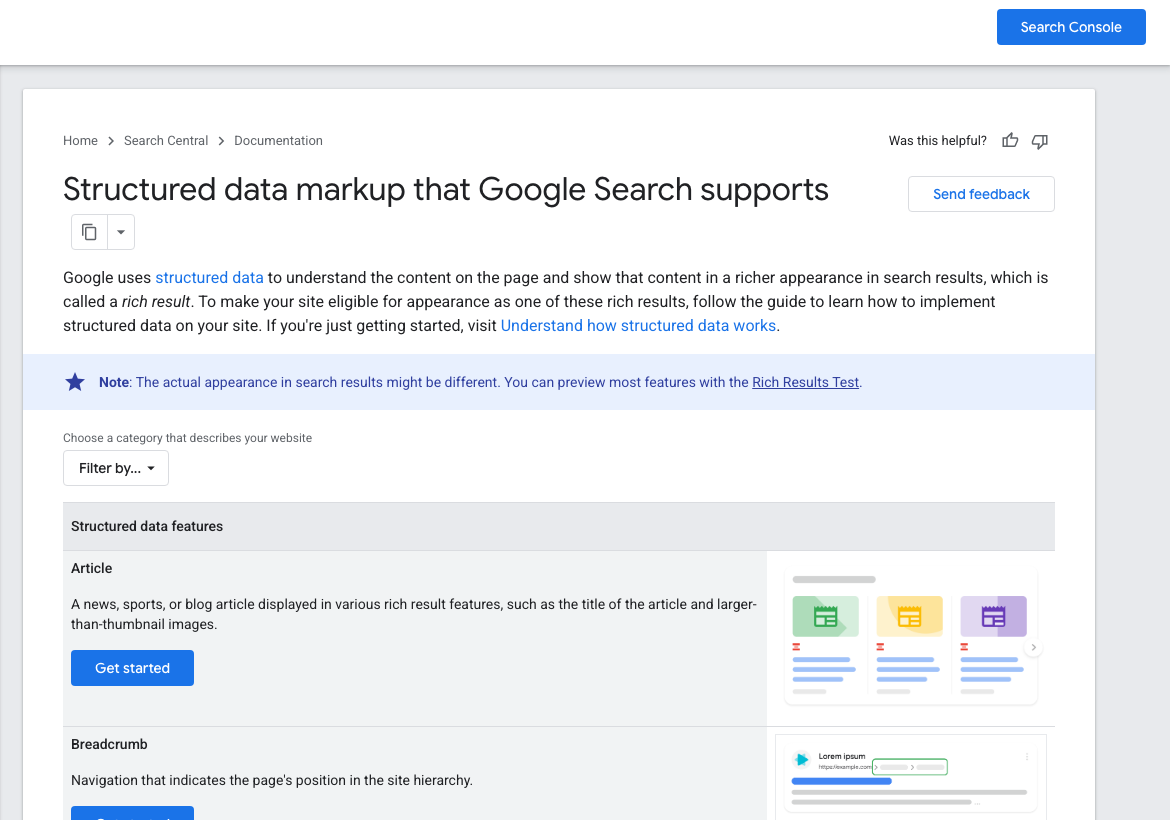
Google Search Central's structured data gallery lists every supported schema type with a visual preview of what it looks like in search results. Source: developers.google.com. Step 5: Submit to Google Search Console
After deploying, submit your URL for indexing via Google Search Console using the URL Inspection tool. Monitor the Enhancements report in Search Console for your schema type. It shows detected items, valid items, and any issues Google found during crawling.
Google doesn't publish a timeline for when a rich result starts to appear, and it states that it doesn't guarantee display even when the markup is valid.
Rich Snippets and AI Search Visibility in 2026
Structured data does not unlock AI Overviews or AI Mode. Google states that structured data is not required for its generative AI search features, such as AI Overviews, and that no special schema.org markup is needed to appear in them.
Markup is still worth keeping accurate for two reasons. It keeps your pages eligible for the rich results that remain, and Google's guidance asks that structured data match the visible text on the page, which is also what makes content easy for any system to read.
The practical rule for a blog is simple. Fill in Article markup correctly, keep dates honest, and put the effort into content that other pages don't already cover. Our guide to AI visibility covers what does earn citations.
Common Rich Snippet Mistakes to Avoid
- Marking up content not visible on the page. Google requires all schema properties to correspond to content visible to users. Marking up a star rating that does not appear on the page violates Google's structured data policies and can result in rich result removal.
- Using deprecated schema types. FAQ rich results ended on May 7, 2026, and HowTo results were removed in 2023. Do not build a visibility strategy around schema types Google has phased out.
- Mismatched schema and page content. If your JSON-LD says the product costs $49 but the page shows $79, Google may ignore the markup or suppress the rich result.
- Not validating before deployment. Small syntax errors in JSON-LD can prevent the entire schema block from being parsed. Always validate with the Rich Results Test before going live.
- Applying schema to the wrong page type. Putting Product schema on a category page or adding Recipe schema to a food blog post that is not actually a recipe will not produce rich results.
- Treating rich snippets as a ranking strategy. Structured data improves your visibility at your current ranking position. It will not rescue a poorly written page that ranks on page three.
Why Are My Rich Snippets Not Showing?
Valid markup does not guarantee a rich result. Google says that markup only makes a feature eligible, and that its systems decide per search whether to show it, depending on factors such as search history, location and device type.
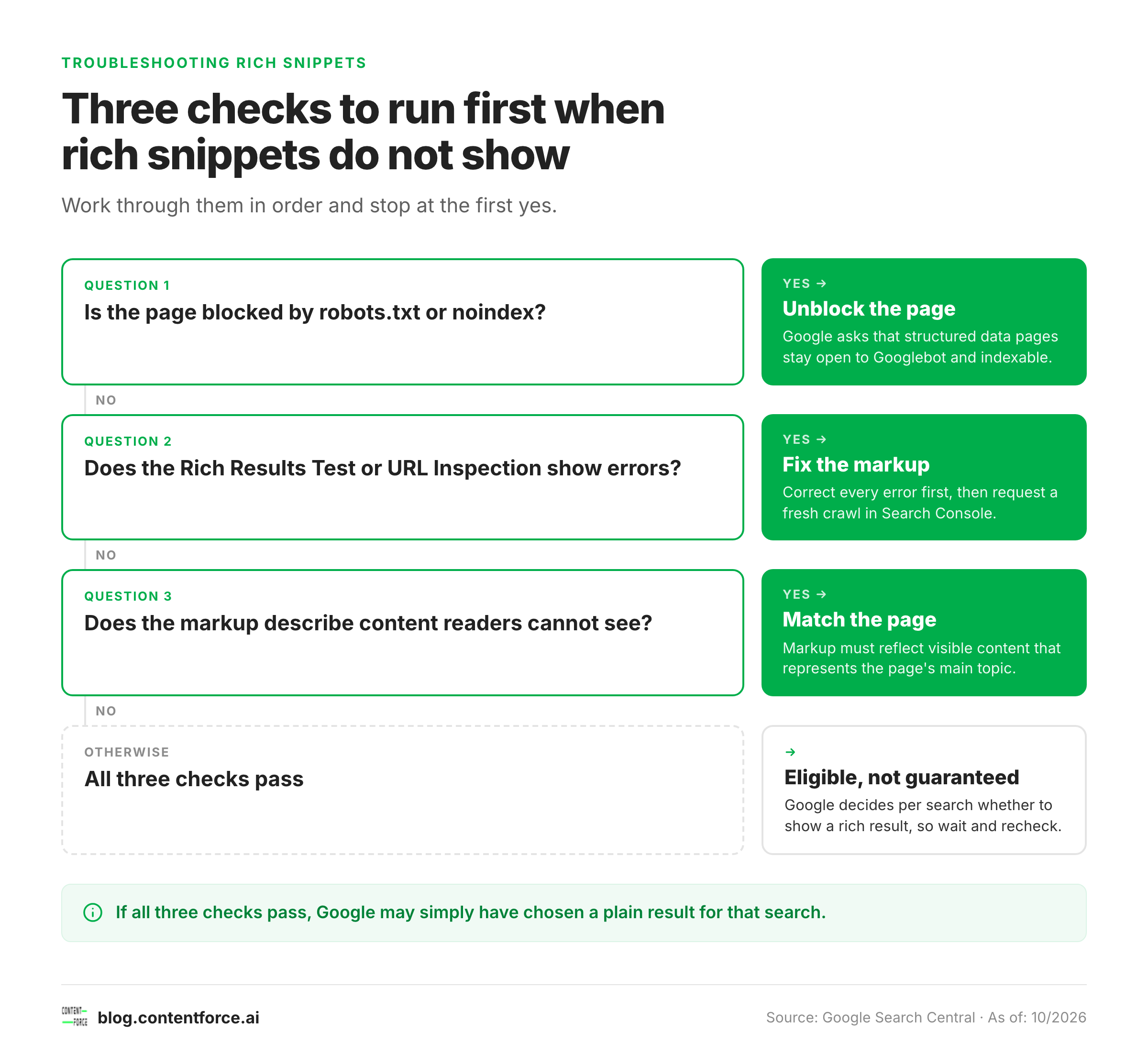
Work through these checks in order when a snippet does not appear:
- Confirm the page is indexed and not blocked, a check a technical SEO audit covers for the whole site. Google asks that pages with structured data are not blocked by robots.txt, noindex or other access controls.
- Run the URL through the Rich Results Test and the URL Inspection tool. Fix every error before reviewing warnings.
- Check that the markup matches the visible page. Google's guidelines say content in the markup must be visible to readers and representative of the page's main content.
- Check that the type is still supported. FAQ and HowTo markup will not produce results, whatever the test tool says about syntax.
- Review the quality guidelines. Outdated time-sensitive content, fake reviews and misleading markup can stop a result from appearing or lead to a manual action.
- Wait and look again. Rich results are decided query by query, so a page can show one on some searches and not on others.
When everything checks out and the result is still plain, Google has most likely picked a plain listing for that search. That's normal. It's also why rich snippets work best as a bonus, not a plan.
Frequently Asked Questions About Rich Snippets
How long does it take for rich snippets to appear? Google gives no fixed timeline. After it recrawls a page with valid markup, a rich result can appear, but display is never guaranteed. Requesting indexing with the URL Inspection tool in Search Console can speed up the recrawl.
Can a blog post get rich snippets? Most blogs earn Article and Breadcrumb treatment, which tidies the title, date and thumbnail. Stars, recipe cards and video previews need matching content on the page.
Can any website get rich snippets? Any site with valid structured data is eligible in principle. Google also checks that the markup matches the visible page and follows its quality guidelines, so thin pages or policy violations may not get rich results.
What happened to FAQ rich snippets? Google stopped showing FAQ rich results on May 7, 2026, and later removed the FAQ documentation. FAQPage markup remains valid vocabulary, but it will not produce expandable results in Google Search.
Are rich snippets free? Yes. Adding structured data is free. You do not pay Google for rich results. The only cost is your time or developer time to implement and maintain the markup.
Do I need a plugin to add schema markup? No. You can add JSON-LD directly to your page's HTML. WordPress plugins like Rank Math and Yoast SEO generate Article schema for posts automatically, which is more practical for larger blogs.