

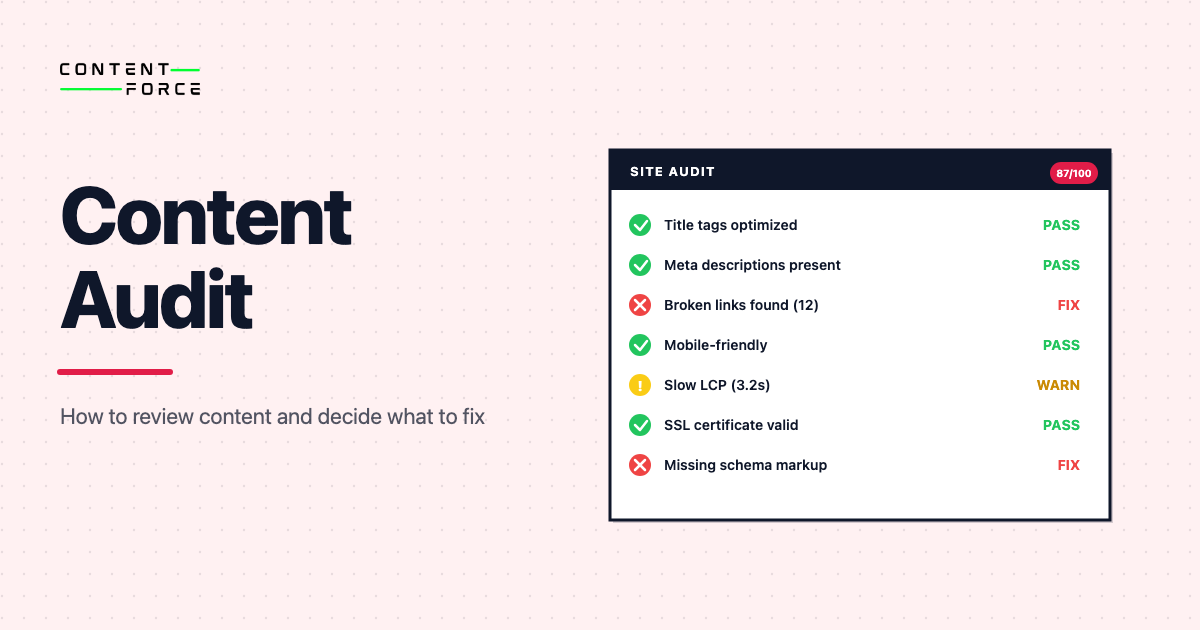
A content audit is a structured review of the pages, posts, landing pages and resource content you already have. Every piece gets evaluated for quality, performance and relevance, then assigned a decision: keep, update, merge or remove. Teams run content audits to improve SEO, user experience and content strategy. Without that review, a library just grows.
- A content audit reviews existing content, not just missing keywords.
- It looks at quality, freshness, intent fit, performance and duplication.
- The output is a decision backlog, not a giant spreadsheet nobody uses.
- The point is to improve the content system, not just count URLs.
What is a content audit?
A content audit is the process of reviewing your existing content against a clear set of standards so you can decide what to improve. Every page gets judged. Each URL must either earn its place on the site or get an action assigned to fix the problem.
Most content libraries grow faster than they improve. Teams keep adding pages, but older pages drift out of date, overlap with each other or stop matching what users actually need. An audit gives you a way to clean that up without guessing.
Five questions drive the whole process:
- Should this page stay live?
- Does it need a light refresh or a full rewrite?
- Is it competing with another page on the same site?
- Does it still match user intent?
- Is it helping traffic, trust, or conversion in a meaningful way?
Content audit vs content inventory: A content inventory is a list of every page on your site, capturing metadata like URL, title and last-updated date. A content audit is the quality and relevance judgment you apply to that inventory. The inventory tells you what you have. The audit tells you what to do with it. You need the inventory first, then the audit on top of it.
Why a content audit matters
Noisy content operations are expensive. Too many similar pages, outdated advice, weak articles that never got a second pass and clusters that look larger than they are: these all compound over time.
A good audit helps you:
- Find pages that deserve an update before you create duplicates
- Spot outdated examples, screenshots or pricing claims
- Reduce cannibalization between similar URLs
- Improve the consistency of a topic cluster
- Focus effort on the pages most likely to move traffic or revenue
Not a minor benefit. This is the foundation of a content program that improves over time instead of just expanding.
SEO is not the only reason to run one. Content audits also support brand clarity, conversion, product education and editorial quality.
What does a content audit review?
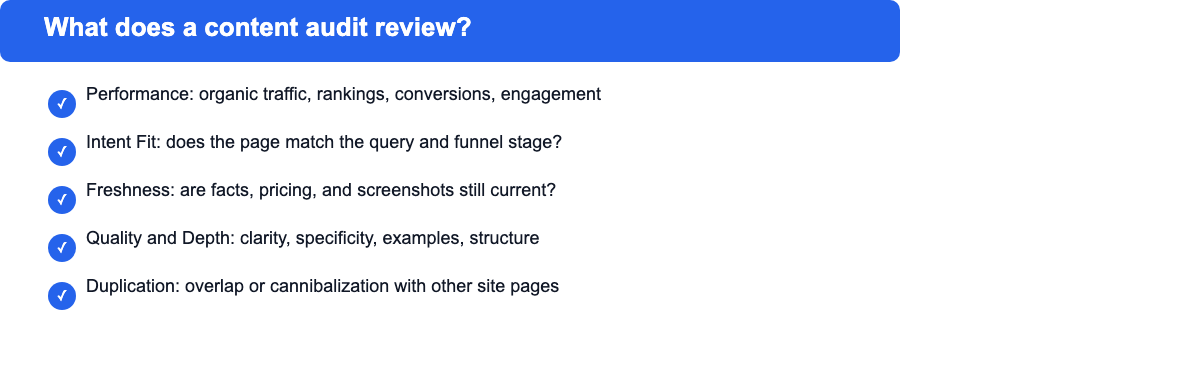
Five dimensions shape every content audit: performance, intent fit, freshness, quality and depth, and duplication or overlap. Strong teams review each page through all five lenses at once rather than relying on data alone.
Performance
Start with the measurable signals. Organic traffic, impressions, clicks, rankings, engagement, leads, assisted conversions. Whatever metrics matter for the page type should go in the spreadsheet first.
Performance data shows whether a page gets attention. What it cannot tell you is why a page succeeds or fails, but it gives you a strong starting point for judgment.
Intent fit
Pages underperform for many reasons. A query might want a comparison, but your page is a generic explainer. Visitors arrive at the top of the funnel when the real business need is mid-funnel education.
Intent fit is one of the highest-value review criteria. Healthy internal metrics can mask a page that is simply the wrong answer for the audience. Intent review is exactly how you catch that gap.
Freshness
Some content types go stale fast: software pricing, feature lists, product screenshots, legal requirements, process guidance. When the facts are tied to a platform that has changed, the page is outdated whether it looks current or not.
Trust erodes quickly when examples, numbers or screenshots fall behind reality. A well-written page can still fail this check if the facts beneath it have moved on.
Quality and depth
Manual review matters most here. Ask whether the page teaches, helps, compares or guides the reader. Thin sections, vague claims, weak examples and poor structure are all audit findings even when the page still ranks.
Quality review should include:
- Answer-first clarity under each heading
- Depth relative to the topic difficulty
- Specificity, examples and proof
- Scannability
- Internal links and next-step usefulness
Duplication and overlap
Some pages should not both exist. Two URLs competing for the same query class, or one thin page that belongs inside a stronger canonical page. The audit should say so clearly.
Teams recover significant value here. Merging or redirecting weak overlapping pages often improves a cluster faster than creating new content, making this the highest-ROI action in the whole audit.
How to do a content audit
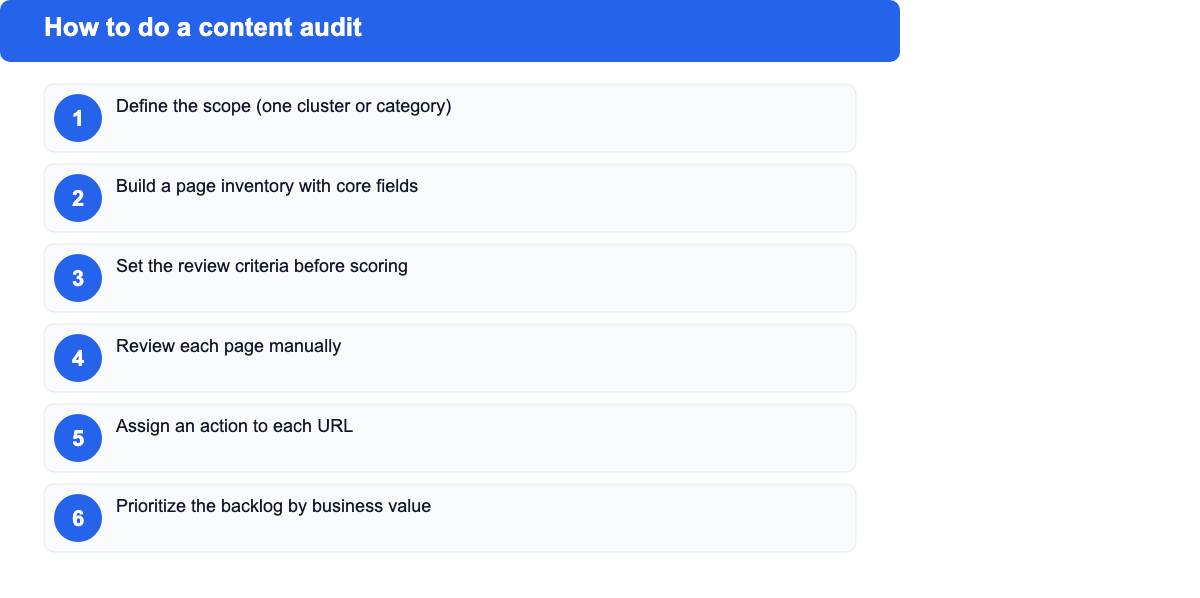
The cleanest workflow is not complicated. Keeping the output actionable is the only real challenge. The six steps below apply whether you are reviewing a single cluster or an entire site.
1. Define the scope
Avoid starting with the whole site unless it is small. Pick a realistic slice: one topic cluster, one product line, one blog category or one stage of the funnel. Scope is your audit unit.
Clear scope keeps things from turning into a never-ending exercise. Unclear scope is the most common reason audits stall before producing output. For teams new to the process, a single cluster of 20-30 pages is a good starting point.
2. Build a page inventory
List the URLs in scope and capture the basic fields you need to review them. That usually includes:
- URL
- Page title
- Content type
- Target topic or keyword
- Funnel stage
- Owner
- Last updated date
- Core performance metrics (traffic, impressions, rankings)
Once built, the audit becomes much easier to manage. Google Sheets works well for most teams; larger operations may use Airtable or Notion.
3. Set the review criteria
Before scoring anything, decide what good looks like. Skip this step and different reviewers will judge pages by different standards.
A practical audit scorecard covers these criteria:
| Criterion | What to check | Signals to look for |
|---|---|---|
| Relevance | Does this page still match the target query and user intent? | Search intent, topic fit, funnel stage alignment |
| Freshness | Are the facts, examples and screenshots current? | Date of last update, outdated pricing, stale screenshots |
| Performance | Is this page getting meaningful traffic or conversions? | Organic clicks, impressions, rankings, assisted conversions |
| Quality and depth | Does this page teach or help the reader in a meaningful way? | Answer clarity, depth vs. topic difficulty, examples |
| Overlap | Is this competing with another page on the same topic? | Keyword cannibalization, duplicate angles, similar URLs |
| Strategic value | Does this page support a key business or SEO goal? | Commercial intent, cluster role, link equity, conversion path |
Score each criterion on a 1-5 scale. Keep the scoring simple enough that multiple reviewers reach the same conclusion independently.
4. Review each page manually
Now go page by page. Some signals come from analytics tools, but others require reading the page. Open each URL and judge whether it is still the right answer. If it is not, say so.
Many teams rush this step. They export data, color a spreadsheet and call it done, missing everything that matters. A content audit is not only a data exercise. Reading and judging each page is the core work, and no tool does that for you. Numbers tell you where to look. They do not tell you what to fix.
5. Assign an action to each URL
Each page should end with a clear recommended action. Keeping the action set simple is important: if it is too complex, it will not get applied.
Common actions include:
- Keep
- Update
- Rewrite
- Merge
- Redirect
- Remove
If an action is not obvious, the audit was probably too vague.
6. Prioritize the backlog
Not every page deserves work now. Prioritize by some mix of business value, traffic upside, conversion impact, cluster importance and effort required.
A page with moderate traffic but high commercial intent may deserve attention before a high-traffic page that has little strategic value. The audit’s job is to make those tradeoffs visible.
What tools do teams use for content audits?
Most teams combine a site crawler with analytics data and a spreadsheet. No single tool handles the full process, so the practical approach is to pick one from each category and connect them through a shared inventory file.
Crawl and inventory tools such as Screaming Frog SEO Spider and Sitebulb discover all URLs on your site and flag technical issues like broken links, missing meta descriptions and redirect chains. Both export a full URL list that becomes the starting point for the audit.
Analytics and performance tools give each URL its traffic data. Google Analytics and Google Search Console are the standard starting point, since both are free and cover organic traffic, click-through rates, impressions and top queries. Ahrefs and Semrush add ranking data, backlink signals and competitive comparisons if you need them.
Spreadsheet and tracking tools tie everything together. Most teams use Google Sheets or Notion to build the master audit document where they paste crawl data, add analytics columns and record the review status and recommended action for each URL.
All-in-one platforms like Siteimprove or the Semrush Content Audit tool combine crawl, analytics and quality scoring in a single interface. These can save time on larger sites, though they are usually overkill for teams auditing a focused cluster or a site with fewer than a few hundred pages.
Tool choice depends on audit scope. For a single cluster on a small blog, Search Console exports and a spreadsheet are enough. A full-site audit for a large editorial operation benefits from a dedicated crawler and an integrated platform.
How should you score pages in a content audit?
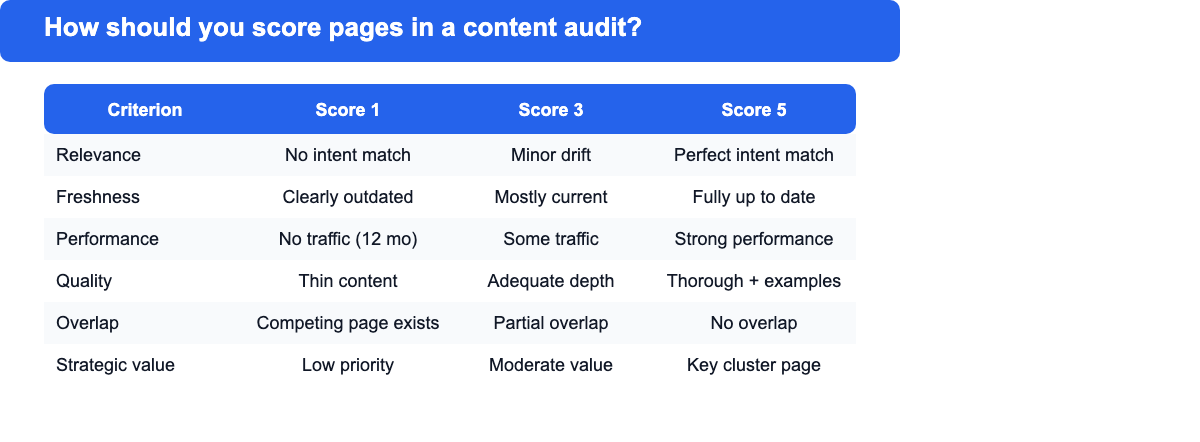
The best scoring system is one your team will trust and reuse. A simple score from 1 to 5 across five or six criteria is enough for most audits.
| Criterion | Score 1 | Score 3 | Score 5 |
|---|---|---|---|
| Relevance | No longer matches the target query or user intent | Mostly on-topic with minor intent drift | Directly answers the target query with strong intent match |
| Freshness | Facts, prices or screenshots are clearly outdated | Mostly current with some stale details | Fully up to date across all claims and examples |
| Performance | No meaningful traffic or conversions in 12 months | Some traffic but below expected for topic | Strong traffic, rankings or conversion contribution |
| Quality and depth | Thin content, vague claims, poor structure | Adequate depth with gaps in specificity | Thorough, well-structured, backed by examples and proof |
| Overlap | Directly competes with a stronger page on the same site | Partial overlap that weakens the cluster | No overlap; unique angle with a clear place in the site |
| Strategic value | Low business priority, weak cluster role | Moderate value; supports traffic but not conversions | High commercial or strategic value; key cluster page |
After scoring, translate the numbers into action. Not every weak page is a cut. A low-scoring but strategically important page usually becomes an update or rewrite candidate. A low-scoring page with low strategic value is more likely a merge or removal, especially if a stronger page already covers the same ground.
A simple decision rule: pages averaging 3 or above on relevance and strategic value deserve at least a light update before removal is considered.
Content audit example
A content team at a B2B software company audits its SEO cluster on project management tools. The cluster has 18 URLs. After reviewing against the six criteria, they find:
- A strong comparison page that ranks in position 4 and needs only small freshness updates to screenshots
- Three how-to articles with overlapping angles that should be merged into one definitive guide
- A landing page with 2,200 monthly visits but a relevance score of 2 because the page targets the wrong stage of the funnel
- Four pages from two years ago with no traffic, no backlinks and no strategic role that should be redirected or removed
- No clear internal path from the informational content to the product trial page
Publishing more content is not the next move. Merging the overlapping how-tos, fixing the intent-mismatched landing page, removing the zero-value pages, and building internal links from the informational cluster to the trial CTA. That single sprint will do more than adding four new articles.
Common mistakes in content audits
The process is straightforward, but teams still make the same mistakes.
Turning the audit into a spreadsheet only
Data matters, but skipping the actual reading means the audit misses weak explanations, bad structure, outdated examples and overlap that is obvious when you look at the page. Numbers tell you where to look. They do not tell you what is wrong.
Using too many statuses
Complicated action labels make the backlog hard to use. Keep it tight enough that editors, SEOs and stakeholders interpret it the same way. Six actions (keep, update, rewrite, merge, redirect, remove) is usually the right level. When teams cannot agree on what an action means, it is useless.
Ignoring business context
Some pages matter because they support product education or sales conversations, not because they get the most search traffic. Track only visits and you will miss those pages, underinvesting in content that drives real business value.
Creating new pages before fixing weak ones
Teams frequently spot a weak page on a topic, then create a second URL on the same topic instead of improving what is already there. Expensive mistake. Two competing pages accelerate cannibalization and split link equity instead of concentrating it.
Forgetting internal links and cluster logic
A page may be decent on its own and still perform poorly. Sitting inside a broken cluster with weak supporting links and unclear topic ownership is often what drives the underperformance. Page-level quality issues are only part of the picture. Cluster structure problems need flagging too.
Content audit vs content gap analysis
Related tasks, not the same task.
A content audit reviews what you already have and decides what to do with each existing page. The output is a decision for each URL (keep, update, merge, remove).
A content gap analysis identifies topics your competitors cover that you do not. The output is a list of topics to create, not a verdict on existing pages.
Both workflows work best together. Auditing the current library first shows you what is already there. Running a gap analysis afterwards reveals what is still missing. Skipping the audit and going straight to gap analysis often leads to creating content that duplicates what you already have.
How often should you run a content audit?
Most teams run a light audit on a continuous basis and a deeper one on a set cadence. Comprehensive reviews every 3-6 months are the common recommendation; an annual review is the minimum for most businesses. High-volume publishing sites benefit from quarterly cycles or more frequent checks on the most-visited pages.
- Monthly checks for high-value pages or volatile pages (pricing, product features, competitive comparisons)
- Quarterly reviews for important clusters
- Event-driven reviews when products, messaging, or markets change
Fast-changing markets demand more frequent revisits of critical pages. Some situations call for an immediate review regardless of cadence: a major Google algorithm update, a product rebrand, a new market expansion or a noticeable drop in organic traffic. Waiting for the quarterly cycle when traffic has already dropped is not a viable plan.
FAQ about content audits
What is the main goal of a content audit?
The main goal is to decide what to improve in your existing library so the site stays useful, current and aligned to where the business is going. The output is a prioritized action for each page in scope, not a document nobody acts on.
Is a content audit only for SEO?
No. Content audits also improve brand clarity, conversion support, product education and editorial consistency across the whole site. Many of the most valuable audit findings have nothing to do with rankings.
What should a content audit output?
A good audit should output a prioritized action list for each page in scope. That means one recommended action per URL, the reasoning behind it and a priority level so the work gets scheduled rather than left in a spreadsheet nobody uses.
How long does a content audit take?
Scope determines the answer. A small cluster review of 20-30 pages can happen in a day or two. A full-site audit can take much longer, especially for a first run. Tight scoping matters: the goal is decisions, not a document nobody revisits.
What is the difference between a content audit and a site audit?
A site audit focuses on technical issues like crawlability, broken links or indexation. A content audit does not. Usefulness, freshness, intent fit and strategic value of the content itself: usefulness, freshness, intent fit and strategic value. A page can be technically clean and still be the wrong answer for the query. Both audits serve different purposes and you often need both.
What is the difference between a content inventory and a content audit?
A content inventory is a list of every page on the site, capturing metadata like URL, title and last-updated date. A content audit is the quality and relevance judgment you apply to that inventory. The inventory tells you what you have. The audit tells you what to do with it. You need the inventory first, then the audit on top of it.
