
Glossary
What Is an AI Workflow? A Complete Guide for 2026

An AI workflow is a structured sequence of automated tasks in which AI systems perform, coordinate or enhance a process to complete a goal faster than manual methods. Triggers, AI processing and output actions chain together, and human-in-the-loop steps can pause the workflow at any point for review before it continues.
- A trigger such as a form submission or scheduled time starts the workflow
- Repetitive processes that used to take 30 minutes now run in seconds
- Traditional rule-based automation fails on unexpected input, but AI workflows adapt to it
- A support ticket workflow classifies the ticket and drafts a first-response email
AI is reshaping how teams work. Not by replacing people. By handling the repetitive, time-consuming sequences that used to eat up hours every week. That's what an AI workflow does: it takes a structured process and automates it using artificial intelligence, so your team can focus on work that requires human judgment.
This guide covers everything you need to know: what AI workflows are, how they work, the different types, how to build one from scratch and which tools to use in 2026.
What Is an AI Workflow?
An AI workflow is a structured sequence of automated tasks where AI systems perform, coordinate or enhance processes to complete a goal faster than manual methods. The systems can run on their own or with human oversight built into specific steps.
Unlike a simple script or rule-based automation, an AI workflow handles unstructured inputs like emails or documents, makes context-aware decisions and adapts when conditions change. It connects your existing tools, feeds data into an AI model and triggers actions based on what the model returns.
Consider two examples. A content team might build an AI workflow that watches a competitor's RSS feed, summarizes new articles, identifies relevant topics and drafts a brief, all without anyone clicking a button. A sales team might build one that pulls new leads from a form, scores them with an AI model and routes high-priority contacts to a rep while adding the rest to a nurture sequence.
In both cases, work that used to take 30 minutes per occurrence now happens in seconds.
AI Workflow vs. Traditional Workflow Automation
Traditional workflow automation is rule-based. You write "if X happens, do Y" and it holds as long as X and Y stay predictable. If an invoice arrives in an unexpected format, a rule-based system fails or routes it to a human.
AI workflows handle that ambiguity. The AI component can read the invoice regardless of format, extract the relevant data and continue the process. The difference is adaptability. Rule-based automation follows a fixed path, while an AI workflow reasons about what to do next based on the content it receives.
Traditional automation still works for simple, stable processes. AI workflows make sense when inputs vary, the decisions need judgment or the volume is too high for human review.
How AI Workflows Work
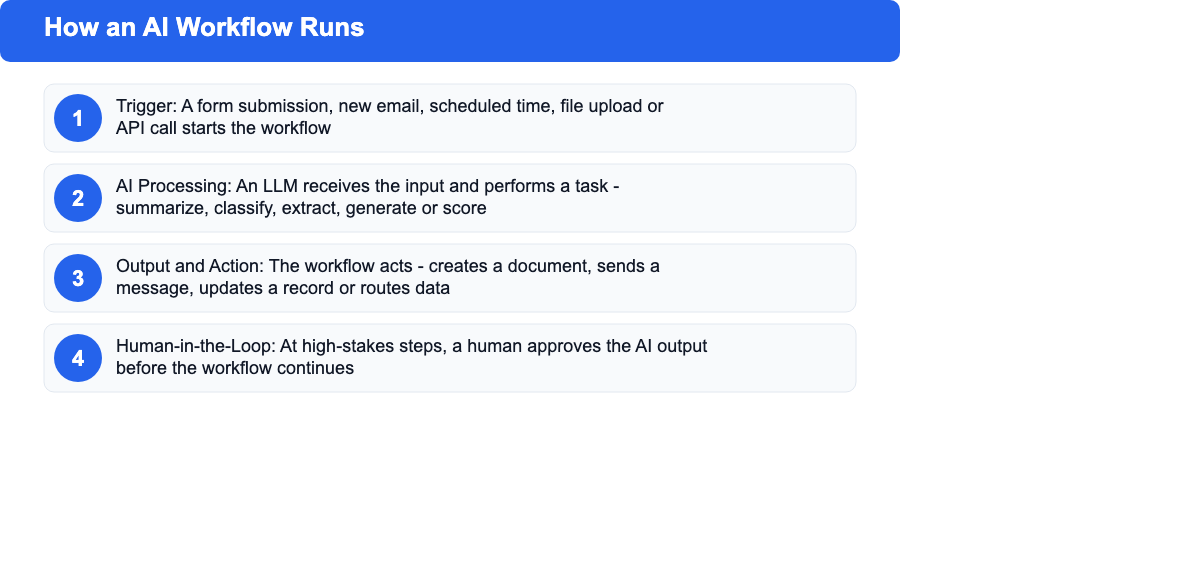
An AI workflow runs by chaining three core elements: a trigger that starts the process, AI logic that processes the input and decides what to do, and an output action that completes the task. Most platforms offer a visual builder for this chain, no coding needed.
Triggers and Inputs
A trigger is the event that starts a workflow. It could be a form submission, a new email, a scheduled time, a file upload or an API call from another system. The trigger passes data into the workflow, which becomes the input the AI processes.
Design starts with the right trigger. A marketing team automating content briefs might fire a workflow whenever a keyword lands in a shared spreadsheet. A support team might fire one whenever a new ticket arrives in Zendesk.
AI Processing and Decision-Making
This is where the intelligence lives. The AI component, a large language model (LLM) like GPT or Claude, receives the input and does something with it: summarize, classify, extract, generate, score or decide. The prompt you write for this step determines what the AI does and what shape the output takes.
Some workflows chain multiple AI steps. A content workflow might summarize a source article, then classify the topic, then generate a brief. Three separate AI calls, each feeding the next.
Outputs and Actions
Once the AI has processed the input, the workflow acts: creates a document, sends a message, updates a record, posts content, calls an API or routes the result to another system. This is where the automation closes the loop and delivers value.
A brand-monitoring workflow analyzes sentiment and sends its output as a Slack alert for negative results. A social-content workflow sends generated copy straight to a scheduling tool.
Human-in-the-Loop
Not every AI decision should execute without review. Human-in-the-loop (HITL) steps pause the workflow at a defined point and wait for a human to approve, edit or reject the AI's output before the workflow continues.
HITL steps matter when stakes are high, such as publishing live content or sending emails to customers, or when the AI's accuracy is not reliable enough to act without oversight. Modern platforms like n8n and Zapier support HITL out of the box. The workflow pauses, notifies the right person and resumes once they respond.
Types of AI Workflows
AI workflows fall into four broad categories. Understanding which type fits your situation helps you pick the right tool and design the right process.
Content and Creative Workflows
Marketing and SEO teams use these most. The scope is wide. They automate creation, editing and distribution of content across formats and channels, from long-form articles to short social posts.
Examples:
- Research a keyword, pull top-ranking articles, summarize key points and draft a content brief
- Convert a long blog post into social media posts for LinkedIn, X and Instagram
- Monitor a competitor's site for new content, summarize it and send a digest to the content team
- Generate product descriptions from a spreadsheet of specs and upload them to an e-commerce store
Data Processing Workflows
Operations, finance and analytics teams rely on these. Data is the raw material. At their core, they collect, clean, transform and route it between systems so downstream tools always have accurate inputs to work with.
Examples:
- Pull data from multiple sources, normalize the format and load it into a database
- Read incoming invoices, extract line items and log them in an accounting system
- Scrape pricing data from competitor sites, compare it to your own and generate a report
- Monitor a data feed for anomalies and alert the relevant team when something is out of range
Customer Service Workflows
Speed matters in support. These workflows handle incoming requests, route them and generate initial responses. The result is faster response times and fewer routine tickets landing with your support staff, who can focus on the cases that need real expertise.
Examples:
- Read an incoming support ticket, classify it by topic and urgency and route it to the right agent
- Draft a first-response email using the ticket content and your knowledge base
- Follow up with customers who have not responded after 48 hours
- Pull a customer's account data and summarize their history before a call
Operational Workflows
Broad by design. HR, project management and executive operations teams use these for internal coordination, scheduling, reporting and process management.
Examples:
- Screen incoming job applications against a job description and produce a shortlist with notes
- Generate a weekly status report by pulling data from Jira, Notion and Google Analytics
- Schedule meetings by reading availability from calendars and sending invites
- Summarize meeting transcripts and extract action items to a project management tool
Key Benefits of AI Workflows
AI workflows reduce manual effort, eliminate repetitive errors and let teams scale output without adding headcount. Research from the Harvard Business Review shows nearly two-thirds of organizations now consider AI adoption a key strategic priority. The operational advantages explain why.
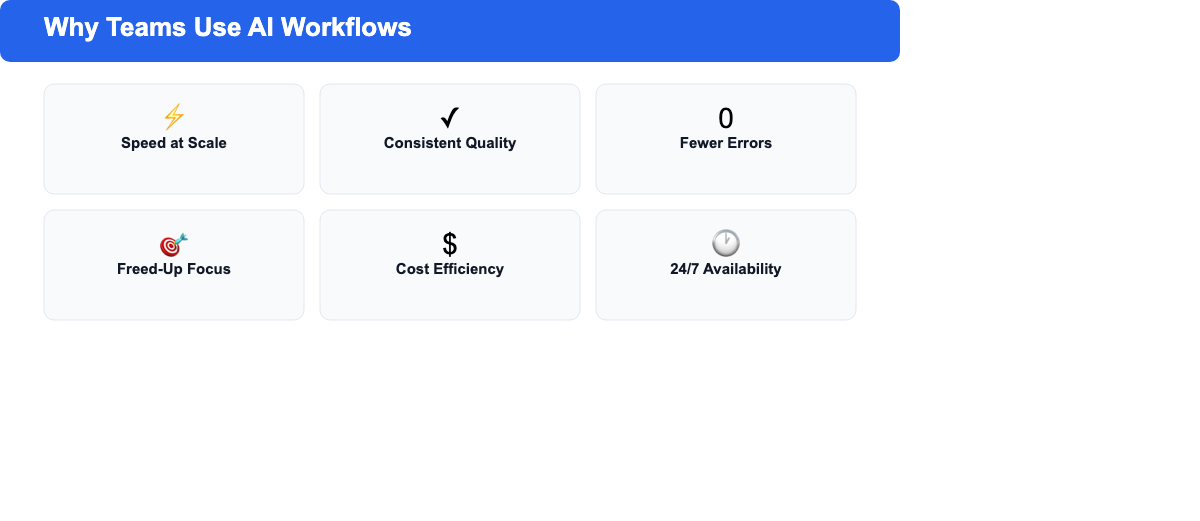
Speed at scale. Tasks that take a human 30 minutes per item, reading a brief, drafting a response, extracting data from a document, can run in seconds across thousands of items. Volume stops being a constraint.
Consistent quality. Human output varies with energy, attention and context. An AI workflow follows the same instructions every time. Results hold uniform across every execution.
Reduced errors. Data entry mistakes, missed steps and forgotten follow-ups disappear when you automate a process. The workflow either runs or fails visibly. There is no silent degradation.
Freed-up focus. When repetitive work moves to automation, your team can spend more time on decisions, strategy and creative work that needs genuine judgment.
Cost efficiency. Scaling operations has meant hiring. AI workflows let you handle more volume without adding headcount or ballooning contractor spend.
24/7 availability. AI workflows run whenever triggered. They do not stop at 5pm, take sick days or need a lunch break. Processes that depend on overnight data run on their own and are ready when your team arrives.
How to Build an AI Workflow: Step by Step
Building an AI workflow is more straightforward than it sounds. Five steps. They apply whether you're using a no-code platform or a developer framework, and the logic is the same either way.
Step 1: Define Your Goal and Trigger
Start with a clear outcome: what should this workflow produce, and when should it start? Vague goals lead to vague workflows. "Automate content" is not a goal. "Generate a first draft from a content brief within 5 minutes of it being added to our Notion database" is a goal.
Once the goal is clear, identify the trigger. Common triggers include a new row in a spreadsheet, a form submission, a scheduled time, a new file in a folder or a webhook from another system.
Step 2: Map the Manual Process
Before you automate anything, write out every step a human does today. Include decisions, exceptions and edge cases. What happens if the input is incomplete? What if the AI's output falls short of the quality bar?
This map becomes your blueprint. Steps that need human judgment become candidates for HITL. Steps that are pure data transformation, with no meaningful decision involved, become candidates for full automation.
Step 3: Choose Your AI Workflow Tool
Pick a platform that matches your team's technical level and the complexity of your workflow. No-code tools like Zapier or Make work well for simple chains. Tools built for developers, like n8n or LangChain, handle complex, multi-step logic better.
See the tools section below for a comparison. Choose the simplest tool for the job. Over-engineering the platform selection adds cost and complexity without improving results.
Step 4: Connect and Configure
Build the workflow in your chosen tool. Connect the trigger to the AI step, write the prompt that tells the model what to do with the input and configure the output action. Most platforms offer pre-built integrations for common tools such as Gmail, Slack, Notion, Google Sheets and HubSpot, so you do not need to write API code from scratch.
The prompt is the most important configuration choice. Full stop. A clear, specific prompt produces consistent, useful output. A vague prompt produces inconsistent output that creates more review work than it saves.
Step 5: Test, Monitor and Improve
Run the workflow on real inputs before going live. Check the output at every step: does the AI extract the right data? Does the action complete? Does the output land where it should?
Once live, monitoring is ongoing. Track error rates and check output quality on a schedule. Update prompts when results drift. AI workflows are not "set and forget." They need tuning as inputs change and models update.
Best AI Workflow Tools in 2026
The right tool depends on complexity, technical skills and budget. Here is a comparison of the leading options, with pricing as of mid-2026:
| Tool | Best For | Pricing | Complexity |
|---|---|---|---|
| n8n | Technical teams, self-hosted, complex logic | Free (self-hosted), paid cloud from $20/month | Medium-High |
| Zapier | Simple automations, non-technical teams | Free tier, paid from $19.99/month | Low |
| Make (formerly Integromat) | Visual builders, moderate complexity | Free tier, paid from $9/month | Low-Medium |
| Microsoft Power Automate | Microsoft 365 shops, enterprise | Included in M365, standalone from $15/user/month | Medium |
| LangChain | Developers building custom AI chains | Open source (free), cloud options available | High |
| Gumloop | AI-native workflows, content teams | Paid from $97/month | Low-Medium |
n8n
n8n is an open-source workflow automation platform with a visual builder and strong AI support. Self-hosting is free, which makes it popular with technical teams who want full control over their data and infrastructure. It supports hundreds of integrations and lets you build complex multi-step logic, including conditional branches, loops and error handling. The human-in-the-loop feature is well-implemented. The workflow pauses at any step you choose and waits for approval before continuing.
Best for: technical teams, complex workflows, privacy-sensitive data, custom AI integrations.
Zapier
Zapier is the most widely used automation platform, known for ease of use and an integration library with over 7,000 apps. Its "Zaps" are simple two-step chains: trigger, then action. The "Paths" feature adds conditional logic. Zapier added AI steps that include LLM calls inside a Zap. For complex multi-step AI workflows, better options exist, but Zapier excels at simple automation and serves teams with no technical background well.
Best for: non-technical teams, simple workflows, connecting common SaaS tools.
Make (formerly Integromat)
Make offers a visual "scenario" builder that sits between Zapier's simplicity and n8n's power. More complex logic is available than Zapier offers, including loops, iterators and aggregators, at a lower price. Make's AI integrations connect to OpenAI or other providers via their APIs, which requires some configuration. For teams that need more flexibility than Zapier without self-hosting, Make is a strong fit.
Best for: moderate-complexity workflows, cost-conscious teams, visual builders who want more control.
Microsoft Power Automate
Power Automate is Microsoft's automation platform, built deep into the Microsoft 365 ecosystem. Teams running on SharePoint, Outlook and Excel will find it connects to all of them natively. AI Builder adds prebuilt models for document processing, sentiment analysis and prediction. The learning curve is steeper than Zapier or Make, and the interface is less intuitive, but the depth of Microsoft integration is unmatched.
Best for: enterprise teams on Microsoft 365, document processing, SharePoint-based workflows.
LangChain
LangChain is an open-source framework for building AI applications in Python or JavaScript. Not a no-code platform. Think of it as a developer toolkit. LangChain suits cases where custom AI logic exceeds what off-the-shelf tools can handle: multi-agent systems, retrieval-augmented generation (RAG), custom memory or complex prompt chaining. Complete control comes with an engineering cost to implement and maintain.
Best for: developers, complex AI logic, custom AI agent systems, RAG implementations.
Gumloop
Gumloop is a newer entrant built for AI-first workflows. Its visual canvas centers on LLM nodes rather than adapting a general automation platform. Content workflows run well: research, summarization and generation. Marketing teams have adopted it at a good clip. The integration library is less mature than n8n or Zapier, but the AI workflow experience is more purpose-built.
Best for: content and marketing teams, AI-native workflows, teams where AI is the core of the process.
SEO Title Generator: eight title tag variations, sized for the SERP and intent-matched. Free, no signup.
AI Workflow Use Cases by Industry
Practical applications span every sector. Here is how different teams are using AI workflows in 2026, with concrete examples drawn from real use cases.
Content Marketing and SEO
Content teams were early adopters. So much of content work is structured, repetitive and suited to automation.
- Keyword research workflow: pull keyword data from an SEO tool, cluster related keywords with an LLM and generate topic clusters in a spreadsheet
- Content brief workflow: given a target keyword, search for top-ranking pages, extract their H2 structures and generate a brief with suggested headings and word count
- Content repurposing workflow: take a published blog post, extract the key points and generate a LinkedIn post, an X thread and a newsletter blurb, each formatted for its channel
- Internal link workflow: given a new article, find relevant existing articles from a sitemap and suggest internal link placements
Sales and Lead Generation
- Lead enrichment workflow: when a new lead comes in from a form, look up the company, score the lead based on fit criteria and route high-priority leads to a sales rep via Slack
- Follow-up email workflow: when a deal has not moved in 5 days, generate a personalized follow-up email draft and queue it for the rep to review and send
- Call summary workflow: after a sales call transcript is uploaded, extract key objections, next steps and decision-maker details, then log them to the CRM
HR and Recruiting
- CV screening workflow: when a new application arrives, for example, you can use Recruit CRM's AI recruiting functionalities to compare the CV with the job description, score the candidate against the required criteria, and add them to a shortlist sheet with notes.
- Onboarding workflow: when a new hire record is created in the HRIS, generate a personalized onboarding checklist and send it to their manager and the IT team
- Exit interview workflow: after an exit interview is recorded and transcribed, extract themes, flag concerning patterns and add them to an HR analytics dashboard
Finance and Reporting
- Invoice processing workflow: when an invoice arrives by email, extract the vendor, amount, date and line items, match it against a purchase order and create a draft entry in the accounting system
- Weekly reporting workflow: every Monday morning, pull the previous week's data from the analytics platform, generate a natural language summary of performance and send it to the leadership team
- Budget monitoring workflow: when any department's spend crosses 80% of its monthly budget, generate a summary of recent transactions and alert the finance lead
Customer Support
- Ticket triage workflow: when a support ticket arrives, classify it by topic and urgency, assign it to the right team and generate a suggested first response using the knowledge base
- Escalation workflow: if a ticket has been open for 24 hours without resolution, summarize the thread, flag it to a senior agent and update the customer with an estimated resolution time
Common AI Workflow Challenges (and How to Solve Them)
Failure modes are predictable. Know them in advance. Building with the common pitfalls in mind saves significant time and frustration down the line.
Data quality issues. AI workflows are only as good as their inputs. Inconsistent, incomplete or poorly formatted data going in produces inconsistent output coming out. Add a validation step before the AI node that checks inputs and routes bad data to a review queue rather than letting it flow through unchecked.
Prompt drift. A prompt that works well today may produce lower-quality output next month when the underlying model updates or the range of inputs shifts. Monitor output quality at regular intervals, not just errors. Keep a version history of your prompts. Review a sample of executions each week until the workflow's consistency is established.
Integration failures. Workflows break when an API changes, a credential expires or an external service goes down. Build error handling into every workflow. Configure alerts for failures, set up retries for transient errors and create a fallback path that routes failures to a human rather than dropping them silently.
Over-automation. Some teams automate too aggressively and strip out the human checks that catch errors before they cause damage. An AI workflow that publishes content without review will, at some point, publish something wrong. Add HITL steps at any point where the cost of an error is high. Human oversight is a designed safeguard, not a sign of failure.
Cost management. LLM API calls add up fast when workflows run at volume. A workflow making 3 API calls per execution and running 10,000 times a month generates meaningful costs. Estimate costs before launch, use cheaper models for simple tasks like classification and extraction, reserve expensive models for generation and reasoning and set spending alerts in your AI provider dashboard.
Maintenance burden. Workflows need updates when connected tools change, business processes evolve or prompt quality degrades. Teams underestimate this. Document every workflow, assign an owner and run a four-times-a-year review of all active workflows to confirm they are still needed and working.
Frequently Asked Questions
What is the difference between AI workflow and RPA?
Robotic Process Automation (RPA) mimics human actions on a screen: clicking, typing, copying data from one system to another. It is rule-based and brittle. Change the UI and the bot breaks. AI workflows use AI models to handle unstructured inputs and make judgment-based decisions, not to mimic screen interactions. RPA suits legacy systems with no API. AI workflows fit better when data is text-heavy, decisions need context or inputs vary widely.
Can I build an AI workflow without coding?
Yes. Platforms like Zapier, Make and Gumloop are built for non-technical users. You connect nodes in a visual interface, write prompts in plain language and configure outputs from dropdown menus. No code needed. More complex workflows, such as custom AI logic, self-hosted infrastructure or multi-agent systems, do need developer skills. The majority of practical business workflows are achievable without writing a single line of code.
How much does an AI workflow tool cost?
Pricing ranges from free to hundreds of dollars a month. Zapier's free tier covers basic automation; paid plans start at around $20/month for individuals and scale based on task volume. Make starts at $9/month. n8n is free to self-host. LangChain is open source. Beyond platform costs, you pay for AI model usage, charged per token by providers like OpenAI or Anthropic. A content workflow running a few hundred times a month will land under $20/month in total API costs.
What is a human-in-the-loop AI workflow?
A human-in-the-loop (HITL) workflow includes a step where a human must review, approve or modify the AI's output before the workflow continues. Practical example: an AI generates a draft email, the workflow pauses and sends the draft to a team member for review, then sends the email only after they approve it. HITL steps make sense whenever automated action would be hard to reverse, the AI's accuracy is not reliable enough to act without review or compliance demands human sign-off.
How is an AI workflow different from a chatbot?
A chatbot is a conversational interface. It responds in real time, one message at a time. An AI workflow is a process that runs on its own, with no human interaction at the point of execution. A chatbot might help a customer find information; an AI workflow might process 500 support requests overnight, classify each one and generate draft responses without anyone present. The two complement each other: a chatbot can trigger a workflow as part of handling a query.