
Tool list
Best Internal Linking Tools for 2026 (Tested and Compared)

Internal linking tools range from WordPress plugins like Link Whisper and Internal Link Juicer to platform-agnostic platforms like LinkStorm, InLinks and Twylu, tested across an affiliate site, a B2B SaaS blog, a high-volume publisher and a niche site for suggestion quality, automation depth and pricing value. Link Whisper leads for WordPress bloggers, LinkStorm for agencies managing multiple client sites.
Internal links are one of the highest-ROI levers in on-page SEO, yet they get ignored. Unlike backlinks, which require outreach, negotiation and time, internal links are fully within your control. You can add them today at zero cost and see PageRank flow to the pages that need it most within the next crawl cycle.
The problem is scale. If you run a site with 50 posts, auditing your internal link structure by hand is doable. At 500 posts, or across ten client sites, or when you're publishing dozens of articles a month, manual internal linking becomes a bottleneck fast. You forget which pages exist. Anchor text gets repetitive. Orphan pages multiply. High-authority posts stop passing equity to the content that could actually rank.
That is where internal linking tools come in. They range from lightweight WordPress plugins that suggest links while you type to enterprise-grade crawlers that map your entire link graph and flag structural gaps.
For this guide, we tested 15 tools across several live sites in different verticals: an affiliate comparison site, a B2B SaaS blog, a high-volume content publisher and a small niche site. We evaluated suggestion quality, ease of integration, automation depth, pricing value and how well each tool fits different team sizes and workflows.
What follows is a practical breakdown of the best tools available in 2026, organized by category so you can find the right fit for your situation.
What to Look for in an Internal Linking Tool
Before diving into specific tools, it helps to know what separates a useful internal linking tool from one that adds friction without much payoff.
Link suggestion quality. This is the most important factor. Does the tool suggest links that are semantically relevant to the content, or does it keyword-match superficially? AI-powered tools that understand topical context produce better suggestions than rule-based systems that match exact strings.
Platform support. Some tools are built for WordPress only. Others work via API, crawl-based scanning or JavaScript injection and are therefore platform-agnostic. WordPress users have more specialized options. If you run a headless CMS, Webflow or a custom build, you need a tool that works independently of the CMS.
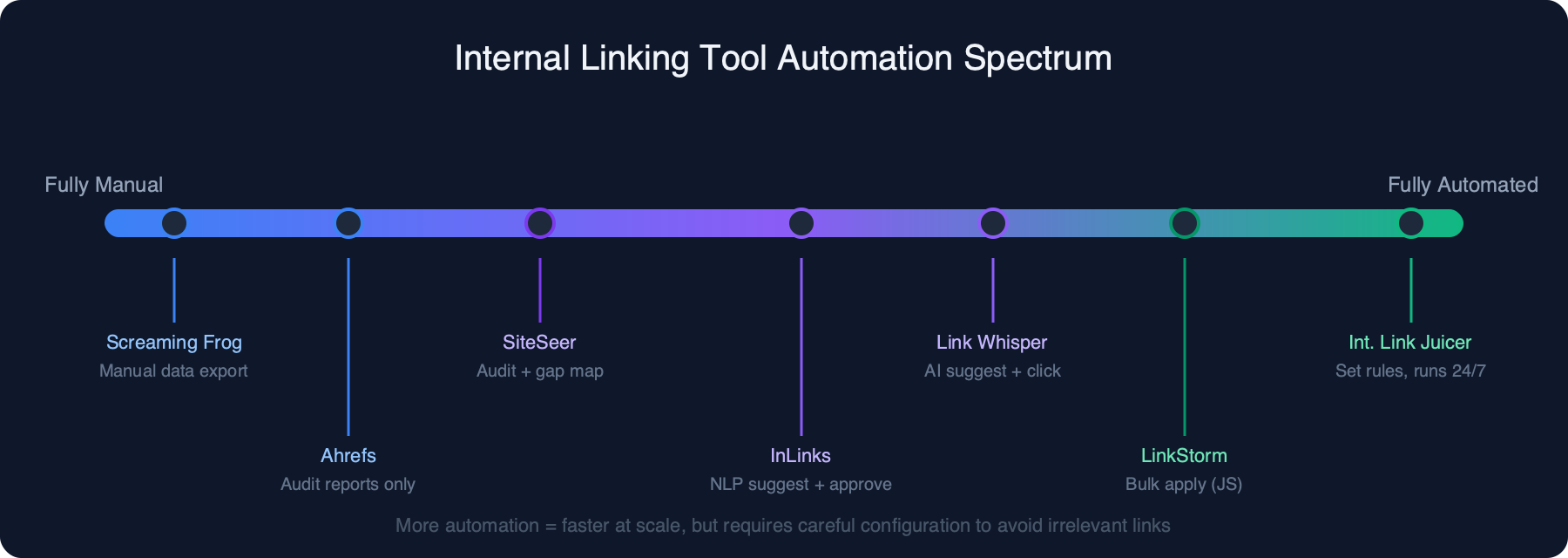
Automation level. Tools sit on a spectrum from fully manual (you review and approve every link) to fully automated (the tool inserts links without your input). More automation is faster but riskier. For agencies and content teams, semi-automated workflows with human review hit the best balance.
Reporting and audit features. The best tools don't just add links. They show you which pages are over-linked, which are orphaned and how your link equity is distributed. This matters most for site audits and technical SEO work.
Price and scalability. A $77/year WordPress plugin is excellent value for a solo blogger. A $299/month enterprise tier might be cheap for an agency billing ten clients. Match the pricing tier to your actual scale.
Anchor text control. Good tools let you customize anchor text rather than reusing the same phrase. Anchor text diversity is a ranking signal, and over-optimized anchors can trigger algorithmic penalties.
Quick Comparison: Internal Linking Tools at a Glance
| Tool | Best For | Platform | Starting Price | Free Option |
|---|---|---|---|---|
| LinkStorm | Agencies, multi-site, any CMS | Platform-agnostic | ~$79/month | No |
| Link Whisper | WordPress bloggers and publishers | WordPress only | $77/year | No (30-day refund) |
| LinkBoss | Agencies, AI cluster linking | Cloud/WordPress | ~$29/month | No |
| Twylu | Topical cluster builders | Platform-agnostic | Freemium | Yes (limited) |
| InLinks | Entity-based SEO, content strategy | Platform-agnostic | ~$49/month | Trial available |
| Linksy | Bulk link insertion workflows | WordPress | ~$27/month | No |
| Beki AI | Content teams, easy setup | WordPress/any CMS | ~$29/month | No |
| SiteSeer | Site-wide auditing, any CMS | Platform-agnostic | Varies by crawl | No |
| Internal Link Juicer | Automated WP linking, large sites | WordPress only | Free / $69.99/year Pro | Yes |
| Linkilo | Budget WordPress users | WordPress only | ~$49/year | No |
| Interlinks Manager | Budget WP, anchor text control | WordPress only | ~$20-30 one-time | No |
| Ahrefs | Enterprise SEO audit | Any (crawl-based) | $129/month | Ahrefs Webmaster Tools |
| Semrush | All-in-one SEO teams | Any (crawl-based) | €134/month | Limited free account |
| Screaming Frog | Technical SEO, custom analysis | Any (crawl-based) | Free / £199/year | Yes (500 URLs) |
| The Upper Ranks | Small sites, free audits | Any (crawl-based) | Free | Yes |
Outline, title, intro, conclusion, FAQ, rewriter and summarizer, each on its own page. No signup.
Specialized AI-Powered Internal Linking Tools
This category covers tools built for internal linking, with AI at the core of their suggestion engines. Reach for these when you want serious automation and intelligent recommendations, not keyword matching.
LinkStorm
LinkStorm is one of the most capable platform-agnostic internal linking tools available. Unlike WordPress-only plugins, it connects to your site via a lightweight JavaScript snippet and works with any CMS: WordPress, Webflow, Shopify, Ghost, custom-built sites or anything else that renders HTML.
The core workflow starts with a site crawl. LinkStorm indexes your content, builds a map of your existing internal links and then uses AI to suggest new link opportunities based on semantic relevance rather than exact keyword matching. Review the suggestions in a centralized dashboard, approve or modify them and apply in bulk.
The one-click link insertion works via JavaScript injection. When a visitor loads your page, LinkStorm's script wraps matched phrases with anchor tags on the fly. This is fast and requires no manual edits to your CMS content. There is a legitimate concern worth flagging: JavaScript-inserted links are not the same as links embedded in your HTML source. Most crawlers, including Googlebot, do render JavaScript, but there is ongoing debate in the SEO community about whether JavaScript-injected links pass PageRank identically to hardcoded HTML links. For most sites the difference is negligible. For technically conservative teams managing large sites, it is worth knowing upfront.
The agency dashboard is well-designed. You can manage multiple client sites from one interface, set per-site link rules and generate client-facing reports. This is a meaningful differentiator for freelancers and agencies.
Pricing: Starts at approximately $79/month for small sites. Enterprise tiers are available for agencies managing large portfolios.
Pros:
- Works on any CMS without plugin installation
- AI suggestions are semantically relevant, not just keyword-matched
- Bulk link application saves significant time on large sites
- Multi-site agency dashboard is clean and practical
- Strong reporting on link coverage and distribution
Cons:
- JavaScript-based link insertion may not suit teams that prefer HTML-native links
- Starting price is high for individual bloggers or small sites
- No free tier or trial
Best for: SEO agencies managing multiple client sites across different CMSs, enterprise content teams running large publisher sites.
Link Whisper
Link Whisper is the dominant WordPress-specific internal linking tool. It integrates directly into the WordPress block editor (Gutenberg) and the classic editor, surfacing link suggestions in a sidebar panel as you write or edit posts. You see the suggestions in context, approve them with a click and they are inserted directly into your post content as standard HTML links, not JavaScript wrappers.
The suggestion engine analyzes your existing content and proposes internal links based on keyword relevance and topical proximity. On a general-purpose blog or affiliate site, the suggestions are solid. On highly technical or niche sites, relevance drops; the AI has less context for specialized vocabulary.
Beyond in-editor suggestions, Link Whisper includes a site-wide report showing how many internal links each post has, which posts are link orphans and which posts have excessive linking. That report alone is worth the annual fee for site owners who have never done a structured internal link audit.
Auto-linking is also available: define keywords and Link Whisper automatically inserts links to specified target pages across all existing and new content.
Pricing: $77/year for 1 site, $137/year for 3 sites, $187/year for unlimited sites.
Pros:
- In-editor workflow is natural and fast
- HTML-native link insertion, no JavaScript dependency
- Detailed link reports including orphan pages and link counts per post
- Auto-link feature for consistent keyword targeting
- Affordable for what it offers
Cons:
- WordPress only
- Suggestion quality drops on highly technical or very niche sites
- The auto-link feature can over-link if not configured with limits
Best for: WordPress bloggers, niche site owners and content publishers who write and edit inside WordPress.
LinkBoss
LinkBoss is a cloud-based internal linking platform designed for scale. Where Link Whisper focuses on the individual post editing experience, LinkBoss is built for managing link structures across hundreds of posts, multiple sites or entire content clusters.
The AI engine does something more sophisticated than suggesting individual post-to-post links. It analyzes your site's topical structure, identifies content clusters and pillar pages and then recommends a link graph that strengthens topical authority signals across the cluster. Bulk operations are a core feature. You can apply dozens or hundreds of internal links across a site in a single workflow, which saves substantial time on large-scale SEO projects. The interface is cleaner and more modern than most competitors.
As a newer entrant to the market, LinkBoss has fewer integrations with third-party tools than Ahrefs or Semrush, and the feature set is still maturing. For agencies focused on internal linking at scale, it remains a compelling option.
Pricing: Starts at approximately $29/month.
Pros:
- Topical cluster awareness distinguishes it from simpler suggestion tools
- Bulk link application is well-implemented
- Clean, modern interface
- Affordable starting price for the feature set
Cons:
- Newer tool with a smaller track record
- Fewer third-party integrations
- Support resources are thinner than established tools
Best for: SEO agencies and content teams that think in topical clusters and need to manage internal linking strategy across multiple sites simultaneously.
Twylu (by Allintitle)
Twylu is a specialized internal linking tool from the team behind Allintitle. It introduced a proprietary metric called the Internal Authority Score (IAS), which attempts to quantify how well internal link equity is distributed across a site. The result is a single number that reflects overall internal linking health.
Topical cluster awareness is a strength. The AI groups your content into thematic clusters and makes link suggestions that reinforce the cluster structure, pushing equity from supporting content toward pillar pages and vice versa. The freemium model makes Twylu accessible for smaller sites or teams that want to evaluate before committing. As a niche product, it does one thing with more conceptual depth than most alternatives.
Pricing: Freemium with paid plans. Pricing tiers vary based on site size and crawl volume.
Pros:
- Internal Authority Score provides a useful at-a-glance health metric
- Strong topical cluster logic
- Freemium entry point lowers the barrier to evaluation
- Good semantic relevance in suggestions
Cons:
- Niche product with a smaller community and support ecosystem
- Free tier is genuinely limited
- IAS metric is proprietary with less external validation than established signals
Best for: Content strategists and SEO practitioners who think in topical clusters and want a tool that quantifies internal link equity distribution.
InLinks
InLinks takes a different approach from most internal linking tools. Instead of keyword matching or broad topical analysis, it uses NLP and entity recognition to understand what your content is about at a semantic level. Links are suggested based on entity co-occurrence and topical authority signals rather than surface-level keyword overlap.
In practice, InLinks produces fewer but higher-quality link suggestions. It will not suggest a link just because two posts share a similar phrase. It suggests links when two pages share meaningful entity relationships. That same entity-based logic informs InLinks' content strategy features; the tool can help you identify which entities you cover well versus which are missing from your content. Automatic schema markup generation comes as a bonus feature.
The credits-based pricing is worth understanding before you commit. You purchase credits, and crawling, suggestions and link operations all consume credits at different rates.
Pricing: Starts at approximately $49/month for a basic credit allocation.
Pros:
- NLP and entity-based suggestions are semantically superior to keyword matching
- Integrates naturally with content strategy and topical authority planning
- Schema markup automation is a useful bonus
- Works on any platform
Cons:
- Credits-based pricing can feel unpredictable for high-volume sites
- Steeper learning curve than simpler tools
- More expensive than some competitors for comparable crawl volumes
Best for: Content strategists, semantic SEO practitioners and enterprise teams that take a topical authority approach to content planning.
Linksy
Linksy is built for one thing: fast, bulk internal link insertion. If you have a large backlog of content and need to add internal links across hundreds of posts without reviewing each one individually, Linksy's CSV-based workflow is the most efficient option in this category.
The approach is straightforward. You export your content inventory, define your link rules and target pages and Linksy generates a batch of link insertions you can apply in bulk. The CSV workflow lets you review and modify the link plan in a spreadsheet before applying anything. The trade-off is that Linksy is less AI-powered than tools like InLinks or Twylu. Suggestions are based on keyword and phrase matching rather than deep semantic analysis.
Pricing: Starts at approximately $27/month.
Pros:
- CSV-based workflow is fast and scalable
- Excellent for bulk operations on large sites
- Simple workflow with full transparency before applying changes
- Low starting price
Cons:
- Less AI-powered than competitors; relies on keyword matching
- Requires more manual input to define link rules
- Reporting is less detailed than Link Whisper or Ahrefs
Best for: SEO practitioners and agencies doing one-time or periodic bulk internal link audits and insertions on large content sites.
Beki AI
Beki AI is an AI-first internal linking tool built around ease of use. Setup is quick. The interface is clean. The AI does a reasonable job identifying linking opportunities based on content clustering and topical relevance.
The tool targets content teams that want AI-powered suggestions without the complexity of something like InLinks. Beki AI differentiates itself in how it presents suggestions: rather than an undifferentiated list of potential links, it groups opportunities by content cluster and shows how a given link fits into the broader topical structure. The main limitation is reporting depth. For detailed internal link audits, orphan page analysis and link distribution reporting, more established tools do more.
Pricing: Starts at approximately $29/month.
Pros:
- Easy to set up and use
- AI suggestions organized by topical cluster
- Good for content teams, not just SEO specialists
- Affordable price point
Cons:
- Reporting depth is limited compared to Ahrefs, Screaming Frog or Link Whisper
- Smaller user base means less community support
- Less suitable for large enterprise sites with complex link structures
Best for: Content teams and solo SEO practitioners who want AI link suggestions with a gentle learning curve.
SiteSeer
SiteSeer approaches internal linking from a site-wide auditing perspective. Rather than suggesting individual links to insert, it maps your entire internal link structure, identifies structural weaknesses and shows you where link equity is being lost, concentrated or wasted.
The tool works via crawling rather than CMS integration, which makes it platform-agnostic. Its strength is the comprehensiveness of its audit view. You can see which pages receive the most internal link equity, which pages are effectively orphaned and where link distribution could be rebalanced. What SiteSeer does not do is place links. It tells you where to add them; it does not help you add them.
Pricing: Varies based on crawl volume and plan tier.
Pros:
- Comprehensive site-wide link equity analysis
- Platform-agnostic, works on any CMS
- Good for technical SEO audits and site architecture reviews
Cons:
- Audit-only, no link insertion or placement automation
- Smaller market presence than Ahrefs or Screaming Frog for audit use cases
Best for: Technical SEO specialists doing site architecture audits who need a detailed internal link equity map.
WordPress Internal Linking Plugins
These tools live entirely within the WordPress ecosystem.
Internal Link Juicer
Internal Link Juicer is the leading "set and forget" internal linking plugin for WordPress. The concept is simple: define keyword-to-URL rules and the plugin automatically inserts those links across all your existing posts and any new content you publish. No manual review, no suggestion queue and no ongoing maintenance.
The rule-based approach is less sophisticated than AI-powered tools, but for many sites it is exactly what is needed. Define your rules once and the plugin handles the rest. You can set limits on how many times a keyword links per post, exclude certain posts or categories and prioritize specific targets.
The free version is functional and covers the core auto-linking use case well. The Pro version adds features like advanced analytics, click tracking and CSV import for bulk rule management. Because Internal Link Juicer inserts links via PHP content filters, the links appear in the actual HTML and are crawled identically to manually placed links.
Pricing: Free version available. Pro at approximately $69.99/year.
Pros:
- Fully automated; links are added without ongoing manual effort
- HTML-native insertion, fully crawlable by all bots
- Good control over linking frequency and exclusions
- Free tier is actually useful, not artificially crippled
Cons:
- No AI; relevance depends entirely on the rules you define
- Anchor text must be configured manually per rule
- No suggestion-based workflow for discovering missed opportunities
Best for: WordPress site owners who publish frequently and want automatic internal linking to target pages without ongoing manual effort.
Linkilo
Linkilo is a WordPress plugin that combines AI link suggestions with a simplified interface aimed at users who find Link Whisper overwhelming. It offers post-level link suggestions based on content analysis and a clean dashboard for reviewing and approving opportunities.
Suggestion quality is decent for a budget-tier tool. Where it falls short is on larger sites. The suggestion engine does not scale as well as Link Whisper's, and on sites with hundreds or thousands of posts the coverage feels incomplete. Pricing is more affordable than Link Whisper.
Pricing: Approximately $49/year for 1 site.
Pros:
- Affordable entry point with AI-powered suggestions
- Clean and simple interface
- Lower learning curve than more complex tools
Cons:
- Suggestion quality and coverage drops on large sites
- No real-time in-editor workflow
- Less detailed reporting than Link Whisper
Best for: Budget-conscious WordPress users who want AI suggestions without the cost of Link Whisper, on sites with fewer than 200 posts.
Interlinks Manager
Interlinks Manager is a lightweight WordPress plugin offering maximum control over anchor text and link rules at a one-time purchase price. It is a rules engine: define which keywords should link to which URLs, set limits on how many links appear per post and configure exclusions by post type or category.
The interface is dated by modern standards. There are no AI suggestion capabilities. But for site owners who already know exactly which keywords should link where and just need a reliable mechanism to execute that strategy, it does the job without subscription fees.
Pricing: Approximately $20-30 as a one-time purchase on CodeCanyon.
Pros:
- One-time fee, no recurring subscription
- Strong anchor text control
- Reliable and lightweight
- Good for sites where link strategy is already defined
Cons:
- No AI or intelligent suggestions
- Interface feels dated
- No reporting or audit capabilities
Best for: WordPress users on tight budgets who have a clear internal linking strategy and just need a reliable, affordable tool to execute it.
SEO Suite Tools with Internal Linking Features
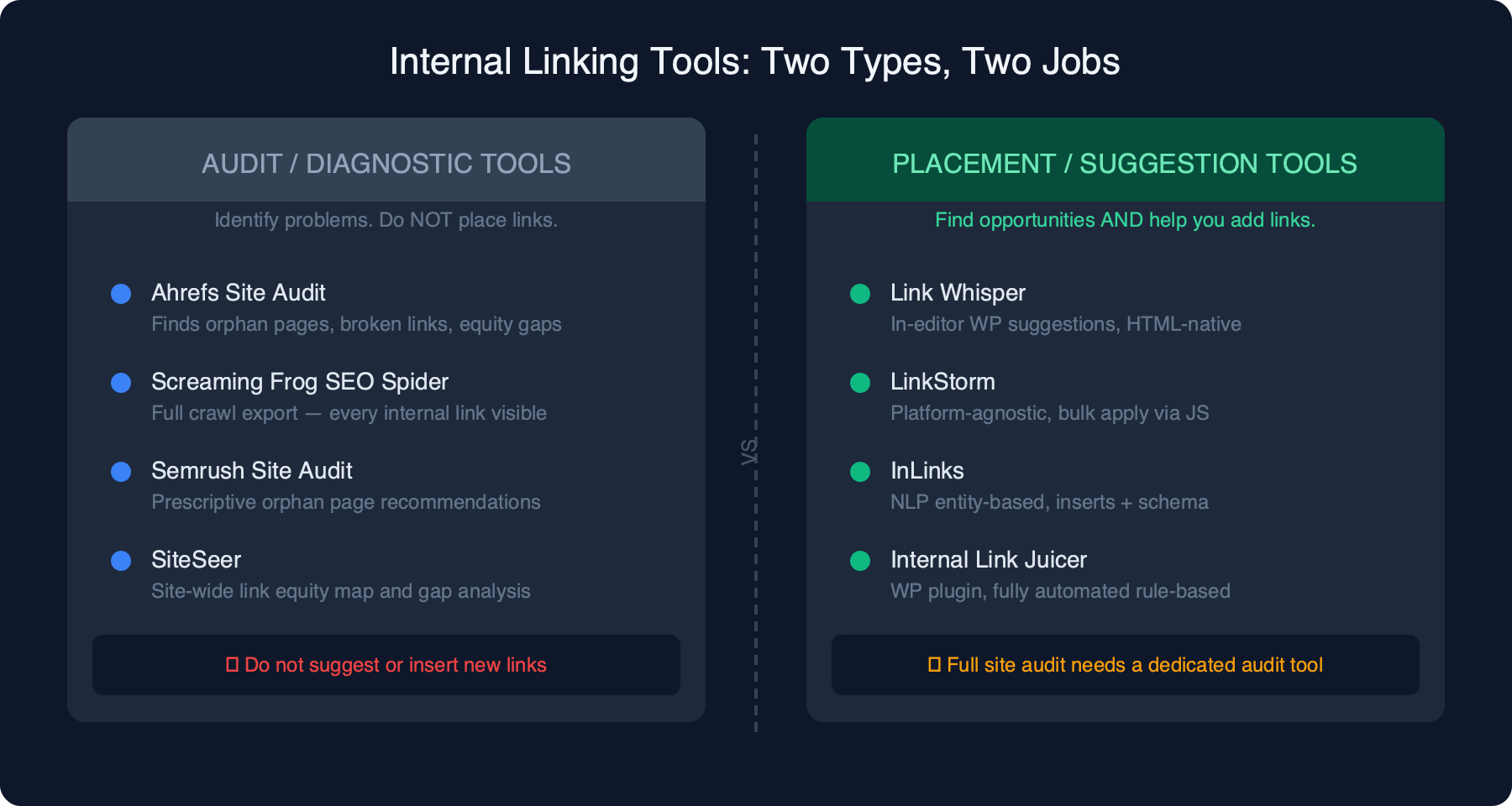
These are not internal linking tools in the primary sense. They are full SEO platforms that include internal link auditing as part of a broader site analysis toolset. They are essential for identifying internal link problems but are not designed for link placement.
Ahrefs
Ahrefs' internal linking functionality lives within its Site Audit module. Run a crawl and Site Audit generates internal link reports showing which pages have few or no internal links, which pages have excessive inbound internal links, where redirect chains are adding unnecessary crawl overhead and which internal links are broken.
The orphan page report is particularly useful. It surfaces posts and pages that exist on your site but receive no internal links from other content, meaning crawlers may not discover them and they receive no PageRank. What Ahrefs does not do is suggest or place new internal links. It identifies problems and gaps; the fixing is manual or requires a separate tool.
Pricing: Starts at $129/month for the Lite plan.
Pros:
- Best-in-class site audit with strong internal link reporting
- Orphan page detection is comprehensive
- Trusted data used by the majority of professional SEO teams
- Ahrefs Webmaster Tools provides limited free access to Site Audit data
Cons:
- Expensive for teams that only need internal link auditing
- No link suggestion or placement capabilities
- Crawl credits limit how frequently you can run audits on large sites
Best for: SEO teams already using Ahrefs for other purposes; enterprise content teams that need a comprehensive audit view.
Semrush
Semrush's Site Audit module covers internal linking in similar ways to Ahrefs. It identifies orphan pages, pages with too few or too many inbound internal links, broken internal links and redirect chains. Semrush is more prescriptive: it surfaces explicit suggestions like "add internal links to these orphan pages" rather than just presenting the data.
Like Ahrefs, Semrush does not place links. The recommendations tell you what to do; implementing them requires your CMS or a specialized tool.
Pricing: Starts at €134/month for the SEO plan.
Pros:
- Comprehensive site audit with clear internal link recommendations
- Prescriptive guidance makes results accessible to non-specialists
- Part of an all-in-one platform
Cons:
- Expensive if your primary need is internal link auditing
- No placement or suggestion capabilities beyond audit reports
- Crawl limits on lower plans can restrict how thoroughly you can audit large sites
Best for: Teams already using Semrush as their primary SEO platform who want internal link auditing included in their existing workflow.
Screaming Frog SEO Spider
Screaming Frog remains the gold standard for custom internal link analysis among technical SEO specialists. Run the crawler against your site and the resulting data export gives you every internal link on every page, the anchor text used, the response codes and full crawl depth information.
From this data, you can build whatever analysis you need: orphan pages, over-linked pages, anchor text distribution, link depth maps and redirect chains. Screaming Frog is more powerful than any specialized audit tool for custom analysis because it gives you raw data rather than pre-packaged reports. The free version crawls up to 500 URLs, which is useful for small sites or for sampling a larger one. At £199/year, the paid version is excellent value for professional SEO use.
Pricing: Free for up to 500 URLs. Paid at £199/year (approximately $279/year).
Pros:
- Most flexible and customizable for technical SEO analysis
- Raw data output can be used for any analysis you can define
- Free tier is useful for small sites
- Integrates with Google Analytics and Search Console for enriched analysis
Cons:
- Steep learning curve for non-technical users
- No AI suggestions or link placement capabilities
- Local desktop application; not ideal for team collaboration
Best for: Technical SEO specialists, SEO agencies doing comprehensive audits and practitioners who want full control over their internal link data.
Free Internal Linking Tools
The Upper Ranks Free Internal Link Tool
The Upper Ranks offers a free internal link tool at theupperranks.com/internal-links/ that performs a basic crawl of your site and surfaces internal link opportunities organized by keyword. For small sites or budget-conscious practitioners who want a quick overview of missed linking opportunities, it delivers genuine value at zero cost.
Limitations are significant for larger sites. There are no bulk operations, no WordPress integration and the crawl volume is capped. Think of it as a one-time diagnostic tool rather than an ongoing workflow.
Best for: Small site owners and budget-restricted practitioners doing a one-time internal link review.
Free Tiers and Trials of Paid Tools
Several paid tools offer meaningful free access worth using before committing to a subscription.
Screaming Frog (free up to 500 URLs) is the standout. The 500-URL limit is functional for small sites, and for larger sites you can segment your crawl to audit specific subdirectories.
Ahrefs Webmaster Tools provides free access to limited Site Audit data for your own verified sites, including some internal link reporting.
Semrush offers a free account with limited functionality. The audit features available under the free tier are minimal, but useful for getting a sense of the platform.
InLinks offers a free trial with genuine access to the entity-based analysis. Given the learning curve, using the trial properly before buying is important.
Link Whisper has no free tier, but it offers a 30-day money-back guarantee that functions as a risk-free trial.
Best Internal Linking Tool by Use Case
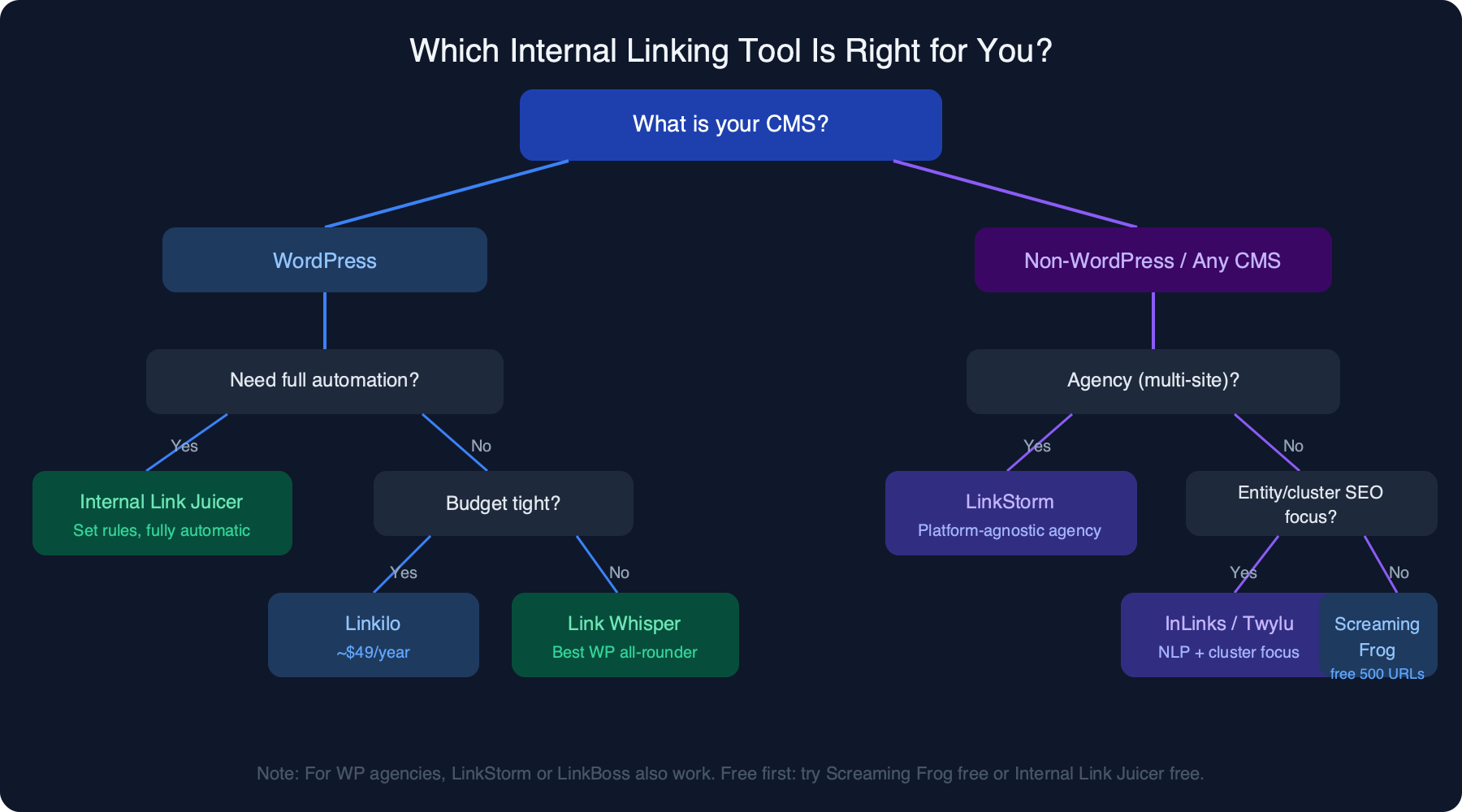
Rather than declaring a single "best" tool, the right choice depends on your platform, team size and what you need the tool to actually do.
WordPress bloggers and niche site owners: Link Whisper is the best overall choice. The in-editor workflow is natural, the suggestions are solid, the reports are actionable and the annual pricing is easy to justify. If you want a fully automated approach with zero ongoing effort, Internal Link Juicer is the better pick.
SEO agencies managing multiple client sites: LinkStorm is the strongest platform-agnostic option. The multi-site dashboard is built for agency use and the AI suggestions work across any CMS without requiring plugin installation on each client site. LinkBoss is a strong alternative if your agency focuses on topical cluster strategy.
Enterprise SEO teams: Your audit stack should include Ahrefs Site Audit and Screaming Frog. Ahrefs gives you structured reports and orphan page detection; Screaming Frog gives you raw data for custom analysis. For bulk link placement at scale, LinkStorm is the most practical option.
Content teams using AI and topical authority strategies: Twylu and InLinks are the tools most aligned with entity-first, topical cluster approaches. Twylu's IAS metric makes link equity health visible in a way that maps well to content strategy conversations. InLinks' entity analysis is more technically sophisticated.
Budget option or free: Screaming Frog's free tier (500 URLs) is the most powerful free option for any platform. For WordPress users, the free version of Internal Link Juicer provides solid automation at no cost.
How We Evaluated These Internal Linking Tools
We tested each tool across live sites in different verticals: an affiliate comparison site in financial services, a B2B SaaS blog with approximately 300 posts, a high-volume content publisher in the lifestyle space and a small niche hobby site with under 100 posts.
For each tool we evaluated:
Suggestion quality. We reviewed a sample of link suggestions and assessed whether the suggested links were semantically relevant to the source content. We tested whether tools could distinguish between superficially similar pages or defaulted to keyword matching without semantic understanding.
Ease of integration. How long did setup take? Did it require developer involvement? Was the first useful output available within an hour of installation?
Automation depth. Could the tool do its core job without ongoing manual input?
Pricing value. We assessed whether the tool's output justified its cost relative to the time it saved and the quality of results it delivered.
Platform flexibility. We noted whether tools were restricted to WordPress or worked across platforms.
One important caveat: tools marketing themselves as "AI-powered" varied significantly in practice. Some used genuine NLP and semantic analysis to understand content relationships. Others used keyword matching with a thin AI label over it. The difference in suggestion quality between these approaches is substantial.
FAQ
What is the best free internal linking tool?
Screaming Frog's free tier (up to 500 URLs) is the most capable free option available. It gives you raw crawl data on every internal link across your site, which you can use to identify orphan pages, over-linked pages, broken links and anchor text issues. For WordPress users who want automated linking without a budget, the free version of Internal Link Juicer is a strong alternative. The Upper Ranks offers a simple free crawler useful for a quick overview on small sites.
What is the best internal linking plugin for WordPress?
Link Whisper is the most popular and feature-rich WordPress-specific internal linking tool. The in-editor workflow, combined with solid AI suggestions and detailed link reports, makes it the right choice for most WordPress users. If your priority is full automation rather than assisted linking, Internal Link Juicer is the better pick: define your keyword rules once and the plugin handles all insertion automatically.
Does Ahrefs have an internal linking tool?
Yes. Ahrefs Site Audit includes internal link reporting that identifies orphan pages, pages with too few or too many internal links, broken internal links and redirect chains. It is an audit and diagnosis tool, not a placement tool. You can identify where internal link problems exist, but Ahrefs does not suggest or insert new links for you.
Is Link Whisper worth it?
For WordPress users managing more than 50 posts, yes. At $77/year for a single site, the time savings from the in-editor suggestion workflow and the value of the link reports easily justify the cost. The orphan page detection alone is worth the fee if you have published a significant volume of content without a structured internal linking strategy.
What is the difference between an internal linking tool and an SEO audit tool?
Audit tools like Ahrefs Site Audit and Screaming Frog SEO Spider identify internal link problems: pages with too few links, orphan pages, broken links and poor link equity distribution. They are diagnostic. Specialized internal linking tools like Link Whisper, LinkStorm and InLinks go further: they suggest new links to add and, in some cases, insert those links automatically. Most professional SEO workflows use both.
Can I use internal linking tools on a non-WordPress site?
Yes, several tools work across any CMS. LinkStorm uses a JavaScript snippet that works on any site. InLinks works via crawl-based analysis with no CMS dependency. Screaming Frog and SiteSeer are also platform-agnostic. Where the tool selection narrows is for link insertion automation: most automated placement tools either use JavaScript injection or require a WordPress plugin.
How many internal links should a page have?
There is no universally correct number. Most internal linking tools flag pages with more than 100 to 150 internal links as potentially over-linked. More useful than a link count threshold is whether each link is useful to the reader. Pages with excessive internal links suffer from anchor text dilution and reduced equity transfer per link.
Do JavaScript-inserted internal links pass PageRank?
Googlebot renders JavaScript and processes JavaScript-inserted links. Google's official position is that JavaScript links are crawlable. That said, there is ongoing debate about whether any timing or processing difference exists between HTML-native links and JavaScript-rendered links. For most sites, JavaScript-inserted links via tools like LinkStorm work without issue. For technically conservative teams managing large enterprise sites where crawl budget matters, HTML-native insertion via WordPress plugins or manual editing is the safer approach.