
Alternatives · 10 tools
The 10 Best Free Semrush Alternatives in 2026 (With Verified Free Tiers)

Semrush's entry SEO Plan costs €134 a month, but Google Search Console, Google Keyword Planner, Ahrefs Webmaster Tools, Screaming Frog and Ubersuggest cover most of its keyword research, backlink analysis, site auditing and rank tracking features for free. No single free tool replaces Semrush completely, but combining several covers most day-to-day SEO work.
As of September 2026
Semrush's entry-level SEO Plan starts at €134 per month (Semrush renamed and restructured its plans; the old Pro/Guru tier names no longer exist). For most independent site owners, bloggers, and small marketing teams, that's a significant line item for a platform where half the features go unused. The good news: the core of what Semrush does: keyword research, backlink analysis, rank tracking, site auditing, and competitor research, can be covered by a combination of free and freemium tools, most of which require no credit card to get started.
This guide covers the ten best free Semrush alternatives in 2026 with verified free tiers. Every tool listed here has a genuine free plan, not just a time-limited trial. For each tool, you'll find exactly what the free tier includes, what it doesn't, and which Semrush feature it's best suited to replace.
The best completely free alternatives to Semrush, by use case:
- Rank tracking and site health: Google Search Console (completely free, no limits)
- Keyword research volume: Google Keyword Planner (free with Google Ads account)
- Backlink analysis for your own site: Ahrefs Webmaster Tools (free for verified domains)
- Technical site auditing: Screaming Frog SEO Spider (free up to 500 URLs)
- Question-based keyword research: AnswerThePublic (3 searches per day free)
- Freemium all-in-one SEO tool: Ubersuggest (3 searches per day free)
- Trending keyword data: Google Trends (completely free, no limits)
- Competitor keyword overview: Serpstat free plan (10 queries per day)
- SERP keyword data: Keyword Surfer Chrome extension (completely free)
- Desktop SEO suite: SEO PowerSuite free version (4 tools, limited exports)
What Semrush Does (And What You're Actually Replacing)
Before choosing free alternatives, it helps to know which Semrush features you actually use. Semrush is built around five core SEO modules:
- Keyword research: discover keywords by search volume, difficulty, and intent using the Keyword Magic Tool and Keyword Overview
- Backlink analysis: audit your own and competitor backlink profiles, identify referring domains, and track link building
- Rank tracking: monitor keyword positions daily across desktop and mobile
- Site audit: crawl your site for technical issues: broken links, missing meta tags, duplicate content, crawlability errors
- Competitor research: analyze competitor organic keywords, traffic estimates, and paid strategies
Semrush pricing: SEO Plan (entry tier) at €134/month, Pro+ (mid tier) at €286/month. The free account limits you to 10 analytics reports per day, insufficient for any ongoing SEO workflow.
The tools below map directly to these five modules. No single free tool replaces Semrush entirely, but the right combination covers most use cases at zero cost.
Free Semrush Alternatives at a Glance
Here's how each free alternative compares on key criteria before diving into the detail.
| Tool | Free Tier Limit | Best For | Paid Plan From |
|---|---|---|---|
| Google Search Console | Completely free, no limits | Rank tracking, site health, indexing | Free forever |
| Google Keyword Planner | Free with Google Ads account | Keyword research volume data | Free (Ads spend optional) |
| Ahrefs Webmaster Tools | Free for verified domains | Backlink analysis, site audit (own site) | $29/month |
| Screaming Frog SEO Spider | Free up to 500 URLs | Technical SEO audit | £199/year |
| Ubersuggest | 3 searches per day | Keyword research, content ideas, site audit | $29/month |
| AnswerThePublic | 3 searches per day | Question-based keyword research | ~$11/month |
| Google Trends | Completely free, no limits | Trending topics, seasonal keyword data | Free forever |
| Serpstat | 10 queries per day | Basic competitor keyword overview | $50/month |
| Keyword Surfer (Chrome extension) | Completely free, no account needed | SERP-level keyword volume data | Free forever |
| SEO PowerSuite Free | 4 tools, limited data export | Desktop SEO suite, rank tracking, audits | $299/year |
1. Google Search Console: Best Free Tool for Rank Tracking and Site Health
Google Search Console is the best free Semrush alternative for rank tracking and site health, it's completely free with no usage limits, no query caps, and no account expiry. For most site owners, it's the single most important free replacement for Semrush's rank tracking and site health modules, and the first tool any SEO workflow should include.
Key Features
- Performance report: shows which queries bring impressions and clicks to your site, average position per keyword, and click-through rate, updated with roughly a 3-day lag
- Index coverage: see which pages are indexed, which are excluded, and why, including canonicalization issues, noindex tags, and crawl errors
- Core Web Vitals: page experience data (LCP, CLS, INP) sourced directly from Chrome user field data
- URL Inspection: check any URL's indexing status, last crawl date, and canonical URL in real time, genuinely useful for diagnosing indexing problems quickly
- Sitemaps: submit XML sitemaps and monitor crawl coverage
- Links report: see your top-linked pages, anchor text, and top linking sites
Pros
- First-party data from Google: the most accurate source for impressions, clicks, and ranking positions
- No limits on sites, keywords, or date ranges (up to 16 months of historical data)
- Performance data updates every few days, fast enough for most monitoring and optimization workflows
- Free forever with no usage tier to outgrow
Cons
- Position data is averaged over a date range, not as granular as Semrush's daily keyword rank tracking
- No competitor keyword data: you can only see your own site's performance
- No keyword difficulty scores or SERP feature analysis
- Backlink data is limited compared to Ahrefs or Semrush
Best For
Site owners managing one or two sites who need accurate rank tracking, search performance monitoring, and indexing health data. If you only install one tool from this list, this is it.
Practical use: filter the Performance report for pages with over 1,000 impressions but CTR below 3%, these are your best keyword optimization opportunities.
SEO Title Generator: eight title tag variations, sized for the SERP and intent-matched. Free, no signup.
2. Google Keyword Planner: Best Free Keyword Research Tool for Search Volume
Google Keyword Planner is the most reliable free source of keyword search volume data, it's Google's own tool, free with any Google Ads account. You don't need to run ads to use it: create an account, skip the campaign creation steps, and you get access to the full keyword research tool at no cost.
Key Features
- Discover new keywords: enter a seed keyword or URL and get hundreds of related keyword ideas
- Search volume data: monthly average search volumes shown as ranges (e.g., 1K–10K) on a free account; exact volumes unlock with active ad spend
- Keyword competition: ad-focused competition indicator (Low/Medium/High) that loosely correlates with organic SEO difficulty
- CPC estimates: see bid ranges advertisers pay per click, a reliable proxy for commercial keyword intent
- Keyword forecasting: project clicks and impressions for a keyword list at a given budget
Pros
- Google's own keyword data: search volumes are as accurate as available anywhere
- Free to use with any Google Ads account; no spending required
- CPC data helps identify high-commercial-intent keywords for monetization decisions
- Useful for identifying seasonal volume patterns in keyword research workflows
Cons
- Volume data shown as ranges on the free account (e.g., "10K–100K"), imprecise for competitive research
- No organic keyword difficulty score or SERP analysis
- Interface is built for paid search, not organic SEO, requires some adjustment
- No competitor rankings, content gap features, or backlink data
Best For
Teams needing reliable search volume data for keyword research without paying for Semrush's Keyword Magic Tool. Best combined with AnswerThePublic for question discovery and Google Search Console for performance tracking.
3. Ahrefs Webmaster Tools: Best Free Backlink Analysis Tool for Your Own Site
Ahrefs Webmaster Tools (AWT) is the best free tool for backlink analysis of your own site, it's free for verified site owners, with no time expiry. After verifying domain ownership via DNS, HTML file, or Google Search Console, you get access to Ahrefs' backlink data and site audit for your domain at no cost.
Key Features
- Backlink profile: all backlinks pointing to your site, with referring domains, link types (dofollow/nofollow), and anchor text
- Domain Rating (DR): Ahrefs' proprietary domain authority metric
- Organic keywords: which keywords your site ranks for and estimated monthly organic traffic
- Site Audit: technical SEO crawl covering broken links, missing tags, slow pages, and canonical issues (up to 5,000 pages on the free tier)
- Top pages: your highest organic traffic pages and their keyword drivers
Pros
- Ahrefs has one of the largest backlink indexes available, the free tier gives you full access to that data for your own domain
- Site Audit is comprehensive and covers all major technical issues
- Organic keyword data is accurate and actionable for your own site
- No time expiry: an ongoing free account, not a trial
Cons
- The free plan does not show competitor backlink data, only your own verified domain
- No keyword research for new topics beyond your existing ranking data
- Competitor organic keyword analysis requires a paid plan (from $29/month)
- Domain verification adds a setup step compared to tools that don't require it
Best For
Site owners monitoring their backlink profile and running site health audits for their own domain. Not a replacement for Semrush's competitor research features on the free tier.
4. Screaming Frog SEO Spider: Best Free Technical SEO Audit Tool
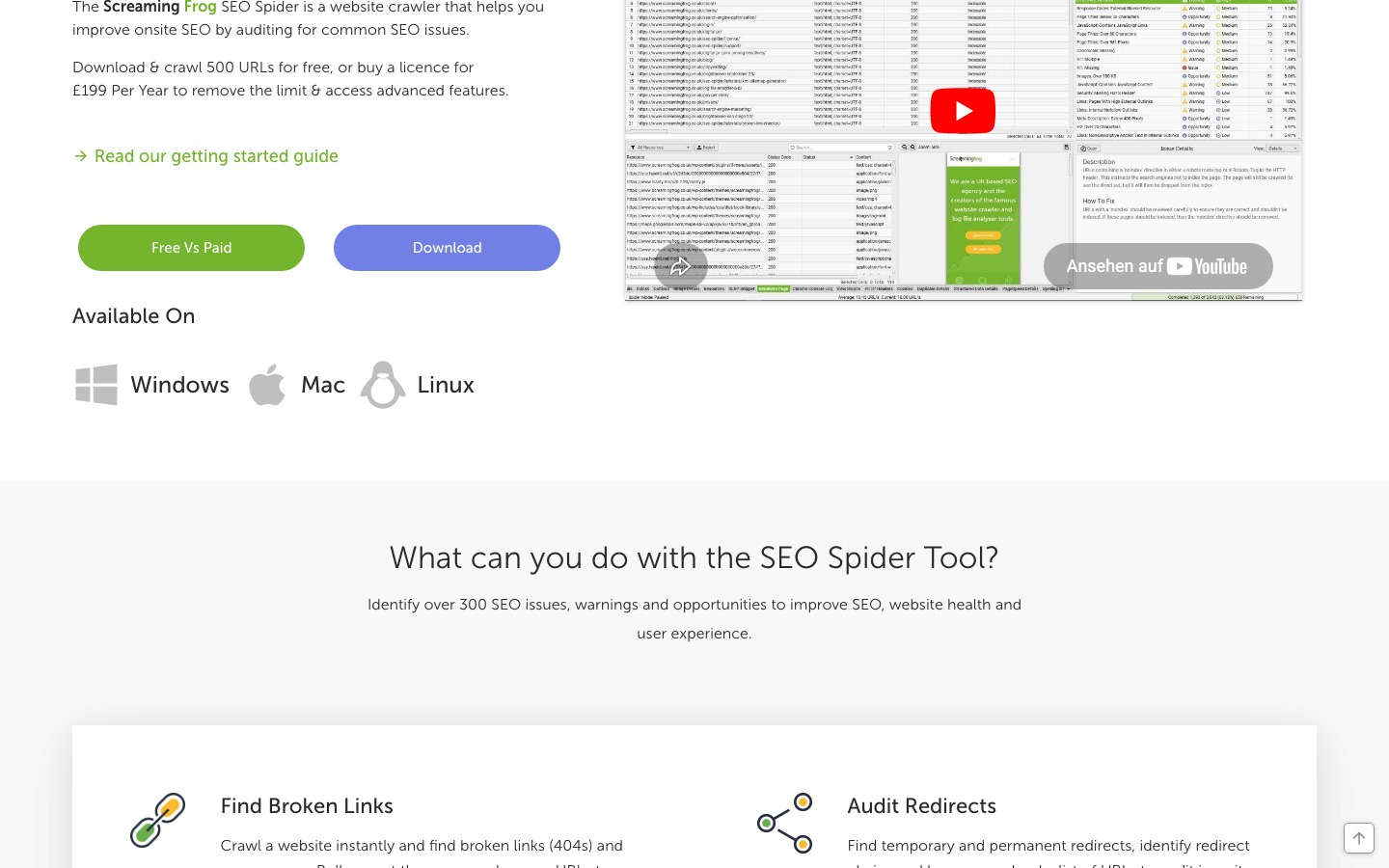
Screaming Frog SEO Spider is the best free tool for technical SEO auditing, its free version crawls up to 500 URLs and covers more technical issue types than any free cloud-based alternative. It runs as a desktop application on Windows, Mac, and Linux with all crawl data stored locally on your machine.
Key Features
- Broken link detection: finds all 4xx and 5xx status errors across crawled pages
- Redirect chain analysis: maps the complete redirect path (URL A → URL B → URL C → final destination), so you can see every hop and identify which intermediate redirects can be shortened
- Meta tag audits: flags missing, duplicate, and truncated title tags and meta descriptions
- Duplicate content detection: surfaces identical and near-duplicate page content with similarity scores
- Heading structure review: audits H1 and H2 usage across all crawled pages
- XML sitemap generation: creates sitemaps from crawl data
Redirect Chain Analysis: What It Actually Finds
Screaming Frog's redirect analysis goes deeper than a simple 301/302 flag:
- Loop detection: identifies redirect loops where page A redirects to page B which redirects back to page A, causing ERR_TOO_MANY_REDIRECTS errors in browsers and blocking search engine crawlers
- Chain visualization: maps the complete redirect path (URL A → URL B → URL C → final destination), letting you see every hop and identify which intermediate redirects can be shortened or consolidated
- 301 vs 302 distinction: differentiates permanent (301) and temporary (302) redirects, 301 redirects pass link equity; 302 redirects technically do not, though Google often treats them similarly in practice
- Internal links pointing to redirects: identifies internal links that still point to redirected URLs rather than the final destination, wasting crawl budget and link equity
- Chain length flagging: redirects longer than 3 hops are flagged as issues, each additional hop reduces the link equity passed to the final destination and increases page load time
Duplicate Content Detection: What It Surfaces
Screaming Frog's duplicate detection covers both content and metadata:
- Near-duplicate content: identifies pages with very similar text content (high similarity scores), helping you find thin or near-identical pages that Google may filter from search results
- Duplicate title tags and meta descriptions: flags these common technical issues that confuse search engines about which page to rank for a given query
- HTTP/HTTPS duplication: crawls both HTTP and HTTPS versions of a site to identify duplicate content created when both versions are accessible simultaneously
- Canonical recommendations: for affected pages, Screaming Frog shows which pages are duplicated so you can decide whether to add canonical tags or 301-redirect duplicates to the main page
- E-commerce and CMS relevance: particularly useful for sites where product pages share similar descriptions or where WWW/non-WWW versions are both live
Desktop Architecture: Why It Matters
Unlike Semrush's cloud-based Site Audit (free tier: 100 pages, data stored on Semrush's servers), Screaming Frog runs entirely locally on your machine:
- All crawl data is stored on your computer and never transmitted to an external server unless you enable Google Analytics or Search Console integrations
- Configure the crawl start URL to specific subfolders (e.g., /blog or /products) and restrict crawling to specific subdirectories with regex exclude patterns, the same scoped audit capability as Semrush
- Screaming Frog also offers a separate Log File Analyser tool (free for up to 1,000 log lines) that lets you analyze server log files locally to see how Googlebot is actually crawling your site
- Crawl data can be saved as a .seospider project file and reopened later for comparison without re-crawling, useful for tracking technical SEO improvements over time without cloud subscription costs
Free vs Semrush comparison: Screaming Frog's free version crawls up to 500 URLs, five times the 100-page limit of Semrush's free Site Audit. For sites under 500 pages, Screaming Frog's free version is the more capable technical audit option.
Pros
- More thorough than any free cloud-based technical SEO tool for site auditing
- No login or cloud account required, works entirely locally
- Exports all data as CSV for further analysis
- 500-URL limit is 5× Semrush's free tier crawl limit (100 pages)
Cons
- 500 URL limit on the free tier, sites above 500 pages need the paid version (£199/year)
- No scheduled crawls or monitoring on the free tier
- No SERP data, keyword research, or backlink analysis
- Steeper learning curve than browser-based tools
Best For
Teams auditing sites under 500 pages or targeted sections of larger sites. It's the strongest free replacement for Semrush's Site Audit module for any site where a 500 URL crawl covers what matters.
5. Ubersuggest: Best Freemium All-in-One SEO and Keyword Research Tool
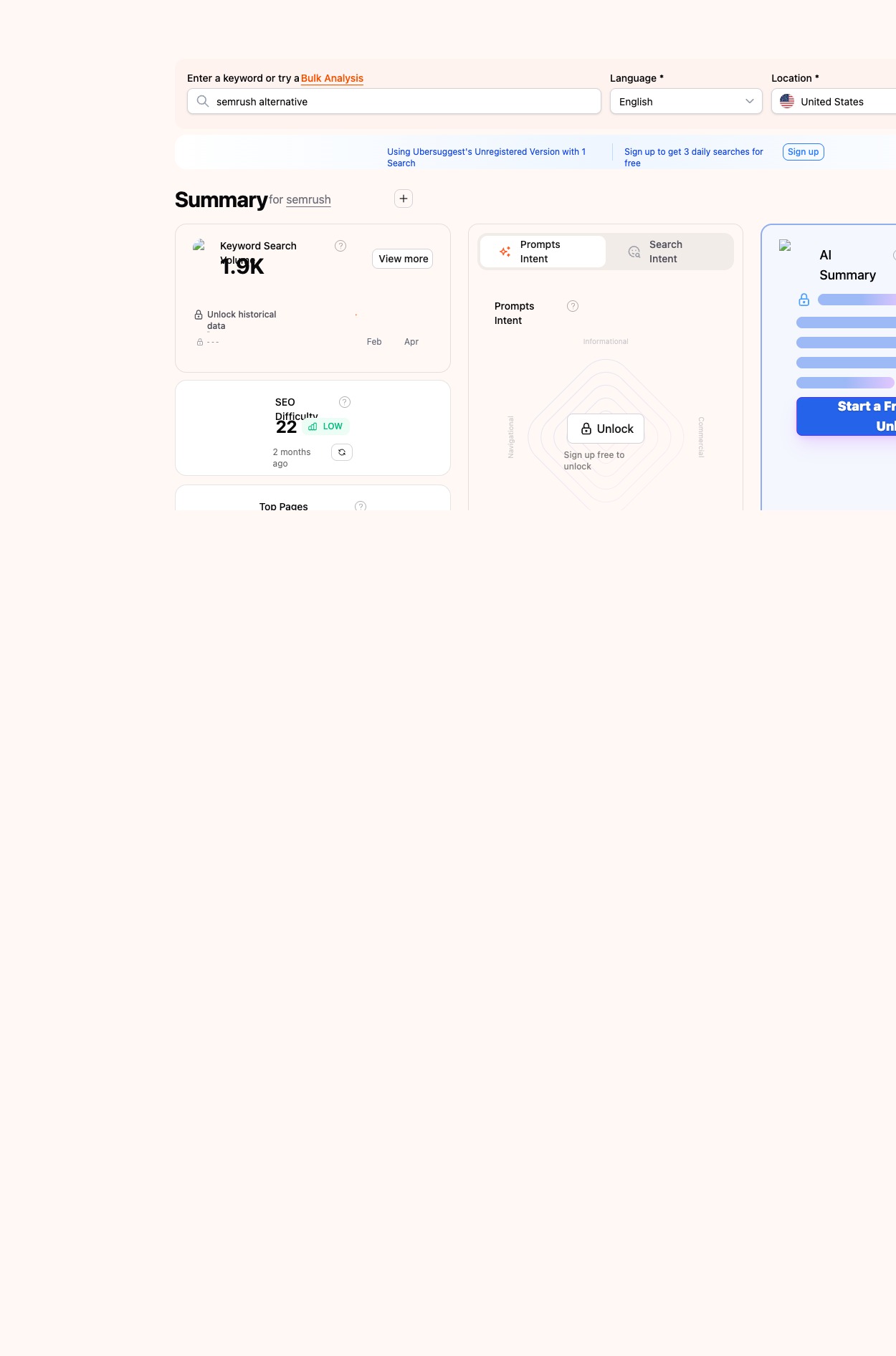
Ubersuggest (by Neil Patel) is the most feature-complete freemium tool for teams that want a single dashboard covering keyword research, competitive analysis, and site auditing. The free plan provides 3 searches per day, with data quality equivalent to the paid plan, the limit is how many searches you get, not the quality of what you see.
Key Features
- Keyword ideas: enter any keyword and get search volume, SEO difficulty, paid difficulty, CPC, and hundreds of related keyword suggestions
- Keyword overview: see the SERP for any keyword and the estimated traffic for each ranking page
- Content ideas: top-ranking content for a keyword with backlink counts and social shares, useful for topic research
- Rank tracking: daily keyword position monitoring for your own site (limited projects on free plan)
- Site audit: basic crawl for on-page and technical SEO issues
- Competitor analysis: view any domain's top organic keywords and estimated traffic
Understanding Ubersuggest's Keyword Data Quality
Ubersuggest's keyword data is sourced from Google Keyword Planner and Google's autocomplete API. This matters because:
- Free and paid users see the same underlying search volume and keyword difficulty metrics, the difference is how many searches per day you get, not data quality
- The SEO difficulty score (0–100 scale) estimates ranking difficulty by analyzing the Domain Authority (DA) of sites currently ranking for the keyword, less precise than Semrush's KD score but useful for separating "probably competitive" from "likely accessible" keywords
- Advanced features, historical keyword data, unlimited rank tracking, and priority support, require a paid plan starting at $12/month
- Each of your 3 daily searches returns a full keyword report including suggestions, SERP overview, and content ideas, making each search more valuable than the 3/day limit implies
Pros
- One dashboard covering keyword research, content ideas, and competitive analysis
- Data quality matches paid plans; only the search quota is limited on free
- Among the cheapest upgrade paths if you outgrow the free tier ($12/month)
- Beginner-friendly interface compared to Ahrefs or Semrush
Cons
- 3 searches per day is a significant constraint for active keyword research workflows
- Rank tracking and site audit are less detailed than Semrush
- Traffic estimates for competitor domains are less precise than paid tools
- Some features count against your daily limit in ways that aren't always clear
Best For
Bloggers, small business owners, and early-stage teams who do light keyword research and want one tool with keyword data, content ideas, and basic competitive analysis. The 3/day limit is workable if you batch your keyword research into focused sessions.
6. AnswerThePublic: Best Free Keyword Research Tool for Question-Based Topics
AnswerThePublic gives 3 free searches per day and is the best free tool for discovering what questions people actually type into search engines. It visualizes question formats, prepositions, comparisons, and alphabetical variations mapped from Google and Bing autocomplete data.
Key Features
- Question visualization: maps every "who", "what", "when", "where", "why", and "how" question format around your keyword
- Preposition queries: shows "for", "with", "without", "near", and "vs" searches around your topic
- Comparison queries: surfaces "vs", "or", and "like" searches, useful for identifying comparison-intent pages
- Alphabetical variations: A–Z keyword variations for any seed term
- CSV export: download all discovered queries for use in your keyword research workflow
Pros
- Surfaces hundreds of real questions your audience is already asking, excellent for content planning
- Free searches provide genuinely useful keyword research output, not just a preview
- Results come from the same autocomplete sources Semrush uses for its Topic Research tool
- Helps identify featured snippet and People Also Ask optimization opportunities
Cons
- 3 searches per day limits research velocity
- No search volume data: questions are shown without popularity rankings
- No SEO keyword difficulty, SERP analysis, or competitive data
- Owned by NP Digital (Neil Patel) since 2022, free tier has gradually become more restrictive
Best For
Content teams planning blog posts, FAQ pages, and topic clusters. Combine AnswerThePublic with Google Keyword Planner: use AnswerThePublic to discover questions people ask, then check their search volume in Google Keyword Planner to prioritize targets.
7. Google Trends: Best Free Tool for Trending and Seasonal Keyword Data
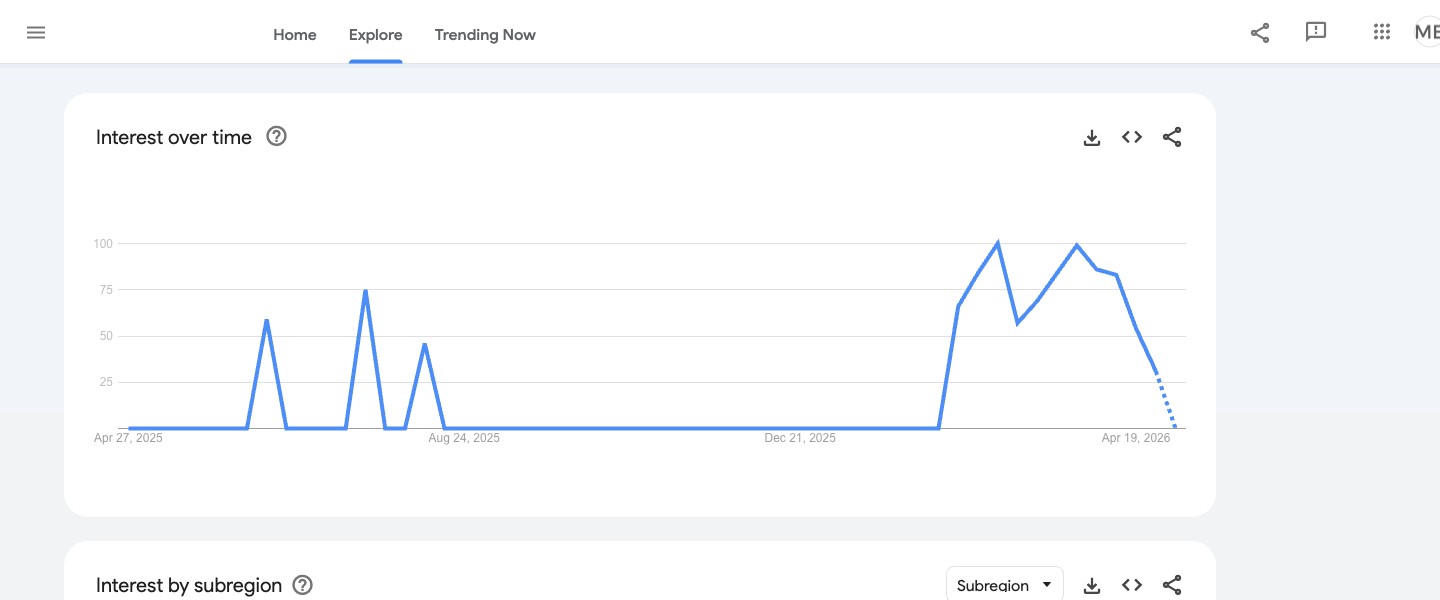
Google Trends is completely free with no usage limits and no registration required, making it the only free SEO tool that shows real-time trending keyword data and seasonal patterns. It shows relative search interest over time for any keyword with geographic breakdown and related queries.
Key Features
- Interest over time: see how search demand for any keyword has trended across days, weeks, months, or years
- Regional breakdown: compare interest by country, state, or city
- Related queries: surface rising and top related search queries, useful for identifying emerging topics early
- Keyword comparison: overlay up to 5 keywords to compare relative popularity
- Category and source filters: filter by web search, YouTube, news, images, or Google Shopping
The "Breakout" Label: Google Trends' Most Valuable Feature
In the Related Queries section, Google Trends marks some queries as "Breakout" instead of showing a percentage increase. This label indicates searches that have grown by more than 5,000% in a short period, these are the highest-value early signals for content opportunities before competition increases. No paid SEO tool surfaces this signal as early as Google Trends does. If you're monitoring trending topics, watch for Breakout queries alongside your target keywords.
What Google Trends Doesn't Provide
Google Trends' limitations are specific, knowing what it can't do prevents misuse:
- Shows relative interest (scaled 0–100), not absolute search volume, you need Google Keyword Planner for actual volume estimates
- No keyword difficulty, backlink data, or competitive SEO analysis
- Cannot tell you how hard it would be to rank for any keyword
- Less useful for discovering keyword ideas from scratch; best for comparing and timing
Recommended workflow: use Google Trends to identify seasonal timing and Breakout topics, validate search volume with Google Keyword Planner, and check ranking difficulty with Ubersuggest before investing in content.
Pros
- Completely free with no registration or rate limits
- The only free SEO tool that shows real-time trending keyword data
- Identifies seasonal content opportunities and lets you time publication for peak search interest
- "Rising" related queries surface emerging topics before they appear in other keyword research tools
Cons
- Shows relative interest (scaled 0–100), not absolute search volume
- Requires combining with Google Keyword Planner for actual volume estimates
- No SEO keyword difficulty, backlink, or competitive data
- Less useful for discovering new keyword ideas from scratch
Best For
Content strategists timing content around seasonal demand, monitoring brand search interest, or identifying Breakout topics gaining momentum before they become competitive. Use Google Trends to decide when to publish; use Google Keyword Planner to confirm the volume is worth pursuing.
8. Serpstat Free Plan: Best Free Tool for Basic Competitor Keyword Research
Serpstat's free plan gives you 10 queries per day and is the only tool on this list that provides basic competitor organic keyword data without requiring any payment. This makes it uniquely useful for quick competitive snapshots without a paid subscription.
Key Features
- Keyword research: search volume, CPC, competition score, and SERP results for any keyword
- Domain analysis: any domain's estimated organic keyword count and traffic data
- Backlink overview: referring domain count and basic link metrics for any domain
- Competitor domains: which sites compete for the same keywords as your domain
- SERP analysis: review who ranks for a keyword and their estimated traffic
Pros
- The only free tool here with basic competitor organic keyword data, not restricted to your own domain
- 10 queries per day is workable for occasional competitive research
- Covers keyword research, backlinks, and competitive analysis in one platform
- No time limit on the free account
Cons
- 10 queries per day is insufficient for active or regular SEO keyword research
- Data depth is significantly lower than Semrush or Ahrefs on paid plans
- Competitive analysis results are most reliable for larger, well-indexed domains
- Many useful features require a paid plan beyond surface-level data
Best For
Site owners who occasionally need quick competitive keyword overviews, checking what a competitor ranks for or estimating domain traffic, without a paid subscription.
9. Keyword Surfer: Best Free Chrome Extension for SERP Keyword Data
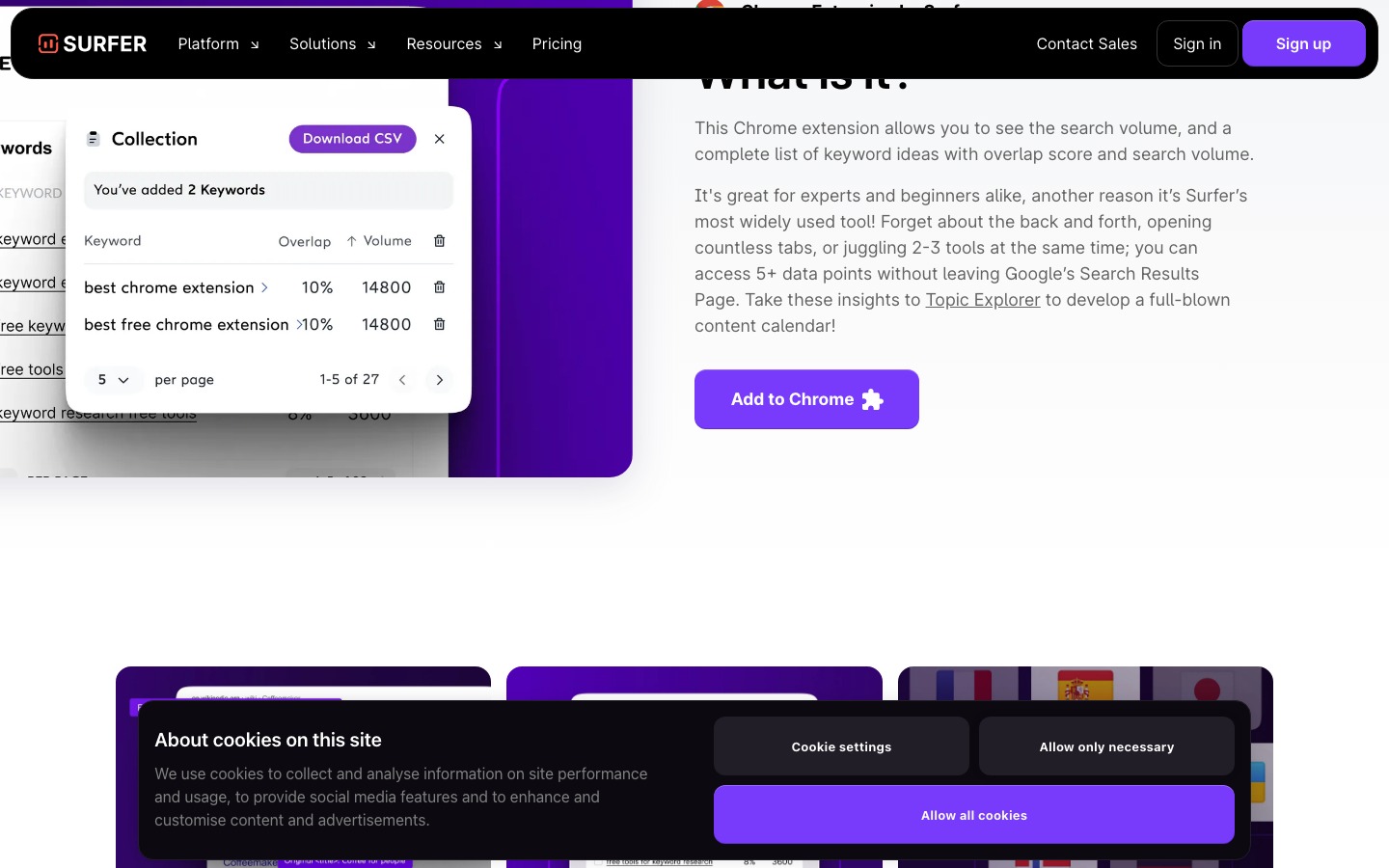
Keyword Surfer is a completely free Chrome extension by Surfer SEO that shows search volume, CPC, and related keyword suggestions directly in Google search results. No account, no login, and no payment required, it's the lowest-friction keyword data tool available.
Key Features
- Search volume in SERPs: monthly search volume estimate displayed directly in the Google search bar for any keyword
- CPC data: average cost-per-click for the searched keyword shown alongside search results
- Related keyword sidebar: related keywords with volume data while browsing Google
- Traffic estimates: estimated monthly organic traffic for each page in the results
- Similarity scores: indicates how closely each ranking page matches the search intent
Pros
- Completely free with no usage limits and no account required
- Zero-friction keyword research data: appears while you use Google normally
- CPC data helps evaluate commercial intent for any keyword at a glance
- Works passively without switching to a separate tool
Cons
- Chrome (or Chromium-based browser) required
- Volume estimates are Surfer's proprietary figures, not Google's direct data, treat as directional
- No ability to export or save keyword lists
- Not a replacement for dedicated keyword research workflows
Best For
SEOs who research directly in Google and want quick keyword volume and related keyword data without switching to a separate tool. Best used alongside Google Keyword Planner for lightweight SERP-level validation.
10. SEO PowerSuite Free: Best Free Desktop SEO Suite
SEO PowerSuite's free version is the most complete free desktop SEO suite available, four applications (Rank Tracker, WebSite Auditor, SEO SpyGlass, and LinkAssistant) with no time expiry. The main restriction is on data export and automated scheduling, not on how many tasks you can run.
Key Features
- Rank Tracker: monitor keyword rankings in Google, Bing, Yahoo, and other search engines, supports mobile and local rank tracking
- WebSite Auditor: full technical site crawl covering broken links, missing tags, duplicate content, page speed, and crawl depth
- SEO SpyGlass: backlink analysis for your site and competitor domains; free tier limits data depth
- LinkAssistant: link prospecting and outreach management; free tier limits saved records
Understanding the Offline and Data Model
SEO PowerSuite is a desktop tool, but its offline capabilities are specific, important to understand before choosing it:
- Data storage: all project data is stored in local database files on your computer, not in the cloud. This is a key advantage for teams with data privacy requirements
- Internet required for live data: SEO PowerSuite needs an internet connection to fetch live keyword data and ranking positions from search engines. Previously downloaded data and reports are accessible offline within the application
- Multi-computer use: SEO PowerSuite uses a license-key activation system rather than a cloud account, meaning the free version can be installed on multiple computers without account-sync requirements
- Export restriction: the free tier blocks all data export, you can see data in the application but cannot save it as a report, CSV, or PDF. Upgrading to Professional ($299/year) or Enterprise ($499/year) unlocks full data export
Pros
- Four useful SEO tools in one free package, the most feature-complete free desktop suite available
- No time expiry on the free account
- All project data stored locally: no cloud data handling unless you opt in
- All four tools are functional on the free tier; limits are on export, not core use
Cons
- Data export is blocked on the free tier, reports cannot be saved or shared without the paid plan ($299/year)
- No scheduled crawls or automated rank tracking refreshes on the free tier
- Desktop-only: no shared dashboards or mobile access
- Requires installing four separate applications
Best For
SEOs who prefer desktop software, want to evaluate SEO PowerSuite before buying, or work in environments where cloud data handling is restricted. The multi-computer free install makes it practical for small teams.
Honorable Mention: Moz Free Tools
Moz offers several free SEO tools worth adding to your stack, even though they're more limited than the tools above. If Moz Pro itself is also on your shortlist, see our full Semrush vs Moz comparison for current pricing and features.
- MozBar: free Chrome extension showing Domain Authority (DA) and Page Authority (PA) scores for any site as you browse, the most useful free tool for quickly evaluating backlink prospects and link building targets
- Link Explorer (free tier): 10 free link queries per month; shows inbound links, Domain Authority, and spam score for any domain
- Keyword Explorer (free tier): 2 free keyword queries per day with volume, difficulty, and SERP analysis
Moz's Domain Authority metric is widely used across the SEO industry as a proxy for site quality, and MozBar is worth installing alongside Keyword Surfer. The free tier is more limited than AWT or Google Search Console for day-to-day use, but MozBar is the fastest free way to assess link quality while browsing.
How to Build a Free Semrush Stack (Without Paying Anything)
No single free tool replaces all of Semrush, but combining the right tools covers most of what Semrush Pro does for keyword research, backlink analysis, technical auditing, and rank tracking.
| Semrush Module | Free Replacement | Free Tier Limit |
|---|---|---|
| Keyword Magic Tool / Keyword Overview | Google Keyword Planner + Ubersuggest | GKP: free with Ads account (volume ranges); Ubersuggest: 3/day |
| Topic Research | AnswerThePublic + Google Trends | 3 searches/day; Trends: unlimited |
| Backlink Analytics | Ahrefs Webmaster Tools | Free for verified domains only |
| Position Tracking | Google Search Console | Completely free, no limits |
| Site Audit | Screaming Frog + AWT Site Audit | Screaming Frog: 500 URLs; AWT: 5,000 pages |
| Competitor Research | Serpstat free plan | 10 queries/day for any domain |
| SERP Analysis | Keyword Surfer Chrome extension | Completely free, no limits |
| Link Prospecting Quality Check | MozBar | Completely free, no limits |
The one gap free tools cannot fill: bulk competitor keyword gap analysis at scale. If you need to compare your keyword coverage against multiple competitor domains across tens of thousands of keywords, the way Semrush's Keyword Gap tool works, no free tool replicates that. For this specific use case, a paid plan on Semrush, Ahrefs, or SE Ranking is needed. Everything else in the table above is genuinely covered for free.
Recommended daily free stack for most site owners:
1. Google Search Console: monitor rankings and site health daily 2. Google Keyword Planner: plan keyword targets weekly 3. Ahrefs Webmaster Tools: review backlink profile monthly 4. Screaming Frog (free): run quarterly technical audits 5. AnswerThePublic: use when planning new content topics 6. Google Trends: check Breakout topics and seasonal timing before publishing 7. Keyword Surfer: install once and leave it on for passive keyword data while browsing
When Free Tools Are Enough (And When to Pay for Semrush)
| Free tools are enough when... | Upgrade to a paid plan when... |
|---|---|
| You manage 1–3 sites | You manage 10+ sites or multiple client accounts |
| You do keyword research a few times per week | You do daily keyword research at high volume |
| You only need backlink data for your own domains | You need competitor backlink gap analysis |
| Your site has fewer than 500 pages | Your site needs scheduled crawls of thousands of pages |
| You monitor your own rankings | You need daily rank tracking across hundreds of keywords |
| You create content occasionally | You run a high-volume content operation |
| You're an independent blogger or small team | You're an agency reporting to clients monthly |
For most solo bloggers, small business sites, and early-stage content teams, the free stack above covers 80–90% of what Semrush does. The main gaps are bulk competitor keyword research and high-volume daily rank tracking.
If you outgrow free tools, SE Ranking (from €109/month) and Mangools (from $29/month) are the most cost-effective paid alternatives before committing to Semrush's €134/month SEO Plan.
Frequently Asked Questions
What is the best completely free alternative to Semrush?
Google Search Console is the best completely free Semrush alternative, it's free forever with no usage limits and covers rank tracking and site health data directly from Google. For keyword research, Google Keyword Planner is free with a Google Ads account. For backlink analysis, Ahrefs Webmaster Tools is free for your own verified domain. No single free tool covers everything Semrush does, but these three together handle the most common daily SEO needs.
Does Semrush have a free plan?
Yes. Semrush's free account includes 10 analytics reports per day across all tools, 1 active project, site audit limited to 100 pages, and rank tracking for 10 keywords. It's useful for occasional lookups but insufficient for any regular SEO workflow. Screaming Frog's free tier crawls 500 pages, five times Semrush's free site audit limit.
Can you replace Semrush completely with free tools?
You can replace most of Semrush's functionality with free tools. Google Search Console handles rank tracking and site health, Ahrefs Webmaster Tools covers backlink analysis for your own site, Google Keyword Planner provides volume data, and Screaming Frog handles technical auditing. The one area free tools cannot fully cover is bulk competitor keyword gap analysis at scale, for that, a paid tool is necessary.
Is Google Search Console a good Semrush alternative?
Google Search Console is the best free alternative for tracking how your site performs in Google search. It shows exactly which keywords bring traffic, your average ranking position, click-through rate, and index coverage status, all from Google's own data. It doesn't provide competitor keyword data, keyword difficulty scores, or backlink analysis for other sites. For monitoring your own organic search performance, it's more accurate than any paid tool.
What does Ahrefs Webmaster Tools give you for free?
Ahrefs Webmaster Tools on the free plan gives you your site's full backlink profile (all referring domains, anchor text, and link types), Domain Rating, organic keyword rankings for your own domain, and a site audit covering up to 5,000 pages. You cannot view competitor backlink data or run keyword research for new topics on the free plan, those require a paid Ahrefs subscription from $29/month.
Is Screaming Frog free?
Yes, Screaming Frog SEO Spider has a permanent free version that crawls up to 500 URLs. It runs on Windows, Mac, and Linux as a desktop application with no time limit and no account required. The paid version (£199/year) removes the 500-URL limit and adds scheduled crawls, JavaScript rendering, and Google Analytics integration.