
Glossary
Topic Cluster: Definition, Structure, and How to Build One (2026)
Was ist ein Topic Cluster? Ein Topic Cluster ist eine Gruppe thematisch verwandter Seiten auf einer Website, bestehend aus einer Pillar Page, mehreren Cluster-Seiten und internen Links. In diesem Leitfaden erfahrst du, wie du einen Topic Cluster aufbaust und damit Topical Authority aufbaust.

A topic cluster is a content architecture that groups related pages around one pillar page, several in-depth cluster pages and internal links that connect them. HubSpot popularized the model in 2017. Topic clusters build topical authority and give readers a clearly structured resource on one core topic.
- Pillar page covers the core topic broadly in 2,000 to 3,500+ words and links to every cluster page
- Cluster pages each cover one subtopic in depth and link back to the pillar page
- Topic clusters fail when the pillar is too specific, too general or overlaps another pillar
- Hub-and-spoke emphasizes user navigation, while a topic cluster targets SEO authority through depth and linking
A topic cluster is a group of thematically related pages on a website, built around a central pillar page, a set of cluster pages, and internal links connecting them. HubSpot popularized the model in 2017, and it has since become the standard for content strategy because it does two things at once: it builds topical authority with search engines and gives readers a clearly structured resource. This guide explains what topic clusters are, why they matter more in 2026 than ever, and how to build one step by step.
What Is a Topic Cluster?
A topic cluster is a content architecture on your website. One main page (the pillar page) covers a broad core topic. Multiple specialized cluster pages each go deep on a specific subtopic. Internal links connect all the pages and signal to search engines that this content belongs together.
The logic is simple. Sites that write a lot about a subject, and write it well, get treated as experts. Google no longer evaluates keywords in isolation. It looks at whether a domain has built genuine context around a topic. A site that covers Keyword A in one post and Keyword B in another, with no visible connection, looks like a general encyclopedia without a specialty.
Topic clusters solve that problem. They link related content and give it a coherent structure.
The Three Components of a Topic Cluster
Every topic cluster has three required elements:
1. Pillar Page
The pillar page is the hub of the cluster. It covers the core topic broadly, touching on every important subtopic without going deep on any one of them. A good pillar page fully answers the main search query in 2,000 to 3,500+ words and links out to every cluster page.
The pillar page isn't an index page or a table of contents. It needs to work as a standalone resource: someone who only reads the pillar should understand the topic. Someone who wants to go deeper follows the links to cluster pages.
2. Cluster Pages
Cluster pages each cover one specific subtopic in depth. Every cluster page fully satisfies the search intent behind its specific query and links back to the pillar page and to neighboring cluster pages where relevant.
Cluster pages aren't short posts. Each one should fully satisfy its specific search intent, as if that subtopic were the only topic on the site. The difference from the pillar is depth: the pillar covers "content marketing" broadly; the cluster page covers "email marketing in a content mix" with all the detail, examples, and action steps a reader needs.
3. Internal Links
Internal links are the connective tissue of the cluster. They transfer link authority (PageRank) within the cluster and tell search engines that these pages belong together semantically. Without consistent internal linking, a topic cluster is content without the architecture; the SEO benefit of the cluster structure is lost.
The linking rule: the pillar page links to every cluster page; every cluster page links back to the pillar page. Cluster pages can also link to each other when the content is closely related.
Topic Cluster vs. Content Cluster: What's the Difference?
The terms are often used interchangeably, but they describe different approaches:
| Dimension | Topic Cluster | Content Cluster |
|---|---|---|
| Starting point | Topic (semantic) | Content format or media type |
| Goal | Build topical authority | Increase content volume and reach |
| Structure | Pillar + cluster pages + bidirectional links | Collection of related posts, often loosely linked |
| SEO focus | Semantic relationships and authority | Keyword coverage and traffic volume |
| Linking logic | Bidirectional internal links (required) | Optional linking |
| Planning approach | Top-down: core topic first, subtopics second | Often reactive: posts grouped into clusters after the fact |
Topic clusters prioritize depth and semantic structure. Content clusters prioritize volume and format diversity. For sustainable SEO, topic clusters win because they build authority rather than just producing content.
Topic Cluster vs. Hub-and-Spoke: What's the Difference?
The hub-and-spoke model describes a similar architecture but with a different emphasis:
- Hub-and-spoke focuses on navigation: a hub page acts as a gateway to detail pages. The goal is user-facing content organization.
- Topic cluster focuses on SEO authority: a pillar page builds topical relevance through depth and internal links. The goal is ranking power and topical authority.
- Pillar page is the specific content type that plays the hub role in a topic cluster. It's both a navigation center and a full standalone resource.
In practice the two models overlap heavily. "Topic cluster" is the more precise term for SEO purposes and the one most commonly used in 2026.
Why Topic Clusters Matter for SEO
Topical Authority and E-E-A-T Signals
Google no longer evaluates individual pages in isolation. It evaluates a domain's overall expertise on a topic. Hummingbird (2013) gave Google the ability to understand semantic relationships between terms, the mechanics behind what our guide to semantic seo covers in more depth. RankBrain (2015) personalized and contextualized query interpretation. The Helpful Content Updates (2022, 2023) shifted the focus further toward real depth and user satisfaction.
The result: sites with clear structure, many relevant pages, and strong internal linking signal genuine expertise to Google. Topic clusters are the practical tool for building that topical authority systematically.
E-E-A-T (Experience, Expertise, Authoritativeness, Trustworthiness) isn't a technical signal you optimize directly. It's an outcome of content depth, clear authorship, and thematic consistency. Topic clusters provide the content foundation. They show that a domain actually has something to say, not just keywords to fill.
HubSpot's own research report, Topic Clusters: The Next Evolution of SEO, describes the same logic: related pages link back to one pillar page, and that linking tells search engines the pillar is an authority on the topic. It's a vendor's account of its own method, not an independent test, so treat it as the origin of the model rather than proof that it works for every site.
PageRank Distribution Through Internal Links
Internal links pass link authority (PageRank) within your site. When a well-linked pillar page links to cluster pages, PageRank flows into those cluster pages and raises their ranking potential, even if those cluster pages have few or no external backlinks of their own.
In practice: you don't need to build external links to every cluster page individually. Link authority from the pillar page distributes across the entire cluster. Every external backlink to the pillar also lifts every cluster page that it links to.
This effect is one of the most practical advantages of the topic cluster model over a strategy built on isolated individual posts.
Better User Experience
Topic clusters improve the user experience because readers find related content linked directly in the text; they don't have to search for it. A reader on a cluster page gets a direct link back to the pillar or forward to an adjacent cluster page that answers their next question.
This reduces bounce rate, increases time on site, and sends strong quality signals to Google. A site where users read several related posts in sequence tells the algorithm the content is genuinely satisfying their intent.
Topic Clusters and AI Overviews
AI Overviews (the AI-generated summaries Google has shown at the top of results pages since 2024) favor sources that offer structured, complete, clearly organized information on a topic. Topic clusters satisfy exactly those requirements: depth, clear structure, and internal architecture that makes information easy to extract.
Google says no additional requirements or special schema.org markup are needed to appear in AI Overviews or AI Mode. A cluster helps for a plainer reason: complete pages with clear headings and consistent internal links are easier to find, read and quote.
How to Build a Topic Cluster (5 Steps)
Step 1: Choose Your Core Topic
The core topic is the foundation of the cluster. It needs to be broad enough to support 5 to 15 cluster pages meaningfully, but specific enough to be clearly distinct from other clusters.
A good core topic meets four tests.
- Broad enough for a pillar page with 2,000+ words
- Specific enough to avoid overlapping with other clusters you're building
- Strategically relevant to your business or audience
- Keyword-backed: the main keyword should show enough search demand to justify a 2,000-word page (500 to 1,000 monthly searches is a common rule of thumb, not an official threshold)
Well-chosen core topics include "content marketing," "accounting for freelancers," "link building," "remote work tools" and "employer branding."
Before committing, confirm that the topic has enough subtopics to justify at least five cluster pages. If it doesn't, the topic is too narrow for its own cluster.
Step 2: Research Your Cluster Topics
Once the core topic is set, research the subtopics for your cluster pages. The goal is a list of 8 to 15 cluster topics that together cover the core topic completely and each address an independent search query.
Use these five sources.
Keyword tools: Ahrefs Keyword Explorer and Semrush Keyword Magic Tool show you every search query connected to your core topic, including search volume and keyword difficulty. Filter for question keywords (who, what, how, why), comparison keywords ("X vs Y"), and tool-oriented keywords ("best X tool," "X software").
"People also ask" boxes: Google's PAA results show exactly what users want to know about your topic. These questions are often ideal cluster page topics because they reflect real search queries.
Competitor analysis: Check which pages rank for your core keyword and which subtopics they cover that you don't. Ahrefs and Semrush show the organic traffic and ranking keywords for any competitor page.
Google Search Console: For existing sites, GSC shows which queries already drive traffic. Queries with high impressions but low click-through rates are often strong candidates for new cluster pages targeting those queries directly.
Related searches: The related searches at the bottom of Google results pages round out the picture of what users explore around your core topic.
If your keyword list is long, group it by search intent first; our guide to keyword clustering shows how that grouping differs from planning topic clusters.
Build a tracking sheet listing all cluster topics, their target keyword, estimated search volume, and current status (planned, in progress, published).
Fix Existing Content Before You Build
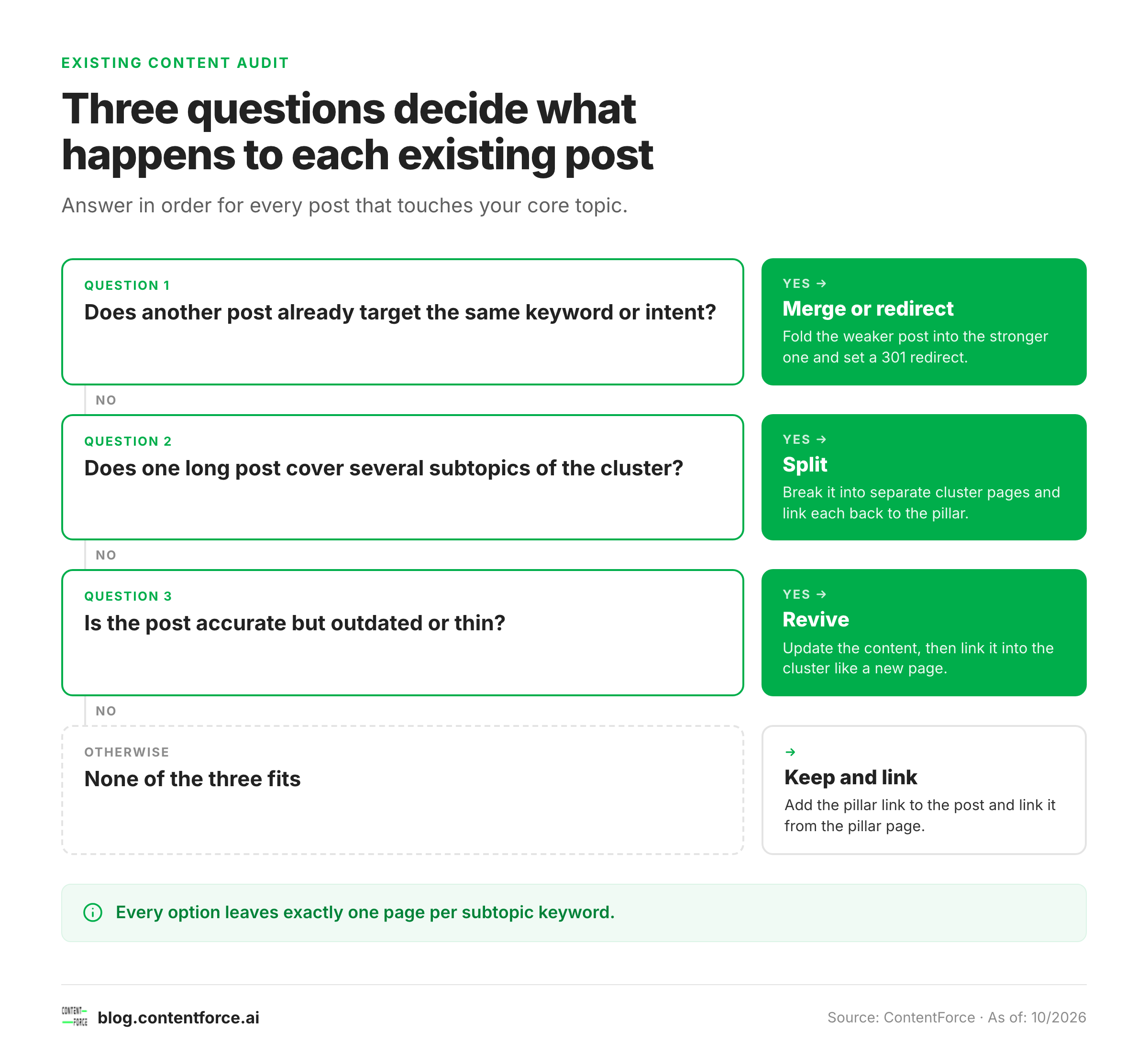
Audit your existing posts before you write anything new, because overlapping pages weaken a cluster before it exists. A content audit tells you which posts already belong to the core topic and what to do with each one.
Sort every related post into one of four options.
| Option | Use it when | What to do |
|---|---|---|
| Keep and link | The post is accurate and covers one subtopic of the cluster | Add the link to the pillar page and link back to the post from the pillar |
| Revive | The topic fits but the post is outdated or thin | Update the content, then link it into the cluster like a new page |
| Split | One long post covers several subtopics | Break it into separate cluster pages and 301 redirect old sections where needed |
| Merge or redirect | Two posts target the same keyword or intent | Fold the weaker post into the stronger one and set a 301 redirect |
Every redirect, merge or deletion should leave one page per subtopic keyword. HubSpot's own documentation for its topic tool says that if two pages cover the same subtopic keywords, they will both rank lower in search results.
Step 3: Plan and Build Your Pillar Page
The pillar page is the hardest part of the cluster. It needs to meet several requirements at once:
- Cover the core topic completely in breadth (touch on every important subtopic)
- Fully satisfy the search intent behind the main keyword
- Link out to every cluster page in the cluster
- Be long enough to function as a complete standalone resource (recommended: 2,000 to 3,500+ words)
- Rank on its own for the core keyword
Tip: Build a detailed outline before you write. The outline should list all key H2 sections and explain in one sentence what value each section delivers. A good outline tells you immediately whether the pillar page truly covers the topic completely.
Before publishing, check your pillar page against the strongest competitor pillar pages for the same core keyword. Yours should be at least as complete and useful, and if it isn't, revise the outline before writing, not after.
Step 4: Create Cluster Content and Set Up Internal Links
With the pillar page built (or at least planned), create the cluster pages. A few rules apply:
Depth over volume: A cluster page that fully covers its subtopic is worth more than three thin cluster pages that each stay shallow. Every cluster page needs to fully satisfy its search intent.
Set internal links at publish time: Never publish a cluster page without the bidirectional internal links in place. The cluster page must link back to the pillar, and the pillar must link forward to the cluster page. Missing internal links after publish are the most common mistake in topic cluster builds.
Anchor text quality: Use descriptive anchor text, not generic phrases like "click here" or "learn more." Google's link guidance asks for anchor text that's descriptive, reasonably concise and relevant to the page it links to, and it only reliably follows links built as an
<a>element with anhrefattribute. "Read our guide to pillar page structure" works; "learn more" doesn't.The linking rules, summarized:
- Every cluster page links back to the pillar page (required)
- The pillar page links forward to every cluster page (required)
- Cluster pages can link to each other when the content is closely related (recommended)
- Don't add links to pages outside the cluster unless there is clear content relevance
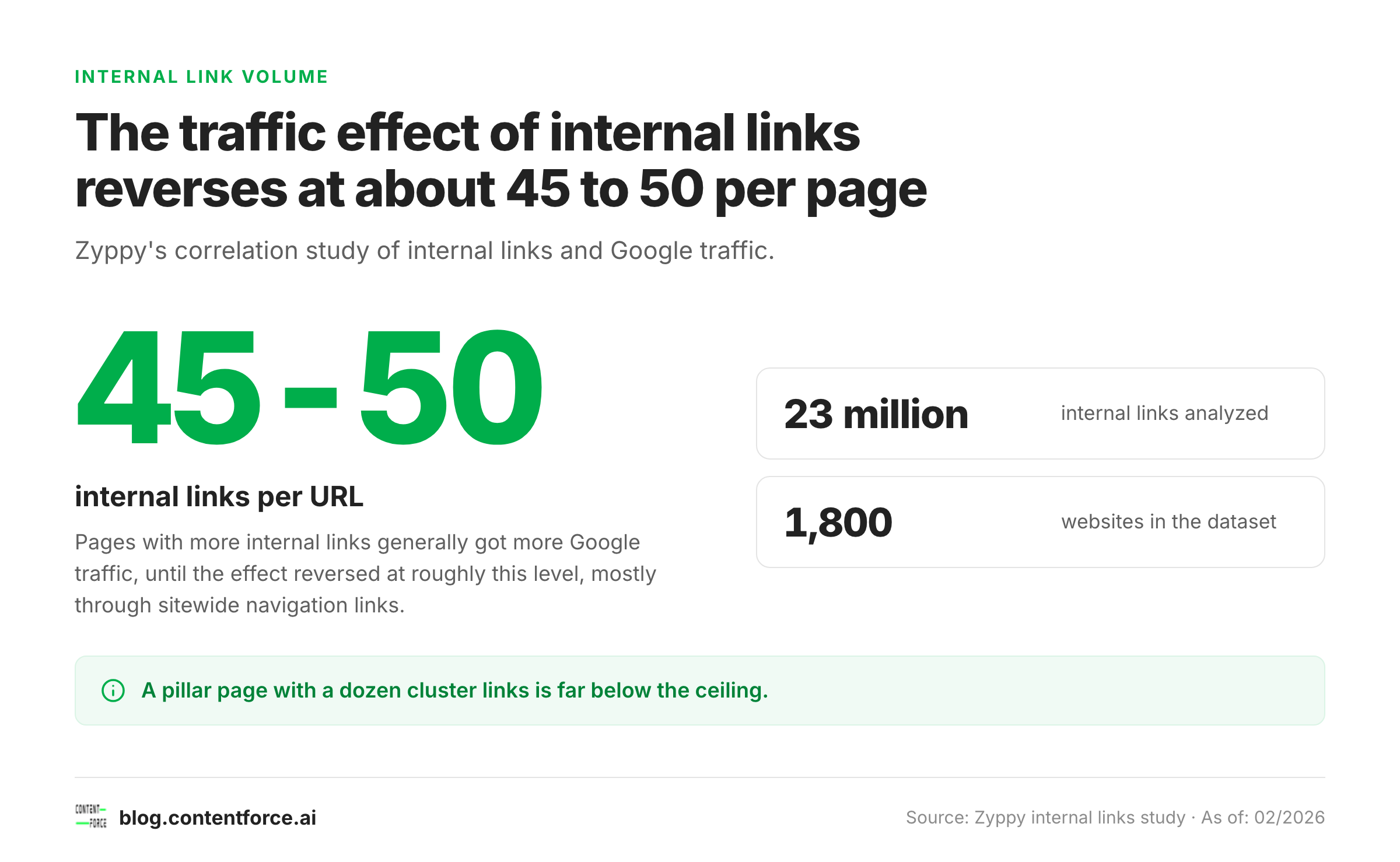
Link volume: There's no official number, but data helps. Zyppy's study of 23 million internal links across 1,800 websites found that pages with more internal links generally got more Google traffic, but that the effect reversed once a URL received roughly 45 to 50 internal links. The same study found that pages with more varied anchor text tended to get more search clicks. It's a correlation study, not proof of cause, so use it as a sanity check: a pillar page with a dozen cluster links is far from the ceiling, and sitewide navigation links count toward it.
Correlation, not proof of cause: use it as a sanity check for pillar page linking. Step 5: Measure Performance and Optimize
A topic cluster isn't a one-time project. It's a system that needs ongoing care. Track these key metrics.
- Organic traffic to the pillar page and each cluster page (Google Search Console, GA4): Is cluster traffic growing over time?
- Average position for the core keyword and each cluster keyword in GSC: Are rankings improving?
- Impressions and CTR for key cluster pages: High impressions with low CTR signals a meta title or description issue.
- Internal link profile: How many pages in the cluster link to each other? Screaming Frog or Ahrefs Site Audit surface gaps.
- Bounce rate and time on page: Are users staying, or bouncing immediately?
- AI presence: Is your pillar page cited in AI Overviews, Perplexity, or ChatGPT for the topic? Tools like Semrush and Ahrefs are beginning to track this.
Schedule a cluster review every six to twelve months. Check whether new cluster topics have emerged, whether existing cluster pages need updating, and whether internal links are still intact.
Topic Cluster Examples
Example 1: SaaS Company (Content Marketing)

A content marketing SaaS builds its entire content strategy around multiple topic clusters. "Content marketing" is a typical core topic. The pillar page is a complete guide to what content marketing is, covering definition and strategy, and it links to each of these cluster pages.
- Blog marketing: how to drive traffic with blog posts
- Content calendar: how to build an editorial plan step by step
- Email marketing as a content channel: strategies and best practices
- Writing SEO content: fundamentals, structure, and checklist
- Content distribution: where and how to promote your content
- Content marketing for B2B companies: differences and strategy
- Content marketing KPIs: what to measure and how
- Content repurposing: how to get more from existing content
All cluster pages link back to the pillar. The pillar links forward to every cluster page with descriptive anchor text. The result is a topic cluster that builds authority around "content marketing" in a way that rewards the site with broader rankings across the entire topic.
Example 2: E-Commerce (Product Category)

An online mattress retailer uses a topic cluster to capture informational traffic during the research phase. The pillar page, "Buying a Mattress: The Complete Guide (Types, Firmness, Tips 2026)", links to each of these cluster pages.
- Best mattress for side sleepers: which firmness is right?
- Mattress comparison 2026: top models tested and ranked
- Box spring vs. platform bed: which works with which mattress?
- How to dispose of an old mattress: tips and options
- How to clean a mattress: removing stains and keeping it fresh
- Best mattress for children: what parents need to know
- Best mattress for back pain: firmness levels that help
The retailer signals to Google that it doesn't just sell mattresses; it genuinely understands how buyers make the right choice. That expertise signal lifts the authority of the product category pages within the same cluster.
Example 3: Agency Blog (Link Building)

An SEO agency positions itself as the go-to resource for everything about link building. The pillar page, "Link Building: What It Is and How It Works", links to each of these cluster pages.
- Guest posting: step-by-step guide to guest blogging for links
- Broken link building: how to find dead links and earn replacements
- HARO link building: how to earn links from journalist queries
- Anchor text optimization: best practices and common mistakes
- Nofollow vs. follow links: what's the difference for SEO?
- Disavow tool: when and how to remove bad links
- Link reclamation: how to recover lost backlinks
- Local link building: strategies for local businesses
The agency earns rankings not just for "link building" but for many long-tail cluster keywords that together drive significant organic traffic.
When Topic Clusters Do Not Work
Topic clusters fail when the pillar is too specific, too general or overlaps another pillar, and when existing pages already compete for the same keyword. The model isn't broken in those cases. The inputs are.
| Failure mode | What you see | How to fix it |
|---|---|---|
| Pillar too specific | The pillar cannot support five cluster pages without repeating itself | Move up one level to a broader core topic and demote the narrow pillar to a cluster page |
| Pillar too general | The pillar targets a head term your site cannot rank for and the cluster pages share no clear theme | Narrow the core topic to a segment you can cover completely, then build a second cluster later |
| Overlapping pillars | Two pillars share cluster pages or target the same keyword and swap rankings | Give each cluster page exactly one parent and one target keyword; merge pillars that answer the same intent |
| Competing existing pages | Old posts rank for the cluster keywords and the new pages sit below them | Run the content audit above and merge, redirect or update before publishing more pages |
A fifth case is a site with very little authority. A cluster organizes the authority you have; it doesn't create it from nothing. On a new site, start with one or two topics and finish them before opening a third. Our guide to keyword cannibalization shows how to confirm that two pages are fighting over the same query.
Topic Clusters and AI Visibility: Schema, AEO, and RAG
Topic clusters help with AI search because they make a topic complete and easy to extract, not because of special markup. Google's AI features documentation states that there are no additional requirements for AI Overviews or AI Mode and that no special schema.org structured data is needed. To get cited in AI Overviews, Perplexity or ChatGPT, it helps to understand how these systems select and retrieve content.
Schema.org Markup for Machine-Readable Cluster Relationships
Schema.org provides properties that describe what a page is about in a machine-readable way. Google doesn't require them for AI features, so treat them as an optional clarity layer that must always match the visible text. The three main items are listed here.
about: What topic does the page primarily cover?mentions: What related entities are referenced on the page?DefinedTerm: A type for a word or phrase with a formal definition, which can be used as the value ofabout.
Example JSON-LD for a pillar page on "topic cluster":
{
  "@context": "https://schema.org",
  "@type": "Article",
  "headline": "Topic Cluster: Definition, Structure, and How to Build One",
  "about": {
    "@type": "DefinedTerm",
    "name": "Topic Cluster",
    "description": "A group of thematically related pages consisting of a pillar page, cluster pages, and internal links."
  },
  "mentions": [
    { "@type": "Thing", "name": "Pillar Page" },
    { "@type": "Thing", "name": "Topical Authority" },
    { "@type": "Thing", "name": "Internal Linking" },
    { "@type": "Thing", "name": "E-E-A-T" }
  ]
}
This markup states which concept the page defines and which related entities it mentions. Schema.org lists about and mentions on CreativeWork, so the pattern is valid, but no source shows that it raises citation rates.
How Topic Clusters Increase Citation Frequency in AI Systems
AI-powered search systems like Google AI Overviews, Perplexity, and Bing Copilot use Retrieval-Augmented Generation (RAG): they search an index of web pages, select relevant passages, and generate an answer. For this process, they prefer pages with four traits.
- Deliver a clear, direct answer to the query in the opening passage
- Are well structured, with clear headings (H2/H3), lists, and tables
- Are thematically complete, covering related aspects without drifting off topic
- Are internally linked to other topically relevant pages, which reinforces domain trust
A well-built cluster meets all four criteria. Thematic depth across many cluster pages and a structured pillar page make your content a stronger candidate for retrieval, though no one can promise a citation.
A practical tip: write the first two to three sentences of each H2 section so they directly and completely answer that section's core question. This "answer-first" structure makes it easy for AI systems to extract exactly those passages for their answers.
Practical Implementation: Schema Markup for Pillar Pages
Add the Schema.org markup directly in the head of your pillar page as JSON-LD. Most WordPress plugins (Rank Math, Yoast SEO) allow adding custom schema code in the post editor or via a custom head hook.
Always validate your schema markup with Google's Rich Results Test (search.google.com/test/rich-results) before publishing. Syntax errors in JSON-LD are silently ignored by Google and don'thing.
Add the schema at the time of publishing. Markup added later is only picked up after the page is crawled again.
Topic Cluster Tools and Workflow
These tools cover the practical side of building and maintaining a topic cluster:
- Ahrefs: Keyword Explorer for researching cluster topics with search volume and keyword difficulty; Site Audit for analyzing the internal link profile and finding linking gaps in the cluster; Content Gap analysis to find cluster topics your competitors cover that you don't.
- Semrush: Topic Research tool for structured ideation around a core topic; Keyword Magic Tool for cluster keyword research; Position Tracking for long-term ranking monitoring across the cluster.
- Google Search Console: Free data source for organic clicks, impressions, and average position for every cluster page; shows which queries already bring traffic and where gaps remain.
- Screaming Frog SEO Spider: Complete analysis of all internal links on your site; surfaces missing links in the cluster and shows the link depth of every page; especially useful after publishing new cluster pages to verify the internal linking.
- Notion or Google Sheets: For managing your cluster blueprint: which cluster pages exist, which keyword each targets, what their status is (planned, in progress, published), and where internal links are still missing.
A lean workflow for building a new cluster:
- Research core topic and cluster topics in Ahrefs
- Build a cluster blueprint in Notion or Google Sheets
- Publish pillar page and cluster pages in priority order
- Set internal links at publish time for every page
- Technical audit with Screaming Frog after the full cluster is live
- Monthly tracking in GSC and Semrush
Blog Outline Generator: headings, key points and FAQ candidates for your topic. Free, no signup.
Common Topic Cluster Mistakes
The same mistakes appear repeatedly in topic cluster builds:
- Thin cluster pages: Cluster pages that cover a subtopic only superficially help neither users nor search engines. Each cluster page must fully satisfy its search intent. Thin pages drag down the authority of the entire cluster.
- Missing internal links after publishing: Many teams create cluster pages and forget to update the pillar page and add the new pages to the internal link structure. Without bidirectional linking, most of the SEO benefit's lost. Check links with Screaming Frog after every new publish.
- Keyword cannibalization within the cluster: When the pillar page and a cluster page target the same keyword, they compete with each other and weaken both. Assign exactly one page per keyword in the cluster. The pillar targets the core keyword; each cluster page targets a distinct subtopic keyword.
- No measurement system: Without tracking how cluster traffic and rankings develop, you can't optimize and you don't know whether the effort is paying off. Set up GSC filters, a ranking tracker, and a cluster blueprint sheet from the start.
- Pillar page too shallow: A pillar page that doesn't cover the core topic completely in breadth can't function as the authority center of the cluster. If the pillar skips important aspects of the core topic, the cluster lacks cohesion.
- Cluster pages with no backlink to the pillar: Every cluster page must link back to the pillar page. One-directional linking (pillar to cluster only) wastes half the available PageRank benefit.
- Building too many clusters at once: Splitting resources across too many simultaneous clusters means none of them get built to the depth needed. Build one cluster completely before starting the next.
Conclusion: Topic Clusters as the Foundation of Topical Authority
Topic clusters are one of the most reliable tools for building topical authority in Google in 2026, and for getting cited in AI-powered search systems at the same time. The logic is straightforward: sites with many strong, well-connected pages on a topic signal genuine expertise to both Google and AI retrieval systems.
Building a topic cluster takes planning and consistency, but the payoff is durable. Start with one core topic that matters strategically to your business. Build the pillar page first, then add cluster pages in priority order. Set internal links at publish time, every time. Measure what changes.
Anyone who has gone through this process once understands why the topic cluster model has remained one of the most reliable paths to sustainable organic rankings.
Frequently Asked Questions
What is a topic cluster?
A topic cluster is a group of thematically related pages on a website. It consists of a pillar page (the main page covering the core topic), cluster pages (detail pages on specific subtopics), and internal links connecting all pages bidirectionally. The goal is to build topical authority with search engines.
What is the difference between a pillar page and cluster content?
The pillar page covers the core topic broadly and links to all cluster pages. Cluster pages each cover one subtopic in depth and link back to the pillar page. Pillar page = overview; cluster page = depth on a specific query.
How many cluster pages does a topic cluster need?
A common benchmark is 5 to 15 cluster pages per core topic. The number depends on the topic and available depth. More important than the count: every cluster page must fully answer an independent search query. Six strong cluster pages beat fifteen thin ones.
How long should a pillar page be?
A recommended range is 2,000 to 3,500+ words. The right length depends on the topic and competitors: check how long the strongest competitor pillar pages are for the same core keyword, and aim for at least parity.
Topic cluster or hub-and-spoke: which is better for SEO?
For SEO purposes, "topic cluster" is the more precise term. It emphasizes the content architecture and bidirectional internal linking as SEO tools. Hub-and-spoke describes a similar concept with more emphasis on navigation structure for users. In practice the two models overlap significantly; 'topic cluster' is the preferred term in 2026 SEO contexts.
Do topic clusters still work in 2026?
Topic clusters still work as a way to organize content and internal links, but no independent study proves a fixed traffic gain. They help because complete, well-linked pages are easier for Google and AI systems to understand and quote, and Google says its AI features need no special optimization beyond good SEO.
How long does it take for a topic cluster to show results?
Expect months rather than weeks, because Google has to crawl and evaluate the whole group of pages. No reliable source gives a fixed timeline, so watch impressions and average position for each cluster page in Google Search Console from the first month.
What is the difference between a topic cluster and a keyword cluster?
A keyword cluster groups search queries that one page can satisfy, while a topic cluster groups pages around a pillar page. Keyword clusters decide what each page covers; topic clusters decide how those pages link. Our guide to keyword clustering covers the first step.