

Sitemap SEO is the practice of creating, optimizing, and submitting an XML sitemap to help search engines discover, crawl, and index your website’s most important pages more efficiently. An XML sitemap is a structured file that lists your URLs and signals to Googlebot which pages exist and when they were last updated.
A well-structured sitemap tells Google exactly what content exists on your site and helps ensure every important page gets discovered, even pages that lack strong internal links. This guide covers every aspect of sitemap SEO: what sitemaps are, which types exist, what to include or exclude, XML sitemap best practices, how to create and submit one to Google Search Console, and how to audit it when things go wrong.
What Is a Sitemap in SEO?
A sitemap is a file that lists a website’s essential pages, ensuring search engines can find and crawl them. It acts as a roadmap for Googlebot, pointing it to every URL you want crawled and indexed, along with metadata like the date each page was last meaningfully updated.
Google’s own documentation describes sitemaps as files that “provide information about the pages, videos, and other files on your site, and the relationships between them.” Google uses this information to crawl your site more intelligently.
Sitemaps do not directly improve your search rankings. What they do is make indexing possible for pages that might otherwise be overlooked, particularly on large sites, new domains with few inbound links, or pages that are not well-connected by internal links.
There are two broad categories: XML sitemaps for search engines, and HTML sitemaps for human visitors. The rest of this guide focuses primarily on XML sitemaps, since they carry the most weight for SEO.
Types of Sitemaps
Not all sitemaps serve the same purpose. Choosing the right type depends on your content and goals.
XML Sitemaps
An XML sitemap is a machine-readable file written in Extensible Markup Language. It is the primary sitemap format for SEO. Google, Bing, and other major search engines read XML sitemaps to discover URLs, understand when content was last updated, and identify relationships between pages. The protocol is defined at sitemaps.org, which Google, Yahoo, and Bing jointly developed.
XML sitemaps are the standard for technical SEO and should exist on virtually every website that cares about search visibility.
HTML Sitemaps
An HTML sitemap is a user-facing page that lists your website’s structure in a readable format. It helps visitors navigate large sites and provides mild SEO value through internal link signals.
HTML sitemaps are optional for most sites and should not be treated as a substitute for an XML sitemap. They work best on large content sites or e-commerce stores where users may need a structured overview.
| XML Sitemap | HTML Sitemap | |
|---|---|---|
| Audience | Search engines | Human visitors |
| Format | XML file | Webpage |
| Primary benefit | Crawl and indexing support | User navigation |
| SEO value | High (enables indexing) | Low to medium (internal links) |
| Required | Recommended for most sites | Optional |
Image Sitemaps
An image sitemap extends your XML sitemap with image-specific metadata: URL, caption, title, and license information. Google uses image sitemaps to index images that might not be found by standard crawling, for example images loaded via JavaScript or images on pages with limited internal links.
Video Sitemaps
A video sitemap provides structured metadata about video content: duration, thumbnail URL, expiration date, and rating. This is essential for sites aiming to appear in Google’s video search results and video rich results.
News Sitemaps
A news sitemap is required for websites that want their articles to appear in Google News. It covers only content published within the last 48 hours and must include article title, publication name, and publication date. Google crawls news sitemaps more frequently than standard sitemaps.
What an XML Sitemap Looks Like
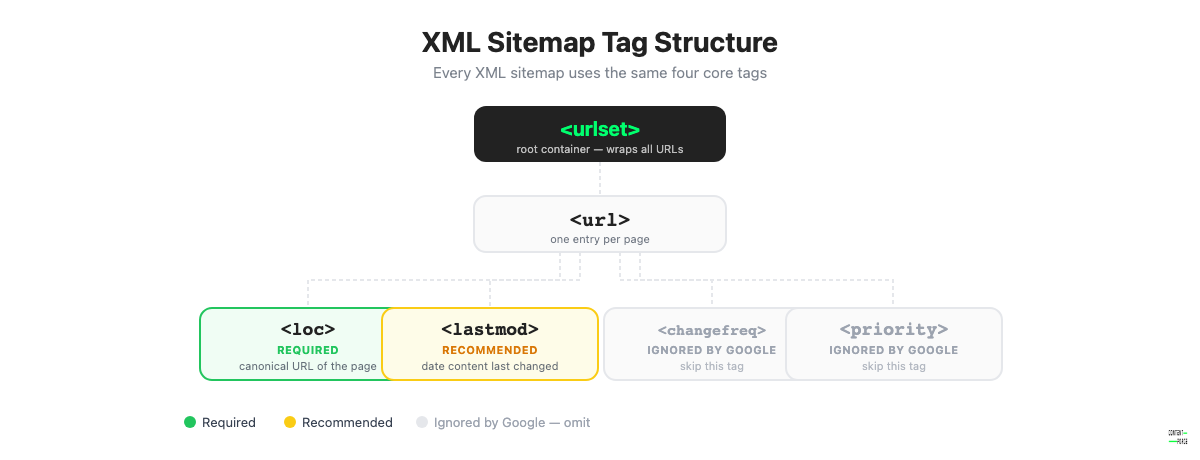
An XML sitemap is a structured text file that uses specific XML tags to list your URLs and metadata. The file must use UTF-8 encoding and reference the sitemaps.org namespace. Here is a minimal example with two URLs:
    https://example.com/page-one/
    2026-04-15


    https://example.com/page-two/
    2026-03-20
The key tags:
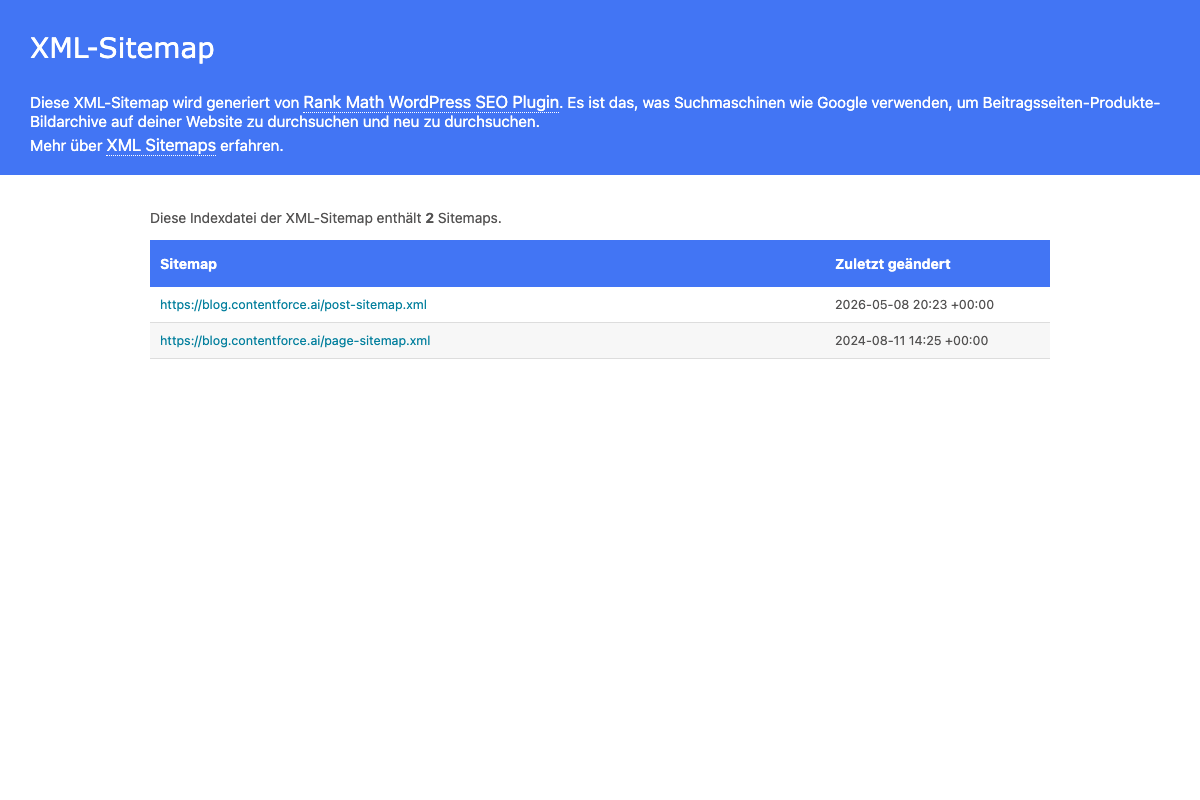
You may also see
Why Sitemaps Matter for SEO
Sitemaps give you direct control over how search engines discover your content. Here is why that matters.
Faster Crawling and Indexing
When you publish new content, Google may take days or weeks to discover it through normal link crawling. A sitemap with an accurate lastmod date signals that something has changed and is worth recrawling. This speeds up the discovery cycle, especially on sites that publish frequently.
According to Google’s own documentation, sitemaps are especially valuable for new websites without many external links, since Googlebot has fewer signals to follow when crawling.
Orphan Page Discovery
An orphan page is a page with no internal links pointing to it. Googlebot cannot find these pages through standard link crawling. A sitemap solves this problem by listing orphan pages directly, ensuring they are at least considered for indexing even without internal link support.
This makes sitemaps particularly valuable during site migrations, when large content sets are added in bulk, or when internal linking is inconsistent.
Crawl Budget Management
Crawl budget is the number of pages Google is willing to crawl on your site within a given period. On large sites with tens of thousands of pages, crawl budget matters because Googlebot cannot crawl everything every day.
A well-maintained sitemap focuses Google’s crawl on your highest-value URLs. By excluding low-quality pages, thin content, parameter variations, and tag archives from your sitemap, you guide Googlebot away from wasting budget on pages that should not rank.
Crawl budget is most critical on e-commerce sites with faceted navigation. A typical clothing retailer might generate millions of URL combinations from filters for size, color, and price. Without careful sitemap management, Googlebot can spend its entire crawl budget on these near-duplicate filter pages, leaving core product pages and category pages under-crawled. A clean sitemap that lists only canonical product and category URLs solves this without requiring additional server configuration.
Sitemaps and AI Search
AI-powered search features, including Google’s AI Overviews and large language models trained on web content, depend on indexed content. A page that is not indexed cannot appear in AI-generated answers.
Sitemaps help ensure your content gets indexed in the first place, which means it can be considered as a source for AI-generated responses. Yoast has noted that while AI search works differently from traditional search, it still relies on underlying indexing, making sitemaps an indirect but meaningful contributor to AI visibility.
What to Include (and Exclude) in Your Sitemap
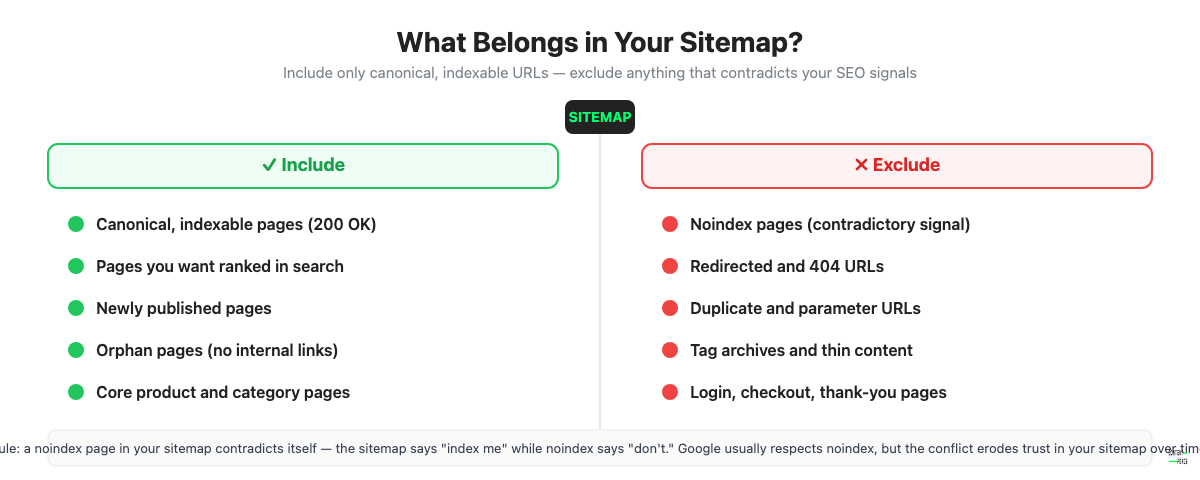
Not every URL on your site belongs in your sitemap. Poor sitemap hygiene sends mixed signals to Google and wastes crawl budget.
Always Include
- Canonical, indexable pages with a 200 HTTP status
- Pages you want ranked in search results
- Pages with unique, valuable content
- Newly published pages that need fast indexing
- Pages with limited internal links (orphan risk)
Always Exclude
| Exclude | Reason |
|---|---|
| Noindex pages | Contradiction: sitemap says “index me,” noindex says “don’t” |
| Redirected URLs | Google follows the redirect anyway; listing the source wastes resources |
| 404 and gone pages | Broken URLs damage sitemap quality signals |
| Duplicate URLs | Canonicalize duplicates; only include the canonical version |
| Parameter URLs | Faceted navigation, session IDs, and tracking parameters create URL bloat |
| Tag and category archives | Typically thin content with low ranking potential |
| Thank-you and login pages | Not intended for search discovery |
| Staging or development URLs | Should never be indexed in production sitemaps |
Including noindex pages in your sitemap is one of the most common technical SEO mistakes. It sends Google a direct contradiction: the sitemap says “please index this,” while the noindex directive says “do not index this.” Google usually respects the noindex tag, but the conflict can slow Googlebot’s trust in your sitemap over time.
XML Sitemap Best Practices
Follow these rules to make your sitemap as effective as possible for SEO.
1. Use Only Canonical, Indexable URLs
Every URL in your sitemap must be the canonical version of the page, must return a 200 HTTP status, and must be indexable (no noindex tag, no X-Robots-Tag: noindex). Running a quick crawl with a tool like Screaming Frog or Ahrefs Site Audit before submitting helps catch violations automatically.
2. Keep It Under 50,000 URLs (or 50MB)
Google enforces a hard limit of 50,000 URLs or 50MB per sitemap file, whichever is reached first. If your site exceeds this limit, use a sitemap index file (covered in practice 7 below) to split your URLs across multiple sitemap files.
3. Use lastmod Honestly
The lastmod tag tells Google when a page was last meaningfully updated. Many CMS plugins set lastmod to today’s date for every page on every crawl, regardless of whether any content changed. Google noticed this behavior and learned to discount dishonest lastmod values.
Only update lastmod when the page content has genuinely changed in a meaningful way. Fixing a typo does not count. Adding a new section, updating statistics, or significantly rewriting a paragraph does.
A trustworthy lastmod signal gives you a real lever: when you update an old article, an accurate lastmod date tells Google the page is fresh and worth recrawling. Over time, sites that maintain honest lastmod values get faster recrawl cycles on their updated content. Sites that spam the lastmod date on every page effectively train Google to ignore it, eliminating one of the few timing signals they can control.
4. Ignore Priority and Changefreq
The
5. Align Your Sitemap with robots.txt
Your sitemap and robots.txt file must agree. If you block a directory or URL pattern in robots.txt, do not list those URLs in your sitemap. Including blocked URLs in your sitemap is contradictory and can cause indexing confusion.
For example, if your robots.txt disallows /wp-admin/, do not let any admin URLs appear in your sitemap. Most CMS plugins handle this automatically, but it is worth verifying.
6. Choose a Dynamic Sitemap Over a Static One
A static sitemap is a manually maintained XML file. A dynamic sitemap is generated automatically by your CMS or application each time it is requested, so it always reflects the current state of your site.
Use dynamic sitemaps whenever possible. Static sitemaps go stale the moment you publish new content, delete old pages, or change URLs. On any site with regular content refresh activity, a static sitemap creates more problems than it solves because it shows Google a snapshot of your site from the day you generated the file, not the site as it is today.
7. Use Sitemap Index Files for Large Sites
A sitemap index file is a master file that references multiple individual sitemap files. Instead of one sitemap with 80,000 URLs (which exceeds the 50K limit), you create:
sitemap-index.xmlreferencing:sitemap-posts.xml(blog articles)sitemap-products.xml(product pages)sitemap-pages.xml(static pages)
This structure also makes it easier to diagnose indexing issues by content type in Google Search Console.
How to Create an XML Sitemap
WordPress (Yoast SEO or Rank Math)
Both Yoast SEO and Rank Math auto-generate XML sitemaps that are dynamic, properly formatted, and follow best practices out of the box.
In Yoast SEO: go to SEO > General > Features and enable the XML sitemaps toggle. Your sitemap will be available at yourdomain.com/sitemap_index.xml.
In Rank Math: go to Rank Math > Sitemap Settings and configure which post types to include. Your sitemap will be at yourdomain.com/sitemap_index.xml.
Both plugins exclude noindex content from the sitemap automatically and update lastmod when posts are saved.
Other CMS Platforms
- Shopify: generates a sitemap automatically at
/sitemap.xml. No setup required. - Wix: generates sitemaps automatically and submits to Google. Configurable in SEO settings.
- Squarespace: generates an XML sitemap at
/sitemap.xmlautomatically for all published pages.
Online Generators
For smaller static sites (under a few hundred pages), online tools like XML-Sitemaps.com or Screaming Frog’s free crawl can generate a sitemap file you upload manually. This works for static sites, but requires manual updates whenever content changes.
Programmatic Generation
For custom or headless sites, generate sitemaps programmatically at build time or as a server-side route. Most web frameworks have sitemap libraries: next-sitemap for Next.js, sitemap for Node.js, django-sitemap for Django. Ensure your implementation handles lastmod accurately based on content update timestamps from your database.
How to Submit Your Sitemap to Google
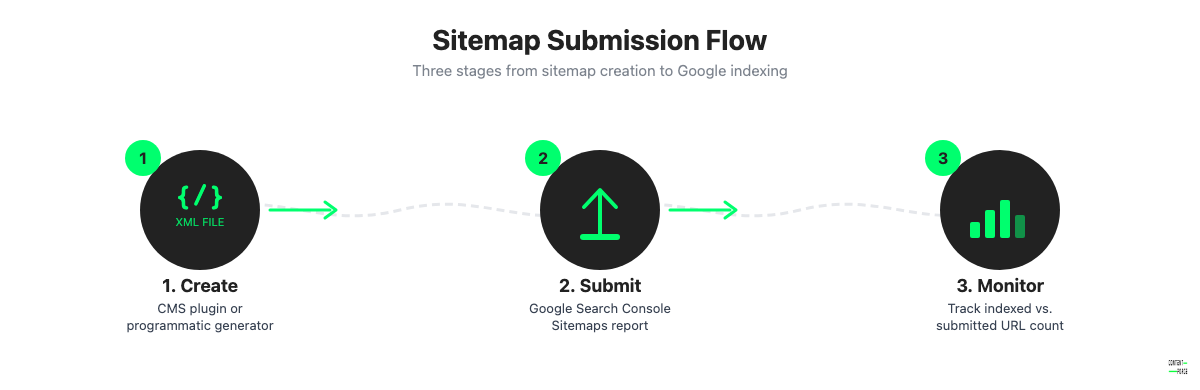
Submitting your sitemap to Google Search Console speeds up discovery and gives you ongoing monitoring data about indexing status and errors. If you have not yet added your site to Search Console, do that first via support.google.com/webmasters/answer/9008080.
- Go to Google Search Console and select your property.
- In the left menu, click Sitemaps under the Index section.
- In the “Add a new sitemap” field, enter your sitemap URL (e.g.,
sitemap_index.xml). - Click Submit.
- Wait for Google to process the sitemap. This typically takes a few minutes to a few hours.
- Check the status column. A green “Success” status means Google has processed the sitemap. The “Discovered URLs” count shows how many URLs were found.
A good companion to sitemap submission is tracking your Google Search Console keywords to see which pages start appearing after you submit. It is the fastest way to confirm new content is being picked up.
You can also ping Google directly without Search Console by requesting this URL in your browser or via a script:
https://www.google.com/ping?sitemap=https://yourdomain.com/sitemap_index.xmlPinging is useful after significant content updates but does not replace ongoing monitoring in Search Console.
How to Audit Your Sitemap
A sitemap that has never been audited almost certainly contains at least some problems. Common issues compound over time on sites that add and remove content regularly. Running a technical SEO audit is the most thorough approach, but a focused sitemap audit can be done quickly with Search Console alone.
Common Sitemap Errors
- Noindex pages in sitemap: directly contradictory; Google will likely ignore the page but flag it as a coverage issue
- Redirected URLs: outdated URLs that now 301 or 302 redirect to new destinations; creates unnecessary crawl steps
- 404 and 410 URLs: broken or deleted pages that were never removed from the sitemap; signals poor sitemap maintenance to Google
- HTTP/HTTPS mismatches: sitemap lists HTTP URLs while the site serves HTTPS, or vice versa; creates duplicate signals
- Non-canonical URLs: parameter URLs, paginated URLs, or alternate language URLs that should point to the canonical version instead
- Missing new pages: recently published pages not yet added to a static sitemap, or excluded from a dynamic sitemap due to incorrect settings
Monitoring in Google Search Console
The Sitemaps report in Google Search Console shows:
- Submitted URLs: the total count of URLs Google found in your sitemap
- Indexed URLs: how many of those were successfully indexed
- Errors: specific issues Google encountered parsing or crawling sitemap URLs
A large gap between submitted and indexed URLs is a common signal. It does not always indicate a problem with the sitemap itself. Pages can fail to index for reasons unrelated to the sitemap, including thin content, duplicate content, or manual actions. But the gap is a useful starting point for investigation.
Check the Sitemaps report monthly, or after any major site change such as a migration, URL restructuring, or large content deletion.
Signs Your Sitemap Is Working
- Rising indexed page count in Search Console following content publishing
- New pages appearing in search results within days of publication
- Low error count in the Sitemaps report
- Submitted vs. indexed gap is within 10-15% and stable
If you recently migrated your site or changed your URL structure, re-submit your sitemap immediately after the migration is complete and monitor the Sitemaps report daily for the first two weeks. Migration-related sitemap issues, such as old URLs that still appear in the sitemap alongside their redirected replacements, are a common source of indexing slowdowns that are easy to catch with Search Console data but easy to miss if you are not actively monitoring.
A healthy sitemap audit process takes less than 15 minutes per month: check the Sitemaps report for errors, compare submitted vs. indexed counts to your last review, and verify that newly published content has been picked up. Catching problems early prevents indexing debt from accumulating.
Frequently Asked Questions
Does a sitemap improve SEO rankings?
Not directly. A sitemap does not send ranking signals to Google. What it does is enable indexing, and a page that is not indexed cannot rank at all. In that sense, sitemaps are a prerequisite for rankings, not a booster. The pages in your sitemap still need to earn rankings through content quality, relevance, and backlinks.
Do I need a sitemap for a small website?
Google says sitemaps are most useful for websites with more than 500 pages, new sites without many external links, and sites with rich media content. If your site has fewer than 500 well-linked pages, you can likely get by without one. However, creating a sitemap is low-effort and free with most CMS tools, so there is little reason not to have one.
How often should I update my sitemap?
If you use a dynamic sitemap generated by your CMS, it updates automatically whenever you publish or edit content. No manual action is needed. If you use a static sitemap, update it every time you add a new page, delete a page, or change a URL.
What is the maximum size for an XML sitemap?
Each sitemap file is limited to 50,000 URLs or 50MB, whichever comes first. If your site exceeds this, create a sitemap index file that references multiple sitemap files, each within the limit.
Why are some of my sitemap pages not indexed?
Indexing is Google’s decision, not yours. Including a URL in your sitemap is a request, not a command. Pages may not get indexed for several reasons: thin or duplicate content, quality issues, a noindex tag accidentally applied, a robots.txt block, or simply that Google decided the page is not worth indexing. Check the URL Inspection tool in Search Console for details on specific pages.
Does Google guarantee it will index my sitemap?
No. Google’s own documentation states that submitting a sitemap “doesn’t guarantee that all the items in your sitemap will be crawled and indexed.” A sitemap increases the likelihood and speed of discovery, but Google always retains final judgment on what it indexes.
