
SEO best practices are the basic tasks that help Google find, understand and rank your pages. Most of the advice in circulation is longer than it needs to be. The seven practices below are ordered by what usually blocks a page first. A page that cannot be crawled or indexed cannot rank, however good it is.
Each practice has one primary-source rule where Google or web.dev gives one. The last two sections tell you what to skip and how to check a single page in about 15 minutes.
What are SEO best practices in 2026?
SEO best practices are the foundational tactics that help search engines crawl, index, understand and rank your content. The order matters. Crawling and indexing come first because a page that Google cannot reach or chooses not to index never gets a position. Page-level work comes next: intent, titles, structure and speed, the group usually called on-page SEO. Authority from links and mentions comes last, because it multiplies a page that already works.
Here is the short list, in that order:
- Make pages crawlable and indexable first.
- Match the search intent of each page.
- Write titles and meta descriptions for each page.
- Structure content so answers are easy to extract.
- Hit the Core Web Vitals targets.
- Link internally with descriptive anchor text.
- Earn relevant links and mentions.
The sections below explain each one and give the rule behind it.
Make pages crawlable and indexable first
Google can only rank a page it has crawled and chosen to index. Before you optimize anything else, check crawling, indexing and duplicate handling in that order.
Check crawl and index status first
Check that the page loads without errors, is not blocked by robots rules or a noindex tag, and appears in Search Console's page indexing report. Google's SEO Starter Guide is the reference for these basics.
Handle duplicates and sitemaps with Google's own rules
Duplicate content is the most common quiet problem. When several URLs show the same content, Google has to pick one. Google's guidance is to redirect non-preferred URLs to the version that best represents the content, and to use a rel="canonical" link element when a redirect is not possible. Google also says it can generally work out duplicates on its own, so the goal is to make the preferred version obvious, not to fight every duplicate.
An XML sitemap helps Google discover pages, but submitting one is optional. If your site is linked well, the sitemap is a safety net for large or new sites rather than a ranking step. For a deeper walk-through of sitemap setup, see our XML sitemap guide.
Match the search intent of each page
Search intent is the reason behind a query: learn something, compare options, buy, or find a specific site. Before you write, search the query yourself and look at what the top results already answer. If they are how-to guides, a product page will not win that query, and if they are comparison pages, a long definition will not either.
Spot the answer type before you write
Take two queries on the same topic. "Best running shoes" expects a ranked list, so a page that opens with the history of running footwear misses the intent. "How to choose running shoes" expects a method, and a list of models would miss it. Check which kind of answer the results give before you write a line.
Match that answer type in your own first paragraph
A reader who searches "best practices seo" wants the list and the order, not a history of search engines, which is why this page opens with the seven-item list above rather than a definition essay. The same rule covers the rest of the page: every section should answer its heading's question first, and the depth can come after that. Our topic cluster guide shows how to split one broad topic into pages that each match one intent.
Write titles and meta descriptions for each page
Google's guidance is direct. Google's SEO Starter Guide says a good title is unique to the page, clear and concise, and accurately describes what the page contains. A good meta description is short, unique to one particular page, and covers its most relevant points.
Two checks catch most problems. First, no two pages should share a title, because duplicate titles blur which page should rank for a query. Second, the title should say what the page actually delivers. A title that promises a list while the page explains a theory will not hold its click-through rate, and it will not earn the ranking to be clicked in the first place.
Structure content so answers are easy to extract
Put the answer in the first sentence of each section, then give the reasons and evidence after it. A reader who skims the headings should be able to get the answer from the first sentence of each section without reading the rest.
Two details are easy to get wrong:
Use descriptive headings and URLs
Google says heading order matters for screen readers, not for how Search ranks a page, and that there is no ideal number of headings. Use headings to describe what each section answers, and do not add or remove them to hit a count. URLs should work the same way: Google recommends descriptive URLs that include words useful to users, such as the topic of the page, rather than codes or dates that tell a reader nothing.
Write short, descriptive alt text
Image alt text should be short but descriptive, and explain how the image relates to the surrounding content. A chart needs the finding it shows, not just the word "chart". Decorative images can have empty alt text. The image optimization guide covers file names, sizes and loading in more detail.
Hit the Core Web Vitals targets
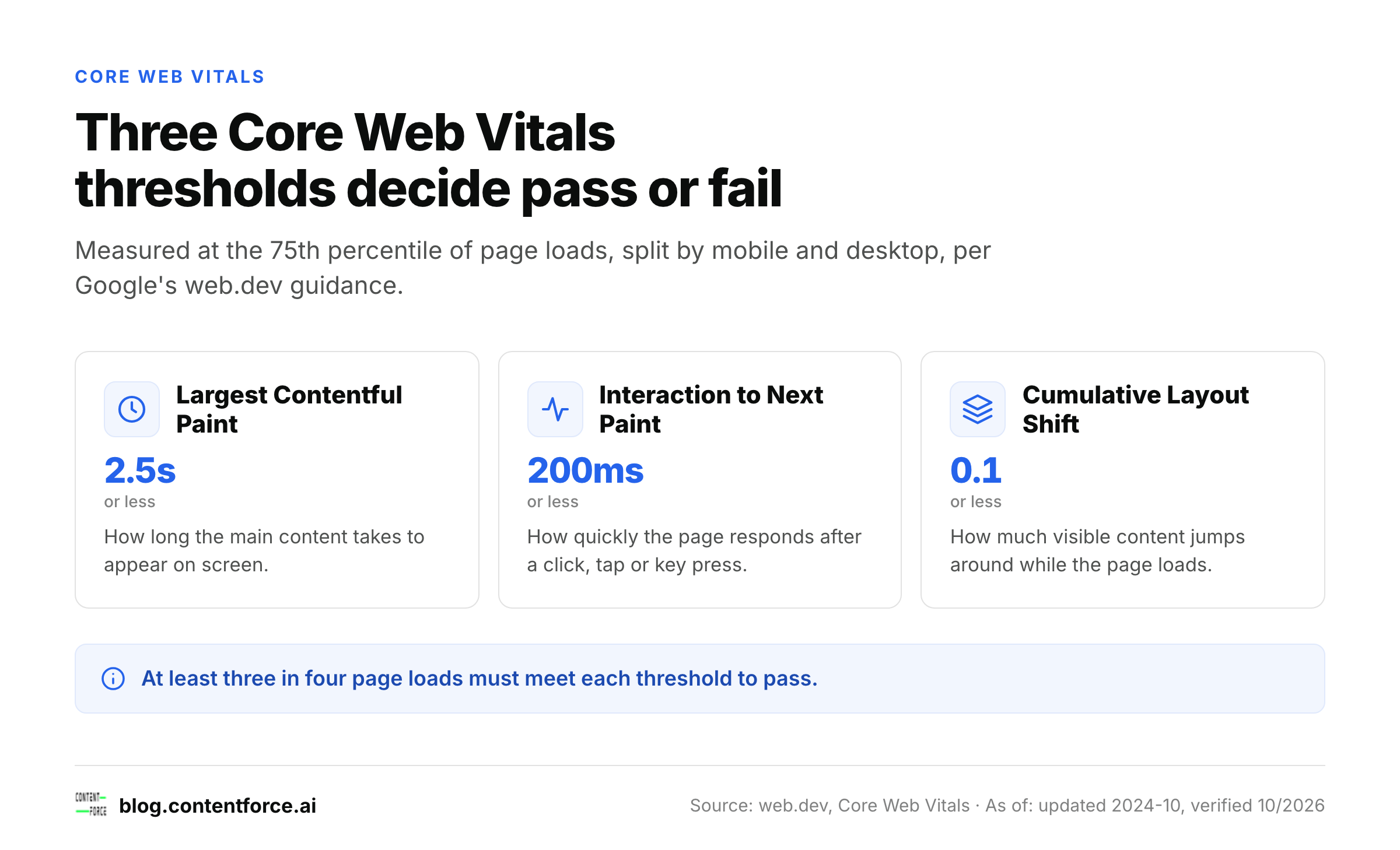
Good Core Web Vitals scores are a largest contentful paint of 2.5 seconds or less, an interaction to next paint of 200 milliseconds or less, and a cumulative layout shift of 0.1 or less. Google's web.dev guidance measures these at the 75th percentile of page loads, split by mobile and desktop. In practice, at least three in four loads must meet each threshold. A page where one in four visitors waits too long can fail, even if the average looks fine. If you still see a metric called First Input Delay in an old report or an old article, it is outdated: web.dev confirms INP officially replaced FID as a Core Web Vital on March 12, 2024.
The three Core Web Vitals thresholds
| Metric | Good threshold | What it measures |
|---|---|---|
| Largest Contentful Paint (LCP) | 2.5 seconds or less | How long the main content takes to appear on screen |
| Interaction to Next Paint (INP) | 200 milliseconds or less | How quickly the page responds after a click, tap or key press |
| Cumulative Layout Shift (CLS) | 0.1 or less | How much visible content jumps around while the page loads |
How to check and fix each metric
Check the three numbers for your top pages in Search Console's Core Web Vitals report or in PageSpeed Insights, then fix the slowest metric first. A large hero image or an unoptimized font usually drives a slow LCP; a heavy third-party script running on page load usually drives a slow INP; an image, embed or ad slot with no reserved width and height usually drives a high CLS. Reserving the space with explicit width and height attributes, or with a CSS aspect-ratio, is the single fix that resolves most CLS failures.
Link internally with descriptive anchor text
Internal links tell readers and Google which pages are related and which ones matter most.
Write anchor text that names the destination
Use anchor text that says what the target page covers, such as "SEO audit checklist", instead of "click here" or "read more". Link from pages that already get traffic to pages that need it, because internal links pass attention along your site.
Limit links to what a reader would actually follow
Keep the number of links on a page to what a reader would actually follow. Five useful links in the right places beat thirty links in a footer. Our SEO audit checklist is a good example of a page that links out to specific fixes rather than listing every possible task.
Earn relevant links and mentions
Links still matter, but the useful ones come from sites that are relevant to your topic and whose readers would care about your page.
Relevance beats volume
One link from a site in your field is worth more than many from unrelated directories. Mentions without links also help when they show that people in your field talk about your work.
How to actually earn them
Earning these links takes patient work rather than tactics. Publish one page that is genuinely the best answer to a specific question, tell the people who would cite it, and offer something they can use: data, a template, a clear explanation of a rule. Do not buy links or trade them in bulk, because that is the pattern Google's spam policies are written against.
What to skip in 2026
Some common advice does not help and wastes time. Skip these four:
- Keyword density targets. Google's guidance is to write for readers, not to hit a percentage. Write the page naturally and make sure the title and first paragraph say what it covers.
- Heading-count quotas. Google says there is no ideal number of headings. Add a heading when a section needs one and drop it when it does not.
- Mandatory sitemap submission. Google says submitting a sitemap is optional and that you should first focus on making sure people know about your site.
- Exact-match keyword repetition. Repeating the exact query in headings and paragraphs makes text harder to read. Use the query's wording where it fits and use the plain words a reader would use everywhere else.
Each of these comes from a common habit, not a Google rule. If you can name the Google statement behind a practice, keep it. If you cannot, treat it as an optional experiment.
A 15-minute checklist for one page
Run this on one page before you touch the rest of the site:
- Check the search intent: does the first section answer the query the way the top results do?
- Check the title and meta description: are they unique to this page, clear, and accurate?
- Check the first sentence of each section: does it answer the heading's question?
- Check the URL and image alt text: are they descriptive and short?
- Check Core Web Vitals for this page in Search Console or PageSpeed Insights against the three thresholds above.
- Check internal links: does the page link to two or three related pages with descriptive anchor text?
If a page fails two or more checks, fix it before you publish anything new. For a fuller audit, the SEO audit checklist covers the rest of the site.
Frequently asked questions
Which practice should I start with?
Start with crawling and indexing. Confirm that Google can reach the page and that the preferred URL is the one indexed. A well-written page that is not indexed cannot rank, so every other practice depends on this one.
How often should I review these practices?
Review the Core Web Vitals and Search Console data for your top pages every month, and run the page checklist when you publish or update a page. The rules themselves change slowly. The measurements change faster, so check the numbers more often than the rules.
Is SEO still worth it in 2026?
Yes, for any page whose purpose is to be found by people who are already searching for the answer. Search still sends visitors to pages that answer a specific question well, and the basics above decide whether a page is eligible for those visitors. It is less worth prioritizing for pages that no one searches for, such as internal announcements. Check whether a query has real searchers before you invest in a page.
What is the 80/20 rule for SEO?
The 80/20 rule, also called the Pareto principle, is a rule of thumb that a small share of actions drives most of the results. It is not a Google guideline, and it does not give an exact split for any one site. Use it as a way to pick work: list your pages by traffic or by business value, run the checklist on the top fifth first, and fix what fails there before you touch the rest.
Do I need a developer for technical SEO?
Not for most of the checks in this article: checking indexing in Search Console, writing titles and descriptions, adding alt text and fixing internal links are all content-team work. You need a developer for fixes that touch code or server configuration, such as setting up redirects, adding structured data, or changing how a template loads scripts and fonts for Core Web Vitals. If a fix needs a template or server change, loop in a developer rather than working around it in content.
Do these practices still matter for AI answers?
Our reading is yes, though this is editorial judgment rather than a direct Google statement. AI answers draw on pages that search systems can crawl, index and understand, and a page with a clear answer in its first sentence is easier to quote. The same basics apply, which is why the list starts with crawling and indexing.