How-to · 6 steps
SEO Audit Checklist: 40 Checks in Priority Order

This checklist walks you through 40 SEO audit checks across seven priority-ordered phases using Google Search Console and other tools, starting with crawlability and AI crawler access before architecture, speed, mobile usability, content quality, schema, and AI Overview readiness. Running the checks in this order ensures downstream fixes actually pay off.
- Fix crawlability, indexation, and AI crawler access issues in robots.txt and sitemaps first
- Clean up site architecture, click depth, and internal linking structure
- Improve Core Web Vitals and page speed, since these affect every page at once
- Fix mobile usability, content parity, and HTTPS or SSL security issues
- Audit on-page fundamentals like title tags, headings, thin content, and keyword cannibalization
- Add or validate structured data and schema markup for eligible page templates
How to Use This Priority-Ordered Checklist
Most SEO audit checklists read like a junk drawer. Fifty items, no real order, and a vague promise that fixing all of them will help. That's not how audits actually work in practice. A broken canonical tag on a page nobody can even crawl doesn't matter yet. A missing FAQ schema tag is pointless if the page it's attached to has a noindex tag firing by accident.
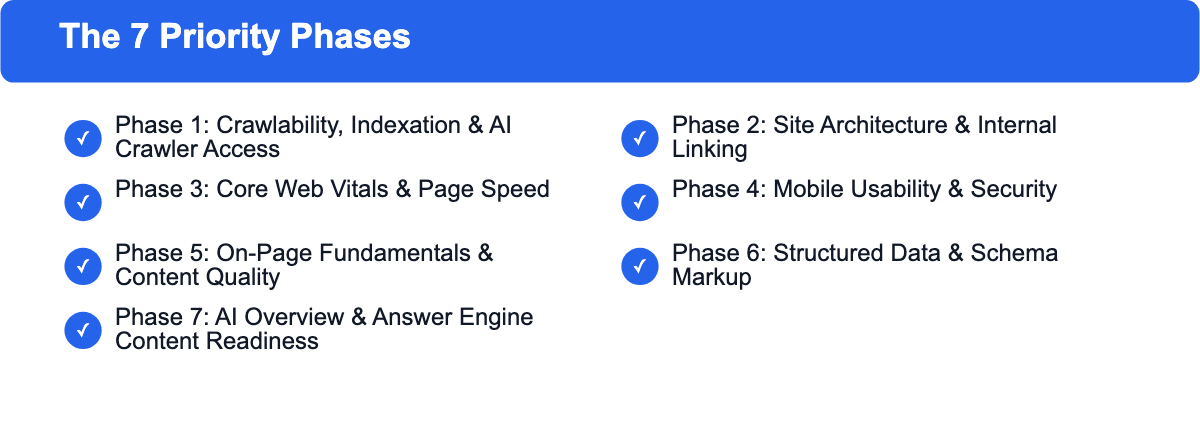
This checklist is built around sequence, not just coverage. You fix crawl blockers first, because nothing downstream matters until Google (and now AI crawlers) can actually reach your pages. Then you clean up architecture and speed, because those affect every page at once. Only after that do you get into page-level content and schema work, where the returns are real but narrower.
One thing we do differently from most checklists you'll find: we don't treat AI crawler access as a bonus section tacked onto the end. GPTBot, ClaudeBot, and PerplexityBot read the same robots.txt file Googlebot does, so we check them in the same pass, as part of Phase 1. If you're auditing crawlability anyway, you're already looking at that file. There's no reason to come back to it 40 items later.
Forty checks total, in seven phases, in the order we'd actually run them on a live site.
Phase 1: Crawlability, Indexation & AI Crawler Access (Checks 1-9)
Nothing else on this list is worth doing if search engines and AI crawlers can't reach your pages. Start here every time, more on that in SEO Best Practices.
1. Confirm robots.txt isn't blocking search engines
Pull up yoursite.com/robots.txt directly and read it. Look for a stray Disallow: / left over from a staging environment, or a rule that accidentally blocks an entire subfolder you actually want indexed. This sounds too basic to matter, but it's one of the most common single causes of a site losing most of its organic traffic overnight after a redesign or migration.
2. Check whether AI crawlers are allowed or intentionally blocked
Look for GPTBot, ClaudeBot, PerplexityBot, Google-Extended, and Amazonbot in your robots.txt. There's no universally correct answer here; some publishers deliberately block AI crawlers to protect content from being used in training data, and that's a legitimate call. What matters is that the current state is a decision you made, not an accident inherited from a default WordPress security plugin setting.
3. Review XML sitemap health
Your sitemap should only contain canonical, indexable, 200-status URLs. Check for old redirected URLs still sitting in the sitemap, orphaned entries pointing to deleted pages, and confirm the sitemap is actually referenced in robots.txt and submitted in Search Console.
4. Audit noindex tags for accidental exclusions
Crawl the site and pull every page with a noindex tag or meta robots directive. It's common to find important pages, like a pricing page or a top-performing blog post, carrying a noindex tag left over from a staging build that never got cleaned up before launch.
5. Review Search Console crawl errors
Check the Pages report in Google Search Console for "Not found (404)," "Crawled - currently not indexed," and "Discovered - currently not indexed" categories. The second and third are usually more informative than a flat 404 count, since they tell you Google found the page but decided not to bother indexing it, which is often a content quality signal rather than a technical one.
6. Find and fix orphan pages
An orphan page has no internal links pointing to it from anywhere else on the site. Crawlers and users alike find these pages only through a sitemap, if at all. Run a full site crawl, compare the list of crawled URLs against internal link data, and either link to orphaned pages that deserve traffic or remove ones that don't.
7. Check canonical tag implementation
Every indexable page should have a self-referencing canonical unless it's intentionally pointing elsewhere (like a paginated series pointing to page 1). Watch for canonicals that point to a redirect, or worse, to a completely unrelated URL, both of which quietly tell search engines to ignore the page you're trying to rank.
8. Confirm critical content renders without JavaScript
Use Search Console's URL Inspection tool or a rendering test to see what a crawler actually sees after JavaScript executes. If your main content, headings, or internal links only appear after a client-side render that fails or times out, you're relying on Google's rendering budget to save you, which isn't guaranteed, and matters even more for AI crawlers that often skip JavaScript execution entirely.
9. Add or verify an llms.txt file
This one's newer and still evolving: a plain text file at the root of your domain, meant to give AI systems a structured summary of what your site covers and where the important pages live. Google has said it doesn't use llms.txt for Search, so having or skipping one makes no difference to your Google rankings. Some other AI crawlers may still reference it, which makes it an optional addition rather than a priority. If you already have one, just check that it still matches your current site structure.
Phase 2: Site Architecture & Internal Linking (Checks 10-15)
Once crawlers can reach your pages, the next question is how efficiently they can move between them, and how clearly that structure signals what matters most.
10. Map click depth to your most important pages
Click depth is how many clicks it takes to reach a page from your homepage. Pages buried more than 3-4 clicks deep get crawled less often and rank worse, even if the content itself is strong. Pull a full site crawl and check the click-depth distribution for your revenue-driving or highest-intent pages specifically, more on that in SEO Best Practices.
11. Fix broken internal links
Broken internal links waste crawl budget and hand users a dead end. Run a crawler like Screaming Frog, filter for internal links returning 4xx or 5xx status codes, and fix or remove them. This is mechanical work, but it adds up on sites that have existed for a few years and gone through multiple redesigns.
12. Review topical cluster and internal linking structure
Check whether related content actually links to related content. A well-built cluster has a pillar page linking out to supporting articles, and those supporting articles linking back to the pillar and to each other where relevant. Loose, disconnected content islands are a common finding on sites that publish a lot but never go back and interlink older posts with newer ones.
13. Audit anchor text quality and diversity
Look at the anchor text used for internal links pointing to your priority pages. Generic anchors like "click here" or "read more" waste a signal that could otherwise reinforce what a page is about. At the same time, watch for over-optimized, exact-match anchor text repeated identically across dozens of links, which can look manipulative rather than natural.
14. Eliminate redirect chains
A redirect chain is when URL A redirects to B, which redirects to C, before finally landing on the live page. Each hop adds latency and dilutes link equity slightly. Crawl the site for chains longer than one hop and point them directly at the final destination.
15. Check breadcrumb navigation and markup
Breadcrumbs help both users and crawlers understand where a page sits in your site hierarchy, and when marked up correctly with BreadcrumbList schema, they can also show up directly in search results. Confirm breadcrumbs exist on deep pages and that the visible trail matches your actual URL structure.
Phase 3: Core Web Vitals & Page Speed (Checks 16-22)
Speed affects every page on the site simultaneously, which is exactly why it comes before page-level content work. A single fix here can move the needle across your whole domain.
16. Measure Largest Contentful Paint (LCP)
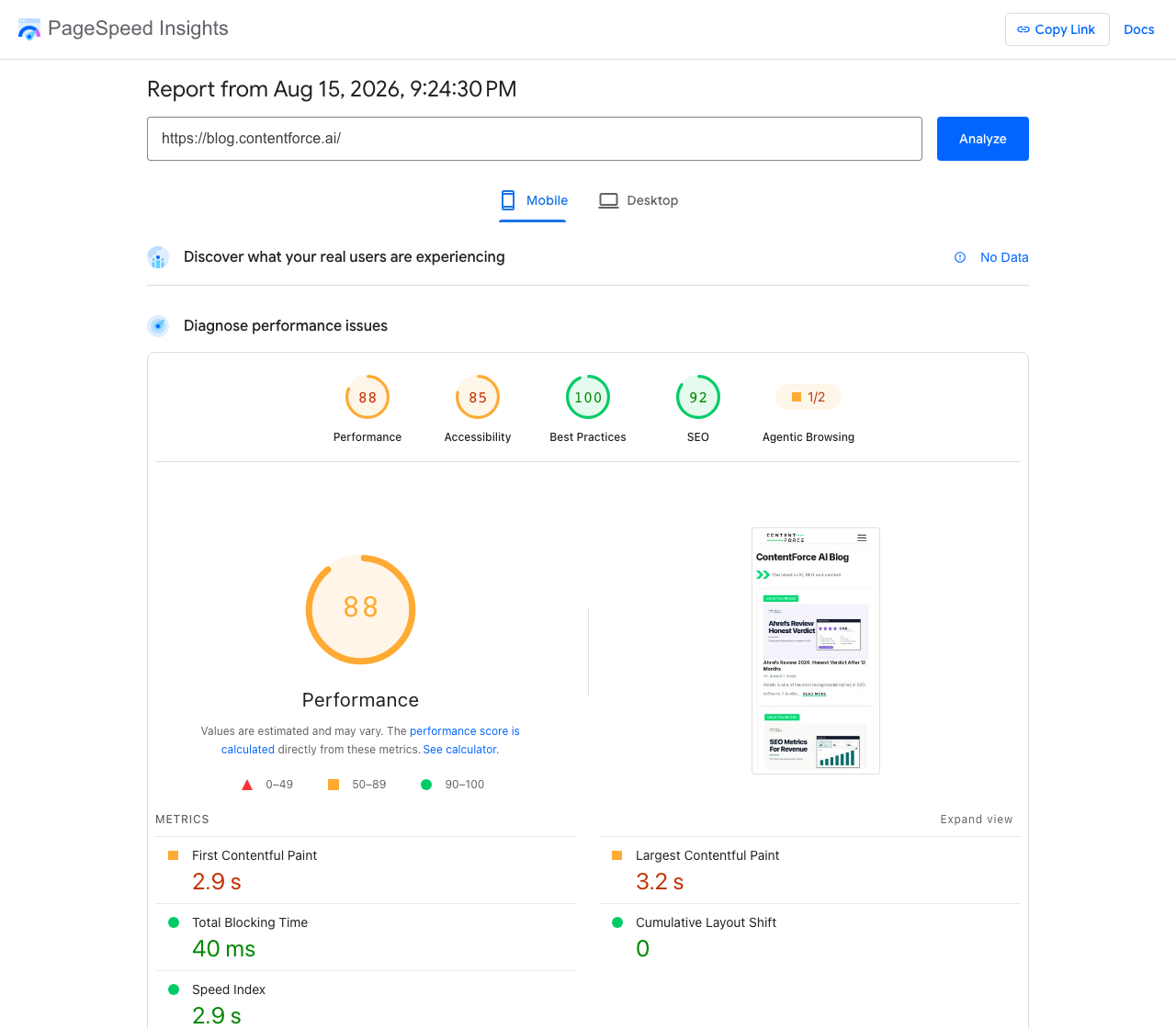
LCP measures how long it takes for the largest visible element, usually a hero image or headline, to render. Google's threshold for "good" is under 2.5 seconds. Check this in PageSpeed Insights or Search Console's Core Web Vitals report, using real field data rather than a single lab test, since actual user conditions vary a lot more than a controlled test environment does.
17. Measure Interaction to Next Paint (INP)
INP replaced First Input Delay as a Core Web Vital and measures how responsive your page feels when a user actually interacts with it, like tapping a menu or filling out a form. The target is under 200ms. Heavy JavaScript execution on interaction, not just on load, is the usual culprit here.
18. Measure Cumulative Layout Shift (CLS)
CLS tracks unexpected visual movement, like a button shifting down right as a user is about to tap it because an ad or image loaded late without a reserved size. The target is under 0.1. Set explicit width and height attributes on images and embeds to prevent this.
19. Check server response time
Time to First Byte should generally stay under 200ms. A slow TTFB caps how fast every other speed metric can possibly be, since nothing on the page can start rendering until the server responds. Check hosting, database query performance, and whether a CDN is actually configured correctly rather than just installed.
20. Optimize images
Look for oversized image files, missing next-gen formats like WebP or AVIF, and images that aren't properly compressed for their display size. This is usually the single fastest speed win available on a content-heavy site, since images often account for the majority of total page weight.
21. Eliminate render-blocking resources
CSS and JavaScript files that load in the page head before content can render will delay everything behind them. Defer non-critical scripts, inline critical CSS, and load the rest asynchronously where your setup allows it.
22. Confirm text compression is enabled
Gzip or Brotli compression should be active on your server for text-based resources like HTML, CSS, and JavaScript. This is usually a one-time server configuration check, but it's worth confirming directly rather than assuming your host has it turned on by default.
Phase 4: Mobile Usability & Security (Checks 23-27)
Google has indexed mobile-first for years now, and security issues can tank rankings and user trust immediately, so both belong here before you invest more time in content-level work.
23. Test mobile usability and touch target sizing
Use Search Console's mobile usability report and manually test the site on an actual phone, not just a resized browser window. Check that buttons and links have enough spacing to tap accurately and that text is legible without pinch-zooming.
24. Confirm mobile and desktop content parity
Since Google primarily uses the mobile version of your site for indexing, any content, links, or structured data present on desktop but missing on mobile effectively doesn't exist for ranking purposes. Compare both versions side by side, especially for sites still running separate mobile templates.
25. Verify HTTPS is implemented site-wide
Every page should load over HTTPS with a valid certificate, and every HTTP version should 301 redirect to its HTTPS equivalent. Check this across your whole domain, not just the homepage, since older subdomains or legacy pages sometimes get missed during a migration.
26. Check for mixed content warnings
Mixed content happens when an HTTPS page still loads some resources, like images or scripts, over plain HTTP. Browsers flag this, and it can silently break page functionality or trigger security warnings that scare off users. Browser dev tools will list these directly in the console.
27. Confirm SSL certificate validity
Check the certificate's expiration date and that the full chain, including intermediate certificates, is properly installed. An expired or misconfigured certificate is one of the fastest ways to lose both rankings and user trust at the same time.
Phase 5: On-Page Fundamentals & Content Quality (Checks 28-34)
With the technical foundation solid, this is where you start looking at individual pages and whether they're actually saying the right thing, clearly.
28. Audit title tags for length and duplication
Title tags should generally stay under about 60 characters to avoid truncation in search results, and every page should have a unique one. Duplicate title tags across multiple URLs are a common and easily fixed finding, especially on sites using templated category or filter pages.
29. Audit meta descriptions for length and duplication
Meta descriptions don't directly affect rankings, but they affect click-through rate, which does matter. Keep them under roughly 155-160 characters, make sure none are missing entirely, and check for duplicates across similar pages.
30. Check heading hierarchy
Each page should have one clear H1, and H2s and H3s should nest logically underneath it rather than skipping levels or being used purely for visual styling. A page that jumps from an H2 straight to an H4 without an H3 in between makes both accessibility tools and search engines work harder to understand your content structure.
31. Identify thin or duplicate content
Thin content is a page too short or too generic to genuinely satisfy the search intent behind its target query. Duplicate content, whether it's near-identical product descriptions or boilerplate text reused across dozens of location pages, dilutes ranking signals across multiple URLs instead of concentrating them on one strong page.
32. Check for keyword cannibalization
This happens when two or more pages on your own site target the same query, splitting both ranking signals and click-through data between them instead of consolidating on one authoritative page. Pull your organic keyword data and look for multiple URLs ranking for the same or very similar terms.
33. Audit image alt text
Alt text should describe the image accurately for accessibility purposes first, and it also gives search engines additional context about page content. Missing alt text on meaningful images, not decorative ones, is a common and quick fix once you've identified where it's missing.
34. Review content freshness and last-updated signals
For time-sensitive topics especially, check when content was last substantively updated versus when it was originally published. A page still citing 2023 pricing or an outdated statistic in 2026 is a credibility problem for readers and a staleness signal for search engines, independent of everything else on the page being technically sound.
Phase 6: Structured Data & Schema Markup (Checks 35-38)
Schema doesn't create rankings on its own, but it helps search engines and AI systems parse your content correctly, and it's a prerequisite for a lot of rich result formats.
35. Validate existing schema markup
Run your key page templates through Google's Rich Results Test or Schema Markup Validator. It's common to find schema that was implemented correctly at some point but broke silently after a theme update or plugin change, and nobody noticed because there's no visible symptom until you specifically check.
36. Add Article or BlogPosting schema
For blog content specifically, this schema type gives search engines structured signals about publish date, author, and headline that plain HTML doesn't communicate as reliably. Confirm the dates in the schema actually match what's visible on the page.
37. Add FAQPage schema where relevant
If a page genuinely contains a question-and-answer format, FAQ schema can earn extra visibility in search results. Don't force it onto content that isn't actually structured as Q&A just to get the schema; that's a quality violation, not a growth tactic.
38. Add Organization and breadcrumb schema
Organization schema at the site level helps establish entity information like your logo, social profiles, and official name in a machine-readable format. Combined with the breadcrumb markup from Phase 2, this rounds out the structured data foundation most sites need.
Phase 7: AI Overview & Answer Engine Content Readiness (Checks 39-40)
This phase is different from Phase 1's AI crawler access checks. Those were about whether AI systems can reach your content at all. These two checks are about whether your content is actually structured to get cited once they do.
39. Format key answers for direct extraction
AI Overviews and answer engines tend to pull short, self-contained answers, often the first sentence or two directly under a heading that matches the query. Check whether your most important pages lead with a clear, direct answer before diving into supporting detail, rather than building up to the answer several paragraphs in.
40. Add original data or citations worth quoting
Generic, widely repeated advice is easy for an AI system to paraphrase without ever citing your specific page as the source. Original data, a real case study, or a specific number you can back up gives both human readers and AI systems a concrete reason to point back to you specifically instead of a summarized, unattributed paraphrase.
What a Live Audit Actually Finds
To see how this plays out in practice, we ran a full crawl through Ahrefs Site Audit on a live, actively-maintained site: 355 pages crawled, checked against 173 possible issue types. Only 35 of those 173 issue types actually returned findings, which is itself worth noting; most of a standard checklist won't apply to any given site, and chasing every theoretical issue instead of the ones actually present is a waste of time.
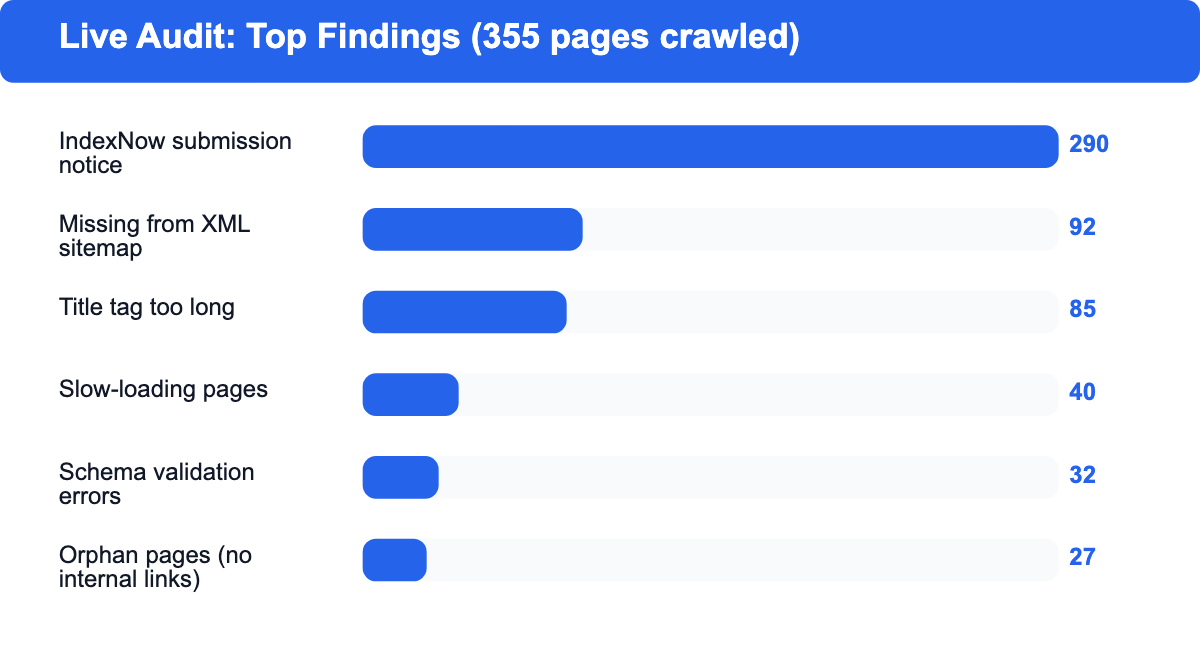
What did show up, in order of how many pages were affected:
- 290 pages flagged for IndexNow submission, a notice-level item about faster indexing signaling rather than a problem
- 92 indexable pages missing from the XML sitemap
- 85 pages with title tags too long
- 40 pages flagged as slow to load
- 32 pages with schema markup that failed validation
- 27 pages with missing or empty meta descriptions
- 27 orphan pages with no incoming internal links, flagged as an error-level issue
- 27 pages missing Open Graph tags
- 20 pages with meta descriptions too short
- 13 pages missing image alt text
Two things stand out. First, the highest-volume finding (missing sitemap entries) is exactly a Phase 1 issue, confirming that crawl and indexation problems tend to be the most widespread, not the most obvious. Second, orphan pages showed up as an error-level issue affecting 27 pages on a single mid-size site, which lines up with how often that specific check gets skipped on real audits: it requires cross-referencing a full crawl against internal link data rather than reading a single report, so it's an easy one to shortcut.
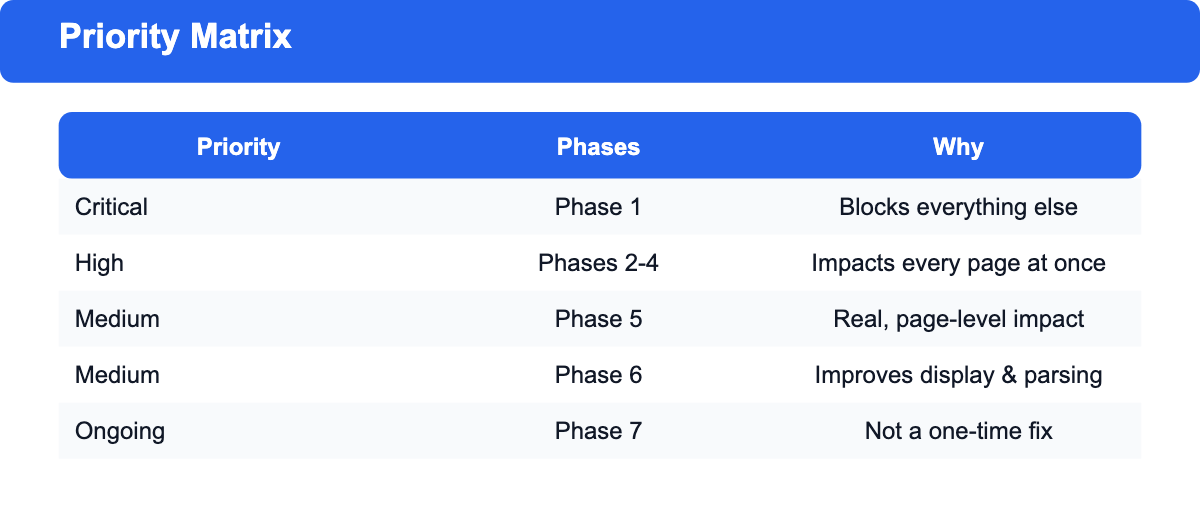
Priority Matrix: What to Fix First
| Priority | Phases | Why it comes first |
|---|---|---|
| Critical | Phase 1 (Crawlability, Indexation, AI Crawler Access) | Nothing downstream matters if crawlers can't reach the page |
| High | Phase 2 (Architecture), Phase 3 (Speed), Phase 4 (Mobile & Security) | Affects every page on the site simultaneously; broad-impact fixes |
| Medium | Phase 5 (On-Page & Content) | Page-level fixes with real but narrower impact per page |
| Medium | Phase 6 (Structured Data) | Enhances how well-crawled, well-written pages get displayed and understood |
| Ongoing | Phase 7 (AI Overview Readiness) | Not a one-time fix; needs revisiting as content and AI search behavior evolve |
If you only have time for one pass, work top to bottom through this table rather than jumping straight to whichever phase feels most interesting. A perfectly schema-marked page that Google can't crawl gets you nothing.
Tools You Need for This Audit
You don't need an expensive stack to run this checklist. Google Search Console and Google PageSpeed Insights are free and cover a meaningful chunk of Phases 1, 3, and 4 directly. Screaming Frog's free tier crawls up to 500 URLs, which is enough for most small-to-mid-size sites to cover architecture, redirects, and on-page checks in Phases 2 and 5. Google's Rich Results Test handles schema validation for Phase 6 at no cost.
For sites larger than 500 pages, or if you want issue tracking over time instead of a one-off crawl, a paid site audit tool like Ahrefs becomes worth the cost, largely because it tracks changes between crawls automatically rather than requiring you to diff two exports by hand.
Blog Outline Generator: headings, key points and FAQ candidates for your topic. Free, no signup.
How Often to Run a Full SEO Audit
A full pass through all seven phases makes sense roughly once or twice a year for most sites, plus immediately after any major event: a redesign, a CMS migration, a significant traffic drop, or a large batch of new content going live at once. Between full audits, Phase 1 crawlability checks and Core Web Vitals in Phase 3 are worth a lighter monthly check, since those are the two areas most likely to break silently from a plugin update or hosting change with no obvious warning.
Frequently Asked Questions
How long does a full 40-point SEO audit take?
For a site under a few hundred pages, expect one to three days for a thorough manual pass, including time to actually fix the highest-priority findings rather than just document them. Larger or more technically complex sites can take a week or more, particularly if the architecture and internal linking phases turn up structural issues that need more than a quick fix.
Do I need to fix every single issue an audit tool flags?
No. Site audit tools flag issues by severity, but severity alone doesn't account for how much traffic or revenue a given page actually drives. A warning-level issue on your highest-converting landing page usually deserves attention before an error-level issue on a page nobody visits.
Is technical SEO still worth prioritizing now that AI search is growing?
Yes, and more than before, not less. AI crawlers still need to reach and parse your content before they can cite it anywhere, which means the crawlability and indexation work in Phase 1 now serves two audiences instead of one. The content-level AI readiness work in Phase 7 is additive on top of solid technical fundamentals, not a replacement for them.
What's the difference between a technical SEO audit and a full SEO audit?
A technical audit typically stops at Phases 1 through 4 in this checklist: crawlability, architecture, speed, and mobile/security. A full SEO audit, like this one, continues through on-page content, structured data, and AI search readiness, covering the parts of a site's performance that pure technical fixes can't reach on their own.