
Guide
Semantic SEO: Entities, Topics and How Google Connects Them

Semantic SEO optimizes content around a topic and the entities inside it instead of a single keyword, so one page can rank for many related variations. Google reads entities through the Knowledge Graph, Hummingbird and RankBrain and scores their centrality as salience. A four-step framework plus a salience check in Google Cloud's Natural Language API produces fewer, stronger pages.
- Classify search intent as informational, navigational, commercial or transactional before writing
- Group keywords that share the same intent and entities into one topic page
- Write naturally, then structure headings, tables, lists and schema for machine parsing
- Link broad pages to specific entity pages using descriptive anchor text
- Run the page through the Natural Language API demo to check entity salience
Semantic SEO is the practice of optimizing content around a topic and the entities inside it, rather than a single keyword. Instead of repeating a phrase until Google notices it, you build content that clearly identifies what your page is about, who or what it involves, and how those things relate to each other. Google's ranking systems read that structure directly, then use it to decide whether your page deserves a spot on the SERP.
Most explanations stop at that definition. This one doesn't. It walks through what an entity actually is in Google's systems, how the Knowledge Graph and Google's Natural Language API connect entities to topics, and how you can check whether your own content is being read as a coherent topic or as a pile of disconnected keywords.
What Is Semantic SEO?
Semantic SEO means writing and structuring content around meaning, topics, and the relationships between concepts, instead of around isolated keywords. A page built with semantic SEO in mind answers the full scope of a question, names the specific things involved (people, products, places, ideas), and makes the connections between those things explicit enough for a machine to parse.
The contrast with keyword-only SEO is direct. Keyword SEO treats "best running shoes for flat feet" as a string to match. Semantic SEO treats the same query as a topic with several implied sub-questions: which shoe models, what makes a shoe suitable for flat feet, what arch support actually does, and how those shoes compare on price and durability. A page that answers all of that, using the actual product and feature names involved, will typically outperform a page that just repeats the search phrase a dozen times.
This is why word count and phrase repetition stopped being reliable ranking levers years ago. Google isn't counting how many times you wrote "running shoes." It's checking whether your page actually contains and connects the concepts a person searching that phrase needs.
That's the whole shift in one sentence.
Why Semantic SEO Replaced Keyword Matching
Semantic SEO isn't a trend someone invented. It's the direct result of three specific changes Google made to how it reads and ranks content, and it's worth knowing all three, because they explain why different parts of "good SEO" exist at all.
Google launched the Knowledge Graph on May 16, 2012, giving search results access to a structured database of real-world entities, people, places, organizations, and the facts connecting them, instead of relying only on the words present on a page. This is the system responsible for the fact panels that appear next to search results.
A year later, Google rolled out Hummingbird, announced on September 26, 2013 after roughly a month already live. Hummingbird changed how Google parsed a query itself, moving from matching individual keywords to interpreting the full phrase for intent and context. Google described it internally as the biggest change to the algorithm since 2001.
Then in 2015, Google introduced RankBrain, a machine learning system built on top of Hummingbird's language understanding. RankBrain was designed to interpret the roughly 15% of daily searches Google had never seen before, queries with no exact historical match, by relating them to concepts and entities it already understood rather than requiring an exact keyword hit.
Put together, these three systems moved Google from matching strings to reasoning about things: what a query is really asking, what entities are involved, and which pages actually address that need. Semantic SEO is simply the practice of writing content that plays to that system instead of fighting it.

None of this is new. It's just rarely explained mechanically, which is why the next section goes further than most guides bother to.
SEO Title Generator: eight title tag variations, sized for the SERP and intent-matched. Free, no signup.
What Are Entities in SEO? (How Google's Knowledge Graph Works)
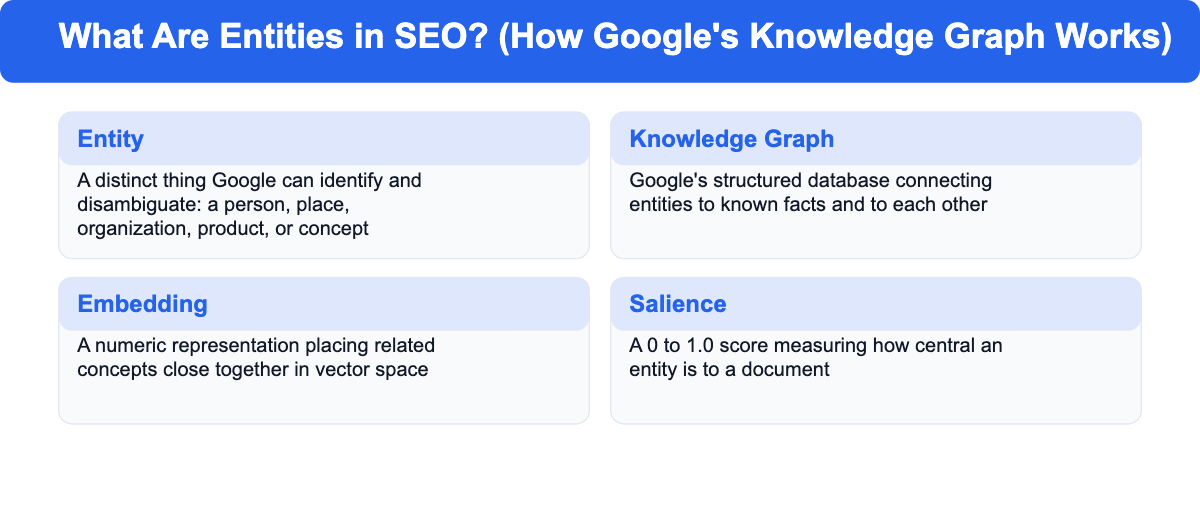
An entity is anything Google's systems can identify as a distinct, definable thing: a person, a place, an organization, a product, or an abstract concept. What makes something an entity in Google's sense isn't that it's important to you. It's that Google can disambiguate it from other things with similar names and attach known facts to it. "Apple" the company and "apple" the fruit are two different entities to Google, resolved by the surrounding context.
Google doesn't rank pages purely on the words they contain. It ranks them partly on whether the entities a page discusses, and the relationships between those entities, match what a searcher is actually looking for. That's the part most keyword-first SEO advice skips entirely.
How Google Identifies Entities
Google identifies entities in text using natural language processing, the same category of technology exposed publicly through Google Cloud's Natural Language API. That API's entity analysis method finds named entities in a piece of text, classifies them by type (person, organization, location, product, and more), and assigns each one a salience score between 0 and 1.0, a measure of how central that entity is to the overall document.
Salience is a useful concept even if you never touch the API directly. If an article about business bank accounts mentions "N26" once in a passing comparison list, N26 has low salience on that page. If an entire section explains N26's fee structure, account opening process, and app features, N26 has high salience, and that page becomes a much stronger candidate to rank for searches specifically about N26.
That's the difference between mentioning something and actually covering it.
Disambiguation works the same way behind the scenes. Google uses surrounding words and known relationships (stored in the Knowledge Graph) to decide which specific entity a word refers to, then connects that entity to everything else it already knows about it. You don't get to skip this step by hoping context is obvious; if it isn't explicit in the text, Google has to guess.
Entities and Embeddings
The mechanism that lets Google relate entities and topics to each other mathematically is called an embedding. An embedding represents a word, phrase, or entity as a set of numbers, a point in a high-dimensional space, positioned so that related concepts sit close together and unrelated concepts sit far apart.
You don't need to understand the math to use this practically. Content that consistently uses the vocabulary, related terms, and named entities a real expert would use ends up positioned near other authoritative content on that topic in Google's internal representation. Content that uses vague, generic phrasing, even if it technically contains the target keyword, sits further from where topical authority actually clusters.
This is also why synonyms and closely related phrasing beat exact-match repetition. Google doesn't need you to repeat "semantic SEO" ten times. It needs the surrounding content to consistently reference the entities and related concepts, things like Knowledge Graph, embeddings, topic clusters, and entity salience, that genuinely belong to this topic.
You may still see this called "LSI keywords" in older SEO advice. That name isn't accurate (LSI is a specific 1988 patent technique unrelated to how modern embeddings work), but the underlying advice, use related terms and synonyms instead of repeating one phrase, is the same idea this section describes.
How Google Connects Topics, Entities and Search Intent
Semantic SEO and semantic search are two sides of the same shift. Semantic search is what Google does when it interprets meaning and intent instead of matching strings, and semantic SEO is how you build content for that system. Once Google can identify the entities on a page, it uses topic-level structures to decide how authoritative that page (and the site around it) is on the subject. The most common structure is the pillar-and-cluster model: one comprehensive "pillar" page covers a broad topic, and several narrower "cluster" pages each cover a related subtopic in depth, all linked together.
This structure works because it mirrors how entities relate to each other in the Knowledge Graph. A pillar page on "business banking" naturally connects to cluster pages on specific entities like individual providers, account types, or fee structures, the same way those entities are connected in Google's own data. Internal links between these pages aren't just navigation. They're an explicit signal reinforcing relationships Google's systems are already trying to infer from context.
This same topic-and-entity connection is what powers AI Overviews and other AI-generated search answers. When a query triggers an AI-generated summary, the system typically breaks the original question into several related sub-queries, a process often called query fan-out, then pulls supporting facts from multiple pages that each cover part of the topic well. A page that clearly names its entities and answers a specific sub-question completely is far more likely to be pulled into that synthesis than a page that only vaguely gestures at the topic.
If you want a deeper, step-by-step process for planning topic and entity coverage across an entire site, see our guide on how to build a topical map for SEO. That guide covers the planning and content-architecture side. This one's about the entity and meaning layer underneath it.
Semantic SEO vs. Traditional Keyword SEO
The clearest way to see what changed is to compare the two approaches directly. It's a short table, but it explains most of the confusion around this topic.
| Keyword SEO | Semantic SEO | |
|---|---|---|
| Unit of optimization | A single keyword phrase | A topic and its related entities |
| Success signal | Exact-match keyword density | Entity coverage, salience, and topical depth |
| Content strategy | One page per keyword variation | One page covering a full topic and its variations |
| Typical failure mode | Thin pages that repeat a phrase without answering the question | Avoided by design, since the goal is answering the topic, not the phrase |
| Example | Separate pages for "cheap business account" and "affordable business account" | One page covering business account costs that naturally ranks for both |
The practical effect is fewer, stronger pages instead of many thin ones. A site built around keyword SEO tends to accumulate near-duplicate pages targeting minor keyword variations. A site built around semantic SEO consolidates those into single, comprehensive pages, which also avoids the internal competition, usually called cannibalization, that comes from multiple pages chasing the same underlying topic.
Fewer pages, each one doing more work. That's the trade you're making.
How to Do Semantic SEO: A Practical Framework
Knowing what entities and embeddings are only matters if it changes how you plan and write content. Here's how to do semantic SEO in practice, broken into four steps.
Map Content to Search Intent
Before writing, classify what the searcher actually wants using the standard four-way split: informational (they want to learn something), navigational (they want a specific site or page), commercial (they're comparing options before buying), and transactional (they're ready to act). A page optimized around the wrong intent, a comparison page written like a product manual, for example, won't do well no matter how well it covers entities. It isn't answering the actual reason someone searched.
Group Keywords Into Topic Clusters
Don't treat every keyword variation as a separate target. Group keywords that share the same underlying intent and entity set, then build one page (or one pillar-and-cluster group) to cover all of them. "Business account fees," "business banking costs," and "how much does a business account cost" are the same topic wearing different words. Writing one strong page for that topic, using the actual entities involved (specific providers, fee types, account tiers), will rank for all three without needing three pages.
Write for People, Structure for Machines
Two things need to happen at once. The writing itself should read naturally, using the vocabulary a knowledgeable person would actually use, not keyword-stuffed phrasing bent into awkward sentences. Structurally, the page should use clear, descriptive headings, well-formed HTML elements (proper heading levels, real tables instead of images of tables, lists instead of comma-separated walls of text), and structured data where it genuinely applies, such as FAQ or article schema.
Worth being honest here: the evidence on structured data is mixed. Backlinko's own large-scale ranking correlation study found no direct correlation between schema markup and rankings, while several other SEO teams still recommend it for a different reason. Schema improves how confidently and quickly search engines and AI systems can extract and reuse specific facts, and it can unlock visual features like rich results, independent of whether it moves you up a position. Both things can be true at once. Schema may not be a ranking factor by itself, but it still helps machines parse your entities correctly.
Link Entities Together Internally
Internal links are one of the clearest, most controllable ways to tell Google how your content is related. Link from a broad page to the specific entity or subtopic pages beneath it, and use anchor text that describes what the linked page is actually about rather than generic phrases like "click here." A link from a business banking overview to a specific provider's page, anchored with that provider's name, reinforces the same entity relationship Google's already trying to infer from your content.
Quick recap:
- Match content to the right search intent before writing
- Group related keywords into single topic-level pages instead of many thin ones
- Write naturally, but structure headings, tables, and schema for machine parsing
- Use internal links and descriptive anchor text to make entity relationships explicit
How to Check If Your Content Is Semantically Optimized
Most semantic SEO advice stops at "cover the topic well," without giving you a way to verify it. Here's a concrete way to check.
- Run your content through Google Cloud's Natural Language API entity analysis. The public demo lets you paste in a page of text and see exactly which entities Google's own NLP system extracts, what type it assigns each one, and its salience score. If the entities that come back don't match what your page is actually about, or if your target entity has a low salience score, that's a direct sign your content is diluted rather than focused.
- Check whether your key entities have a clear, disambiguated home. Search for the specific product, provider, or concept name your page centers on and see whether Google surfaces a Knowledge Panel or consistently disambiguates it correctly. Entities with a Wikipedia or Wikidata page tend to be recognized more reliably, since those sources feed the Knowledge Graph directly.
- Read your own headings as a list, without the body text. If someone could understand the full scope of your topic from the headings alone, entity and topic coverage is probably strong. If the headings are vague ("Benefits," "Conclusion," "More Tips") rather than naming actual entities and sub-questions, the page likely reads as generic to Google's systems too.
- Look for near-duplicate pages on your own site targeting close keyword variants. If you find two or three pages that could be merged into one stronger page covering the full entity and topic set, that fragmentation is itself a signal the site isn't organized around topics yet.
Frequently Asked Questions
What is the difference between SEO and semantic SEO?
Traditional SEO optimizes for individual keywords and their exact-match variations. Semantic SEO optimizes for a topic and the entities inside it, so a single well-built page can rank for many related keyword variations at once instead of needing a separate page for each one.
What are some examples of semantic SEO in practice?
A single comprehensive guide to business bank accounts that names specific providers, fee structures, and account types, and links to dedicated pages on each provider, is a semantic SEO approach. The opposite would be five separate thin pages, each targeting one keyword variation like "cheap business account" or "free business account," without meaningfully connecting them.
Is keyword research still worth doing if semantic SEO is about topics?
Yes. Keyword research still tells you what people search for and how they phrase it, which shapes your headings and vocabulary. What changes is the output: instead of building one page per keyword, you use keyword research to confirm which keywords belong to the same topic, then build one strong page that covers all of them.
Do I need a specific tool to do semantic SEO?
No specific tool is required. Google's Cloud Natural Language API demo is a free way to see how your content is parsed into entities, and standard keyword research tools still help identify related terms and questions. The core work isn't a tool feature. Covering a topic completely and naming its entities clearly is a writing and content-planning discipline, and you can't buy your way past that part.