
Guide
Ecommerce SEO Tips That Work: A Practical Guide From Practitioners

The ecommerce SEO tips that pay off first are to fix category pages, answer buyer questions on product pages, keep product details in the page source, control faceted navigation and map every redirect before a URL changes. The ContentForce guide ties each tip to Google documentation and adds tips from six practitioners.
- Add buying guidance and subcategory links to your top category pages
- Rewrite product pages so they answer the questions buyers actually ask
- Check that product details appear in the page source, not only on screen
- Block or limit faceted navigation URLs that create endless filter combinations
- Map every old URL to its new URL and redirect with 301
- Wait a few weeks, compare the same numbers and repeat
The ecommerce SEO tips that pay off first are to fix your category pages, answer buyer questions on product pages, keep product details in the page source, control faceted navigation and map every redirect before a URL changes. Category and product pages carry the searches closest to a sale, so they come before the blog. This guide groups the tips by page type, ties each rule to what Google says in its ecommerce documentation, and adds first-hand tips from six practitioners who work on online stores every week.
Which ecommerce SEO tips matter most?
Most stores don't lack ideas. They lack an order. The table below is our own assessment of effort and impact for a store that already has products indexed, and it's the order we'd work in ourselves.
| Tip | Effort | Impact | Where it is covered |
|---|---|---|---|
| Add buying guidance to category pages | Low | High | Category page tips |
| Build subcategories that have real search demand | Medium | High | Category page tips |
| Answer buyer questions on product pages | Medium | High | Product page tips |
| Keep product details in the page source | Medium | High | Technical tips |
| Control faceted navigation URLs | Medium | Medium | Technical tips |
| Add Product structured data | Medium | Medium | Product page tips |
| Map redirects before any URL change | Low | High | Technical tips |
None of these needs a new tool. What they'll need is someone who owns the category and product templates, because most of the gains come from fixing a template once and letting it roll out to hundreds of pages. If you're new to the basics, our general SEO tips cover intent, titles and Search Console; this guide only covers what's different for a store.
Research tips: Target buyer needs, not the biggest keyword
A store's keyword list tends to start with the head terms: "work boots", "running shoes", "coffee grinder". Those are the hardest terms to win, and frankly they often aren't the ones that convert. Sasha Berson's tip below puts it plainly: build content around the customer's situation first and fit keywords in later.
Start from the customer's situation
Write down the problems your buyers describe in support tickets, reviews and sales chats. "Waterproof work boots for concrete floors" tells you the material, the job and the pain, and a page that answers it'll beat a generic boots page for that buyer. Phrases like this are long-tail keywords: lower volume, far clearer intent, and usually less competition.
Match each search to the right page type
The same product range can attract four different kinds of search, and each one wants a different page. That's easy to miss. Getting this wrong is the most common reason a good store page doesn't rank: a product page won't win a search where every result is a buying guide.
| Search example | What the searcher wants | Best page type |
|---|---|---|
| work boots | To browse the range | Category page |
| waterproof work boots for concrete floors | A shortlist for one situation | Subcategory or curated landing page |
| brand and model name, size 11 | To buy one specific item | Product page |
| how to break in work boots | Advice before or after buying | Guide or blog post |
Searches that already name a size, a use case or a model are high-intent keywords, and they belong on category, subcategory and product pages, not in the blog.
SEO Title Generator: eight title tag variations, sized for the SERP and intent-matched. Free, no signup.
Category page tips: Treat them as your highest-intent pages
Google says it'll work out which pages on a store matter by looking at how they link to each other, not at the URL structure. Its ecommerce guidance recommends links from menus to category pages, from category pages to subcategory pages, and from subcategory pages to every product page. It also warns that if category pages don't link directly to all products, Googlebot might not find all of them by crawling, because it generally doesn't type queries into your search box.
Add copy that helps someone choose
A grid of product tiles gives a searcher nothing to read, and it gives Google little to understand. Daniel Lofaso suggests 100 to 200 words of buying guidance, links to subcategories and an FAQ block. Keep the copy useful: what to look for, which option suits which buyer, and how sizes or materials differ. Put a short intro above the grid and the longer guidance below it, so shoppers still see products first.
Create subcategories that people actually search for
Subcategories by size, price, end user or use case often convert well because they match a narrower need. Only build one when there's clearly search demand and enough products to fill it; a subcategory with two items isn't much more than a thin page. Link each one from its parent category, and link your best sellers from the home page too. Google says the more internal links a page gets, the more important it looks relative to the rest of your site.
Handle empty categories properly
Seasonal ranges and sold-out lines leave categories with no products. Google recommends a noindex robots meta tag on a category with no items, or a 404 status if your shop removes empty categories from browse and search anyway. Don't leave hundreds of empty listing pages open to crawling; they waste crawl time and frustrate shoppers who land on them.
Product page tips: Answer the buyer, not the manufacturer
Most product pages fail for a simple reason: they'll repeat the manufacturer's description, which also appears on every other shop that sells the item. Google's ecommerce documentation ends with the same advice it gives everyone, which is to create useful and interesting content that's valuable to users. On a product page, that means answering the questions a buyer has before they spend money.
Rewrite descriptions around real questions
Stefan Chiriacescu's afternoon exercise is a good place to start: take your top 20 products, find the five questions people ask most about each, and answer them on the page in plain language. Rehan Ahmed adds the test behind it: does the page explain whether the product will fit the buyer's needs? Fit, sizing, compatibility, care and delivery questions belong on the page, not only in a returns policy.
Collect and show genuine reviews
Reviews answer questions you didn't think to cover, and they'll add fresh text to pages that otherwise never change. Ask for a review after delivery, show them on the product page in text form, and reply to the critical ones. Never write or buy reviews; fake reviews break consumer law in many countries and destroy the trust you're trying to build.
Add Product structured data and a Merchant Center feed
Google says structured data isn't required to appear in Search, but it increases eligibility for product rich snippets showing price, availability, ratings, shipping and returns. Pages where customers can buy should use merchant listing markup. A Google Merchant Center feed is optional for normal results, but it's required for the Shopping tab, and Google says sending both gives it the best chance to understand and verify your data.
Give every variant its own URL
If a shirt comes in five colours, of course each one is a separate thing to buy, and Google recommends that each variant can be identified by its own URL, either as a path segment such as /t-shirt/green or a query parameter such as /t-shirt?color=green. Point the canonical tag of variant pages to the main product URL, and use the same URL in internal links, sitemaps and canonical tags. Google also notes that it ignores fragment identifiers, so /t-shirt#black and /t-shirt#white count as one page.
Technical tips: Rendering, filters, URLs and migrations
Technical problems on stores tend to scale with the catalogue. One broken template can hide details on thousands of products, and one filter menu can create millions of URLs. These four checks catch most of it. A full technical SEO audit covers the rest.
Keep product details in the page source
Johnathan Solorzano's test takes one minute: open a product page, view the source and search for a phrase from the specifications. If it's missing, an app's injecting it after the page loads. Google does render JavaScript, but it queues pages for rendering, and its own documentation says server-side rendering is still a great idea because not all bots can run JavaScript. That matters for AI crawlers too. On Shopify, moving that content into metafields that the theme prints is usually the fix.
Stop faceted navigation from creating endless URLs
Filters for colour, size and price are useful for shoppers, and you shouldn't remove them. However, Google warns that parameter-based filters can generate infinite URL spaces, which leads to overcrawling and slower discovery of new pages. If you don't need filtered URLs in search, block them in robots.txt and keep crawlable links to the products and to one unfiltered listing. If you do need some indexed, use the standard & separator, keep the filter order fixed and return a 404 when a combination has no results. Filtered pages that show the same products are a classic source of duplicate content.
Use readable, stable URLs
Google recommends descriptive words in URL paths, such as /product/black-t-shirt-with-a-white-collar rather than /product/3243, and ?key=value parameters rather than bare values. Don't link internally to session IDs, tracking codes or values like "nearby" that change by user. Every pagination page should have its own URL; Google says that's where it's seeing the most URL mistakes.
Map every redirect before a redesign or replatform
Ivan Vislavskiy's story below, a client that lost 60% of its traffic after a redesign, is the most expensive mistake on this list, and it's also the easiest to prevent. Google's site move guidance says to prepare a mapping from every old URL to its new URL and to use server-side permanent redirects such as 301 or 308, which don't cause a loss in PageRank.
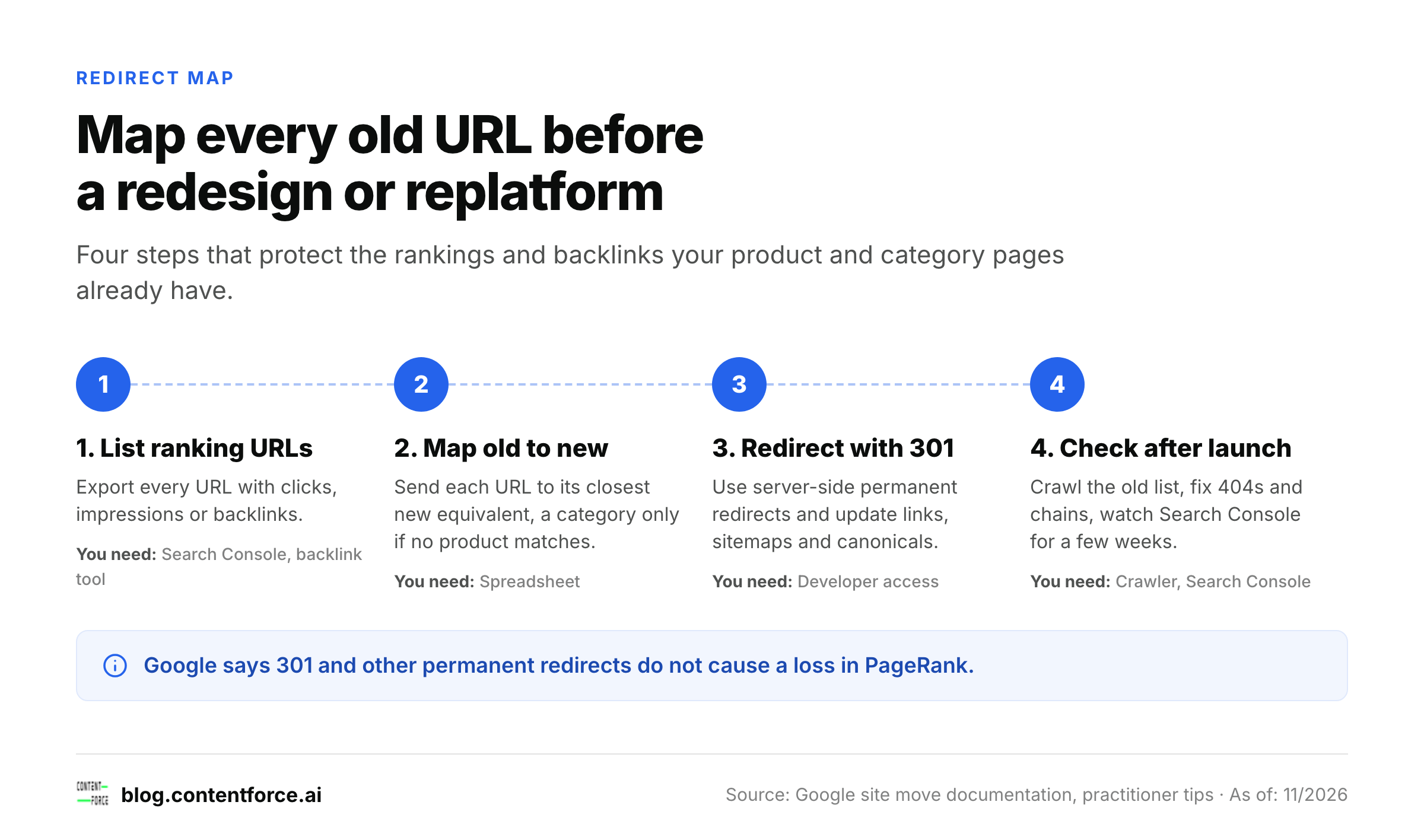
- Export every URL that gets clicks, impressions or backlinks, from Search Console and your backlink tool.
- Map each one to its closest new equivalent; only send a URL to a category when no matching product exists.
- Set up server-side 301 redirects and update internal links, sitemaps and canonical tags to the new URLs.
- After launch, crawl the old list, fix any 404 or redirect chain, and watch Search Console for a few weeks.
Expert tips: ecommerce seo tips from 6 practitioners
We asked people who run SEO for online stores for their single best ecommerce SEO tip. These six are quoted from their submissions and only lightly edited for clarity. Figures inside a tip are the contributor's own statements, not numbers we've verified. After each tip, we add a short note on why it works and how to start.
Fix your category pages before writing another blog post (Daniel Lofaso, CEO & Founder at Digital Elevator)
My tip: fix your category pages before writing another blog post. For most stores, category pages target the highest-intent searches, yet they're often thin product grids with no copy. Add 100-200 words of genuinely useful buying guidance, internal links to subcategories, and an FAQ block, and they tend to start ranking for terms the product pages never will. An additional layer to that is the creation of additional category pages that are backed by search volume. For example, sub-categories by size, price, end-user, or use case often are the types of pages with the highest conversion rates and tend to be relatively easy to rank with some basic on-page SEO.
Daniel Lofaso, CEO & Founder at Digital Elevator.
Our take: A category page sits between a broad search and a specific product, and that's exactly where most buyers start. Pick your five biggest categories by revenue, write the guidance a good shop assistant would give, and check which size, price or use-case subcategories already get impressions in Search Console before you build new ones.
Build content around the customer's need (Sasha Berson, Co-Founder and Chief Growth Executive at Grow Law)
My top tip for successful ecommerce SEO is to focus on creating content based on the customer's particular need, rather than picking a keyword that gets the most traffic. This is something we do at my company when working with clients: we align content with the client's actual circumstances and only later include keywords. For instance, when it comes to an online store dealing with work boots, our focus would be on phrases that address the customer's need, such as "waterproof work boots for concrete floors", rather than repeating "work boots" over and over again.
Sasha Berson, Co-Founder and Chief Growth Executive at Grow Law.
Our take: Need-based phrases describe a situation, so they're easier to answer well and harder for big marketplaces to match with a generic listing. Read your last 50 support emails and reviews, list the situations buyers describe, and check which of them already have a page that answers them directly.
Answer the five questions buyers ask about each top product (Stefan Chiriacescu, Founder & CEO at eCommerce Today)
We run marketing for 200+ Shopify brands. I shared this exact tip on stage at Ecomexpo in Vilnius and at ShopX in Saigon, and it was greatly appreciated by the audience because anyone can do it in an afternoon: take your top 20 products, open 20 tabs, and run a deep research prompt asking what the top 5 most asked questions are about each of those products. Then rewrite each product page so it actually answers those questions, in plain language, right on the page. We do this across our portfolio and it almost guarantees better results in search, in AI answers, and in sales, because you stop describing the product and start answering the buyer.
Stefan Chiriacescu, Founder & CEO at eCommerce Today.
Our take: The questions are the valuable part, so don't skip checking the AI output against your own reviews, returns reasons and support tickets before you rewrite anything. Answer each question in one or two sentences that make sense on their own; that's the format search snippets and AI assistants can quote.
Be authentic and get the basics right (Rehan Ahmed, CEO at Smart Web Agency)
My best ecommerce SEO tip is to be authentic and get the basics right. Write content that solves a real problem for your customers, such as explaining whether a product will fit their needs rather than simply repeating the manufacturer's description. Encourage genuine customer reviews and make sure your website is fast, easy to navigate and straightforward to buy from. These basics are easy to overlook when you are busy chasing the next SEO tactic. Focus on quality of the content over the quantity.
Rehan Ahmed, CEO at Smart Web Agency.
Our take: Speed, navigation and checkout aren't only conversion topics; they'll decide whether a visitor from search stays long enough to buy. Run your best-selling product page through PageSpeed Insights, try the path from search result to checkout on a phone, and fix whatever made you hesitate.
Make sure product details are in the page source (Johnathan Solorzano, Founder at Solo Media Group)
Make sure that the most critical product information is there in the page source, and not just on the screen. On Shopify stores we audit, a third-party app typically loads details such as ingredient lists, sizing and specifications after the page loads, instead of the actual page carrying them, so search engines may not index these details. Right-click, view source, and search for a specific phrase. If it is not in there, you're invisible for the very long-tail keyword that is most likely to convert. Storing that content in Shopify metafields that the theme then displays typically resolves the issue in a few hours.
Johnathan Solorzano, Founder at Solo Media Group.
Our take: The details that apps load late, like ingredients, sizes and specifications, are exactly what people type into very specific searches. You don't need to test every product. Test one per template: if the phrase is missing on one, it's missing on every page that uses the same app.
Create a redirect map before changing URLs (Ivan Vislavskiy, CEO and Co-founder at Comrade Digital Marketing Agency)
A roofing client of ours switched its redesign efforts to a branding agency and saw 60% of its traffic disappear; we worked for four months to recover it. The lesson from that experience is to always create a redirect map before changing URLs on your ecommerce site: find the product and category pages that are already getting rankings and backlinks, and map every changed URL to its new version. Avoid changing URLs when possible, so that you do not lose the SEO power already built up by the old page.
Ivan Vislavskiy, CEO and Co-founder at Comrade Digital Marketing Agency.
Our take: Redesigns are often run by designers and developers, and SEO's usually invited too late. Make the redirect map a launch requirement in the project plan, with a named owner, and keep the old URL list so you can test every redirect on launch day.
Measure and prioritize: Which ecommerce SEO tips to do first
Use Google Search Console for queries, pages and indexing, and your shop analytics for revenue per landing page. Then work through the order below, one page type at a time.
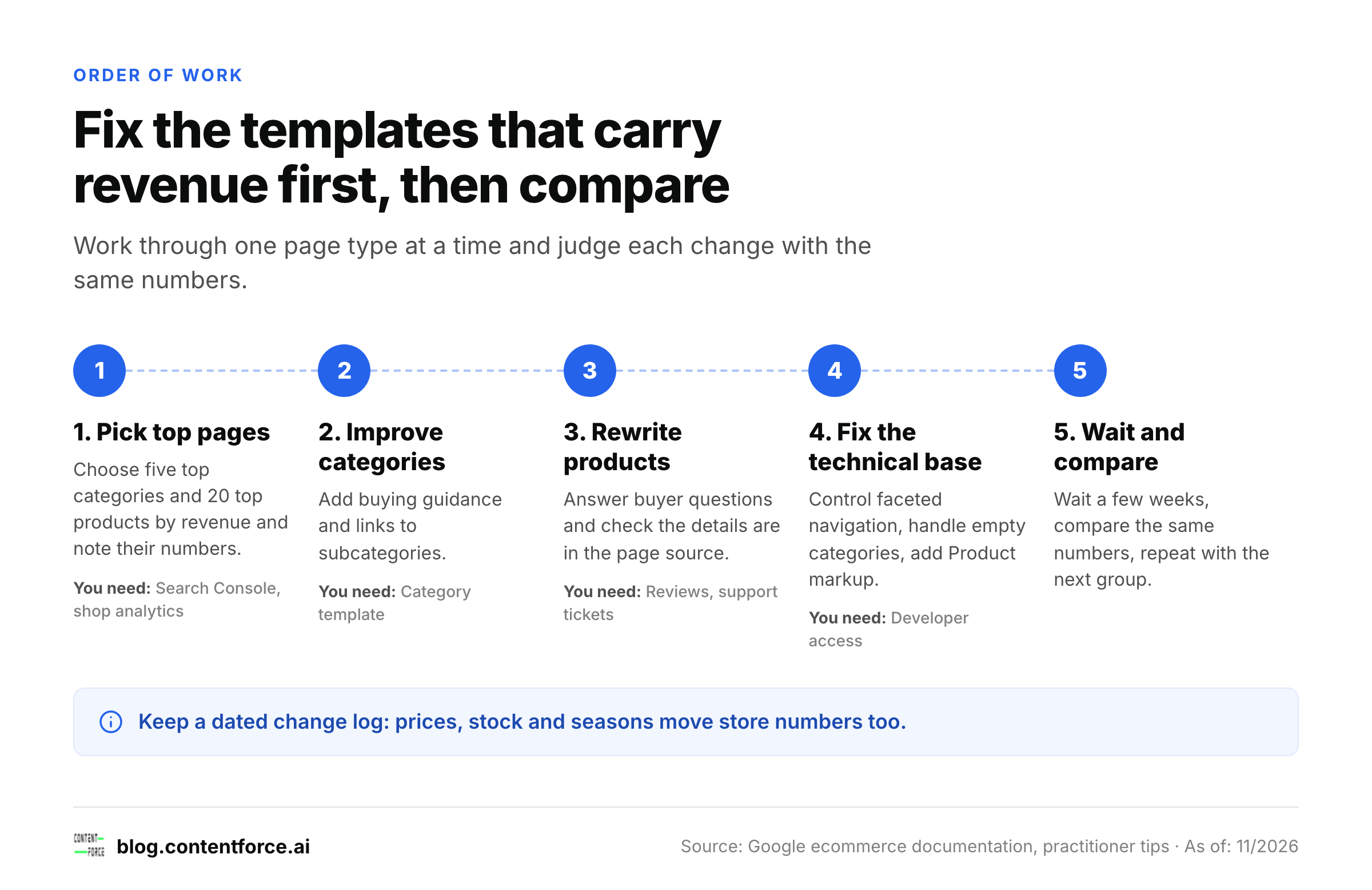
- Pick your five top categories and your 20 top products by revenue, and note their clicks, impressions and average position.
- Add buying guidance and subcategory links to those categories.
- Rewrite the 20 product pages around buyer questions and check that the details appear in the page source.
- Fix faceted navigation and empty categories, and add Product structured data to the product template.
- Wait a few weeks, compare the same numbers, and repeat with the next group.
Keep a dated note of each change; you'll thank yourself later. Store pages change often for reasons that have nothing to do with SEO, like price changes, stock and seasonality, so a log is the only way to tell what worked.
Does ecommerce SEO still matter with AI shopping answers?
Yes. Google says there are no additional requirements to appear in AI Overviews or AI Mode; a page has to be indexed and eligible to show in Search with a snippet. For a store, that means the same work as above: product details in the HTML, clear answers to buyer questions, and structured data that matches what's on the page. Stefan Chiriacescu makes the same point from his agency's work above: pages that answer the buyer tend to do better in search and in AI answers alike.
FAQ
How do I improve SEO for my online store?
Start with your highest-revenue category and product pages. Add buying guidance to categories, answer buyer questions on product pages, check that product details appear in the page source, and fix faceted navigation. Track the results in Search Console.
Are category pages or product pages more important for SEO?
Both matter, but category pages usually win the broader commercial searches, while product pages win searches for a specific item or model. Most stores underinvest in category pages, so that's often where you'll find the faster gain.
Should I write my own product descriptions?
Yes, at least for your best sellers. It's the single change we'd make first. Manufacturer descriptions appear on every shop that sells the item, so they give Google no reason to prefer your page. Write descriptions that answer fit, sizing, compatibility and care questions.
Do I need structured data for ecommerce SEO?
It isn't required to rank, but Google says Product structured data increases eligibility for rich results such as price, availability and ratings. A Merchant Center feed is required if you want to appear in the Shopping tab.
How long does ecommerce SEO take to work?
Expect weeks for changes on pages that already rank and months for new categories. Judge a change only after Google has recrawled the page, and compare the same metrics before and after.
Sources: Help Google understand your ecommerce site structure, Designing a URL structure for ecommerce sites, Managing crawling of faceted navigation URLs, Introduction to Product structured data, Share your product data with Google, JavaScript SEO basics, Site moves with URL changes, AI features and your website. Checked 13 November 2026.