
Guide
SEO Tips That Work: A Practical Guide From Practitioners

The most useful SEO tips are to match search intent, publish helpful content, write clear titles, keep pages fast, link pages together and track results in Google Search Console. The ContentForce guide groups the tips by job, ties each rule to Google documentation and adds tips from four practitioners.
- Read the search results and match the search intent before writing
- Publish helpful, people-first content and refresh pages that already rank
- Give every page a unique, clear and concise title
- Meet the Core Web Vitals thresholds: LCP 2.5 seconds, INP 200 milliseconds, CLS 0.1
- Link related pages with descriptive anchor text
- Pick ten pages near revenue, fix them, wait a few weeks and compare in Search Console
The most useful SEO tips are to match search intent, publish helpful content, write clear titles, keep pages fast, link your pages together and track results in Google Search Console. Do them in that order: the first three decide whether a page can rank at all, the rest decide how far it goes. It's a short list on purpose, and it doesn't pretend every tag matters. This guide groups the tips by job, ties each rule to what Google says in its own documentation, and adds first-hand tips from four practitioners.
Which SEO tips matter most?
Start with the tips that cost little and change the most; that's where most sites lose time. The table below is our own assessment of effort and impact for a site that already has some pages indexed.
| Tip | Effort | Impact | Where it is covered |
|---|---|---|---|
| Match search intent before you write | Low | High | Research tips |
| Publish helpful, people-first content | High | High | Content tips |
| Refresh pages that already rank | Medium | High | Content tips |
| Write unique, clear titles | Low | Medium | On-page tips |
| Pass Core Web Vitals | Medium | Medium | Technical tips |
| Link your own pages with descriptive text | Low | Medium | Link tips |
| Track queries and pages in Search Console | Low | High | Measure and prioritize |
Google also sets expectations on timing. Its SEO Starter Guide says some changes take effect in a few hours while others could take several months, and it suggests waiting a few weeks before judging results. Plan a tip, ship it, then check it later; it's the cleanest way to learn instead of changing five things at once, because you won't know what worked otherwise.
Research tips: Match search intent before you write
Before you write anything, decide which job the page does for the searcher. Where the results are all how-to guides, a product page won't rank, however well it's optimised.
Read the SERP before you write
Search your target keyword and note what the results have in common: the page type, the headings they share, the questions they answer and the questions they skip. The shared parts are the minimum you must cover. The skipped parts are your chance to add something. Our guide to keyword research walks through this step by step, and an SEO content brief turns the notes into a writing plan.
Use Search Console queries you already rank for
Your own data clearly beats any keyword tool for finding quick wins, and it's free. Open the Performance report in Google Search Console, filter to pages that get impressions but few clicks, and read the queries behind them. Each one tells you what searchers expect from that page, and you'll often find the answer is one paragraph away. Add the missing answer, or write a separate page when the intent differs; it's rarely worth forcing two intents into one page.
SEO Title Generator: eight title tag variations, sized for the SERP and intent-matched. Free, no signup.
Content tips: Write for people and keep pages current
Google says content should be helpful, reliable and people-first, and describes it as the factor it emphasises most. Its helpful content guidance treats E-E-A-T (experience, expertise, authoritativeness and trustworthiness) as a way to recognise helpful content rather than a direct ranking factor, and says trust matters most of the four. For the full picture of how this plays out with AI systems, see our guide to LLM SEO.
Show first-hand experience
Say who wrote the page, what they did and what they saw. Here's the test: a stranger should be able to check it. A tip such as "we moved this page's FAQ above the fold and impressions rose over the next month" beats a general statement because a reader can judge it, and a reader who can't judge a claim won't trust it. If you can't show experience, cite a source that can.
Refresh pages that already rank
Updating an existing page is usually cheaper than writing a new one, and it's often faster too. Open the pages that earn impressions, compare them with today's top results, then fix outdated facts, add the missing answer and remove sections that no longer help. Do this for a handful of pages per month; don't touch everything at once.
Use AI without publishing filler
Google's guidance asks three questions of any page: who created it, how it was created and why. Its helpful content page says to disclose AI or automation where readers would reasonably wonder how content was created, and describes large volumes of AI text with no human oversight as little to no effort. Use AI for drafts, outlines and checks, then add your own examples and sources before anything goes live; that's the part readers can't get elsewhere.
| Question | What to check on your page |
|---|---|
| Who | A named author with a real background, linked from the byline |
| How | Which parts used tools or AI, and who reviewed them |
| Why | Whether the page exists to help a reader reach a goal |
On-page tips: Titles, descriptions, headings, URLs and images
Google says a title should be unique to the page, clear and concise, and an accurate description of the content. Treat the title, the first heading and the opening paragraph as one promise to the reader, and keep it consistent; readers who feel misled won't stay.
- Give every page its own title and avoid boilerplate that repeats across pages.
- Put the main topic in the first visible heading, and use further headings to mark real sections.
- Use short URLs made of words people can read.
- Add alt text that briefly describes what the image shows and how it relates to the page.
- Write a meta description that's short and unique to the page; Google says snippets mostly come from page content and only occasionally from the meta description.
Google says versus SEO folklore
Many SEO rules repeat without a source. The table compares common claims with what Google's documentation states.
| Common claim | What Google says |
|---|---|
| Fill in the meta keywords tag | Google Search does not use the keywords meta tag |
| Hit a minimum word count | There is no magical word count target, minimum or maximum |
| Keep titles under a fixed length | There is no limit on how long a title element can be, but titles are truncated in results to fit the device width |
| You need an XML sitemap to be found | A sitemap is not required; Google mainly finds pages through links |
| Repeat the keyword more often | Keyword stuffing is against Google's spam policies |
| AI search needs special optimisation | There are no additional requirements to appear in AI Overviews or AI Mode |
Here's the practical takeaway. Don't spend your time on tags that Google says it ignores. Of course, Google's wording can change, so re-check the linked pages before you rely on a statement. Our own list of SEO best practices keeps to the same standard.
Technical tips: Core Web Vitals, crawling and mobile
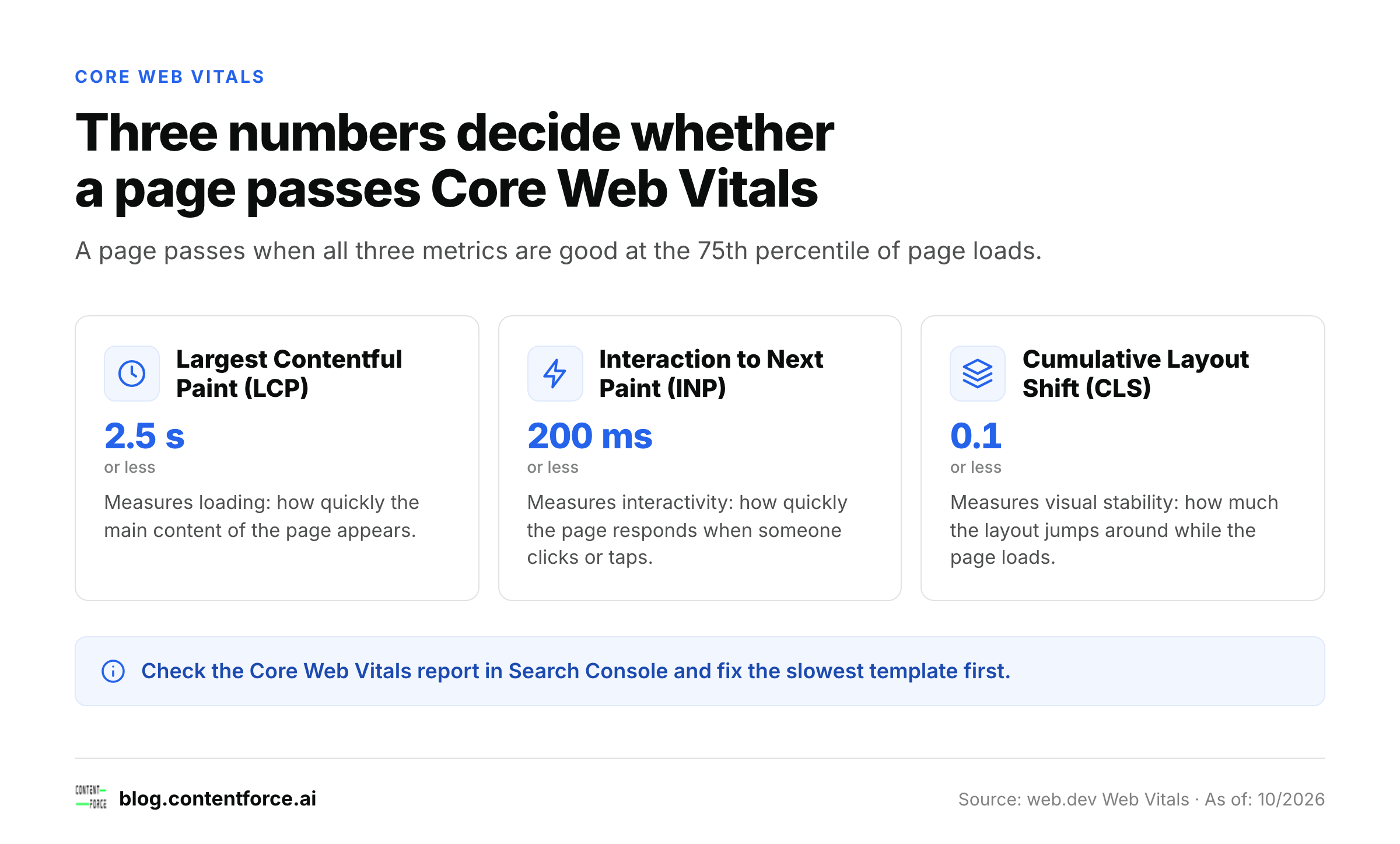
A page has good Core Web Vitals when its Largest Contentful Paint is 2.5 seconds or less, its Interaction to Next Paint is 200 milliseconds or less and its Cumulative Layout Shift is 0.1 or less, measured at the 75th percentile of page loads. Those are the thresholds published on web.dev.
| Metric | What it measures | Good threshold |
|---|---|---|
| Largest Contentful Paint (LCP) | Loading | 2.5 seconds or less |
| Interaction to Next Paint (INP) | Interactivity | 200 milliseconds or less |
| Cumulative Layout Shift (CLS) | Visual stability | 0.1 or less |
Check these metrics in the Core Web Vitals report in Search Console, then fix the slowest template first because one template often covers hundreds of URLs, so you'll fix more with less work. Beyond speed, three habits prevent most technical problems.
- Keep important content in text form so crawlers and readers can use it.
- Don't block crawling of pages you want to rank.
- Submit a sitemap if your site is large or new, even though Google doesn't require one. Our guide to sitemap SEO covers the setup, and a technical SEO audit shows how to catch crawl problems before they cost traffic.
Link tips: Internal links first, backlinks second
Google says the vast majority of new pages it finds each day come through links, so links decide what gets discovered. Start with the ones you control; they're the fastest to fix.
Link related pages together with descriptive anchor text, so that readers and Google know what the destination contains. "Our guide to keyword research" tells both of them more than "click here". Check that every important page has at least a few links pointing to it from other pages on your site.
Backlinks from other sites come second, and they're earned rather than collected. Earn them with content worth citing, such as original data, a clear explanation or a useful tool, and be wary of anyone who guarantees a ranking, which is frankly a red flag. Google's guidance is to use nofollow or a similar annotation on links you don't trust, such as user-generated links.
Expert tips: seo tips from 4 practitioners
We asked practitioners for their best SEO tip. These four are quoted as sent. Figures inside a tip are the contributor's own statements, not numbers we have verified.
Optimise for the errors your users search for (Hamza Hanif, SEO Strategist at Post SMTP)
Don't just try to optimise for "best X" keywords, optimise for your users' actual errors in Google. A query such as "SMTP Error: Could not authenticate" has relatively low volume, but the searcher is having a problem at the moment, and a page that provides the solution in the first 100 words can outrank the forum threads that typically appear in the results. The error you don't want to make is to put all these in a single FAQ: for each error, make a separate URL using the error string in the title, then in H1, and use your support tickets to pull the next topics.
Hamza Hanif, SEO Strategist at Post SMTP.
Build small free tools around the phrases buyers type (Mykyta Chernenko, Founder at AIWriteBook)
Build small free tools around the exact phrases your buyers already type into Google, and give each one its own page. We run more than 40 of them at AIWriteBook (a KDP keyword research tool, a royalty calculator, a blurb generator and so on), and they bring in people who are already in the middle of the job our product does. The mistake to avoid is putting the tool behind a signup wall: let it work on the first visit, then offer the bigger product.
Mykyta Chernenko, Founder at AIWriteBook.
Start from a voice note in your own words (Ivan Vislavskiy, CEO and Co-founder at Comrade Digital Marketing Agency)
One example I often use is recording a short voice note of some five or ten minutes' length that could be transformed into a blog post. My favorite SEO tip is to start with the recorded file: describe how you manage to deal with the problem using your own experience instead of writing generic articles. After that, organize your content into an effective page. Your knowledge and competence should be your own, not something generated by writing apps.
Ivan Vislavskiy, CEO and Co-founder at Comrade Digital Marketing Agency.
Optimise for revenue, not for traffic (Nathan Hawkes, President & Founder at Arcane Marketing)
Stop obsessing over traffic and start paying attention to what actually makes you money. I've seen businesses celebrate a 40-50% increase in organic traffic while their leads and revenue barely moved. Identify the 10 pages on your website that attract visitors with the strongest buying intent, then focus on improving their rankings, messaging, and conversions. I'd rather bring a client 100 visitors who are ready to buy than 10,000 who are just kicking tires.
Nathan Hawkes, President & Founder at Arcane Marketing.
Measure and prioritize: Which SEO tips to do first
Set up Google Search Console first, because the Starter Guide points to it as the way to monitor and optimise how your site performs on Google Search. Then work through the order below, and don't skip step 5.
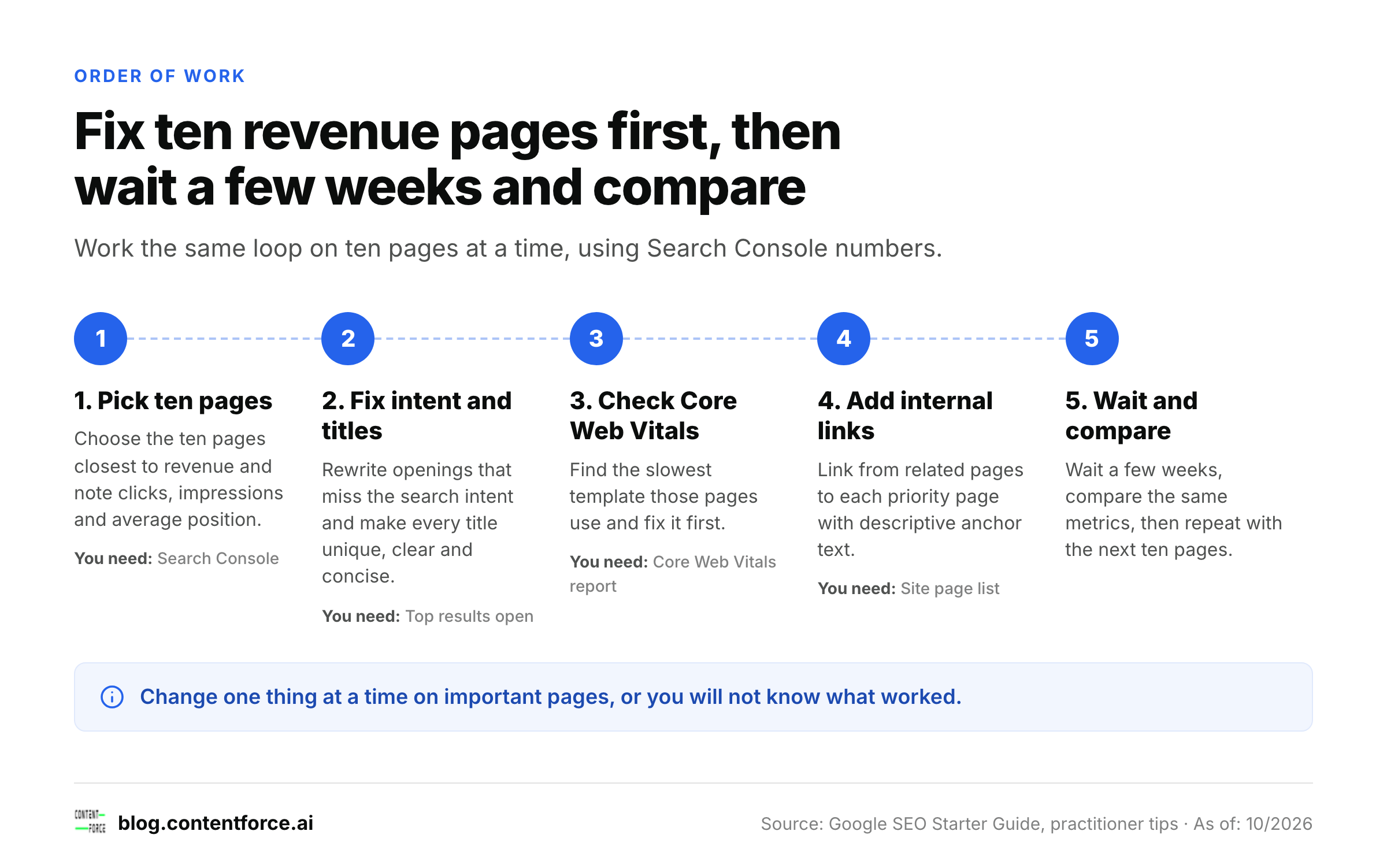
- Pick the ten pages closest to revenue and note their current clicks, impressions and average position.
- Fix intent mismatches and weak titles on those pages: rewrite the opening, add the missing answer, remove sections that don't help and make every title unique, clear and concise.
- Check Core Web Vitals for the templates those pages use and fix the slowest one.
- Add descriptive internal links from related pages to each priority page.
- Wait a few weeks, compare the same metrics, and repeat with the next ten pages.
Pages that rank just outside the first page are usually the cheapest to improve, because they've already got relevance and only need a stronger answer or more internal links. For deeper metric choices, see which SEO metrics predict revenue.
Is SEO still worth it with AI search?
Yes. SEO isn't dead, and the basics haven't changed. Google states that there are no additional requirements to appear in AI Overviews or AI Mode and no other special optimisations necessary. A page has to be indexed and eligible to show in Search with a snippet, and indexing and serving is never guaranteed. That's why the tips above are the right investment: helpful content, clear structure, crawlable pages and strong internal links. Google also says you don't need new machine-readable files or special markup for its AI features.
FAQ
How can I improve my SEO?
Start with search intent. Check what the top results for your keyword have in common, make sure your page answers the same question better, then fix titles, internal links and page speed on your most valuable pages. Track the result in Search Console.
What are the 3 C's of SEO?
There's no official Google definition, and authors use the phrase differently. One useful reading maps to this guide: content (the content tips), code (the technical tips) and credibility (the link tips).
Is SEO easy to do?
The basics are easy to learn and slow to master, and it isn't a quick win. Writing helpful pages, clear titles and sensible links needs no special tool, but results depend on competition, and Google notes that some changes take months to show.
How long do SEO changes take to work?
Expect weeks, not days, for most changes. Judge a change only after the page has been recrawled, keep a dated note of what you edited, and don't change two things at once on important pages.
Do I need paid tools for SEO?
No. Search Console is free and covers queries, clicks, indexing and Core Web Vitals. Paid tools help with competitor research and larger sites, but the tips in this guide don't need them.
Sources: Google SEO Starter Guide, Creating helpful, reliable, people-first content, Influencing title links, AI features and your website, Web Vitals on web.dev. Checked 23 October 2026.