
How-to · 8 steps
How to Complete a Topical Map for SEO (Step-by-Step Guide)

To complete a topical map for SEO, define one core topic, research and filter its subtopics, sort them by search intent and connect them through a planned internal linking structure. The finished topical map works as the planning layer above pillar pages and content clusters. Every step is doable with free tools and a spreadsheet.
- Define a core topic specific enough to own and broad enough for subtopics
- Research subtopics widely, then filter them by business relevance and traffic potential
- Assign one primary search intent and a matching content format to each subtopic
- Audit existing content in Google Search Console for gaps, overlaps, orphans and strong anchors
- Plan internal links between the pillar page, subtopic articles and adjacent subtopics
- Publish the pillar with the first cluster articles and review the map every three months
Most websites that struggle to rank share the same root problem: reactive content. One keyword at a time, no plan for how it all connects. A topical map fixes that. It's a structured blueprint of every topic and subtopic a site needs to cover to earn topical authority with search engines, the planning layer that determines whether your content builds cumulative authority or just accumulates isolated pages competing against each other.
This guide walks through the full process of creating a topical map for your SEO strategy: what it is, why it matters, how to build one step by step, which tools help, the mistakes that kill most projects, and how to tell when it's working.
What Is a Topical Map in SEO?
A topical map is a structured plan of all the topics and subtopics a website needs to cover to become a recognized authority on a given subject in the eyes of search engines. It treats content as an interconnected network where each piece reinforces the credibility of every other piece. No isolated keywords. No random publishing. One coordinated architecture.
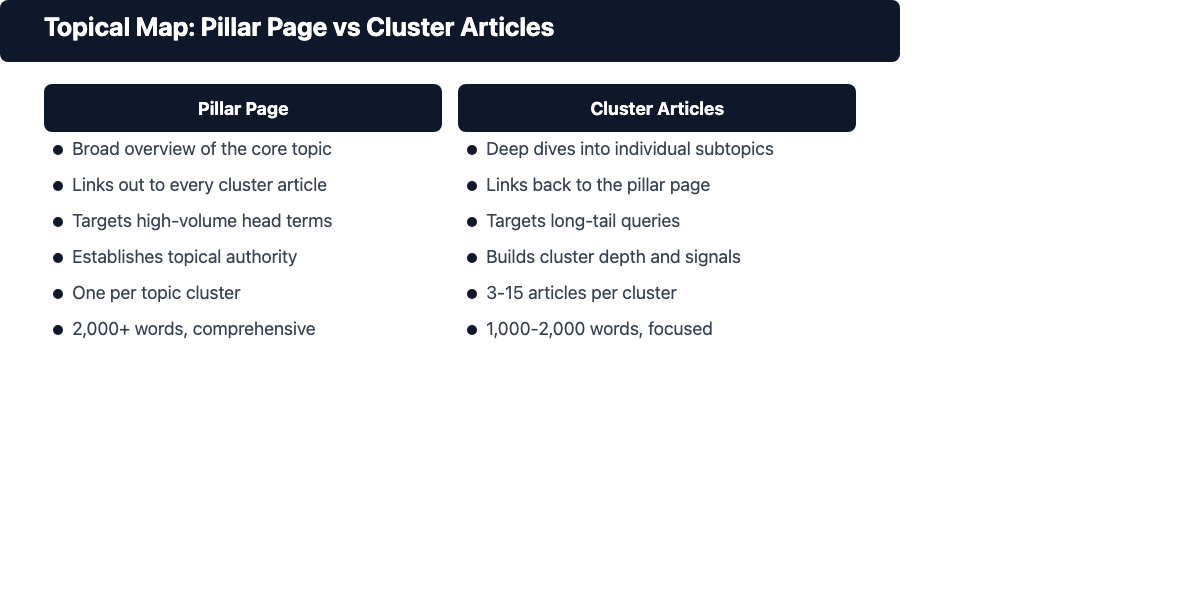
The concept is closely tied to topical authority, the degree to which Google considers your site a reliable and comprehensive source on a specific subject. Sites with strong topical authority consistently outrank thinner sites even when those sites have more backlinks. Google's E-E-A-T guidelines (Experience, Expertise, Authoritativeness, and Trustworthiness) reward depth and completeness of coverage over fragmented content. That's the engine behind topical maps.
A topical map is often described alongside content clusters and pillar pages. In that model, the pillar page is the broad overview and the cluster articles cover the subtopics linking back to it. The topical map is the planning layer above all of that. It decides which clusters to build, which subtopics belong in each, and how everything connects before a single word is written.
Why Topical Mapping Matters for SEO
Building a topical map before producing content changes the quality of everything downstream. It replaces reactive publishing with a deliberate content strategy and SEO architecture that compounds over time. Done right, it's the difference between a site that slowly accumulates authority and one that stalls at the same rankings for years.
Technical SEO Benefits
Search engine crawlers navigate your site by following internal links. When your content is organized around a clear topical hierarchy, crawlers discover and index everything efficiently. They recognize the relationship between pages and assign authority accordingly. A well-built topical map cuts crawl waste, minimizes keyword cannibalization (multiple pages competing for the same query), and gives your site a logical architecture that's easier to audit and scale.
Internal linking is the mechanism that makes this work. A topical map prescribes which articles link to which, so every subtopic article passes link equity back to the core pillar and gets reinforcing context from adjacent subtopics. Without that structure, internal links get added ad hoc and rarely reflect any real hierarchy.
Content Strategy Benefits
A topical map answers the hardest question in content marketing: what should we write next? Instead of guessing or chasing trends, every content decision flows from the map. Teams have clear priorities. Editors know how pieces connect. New writers understand the architecture from day one.
It also prevents the failure mode of covering the same angles over and over without realizing it. When every piece maps to a distinct subtopic and intent, duplication shows up before it gets built, not six months later when you're wondering why two posts keep swapping positions on the same keyword.
How to Build a Topical Map for SEO: Step-by-Step
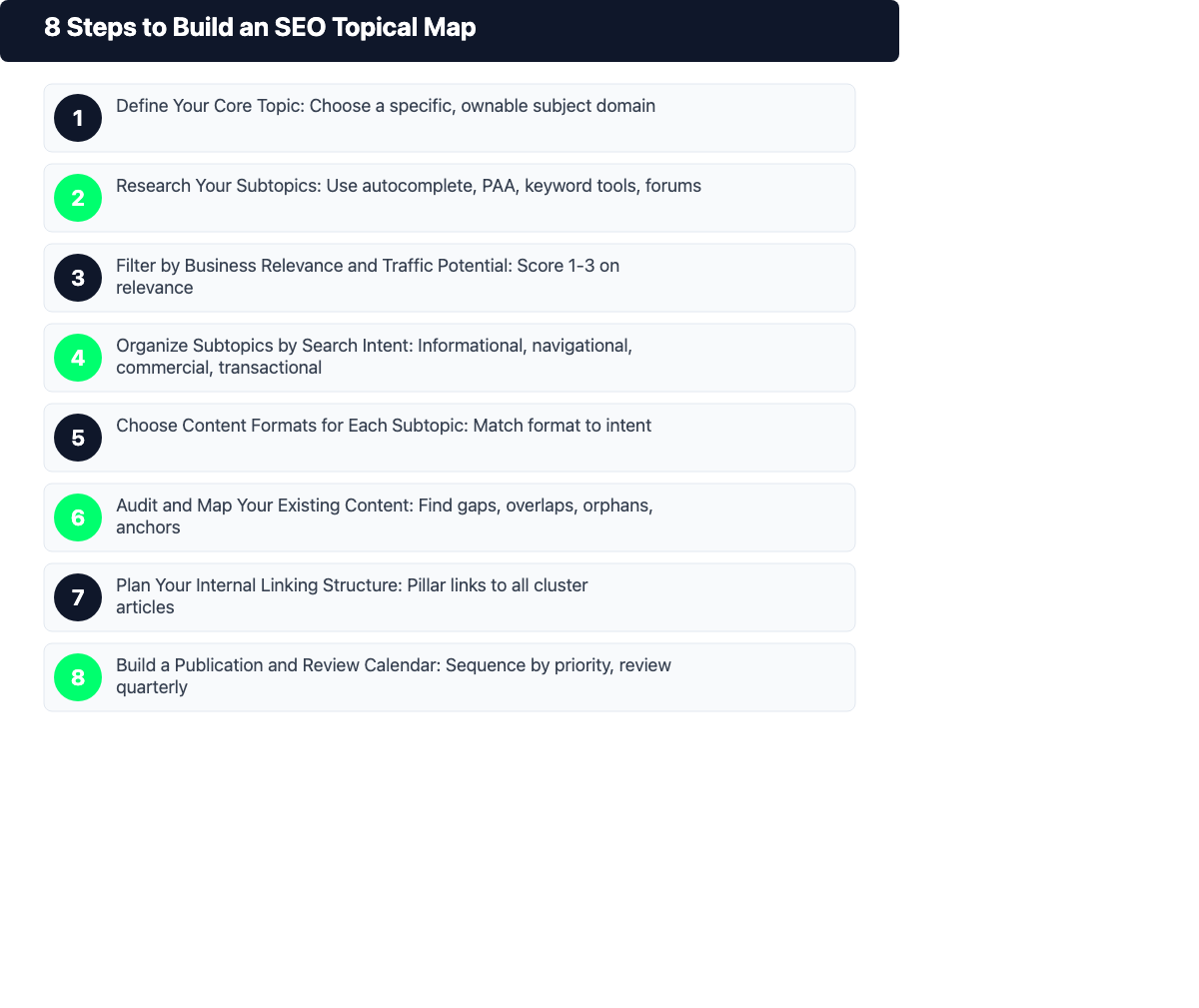
This process is tool-agnostic. Every step is completable with free tools, a spreadsheet, and clear thinking. No paid platform required.
Step 1: Define Your Core Topic
Your core topic is the broadest subject your website wants to own. Specific enough that you could become one of the best sources on the internet for it. Broad enough that it has multiple meaningful subtopics underneath it.
The framing question: what do we want to be known for? A personal finance blog should pick "budgeting for beginners" over "personal finance" because the latter puts you up against banks and major publishers you can't outrank at a domain authority of 30. A B2B SaaS company should pick "project management for remote teams" over "project management" for the same reason.
Write the core topic as a phrase, not a keyword. It's a subject domain, not a single search query. Everything else flows from this.
Step 2: Research Your Subtopics
With the core topic defined, find every meaningful subtopic within it. Think of these as the key questions, angles, and use cases a person learning about your core topic would want addressed. Cast wide first.
Sources that work well:
- Google autocomplete and People Also Ask boxes for your core topic phrase
- The heading structure of top-ranking pages for your core topic
- Keyword research tools filtered to your core topic (Ahrefs, Semrush, Google Keyword Planner)
- AI assistants prompted to generate a comprehensive subtopic list
- Quora, Reddit, and forums where your target audience asks questions
- Your own audience data: support tickets, sales call notes, onboarding questions
Traffic volume doesn't matter yet. Map the landscape first, then filter. Capture everything.
Step 3: Filter by Business Relevance and Traffic Potential
This is where most topical maps fail. Not in the research phase but in prioritization. A raw subtopic list can have hundreds of entries, most of which are irrelevant to your goals or too low-volume to build.
Filter using two criteria together:
Business relevance: How directly does this subtopic connect to what you sell, recommend, or want to be associated with? Score 1 to 3:
- Score 3: directly supports a conversion path or core brand goal (for a project management tool, "how to manage remote team tasks" = 3)
- Score 2: topically adjacent and useful to your audience, but indirect ("remote work productivity tips" = 2)
- Score 1: loosely related, unlikely to attract your target audience or support your goals ("office furniture recommendations" = 1)
Traffic potential: Does this subtopic have enough search demand? Check approximate monthly volume. Subtopics under 50 monthly searches qualify only if they fill a critical cluster gap or serve a high-converting bottom-of-funnel need.
Keep subtopics scoring 2 or 3 on relevance that also have measurable traffic. Most well-scoped maps end up with 3 to 5 primary clusters, each containing 5 to 15 subtopics.
Step 4: Organize Subtopics by Search Intent
Search intent is the underlying reason behind a query. Sorting by intent ensures you're building the right content type for each topic and avoids building two pieces that compete for the same position.
The four primary intent categories:
Intent Reader goal Content type Informational Wants to learn Guide, tutorial, explainer Navigational Looking for a specific resource Brand page, tool page Commercial Evaluating options Comparison, review, roundup Transactional Ready to act Landing page, product page Assign one primary intent to each subtopic. This tells you whether you need a how-to guide, a product comparison, a landing page, or a definition piece. It also surfaces intent collisions before you spend time writing.
Step 5: Choose Content Formats for Each Subtopic
Once you know the intent, choose the format that serves it best. Format and intent need to match for the content to satisfy both readers and search engines.
In-depth guides and tutorials work for informational subtopics. Comparison posts and roundups work for commercial ones. Landing pages and product pages for transactional. For process-heavy or visual subtopics, infographics and step-by-step visual guides convert better than text-only articles.
Decide formats at the map stage, not the brief stage. This is the only point where you can spot format duplication before it costs you: eight how-to guides in one cluster means you're covering the same angle eight times. That's a problem a topical map catches that a keyword list won't.
Step 6: Audit and Map Your Existing Content
Before planning new content, check what's already there. Most websites with 20+ posts have content that maps to their target clusters, and they don't know it.
Export current URLs, titles, and ranking keywords from Google Search Console or a crawl tool. Then map each existing page to a subtopic in your topical map. Four things will surface:
- Gaps: Prioritized subtopics with no existing content
- Overlaps: Two or more pages competing for the same subtopic (consolidation opportunity)
- Orphans: Pages that fit no cluster and drain crawl budget
- Strong anchors: Pages that already rank well and can anchor a cluster immediately
Skip this audit and you'll build content that duplicates what's already there, triggering the cannibalization you were trying to prevent.
Step 7: Plan Your Internal Linking Structure
This is where the topical map becomes a technical SEO asset. Each cluster needs a consistent linking pattern:
- The pillar page links out to every subtopic article in the cluster
- Every subtopic article links back to the pillar page
- Adjacent subtopics within the same cluster link to each other where the connection is natural
Map these relationships explicitly in your topical map document. For each subtopic article, note which pages should link to it and which pages it should link to. That note becomes a brief requirement for writers so links get built into the content, not bolted on after the fact.
An article well-integrated into its cluster's link graph ranks more consistently than an isolated article on the same topic, even if the isolated article is technically better written. Links carry authority. Structure creates reliability.
Step 8: Build a Publication and Review Calendar
A topical map isn't a static document. It guides production for months or years. Connect it to an editorial calendar that sequences content in a deliberate order.
Publish the pillar page simultaneously with the first two or three cluster articles. This gives the pillar page something to link to from day one, signaling to crawlers that the cluster is real and active. Fill in subtopics by priority from your Step 3 scores.
Review the map every three months. Search intent shifts. New competitors enter the space. Your business focus evolves. A topical map is a living framework, not a one-time output. The sites that see compounding results treat it that way.
Best Tools to Create a Topical Map (Free and Paid)
No dedicated tool required, but several make specific steps faster or more rigorous.
| Tool | Best for | Free tier? |
|---|---|---|
| Ahrefs | Keyword research, traffic potential, competitor headings | No (limited trial) |
| Semrush | Keyword gap analysis, subtopic discovery | Yes (limited) |
| Google Search Console | Auditing existing content, identifying ranking signals | Yes |
| Google Keyword Planner | Rough volume estimates for subtopics | Yes |
| ChatGPT / Claude | Generating subtopic lists, organizing intent buckets | Yes |
| Screaming Frog | Full site content audit for existing mapping | Yes (up to 500 URLs) |
| Miro or FigJam | Visualizing the topical map as a diagram | Yes |
| Google Sheets / Notion | Managing the map as a working spreadsheet | Yes |
The most important tool is the one you'll actually maintain. A spreadsheet updated weekly beats a sophisticated platform abandoned after the first session. Start simple, then layer in tools as the map gets complex.
Blog Outline Generator: headings, key points and FAQ candidates for your topic. Free, no signup.
Common Topical Map Mistakes to Avoid
- Building the map around keywords, not topics. A topical map that lists keywords produces content that ranks for individual queries but never builds cluster authority. Start with subjects. Add keywords after.
- Choosing a core topic that's too broad. "Marketing" is not a viable core topic for a mid-authority site. "Local SEO for small businesses" is. The broader the topic, the less differentiated your authority signal and the harder it is to outrank established generalists.
- Skipping the content audit. Building new content into a cluster that already has competing pages on your site creates keyword cannibalization. Audit first, always.
- Publishing content without internal linking. A cluster without internal links is just isolated articles. The link structure is what makes the topical map function as a network.
- Treating the map as a one-time project. A map built in January will have stale priorities by April. Build a quarterly review cadence from the start.
How to Measure Whether Your Topical Map Is Working
Give it 3 to 6 months before judging. SEO authority signals build gradually, and clusters see impression growth before ranking growth shows up in Google Search Console.
Signals that indicate the map is working:
- Impression growth across the cluster, not just one page. A rising cluster means Google values the content network, not a single outlier.
- Multiple cluster pages appearing for the same broad query. When Google surfaces two or more of your cluster articles for a related search, that's a topical authority signal.
- Crawl coverage improvements. More pages indexed from your target cluster over time means your internal linking and architecture are working.
- Ranking improvements on the pillar page. As subtopics accumulate and link back, the pillar rises for broader head terms.
- Lower bounce rates across cluster articles. Good internal linking keeps readers in the cluster, which strengthens engagement signals.
No movement after 6 months means something is wrong: content quality, incomplete internal linking, or a core topic that's too competitive for your current domain authority. Diagnose before adding more content.
Frequently Asked Questions
What is the difference between a topical map and a content cluster?
A content cluster is the execution: a pillar page surrounded by supporting articles with internal links between them. A topical map is the planning layer above it. It defines which clusters to build, which subtopics belong in each, and how they connect. You build the map first, then use it as a blueprint to create the clusters.
How long does it take to build a topical map?
Initial research and planning runs 4 to 8 hours for a focused niche site, and 1 to 3 days for a broader site with multiple topic areas. Ongoing maintenance is lighter: 1 to 2 hours per quarter to review priorities, add new subtopics, and mark completed content.
How many articles do I need for a topical map to work?
A cluster needs at least one pillar page plus 3 to 5 supporting articles before it generates meaningful topical authority signals. Clusters with fewer than 3 supporting pieces rarely show ranking improvements on the pillar. Most well-developed clusters reach 8 to 15 pieces over time.
Can I build a topical map for a new website?
Yes, and it's more valuable on a new site than an established one. A new site has no content legacy to audit, so the map guides every piece from day one. Starting with a clear topical map means internal linking, crawl structure, and content prioritization are designed in, not retrofitted later. Retrofitting after 100 unstructured posts is significantly harder than building it right from the start.