
How-to · 6 steps
Keyword Cannibalization: What It Is, How to Find It, and How to Fix It

Keyword cannibalization happens when two or more pages on the same website target the same primary keyword and the same search intent, so they compete against each other in search rankings instead of one page capturing the full ranking signal. The guide covers how to find it, choose the right fix, and prevent it in AI-assisted content workflows.
- Open Google Search Console and compare which URLs rank for the same query
- Check ranking positions and impressions to confirm both pages actively compete
- Decide whether one page is clearly stronger using traffic, backlinks, and ranking history
- Apply a 301 redirect from the weaker page to the stronger one
- Update internal links to point directly to the surviving URL
- Maintain a keyword map so future pages don't overlap
If two of your pages are ranking for the same keyword, the instinct's to fix it right away. But not every case of keyword overlap is a problem. The real issue occurs when two pages target the same keyword with the same search intent and end up competing against each other for the same position. That's what keyword cannibalization actually means, and that distinction matters before you start redirecting or deleting pages.
This guide covers how to identify genuine cannibalization, how to find it across your site, how to choose the right fix, and how to prevent it going forward, including in AI-assisted content workflows where the risk grows fast as your site grows.
What Is Keyword Cannibalization?
Keyword cannibalization is an SEO issue that occurs when two or more pages on the same website target the same primary keyword and serve the same search intent, causing them to compete with each other in search engine rankings.
The keyword overlap alone doesn't create the problem. What creates the problem is when those pages answer the same question for the same user. Google has to pick which one to show, and because neither page gets all the signals it'd get if they were consolidated, both often rank lower than a single strong page would.
Keyword cannibalization vs content cannibalization
These two terms are often used interchangeably, but there's a meaningful difference. Keyword cannibalization is a ranking conflict: two or more pages compete for the same query. Content cannibalization is topical overlap: two pages cover such similar ground that they provide little distinct value, even when their target keywords differ. Both can hurt your rankings, but the fixes differ. This guide focuses on keyword cannibalization, though many of the same detection and fix methods apply to both.
Keyword cannibalization vs duplicate content
Duplicate content refers to identical or near-identical text appearing across multiple pages. Keyword cannibalization's different: two completely original pages can cannibalize each other in search results if they target the same keyword and intent, even with no shared text. The distinction matters because the fixes are different. Duplicate content often needs a canonical tag or rewrite; cannibalization typically needs consolidation, a redirect, or intent differentiation.
Is Keyword Cannibalization Always a Problem?
No. Keyword cannibalization's only harmful when multiple pages target the same keyword AND the same search intent. If your pages serve meaningfully different intents, they can co-rank without hurting each other.
When keyword cannibalization's a problem
- Ranking dilution. Your site's authority is split across two competing URLs instead of concentrated on one. Neither gets the full benefit, and both tend to rank lower than a single strong consolidated page would.
- Wasted crawl budget. Googlebot allocates a finite crawl capacity to each site. When it spends time indexing multiple competing pages on the same topic, it's got less capacity to discover and index your best content.
- Diluted internal link equity. When internal links are split between page A and page B for the same keyword, neither page builds up the concentrated signal that a single well-linked page would receive.
- Ranking volatility. Google struggles to determine which page is most relevant for a query, so search engines may alternate between your URLs in the results, causing your rankings to bounce rather than settle.
When keyword cannibalization isn't a problem
- Pages serve different intents for the same keyword family (informational vs commercial, for example).
- Different content formats serve different user stages (a broad overview vs a detailed tutorial).
- Your pages are naturally co-ranking because both are genuinely useful for related queries.
Quick diagnostic: Ask yourself: do both pages rank for the same query AND target the same user intent? If yes, you likely have a cannibalization issue. If the intents differ, co-ranking is usually fine.
SEO Title Generator: eight title tag variations, sized for the SERP and intent-matched. Free, no signup.
How to Find Keyword Cannibalization Issues
There's no single tool that reveals all cannibalization problems at once. The best approach combines multiple detection methods, which is especially important when your site grows to the point where keyword overlap becomes harder to track manually.
Method 1: Google Search Console
Google Search Console gives you direct data on which URLs rank for which queries, making it the most reliable tool for detecting active cannibalization.
- Open the Performance report.
- Click "Pages" to see which URLs are ranking.
- Click on a specific URL, then switch to "Queries" to see which keywords it ranks for.
- Export to a spreadsheet and sort by keyword.
- Look for the same query appearing under two or more different URLs.
When the same query appears under multiple pages, check the ranking positions and impressions for each. If both pages are competing in positions 1-20 and pulling similar impression counts, you've got a live cannibalization issue worth addressing.
Best for: Sites with six months or more of GSC data; identifying queries where pages are actively competing.
Method 2: site: Search Operator
The site: operator's the fastest way to spot potential cannibalization for a specific keyword without any tools.
In Google, search: site:yourdomain.com "keyword phrase"
If you see multiple pages from your domain appearing in the results, check whether those pages serve the same intent. Two pages with nearly identical headings and scope are a signal to investigate further.
Best for: Quick spot checks on individual keywords; early-stage sites without enough GSC history.
Method 3: Google Search Without Host Clustering
By default, Google typically shows only one or two results per domain for a given query. You can disable this clustering to see every page it considers for that keyword.
In your Google search URL, add &filter=0 to disable host clustering. This shows all pages Google's indexed for that query from your domain, making it easier to see which of your pages are competing for the same slot.
Best for: Understanding exactly which of your pages Google treats as competitors for a specific query.
Method 4: Content Audit Spreadsheet
For sites with large content libraries, a content audit gives you a systematic view of potential cannibalization across the entire site at once.
Build a spreadsheet with these columns:
| URL | Primary Keyword | Ranking Position | Monthly Sessions | Search Intent | Action |
|---|
Fill in every page, assign a primary keyword to each one, and sort by the "Primary Keyword" column. Any rows with the same keyword are candidates for review. Add the "Search Intent" column to quickly separate genuine conflicts from pages that share a keyword but serve different goals.
Best for: Comprehensive audits; sites that have grown quickly and may have accumulated overlap over time.
Method 5: Ranking History Analysis
Sometimes cannibalization doesn't show up in current rankings; it shows up in the pattern of how rankings have changed over time.
Use a rank tracking tool to check a keyword's position history if you're concerned about it. If you see a pattern where URL A was ranking in the top 5, then URL B launched and URL A dropped while URL B entered the rankings, then URL A partially recovered, that ranking switch is a classic sign that two pages have been competing for the same slot.
Best for: Identifying cannibalization that's already caused ranking fluctuations; retrospective analysis of traffic drops.
How to Fix Keyword Cannibalization
The right fix depends on why the pages are competing and what each page contributes. Use this decision framework before choosing a tactic.
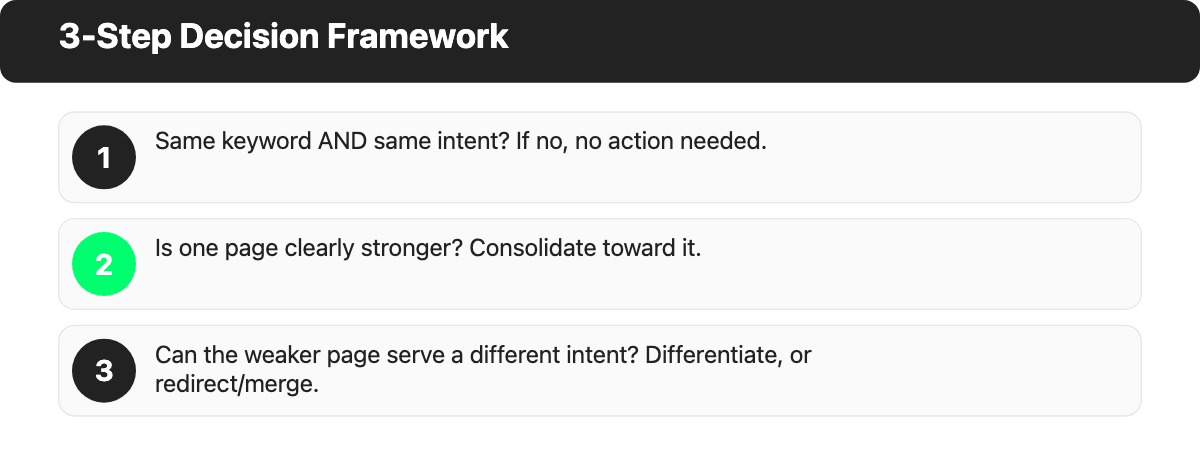
Decision framework
- Do both pages target the same keyword AND the same search intent? If no, no action needed.
- Is one page clearly stronger (more traffic, more backlinks, higher conversion rate)? If yes, consolidate toward the stronger page.
- Can the weaker page be rewritten to serve a genuinely different intent? If yes, differentiate by intent. If no, redirect or merge.
To determine which page's stronger, check: organic traffic in Google Search Console or your analytics tool, referring domain count (backlinks), and ranking history. The page with more of each is typically the one to keep.
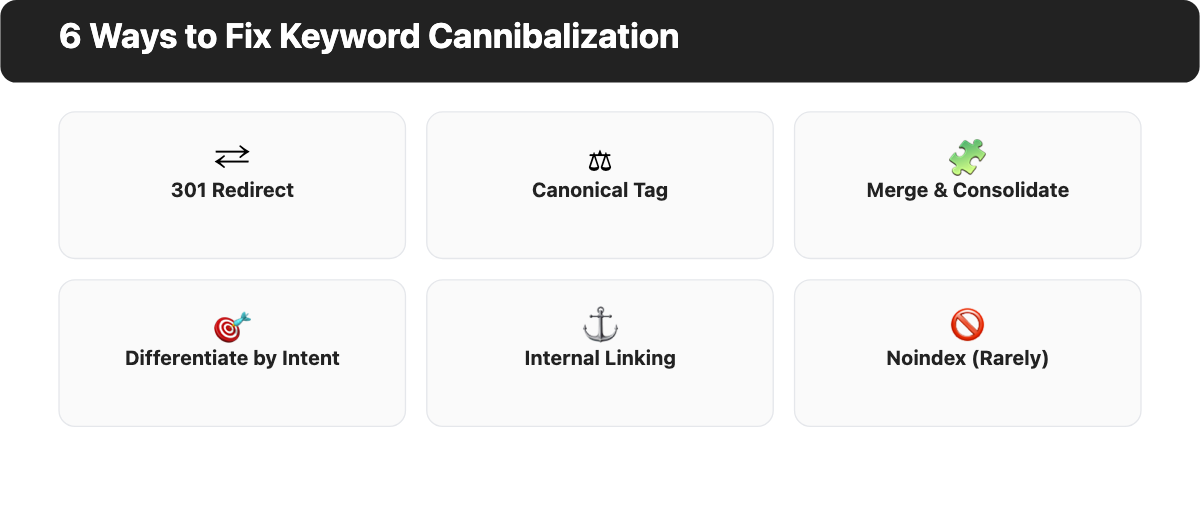
301 Redirect
Use when: One page is clearly weaker and contains no unique content that can't be preserved on the stronger page.
Implement a 301 redirect from the weaker URL to the stronger one. This passes the redirected page's accumulated link equity to the destination and removes the competing URL from Google's index over time.
After setting up the redirect:
- Update all internal links that point to the old URL so they go directly to the new one. Redirect chains work, but internal links should point directly to the canonical URL for efficiency.
- If the redirected page had external backlinks, those signals will pass through the redirect. For high-value link sources, reaching out to update the link directly is worth the effort.
Caution: Always redirect toward the stronger page, not the weaker one. A common mistake's redirecting a high-traffic page to a newer page with a cleaner URL, which destroys the stronger page's accumulated authority.
Canonical Tag
Use when: Both pages need to stay live, but you want to signal to Google which one's the primary version.
Add <link rel="canonical" href="[preferred URL]"> in the <head> of the secondary page, pointing to your preferred URL.
Important limitation: Canonical tags are hints, not directives. Google may choose to ignore them if it determines that the non-canonical version's more relevant for a given query. If you need a reliable solution, a 301 redirect's more definitive. Canonical tags work best when the pages are genuinely similar and you need both to remain accessible.
Merge and Consolidate
Use when: Both pages have unique, valuable content that's worth keeping but would be more powerful combined.
Combine the best content from both pages into one stronger, more comprehensive page. Then set up a 301 redirect from the merged-away URL to the consolidated page. That's the approach Yoast used when three separate SEO audit articles merged into a single guide, and it improved rankings and traffic for the consolidated page.
After merging: update internal links, check for external backlinks pointing to the merged URL, and submit the updated URL in Google Search Console to accelerate recrawling.
Differentiate by Intent
Use when: The pages could legitimately serve different user needs if the content were adjusted.
Rewrite one or both pages so they clearly serve distinct intents. For example, if two pages both target "email marketing software" from a general comparison angle, you could shift one toward a specific audience ("email marketing software for ecommerce stores") or a different content format (a beginner's overview vs an advanced feature comparison).
This fix works only when there's a genuinely different intent to serve. Forcing differentiation where none exists produces two thin, unfocused pages instead of one strong one.
Internal Linking Optimization
Use when: You've got a preferred page but aren't ready to redirect or merge the competing page yet.
Audit your internal links and concentrate anchor-text links toward your preferred page, using an internal linking tool if your site is large enough to make manual tracking impractical. Reduce internal links pointing to the competing page. This shifts ranking signals toward the page you want to rank without removing either page.
This isn't a permanent solution for strong cannibalization, but it's a useful interim measure while you plan a longer-term consolidation.
Noindex (Use Rarely)
Use when: A page must stay live and accessible to users but shouldn't appear in search results.
Adding a noindex directive removes the page from Google's index. Once removed, all accumulated ranking signals for that page (backlinks, topical authority, historical ranking data) are effectively lost over time. A 301 redirect to a relevant page preserves those signals; noindex doesn't.
Use noindex very selectively, and only when no other fix is feasible.
Solutions Matrix
| Scenario | Recommended Fix |
|---|---|
| One page clearly stronger; other has no unique value | 301 Redirect |
| Both pages have unique content worth keeping | Merge and Consolidate |
| Pages can serve genuinely different intents | Differentiate by Intent |
| Both pages must stay live | Canonical Tag |
| Need to shift signals without removing pages | Internal Link Optimization |
| Page must be live but must not rank | Noindex |
How to Prevent Keyword Cannibalization
Prevention's more efficient than cleanup. A few consistent habits will stop most keyword cannibalization before it starts, especially as your site grows and the number of pages makes manual tracking harder.
- Maintain a keyword map. Assign one primary keyword to each page before publishing and record this in a shared document or CMS. Before creating new content, check the map for existing pages targeting similar keywords. One keyword, one page: that's the guiding rule.
- Use a topic cluster structure. Organize content around a pillar page that covers a broad topic and cluster pages that cover specific subtopics. Each cluster page targets a more specific keyword that's distinct from the pillar and from other cluster pages. This structure prevents overlap by design.
- Check your keyword map before every new publish. Build this check into your editorial calendar workflow. If a similar keyword already has a page, decide upfront whether the new piece is sufficiently differentiated or whether you should update the existing page instead.
- Use content briefs that enforce keyword exclusivity. Your content brief template should include a "target keyword" field and a confirmation that no existing page targets that keyword with the same intent.
AI content and cannibalization risk
AI content tools make it fast to produce many pages, and that speed amplifies cannibalization's risk. When you can generate multiple variations of an article in the time it once took to write one, it becomes easy to publish several near-identical pages that target the same keyword from slightly different angles.
The fix is structural: add a keyword map check as a mandatory step before any AI-generated content goes live. Don't let the speed of content creation outpace your quality control. A quick review of your existing keyword map before each publish will prevent most AI-era cannibalization before it starts.
Common Mistakes When Fixing Keyword Cannibalization
1. Redirecting your stronger page to the weaker one
That's the most common and costly mistake. It often happens when the weaker page's got a cleaner URL, a newer design, or a newer publication date. Before setting up any redirect, check traffic, backlinks, and ranking history for both pages. Always redirect the weaker page toward the stronger one, never the other way around.
2. Applying noindex too broadly
Adding noindex to a competing page seems like a quick solution, but it removes all the ranking signals that page's built up. If that page's got backlinks or topical authority, those are discarded once it's removed from the index. A 301 redirect to a relevant page preserves those signals; noindex doesn't. Use noindex only when a page truly mustn't appear in search results.
3. Creating canonical loops
A canonical loop happens when page A sets a canonical pointing to page B, and page B sets a canonical pointing back to page A. Google treats canonicals as hints, not directives, and may ignore both when it encounters a loop, leaving the pages to continue competing. Before implementing canonical tags, audit your existing canonical structure to make sure no loop will be created.
4. Fixing cannibalization that isn't actually hurting you
Not every case of two pages ranking for the same keyword is a problem. Before acting, check whether the pages are genuinely competing for the same ranking slot or co-ranking productively. If both pages are ranking well and neither's pulling the other down, leaving them alone is often the right call.
5. Forgetting to update internal links after a redirect
After a 301 redirect, use your CMS search or a crawl tool to find all internal pages still linking to the old URL and update them to point directly to the new one. Redirect chains add crawl overhead and are less efficient than direct links for passing ranking signals. Updating internal links after a redirect is a step that's easy to skip and consistently worth doing.
Frequently Asked Questions About Keyword Cannibalization
Is keyword cannibalization always bad for SEO?
No. Keyword cannibalization's only harmful when two or more pages target the same keyword with the same search intent and compete for the same ranking position. If your pages cover the same keyword family but serve different user intents, they can co-rank without harming each other. Focus on whether intents overlap, not just whether keywords overlap.
What is the difference between keyword cannibalization and duplicate content?
Duplicate content's identical or near-identical text appearing across multiple pages. Keyword cannibalization is distinct pages with original content that nonetheless compete for the same search query because they target the same keyword and intent. You can have keyword cannibalization without any duplicate content, and you can have duplicate content without keyword cannibalization.
How many pages can target the same keyword?
As long as each page serves a meaningfully different user intent, multiple pages within the same keyword family can co-exist. One primary keyword per intent: that's the safe rule. If you can't clearly describe how each page serves a different user goal, that's a signal they may be cannibalizing each other in search results.
Can I fix keyword cannibalization without deleting or redirecting any pages?
Yes, in many cases. If competing pages can be rewritten to serve distinct intents, differentiation avoids any page removal. Internal linking optimization can also shift ranking signals toward your preferred page. Canonical tags let you keep both pages live while signaling your preference to Google. That said, for pages with significant overlap and no clear differentiation path, a 301 redirect or merge will typically produce better and faster results.