
Glossary
What Is Claude AI? Anthropic's AI Assistant Explained

Claude AI is a large language model and conversational AI assistant built by Anthropic that helps you write, research, code and analyze information through natural conversation. Claude AI is trained with Constitutional AI, a safety-first method, and is available as a free web app, desktop and mobile apps, and an API for developers.
- Constitutional AI has Claude critique and revise its own outputs against written principles
- Current Opus, Sonnet and Fable models handle up to 1 million tokens of context
- ChatGPT relies on RLHF and offers native image generation, which Claude AI does not
- The free plan includes Sonnet 5, memory and web search, Pro costs $20 per month
As of September 2026
Claude AI is an AI assistant built by Anthropic that helps you write, research, code, and analyze information through natural conversation. Developed with Constitutional AI, a safety-first training methodology, Claude AI is designed to give you helpful, honest answers while staying predictable and avoiding harmful outputs. It's available as a free web app, a desktop app, iOS and Android mobile apps, and through an API for developers.
Anthropic released Claude Opus 5.5 on September 22, 2026, its newest flagship model, and the company is preparing for a public listing this fall after a run-rate revenue that crossed $47 billion. If you want to understand what Claude AI is, how it works, and whether it fits your needs, this guide covers the full picture.
What Is Claude AI?
Claude AI is a large language model (LLM) and conversational AI assistant developed by Anthropic. It understands natural language, generates text, analyzes documents, writes and executes code, and handles complex multi-step tasks through a simple chat interface.
The name comes from Claude Shannon, the mathematician widely considered the father of information theory. Shannon's foundational work on encoding and transmitting information underpins much of what modern AI does.
Anthropic was founded in 2021 by Dario Amodei and Daniela Amodei, along with a group of researchers who previously worked at OpenAI. The company was built around a specific mission: to develop AI that's reliably safe, interpretable, and beneficial. It didn't stay a small research lab for long. That mission has attracted enormous capital: Anthropic closed a $65 billion Series H round in May 2026 at a $965 billion post-money valuation, up from the $380 billion valuation it held just three months earlier, and it's reportedly targeting an IPO in late 2026.

What sets Claude AI apart from other AI assistants is its training methodology. Instead of relying purely on human feedback, Anthropic built Claude using Constitutional AI, a principled training approach that embeds safety directly into the model's reasoning process rather than adding it as a filter on top.
How Does Claude AI Work? Constitutional AI Explained
Constitutional AI (CAI) is a training method developed by Anthropic that aligns AI models with human values by having them critique and correct their own outputs according to a predefined set of ethical principles. Instead of relying solely on humans to flag bad answers, the model self-regulates using that principle set as its guide. The core target: outputs that are helpful, honest, and harmless.
Most large language models, including ChatGPT, are trained using Reinforcement Learning from Human Feedback (RLHF). In that process, human raters score model outputs and the model learns to maximize those scores. RLHF works well, but it's clearly vulnerable to rater inconsistencies and can be slow to scale across edge cases.
Constitutional AI works differently. Anthropic gives Claude a written set of principles derived from sources including the United Nations Universal Declaration of Human Rights, published AI research, and public input. During training, Claude evaluates and revises its own outputs against these principles: is this response helpful? Is it honest? Could it cause harm? The model learns from its own self-critiques, guided by the constitutional framework.
In practice, this means Claude will push back when it encounters factually incorrect premises, decline requests that cross ethical lines, and acknowledge uncertainty rather than confabulate a confident-sounding answer.
Extended Context and Long-Document Processing
One of Claude AI's most practically valuable capabilities is its ability to process very long inputs without losing coherence. Claude Opus 5.5, Sonnet 5, and Fable 5.1 all support context windows of up to 1 million tokens, enough to hold a full-length novel, a large codebase, or a complete legal contract. This makes Claude particularly useful for reviewing entire documents for inconsistencies, comparing multiple long reports, or maintaining continuity across extended writing projects.
Extended Thinking
Claude AI also supports extended thinking, a feature that lets the model reason through complex problems step by step before producing a final answer. On the current model lineup, this reasoning runs adaptively: Claude decides on its own how much time to spend thinking based on how hard the problem is, rather than following a fixed budget. It's available across the main model tiers and is especially useful for research-intensive tasks, advanced coding problems, and nuanced analysis.
Article Summarizer: a TL;DR, 3 to 7 key points and concrete takeaways. Free, no signup.
Claude AI Models: Opus, Sonnet, Haiku, and Fable Compared
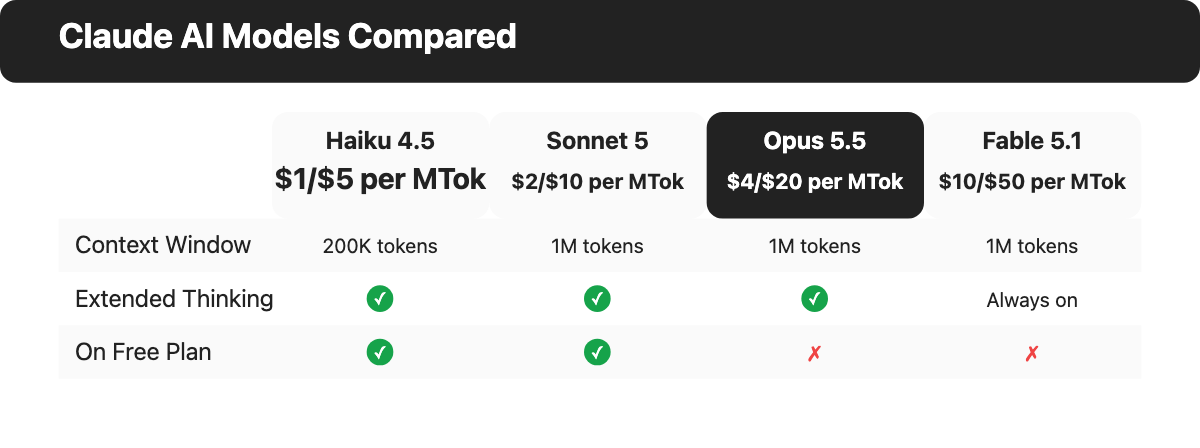
Claude AI is a family of models, each tuned for different levels of capability and cost. As of late 2026, the lineup is:
| Model | Best For | Context Window | Plan Availability |
|---|---|---|---|
| Claude Fable 5.1 | Anthropic's most capable model; the hardest reasoning and long-horizon agentic work | 1M tokens | Pro, Max, Team, Enterprise, API (usage-credit based) |
| Claude Opus 5.5 | Complex reasoning, enterprise workflows, long-horizon tasks | 1M tokens | Pro, Max, Team, Enterprise, API |
| Claude Sonnet 5 | Everyday tasks, writing, coding, balanced performance; the default on claude.ai | 1M tokens | Free, Pro, Max, Team, API |
| Claude Haiku 4.5 | Fast responses, high-volume tasks, real-time apps | 200K tokens | Free, API, select plans |
Claude Fable 5.1
Claude Fable 5.1 is Anthropic's most capable widely released model, built for the hardest reasoning and the longest-running agentic work. It wasn't designed to be the cheapest option, and it doesn't try to be. It runs on a 1 million token context window and, unlike earlier Claude models, keeps its extended thinking switched on for every request rather than treating it as an optional toggle. On Pro and Max plans, though, Fable access is metered through usage credits rather than being unlimited, reflecting its position as the premium tier above Opus.
Claude Opus 5.5
Claude Opus 5.5, released September 22, 2026, is Anthropic's current flagship generally-available model. It replaces Opus 5 at a lower price and roughly 30% faster output, while matching Claude Fable 5.1 on most everyday work. It's designed for complex software engineering and professional enterprise workflows, with strong autonomous task execution (agentic workflows) and self-verification. Opus 5.5 runs on a 1 million token context window and includes adaptive thinking, which scales computing effort based on task difficulty. It's available on Pro, Max, Team, and Enterprise plans.
Claude Sonnet 5
Claude Sonnet 5 is Anthropic's most capable and efficient mid-tier model and the default model on claude.ai, including the free tier. It's designed for high-performance coding, agentic workflows, and computer use. Sonnet 5 supports a 1 million token context window and demonstrates strong proficiency on computer use tasks such as navigating websites, using tools, and filling out forms. For writing, editing, analysis, document summarization, and coding assistance, Sonnet delivers strong results at low latency.
Claude Haiku 4.5
Claude Haiku 4.5 is Anthropic's fastest and most cost-effective model, built for near-frontier intelligence at a fraction of the price of premium tiers. It supports up to 200K tokens and scores over 73% on the SWE-bench Verified coding benchmark. Haiku 4.5 is the first in the Haiku lineup to support extended thinking, which gives it enhanced reasoning for complex tasks despite its speed optimization. It's designed for high-volume API workloads such as customer service bots, automated classification pipelines, and applications that need many responses per minute at minimal cost.
Claude AI Pricing: Free, Pro, Max, and Team Plans
Claude AI is free to use at a basic level, with paid plans that unlock higher usage limits and more powerful models. All prices shown are as of late 2026 and subject to change.
| Plan | Price per Month | What's Included | Best For |
|---|---|---|---|
| Free | $0 | Sonnet 5 and Haiku 4.5 with daily usage limits, memory, web search | Casual users trying Claude AI |
| Pro | $17 (billed annually) or $20 (billed monthly) | 5x+ usage, Opus and Fable access via usage credits, Claude Code, Artifacts (Design, Slides, Docs), Claude Science, Projects | Regular personal or professional use |
| Max 5x | $100 | 5x Pro limits, priority access at busy times | Heavy users, automation workflows |
| Max 20x | $200 | 20x Pro limits, priority access, all features | Intensive continuous usage |
| Team (Standard seat) | $20 (annual) or $25 (monthly) per seat | More usage than Pro, Claude Code, Artifacts, Claude Science, central billing, admin controls | Small to mid-size teams |
| Team (Premium seat) | $100 (annual) or $125 (monthly) per seat | 5x more usage than Standard seats | Teams with heavier daily usage |
| Enterprise | Custom (from $20/seat plus usage at API rates) | SSO, SCIM, audit logs, custom data retention, HIPAA-ready option, dedicated support | Large organizations |
Which plan is right for you?
- Free is the right starting point if you want to test Claude AI with no commitment. Daily limits are generous enough for light use, and you still get Sonnet 5 plus the memory feature, although you'll eventually bump into the caps if you chat with Claude every day.
- Pro at $20 per month is the right upgrade for anyone using AI daily for work. You get Opus and Fable access plus Claude Code, Artifacts, and Claude Science.
- Max is for users running automation pipelines, relying on Claude Code, or needing sustained heavy usage.
- Team or Enterprise is the right path if you're deploying Claude AI across multiple people or need admin controls, SSO, or compliance documentation.
What Can You Do with Claude AI? Key Use Cases
Claude AI handles tasks across text, code, images, and documents, and it's genuinely useful for most of them. The most common use cases are:
- Writing and editing. Drafting emails, blog posts, reports, proposals, and cover letters. Claude AI can match a specific tone, improve clarity, or rewrite content in a different style based on a brief.
- Research and analysis. Summarizing academic papers, synthesizing multiple sources, analyzing arguments, and producing structured overviews of complex topics.
- Coding and software development. Writing, reviewing, debugging, and explaining code across all major programming languages. Claude AI can execute code and is the foundation of Claude Code for autonomous coding workflows.
- Document analysis. Upload a PDF, contract, transcript, or spreadsheet and ask specific questions about the content. Claude AI's large context window handles full documents without requiring manual chunking.
- Image and visual understanding. Claude AI can interpret, describe, and answer questions about uploaded images: screenshots, diagrams, charts, and photographs.
- Web research. Claude AI can search the web to retrieve and synthesize current information when web access is enabled, a capability available even on the free plan. If you're curious how different assistants handle live web queries, our AI search engine comparison breaks down sourcing and accuracy across the field.
- Agentic and multi-step tasks. Claude AI can break a complex goal into steps, execute each one in sequence, and maintain coherence across the entire workflow, even though the task takes 30 or more minutes of continuous execution, and you're not watching every step.
Claude AI's Product Ecosystem: Code, Artifacts, and Connectors
Beyond the core chat interface, Anthropic has built specialized products and features that extend Claude AI into specific professional workflows.
Claude Code
Claude Code is Anthropic's autonomous coding agent. It can read your entire codebase, write code across multiple files, run terminal commands, execute code, and commit changes to Git, without manual direction at each step. Claude Code is available as a CLI tool, a VS Code extension, a JetBrains plugin, and through the Claude desktop and web interfaces. It's included on Pro, Max, Team, and Enterprise plans.
Artifacts: Design, Slides, and Docs
Artifacts let you turn a conversation directly into a shareable, editable output: interactive designs and prototypes, slide decks, one-pagers, spreadsheets, and documents delivered with tracked changes for review, all without leaving the chat. This replaces what used to be a separate "Claude Design" product with a capability built into the core app, available on Pro and above.
Claude Science
Claude Science is Anthropic's specialized offering for research-heavy workflows: literature review, data analysis, and structured scientific writing. It isn't a repackaged version of the general chat app, and it's aimed at researchers and R&D teams who need Claude to work with technical source material at depth. It ships on Pro, Max, Team, and Enterprise plans.
Cowork, Connectors, and MCP
Claude Cowork lets you hand off multi-step tasks that run in the background using your local files and connected cloud applications; it isn't sold as a separate product anymore; as of 2026, it's built directly into the core Claude app. The underlying infrastructure is the Model Context Protocol (MCP), an open standard Anthropic developed to let Claude connect to external tools and services. Anthropic's own connector directory lists roughly 3,000 integrations, including Google Workspace, Microsoft 365, Slack, Salesforce, GitHub, Notion, BigQuery, and Zapier. There's also a beta computer use mode that lets Claude see and interact directly with your screen.
Claude AI vs. ChatGPT vs. Gemini: How They Compare
Claude AI, ChatGPT (OpenAI), and Gemini (Google) are the three dominant general-purpose AI assistants as of late 2026. Here's how they compare on the dimensions that matter most for most users:
| Feature | Claude AI | ChatGPT | Gemini |
|---|---|---|---|
| Training approach | Constitutional AI | RLHF | RLHF + Google data |
| Context window | Up to 1M tokens | Up to 400K tokens | Up to 1M tokens |
| Image generation | No (Artifacts for designs, slides, docs) | Yes (native image generation) | Yes (Imagen integration) |
| Coding strength | Very strong (Claude Code) | Strong | Moderate to strong |
| Safety posture | Conservative, principles-guided | Moderate | Moderate |
| App integrations | ~3,000 via MCP connectors | OpenAI plugin ecosystem | Google Workspace native |
| Mobile apps | iOS and Android | iOS and Android | iOS and Android |
| Free tier | Yes (Sonnet 5, memory, daily limits) | Yes (daily limits) | Yes (daily limits) |
When to choose Claude AI. Claude AI is the strongest choice for careful long-form analysis, large-context document work, and code tasks. If output predictability and safety matter for your use case (legal, compliance, healthcare, finance), Claude AI's Constitutional AI training certainly makes it the most reliably careful option. It's also a top choice for human-like writing that avoids robotic-sounding AI prose. For a broader look at alternatives, see our ChatGPT alternatives comparison.
When to choose ChatGPT. ChatGPT is a better fit if you need native image generation, work heavily with the OpenAI plugin ecosystem, or prefer its more conversational style for creative writing and brainstorming.
When to choose Gemini. Gemini's got a clear advantage if you work primarily in Google Workspace. Its native integration with Docs, Sheets, Gmail, and Drive is difficult to replicate via third-party connectors.
Frequently Asked Questions About Claude AI
Is Claude AI safe to use?
Yes. Safety is a foundational design goal for Claude AI, not a filter applied after the fact. Anthropic's Constitutional AI methodology trains Claude to follow explicit principles around helpfulness, honesty, and avoiding harm. Claude AI won't help with requests it considers harmful, and it'll acknowledge uncertainty rather than generate a confident-sounding wrong answer.
Can Claude AI generate images?
No. Claude AI doesn't generate photorealistic images natively. For AI-assisted visual creation, Claude's Artifacts feature produces designs, slide decks, one-pagers, and documents from text prompts. You can't get that kind of photorealistic output directly inside Claude; tools built into ChatGPT or Google's Imagen (in Gemini) are the better options for that.
Does Claude AI remember past conversations?
Yes, by default. Anthropic shipped a unified memory feature in 2026 that's on automatically for claude.ai and the mobile apps: Claude saves relevant preferences, ongoing work context, and facts you share as you chat, and carries them into your next conversation or into a Cowork task, not just within a single session. Everything memory stores is visible and editable in Settings, and you can turn it off if you'd rather each chat start with a clean slate. Claude's separate Projects feature still lets you store background documents and standing instructions scoped to one specific workspace; it doesn't replace memory, since the two are built for different jobs.
What companies use Claude AI?
Claude AI is widely used across enterprise customers in finance, healthcare, legal services, and technology. Anthropic's commercial API serves both large technology companies and startups building products on top of Claude AI; it's a customer base that keeps getting bigger. The company's nearly $1 trillion valuation and its planned IPO reflect the scale of its commercial adoption. Brands increasingly track how often Claude and other AI assistants cite them in answers using dedicated AI visibility tools.
Is Claude AI better than ChatGPT?
It depends on the task. Claude AI performs better on careful long-form analysis, large-context document work, and tasks requiring consistent adherence to constraints. ChatGPT has the edge on native image generation and breadth of third-party integrations. For most everyday writing and coding tasks, the two aren't far apart in quality, even though they don't approach problems the same way. The better question is which one fits your specific workflow.
Is Claude AI free to use?
Yes. Claude AI has a free tier that gives you access to Sonnet 5 and Haiku 4.5 with daily usage limits, plus memory and web search. Paid plans starting at $20 per month unlock Opus and Fable access, higher usage, and features like Claude Code, Artifacts, and Claude Science.