
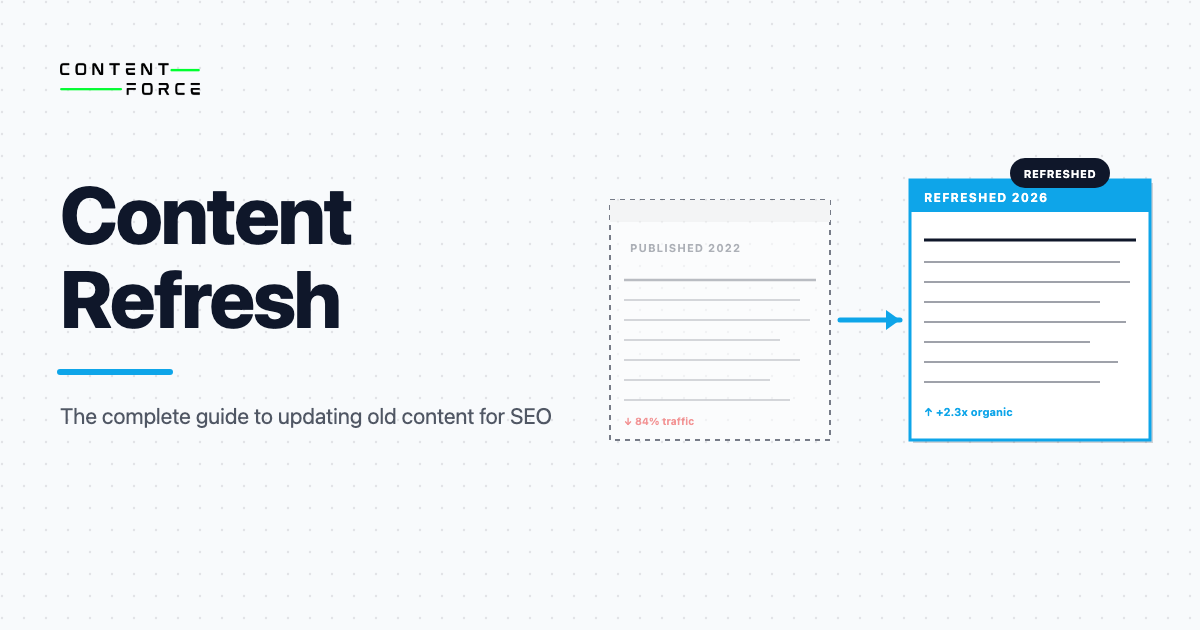
A content refresh updates, improves, or expands existing content to restore its accuracy, relevance, and search performance without changing its URL. You work with what you already have. The page keeps its backlink history, its ranking trajectory, and its indexed URL: you just make it better.
The business case is hard to argue with. Organic content decays at an average rate of -1.21% per week once it starts to decline, according to Animalz research. Teams running quarterly refresh cycles see 42% better results than those on annual schedules, before AI Overviews and LLMs began rewarding freshness as a citation signal in their own right.
The upside shows up in individual case studies too. One documented refresh in the Animalz data set produced 30,000+ additional pageviews and a 55% jump in weekly traffic. Backlinko measured a 260.7% organic traffic increase in the 14 days after relaunching a single article (backlinko.com/content-relaunch), and Ahrefs recorded a 302% traffic uplift after refreshing its own link reclamation guide (ahrefs.com/blog/republishing-content).
This guide covers the full process: why content decays, how to decide what to do with a declining page, how to execute a refresh, and how to optimize the result for both Google and AI search.
What Is a Content Refresh?
A content refresh is an update to published content that improves quality, accuracy, or completeness without creating a new URL. The existing page stays. Its backlink profile stays. Its ranking history stays. You just make it better.
Three related actions are worth distinguishing:
| Action | What changes | URL stays the same? | Typical use case |
|---|---|---|---|
| Content refresh | Facts, structure, gaps, on-page SEO | Yes | Declining traffic, outdated information |
| Content update | Minor edits only (broken links, updated dates) | Yes | Quick maintenance, no structural gaps |
| Content rewrite | Nearly everything from the ground up | Yes | Fundamentally misaligned with current intent |
The distinction matters because each action carries a different time investment and different risk profile. A refresh preserves and restores; a rewrite starts fresh while keeping the URL; a content update is the lightest touch of all.
Common content refresh actions include the changes below.
- Replacing outdated statistics and studies with current data
- Filling topic gaps identified from reviewing current SERP competitors
- Restructuring sections to match today’s search intent pattern
- Updating internal links to newer articles on your site
- Improving the opening paragraph to be more answer-first
- Adding comparison tables, checklists, or summary boxes for scannability
- Removing sections that are no longer accurate or relevant
Why Content Decays (And Why It Matters)
Content decay is the gradual drop in organic traffic that previously well-ranking pages experience over time, even when nothing breaks and nothing is removed. A study cited by Animalz put the average weekly decline at 1.21% per page. Do the math: over twelve months, a page starting to decay at that rate loses more than half its peak traffic. Not because anything went wrong on your end. Because the rest of the web kept improving while the page stayed fixed.
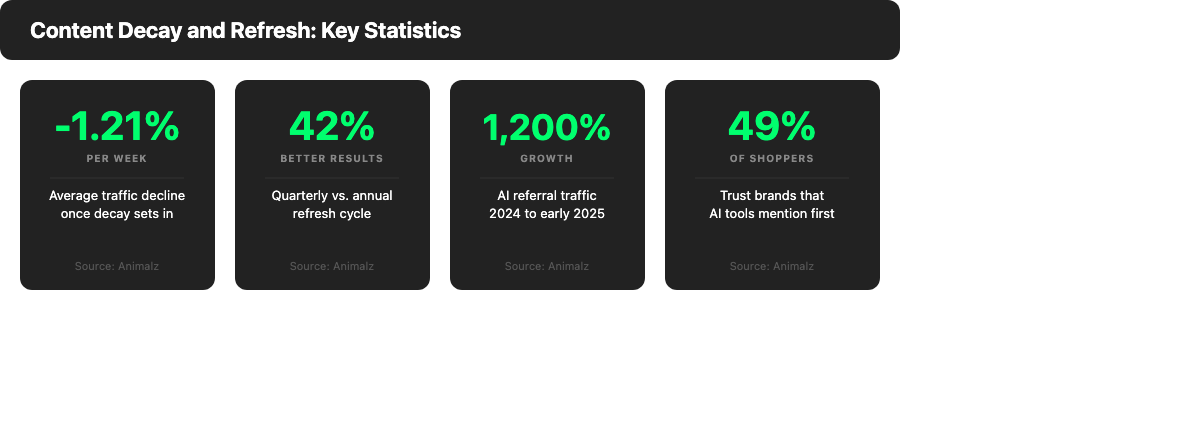
Two decay curves are now running in parallel. The first is the familiar one: rankings slip as competitors publish fresher, deeper content that earns more clicks and backlinks. The second is new. AI Overviews and LLMs favor pages updated recently over pages that haven’t been touched in two or three years. Generative AI referral traffic grew roughly 796% between January 2024 and December 2025 across a 2.3-billion-session sample (WebFX analysis), and Adobe measured an even steeper 1,200% jump in AI-sourced visits to US retail sites over a shorter window (Adobe Analytics). Either way, it’s a channel that barely existed before. A page can still hold page one in traditional search while losing its AI citation share entirely, and neither metric captures the other.
The causes of decay determine the fix. Full stop. A page losing ground to fresh competitor content needs a depth and coverage update. A page with a search intent mismatch needs a structural rethink, not more paragraphs in the wrong direction. Getting the diagnosis right before you start is what separates a productive refresh from a waste of an afternoon and several weeks of waiting for rankings to move.
Increased Competition
Your competitors aren’t standing still. New articles get published on your best-performing topics every quarter. Existing competitors run their own refresh cycles. A page that held the top position two years ago may now face ten newer articles that go deeper, earn fresher backlinks, and match current reader expectations more closely. Closing the depth gap is often the single most effective lever in a content refresh.
Search Intent Shifts
What users want from a query isn’t fixed. Search for “remote work tools” in 2019 and you got one type of result; run the same search today and the SERP reflects a completely different intent pattern. If your article was optimized for 2021 intent and that intent has moved, the page will lose ground even if every sentence is still factually accurate. Checking current SERPs before you start a refresh tells you whether you’re filling gaps or rebuilding from the wrong angle.
Freshness Signals and Algorithm Updates
Google’s Query Deserves Freshness (QDF) signal boosts newly updated content on time-sensitive topics. For evergreen guides, freshness matters less as an isolated factor. That said, Google’s E-E-A-T framework rewards content that demonstrates current expertise. Outdated examples, old screenshots, a tool that shut down in 2023 mentioned as a current option: these erode trust signals that a refresh can fix in an afternoon.
AI Overviews and Zero-Click Search
AI Overviews now answer many informational queries directly in search results, cutting into click-through rates for the pages that previously captured those clicks. What gets cited in an AI Overview and what gets ignored comes down to structure, freshness, and source quality. Pages without clear factual statements, without citable sources, or with information last verified years ago get passed over. A refresh that improves extractability directly improves AI Overview visibility.
LLM Training Data Recency Bias
Large language models have training cutoffs. A model trained through early 2025 is more likely to cite and recommend content published or updated after its prior cutoff than content from 2021 or 2022. The older content might say the same thing. The newer page still wins the citation. Adding current data, replacing old examples, and linking to primary sources all push a refreshed page toward the front of an LLM’s preference pool. For a fuller breakdown of this dynamic, see our guide to LLM SEO.
Refresh vs. Rewrite vs. Consolidate vs. Delete: How to Decide
Before spending time on a content refresh, confirm that a refresh is actually the right action. Four options exist, and choosing the wrong one wastes effort or, worse, leaves a structural problem in place.
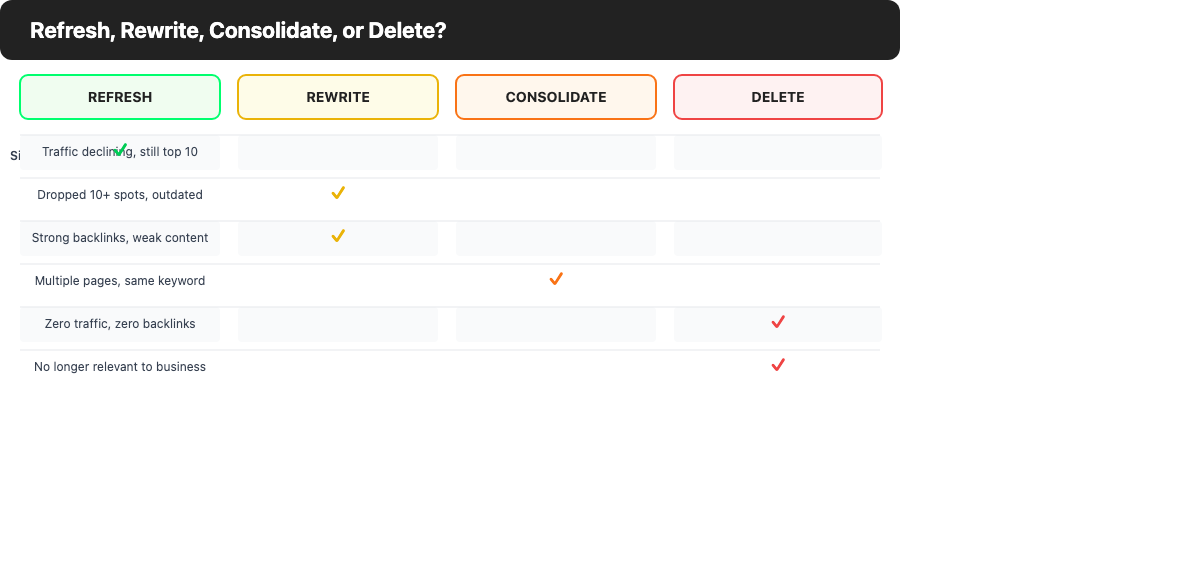
| Signal | Refresh | Rewrite | Consolidate | Delete |
|---|---|---|---|---|
| Traffic declining but still ranking in top 10 | Yes | |||
| Rankings dropped 10+ spots, content outdated | Yes | |||
| Multiple thin pages targeting the same topic | Yes | |||
| Zero organic traffic, zero backlinks for 12 months | Yes | |||
| Strong inbound backlinks but weak content quality | Yes | |||
| Two or more pages cannibalizing the same keyword | Yes | |||
| Seasonal or product-specific page, no longer relevant | Yes |
Three questions can help you reach the right action for any specific page:
- Does the page still rank or earn backlinks worth protecting? If yes, the URL carries authority that a refresh or rewrite can restore. If no, there’s less reason to invest in the URL itself.
- Is the structure fundamentally sound, or is the core thesis wrong for current intent? If the structure is sound but specific details are outdated, a refresh is usually enough. If the whole angle needs to change, a rewrite is more appropriate.
- Do multiple pages on your site compete for the same keyword? If yes, consolidate the weaker pages into the strongest one before refreshing. Refreshing a cannibalizing page without resolving the cannibalization won’t solve the ranking problem.
When to Refresh
Refresh a page when it previously ranked well, traffic has declined gradually over 6 to 12 months, the core topic and URL are still the right match for the keyword, and the drop is explained by gaps in coverage, outdated information, a stale title tag, or loss of content depth relative to current competitors.
When to Rewrite
Rewrite a page when the foundational angle is wrong for current search intent, the structure would need to be rebuilt from scratch to compete, or the original article contains significant factual errors, outdated frameworks, or a narrative that no longer reflects how the topic is understood. Rewrites keep the URL; they aren’t the same as creating a new article.
When to Consolidate
Consolidate when you have multiple pages targeting the same keyword cluster and none of them rank strongly. Pick the strongest URL (usually the one with the most backlinks), redirect the others to it via 301 redirects, and merge the best content from all pages into one comprehensive article. A content inventory review often reveals these consolidation opportunities. Related: see our guide to content gap analysis for identifying which topics deserve a consolidated page.
When to Delete
Delete (and redirect if the page has inbound links) when a page has had no organic traffic in the past 12 months, carries no backlinks worth protecting, and targets a topic no longer relevant to your business or audience. Keeping low-quality, zero-traffic pages adds crawl budget waste and can dilute domain-level quality signals. A content audit is the standard way to surface these candidates systematically.
How to Identify Content That Needs a Refresh
Identifying content that needs a refresh requires combining signals from Google Search Console and GA4, not intuition or page age alone. Old content isn’t necessarily decaying content; new content isn’t automatically healthy.
GSC Signals to Watch
Pull a 3-month performance report in Google Search Console filtered to organic search, and compare it against the prior 3-month period. The table below lists the patterns worth investigating.
| Signal | Threshold to investigate | What it suggests |
|---|---|---|
| Impressions declining | Down 15-20%+ over 90 days | Losing ranking ground |
| CTR dropping, impressions flat | CTR down 1-2 percentage points from prior period | Title or meta no longer competitive |
| Average position slipping | Dropped 3+ spots from prior period | Competitors overtaking |
| High impressions, very low CTR | CTR below 2% with 1,000+ impressions per month | Strong optimization opportunity: better title and meta |
Sort your pages by the largest impression decline over the past 90 days. This list is your starting candidate set for refresh consideration.
GA4 Signals to Watch
In GA4, build a custom report showing organic sessions by landing page with a 90-day comparison against the prior year. Flag any page that matches one of these three patterns.
- Organic sessions have declined more than 15% month over month for two consecutive months
- Engagement rate has fallen below 40%, indicating that users who do arrive find a mismatch between what they expected and what they got
- Exit rate on key informational pages is above 70%
An engagement rate drop without a parallel rankings drop often indicates an intent mismatch: the page still ranks, but users are leaving because the content no longer satisfies what they came for.
Building a Prioritized Refresh Queue
Not every declining page deserves immediate attention. Build a prioritized queue by:
- Exporting all URLs with organic traffic from GSC for the past 6 months.
- Sorting by 3-month traffic trend, descending from the largest decline.
- Cross-referencing with a backlink check to identify pages with existing link equity worth protecting.
- Cross-checking with business priority: which pages drive sign-ups, conversions, or link to high-priority destinations?
- Prioritizing pages that combine a traffic decline with existing link equity, since those have the most to recover and the most to lose if left unaddressed.
High-traffic pages with modest declines deserve attention before low-traffic pages with sharp declines, because the absolute recovery potential is much larger.
How to Do a Content Refresh (Step-by-Step)
The steps below apply regardless of page type: a how-to guide, a product comparison, a data roundup. Run them in order. Skipping ahead creates dependencies you’ll need to undo.
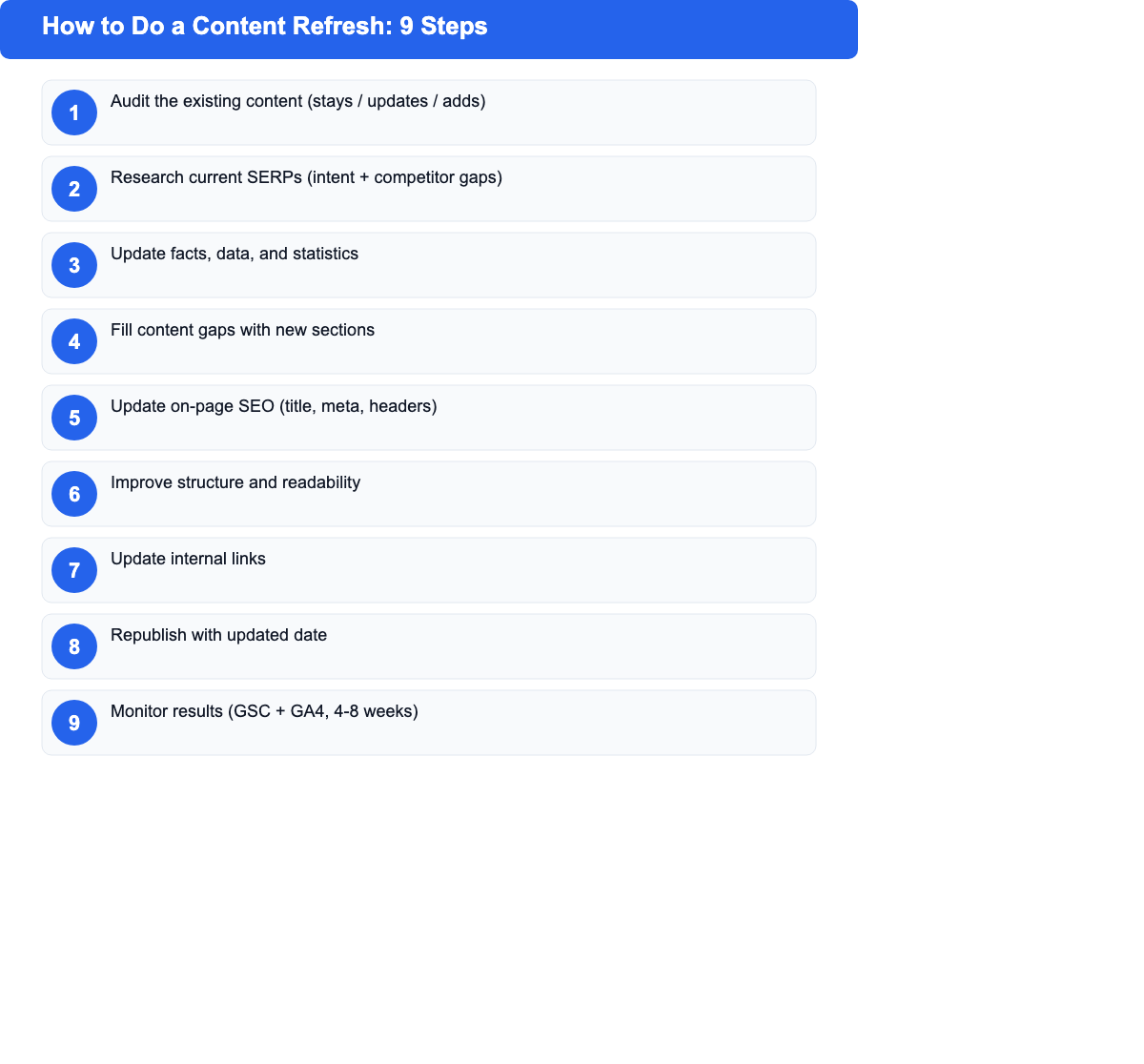
Step 1: Audit the Existing Content
Read the full article as a first-time visitor would read it. Note every claim that feels outdated, every section that ends without a real answer, every question the article raises but doesn’t resolve. Note what works too: sections that are clear, well-structured, and still accurate should stay intact rather than get disrupted in the name of freshness.
A simple three-column document works well for tracking this review.
- What stays (accurate, well-written, still relevant)
- What updates (same topic, needs new data or examples)
- What adds (topics missing from the current article, surfaced by SERP research)
Step 2: Research Current SERPs
Open the top five organic results for your target keyword. Compare their H2 and H3 structure to yours. Write down every major topic they cover that your article doesn’t. Note whether the SERP intent has shifted toward more or less depth than your page currently offers, and note whether top results open with a direct answer that your article buries two scrolls down.
The “People also ask” box is useful here. Related queries at the bottom of the results page too. Both surfaces reveal questions readers have that no current article may answer well: and those gaps are where a refresh can build a lead over the existing top results.
Step 3: Update Facts, Data, and Statistics
Check every statistic, study reference, and “as of [year]” claim against a current source. Replace outdated numbers with the most recent data you can find with a verifiable link. If a source is no longer available, find a newer equivalent or cut the claim.
References to discontinued products, defunct companies, or deprecated practices are particularly damaging. Readers who spot a tool that shut down in 2023 being recommended as a current option lose confidence in the whole article. Search engines pick up on these quality signals too.
Step 4: Fill Content Gaps
Add sections or subsections for every major topic your competitors cover that your article skips. Each new section should open with one sentence that directly answers the question. No preamble, no throat-clearing: a reader landing on that H2 from a table of contents should get the answer in the first line.
Before adding a large new section, ask whether it belongs here or in a linked article. A well-linked cluster of focused articles routinely outperforms one sprawling article trying to cover everything. Our guide to content gap analysis explains how to map out which topics deserve a standalone page versus a section in an existing one.
Step 5: Update On-Page SEO
Review and update:
- Title tag: Does it match current search intent? Does the primary keyword appear near the front? Is it between 50 and 60 characters?
- Meta description: Does it include a clear, specific benefit statement? Is it under 160 characters?
- H1: Does it match the title tag closely while being slightly more descriptive?
- Header structure: Are H2s and H3s logically ordered, covering the right subtopics in the right sequence?
- Image alt text: Are all images labeled with descriptive, keyword-relevant alt text?
Don’t keyword-stuff revised headings. The goal is to match reader language naturally, not to force repetition of the exact keyword phrase into every H2.
Step 6: Improve Structure and Readability
Most articles written two or three years ago were written for a reading pattern that has since changed. Today’s readers scan faster and expect more structured output. These structural improvements come up most often.
- Adding a summary table at the top for complex comparison content
- Breaking long paragraphs into shorter ones (aim for 3 sentences maximum per paragraph in body text)
- Converting lists of steps from prose into numbered lists
- Adding a “key takeaways” or “quick summary” box at the end of long sections
- Breaking dense explanations into a definition, a reason, and an example structure
Readability improvements alone won’t recover rankings, but they reduce bounce rates, improve engagement time, and make the content easier to extract for AI Overviews.
Step 7: Update Internal Links
Add internal links to newer articles you’ve published since the original post went live. Remove or update links to articles that no longer exist or have moved. Also scan the refreshed article for opportunities to link to your highest-priority pages.
Internal linking after a refresh serves two purposes: it distributes link equity from pages that may have acquired backlinks over time, and it helps readers navigate related content rather than leaving your site after the article ends.
Step 8: Republish with Updated Date
Once the refresh is complete, update the article’s last-modified date and republish. On WordPress, this means updating the “Last Updated” date field. Some themes also display a visible “Last updated: [date]” label; updating this signals recency to readers and reinforces freshness signals to search engines.
Don’t change the URL unless there’s a specific reason to do so. Changing the URL breaks existing backlinks and resets the page’s ranking history. The only exception is a URL with a year embedded in it, such as /content-refresh-2022/, which will become permanently stale. In that case, set up a 301 redirect from the old URL to the new one and update all internal links.
Step 9: Monitor Results
Track the page’s performance for 4 to 8 weeks after republishing. Key metrics to watch:
- GSC impressions and average position for the primary keyword and related queries
- Organic sessions from GA4
- CTR changes resulting from an updated title and meta description
- Engagement rate to confirm the refreshed content now better satisfies intent
Most refreshed pages see ranking movement within 2 to 4 weeks as Googlebot recrawls and re-indexes the updated content. If no movement appears after 6 weeks, revisit the SERP analysis and check whether the refresh addressed the actual cause of the decline.
Content Refresh for AI Search (AEO)
Answer Engine Optimization (AEO) is the practice of structuring content for extraction and citation by AI systems: Google’s AI Overviews, ChatGPT, Claude, and others. A content refresh is one of the best opportunities to optimize for both traditional search and AI search at the same time, without creating a separate deliverable for each. Our full guide to answer engine optimization covers the foundational concepts; below is what specifically changes during a refresh.
Why AI Overviews Favor Fresh Content
AI Overviews favor fresh content because recency matters to AI systems in two distinct ways. First, content updated recently is more likely to contain accurate current information: which AI systems prefer when generating answers users might act on. Second, models trained on more recent web snapshots weight newer content more heavily when forming their own knowledge base.
A page last touched in 2021 is at a structural disadvantage against a refreshed page from 2025, even if both pages rank on page one. Beyond freshness, structural clarity matters. Pages built around direct questions and atomic answers: one clear answer per section, not the same answer spread across five paragraphs: get extracted more often. Research from Animalz puts the trust dimension in concrete terms: 49% of shoppers say they trust brands that AI tools mention first. That’s a top-of-funnel trust signal that didn’t exist three years ago.
For how AI systems are reshaping content visibility more broadly, see our guide to AI visibility.
How to Optimize Refreshed Content for AI Citations
Four changes to make during a content refresh that directly improve AI citation rates:
- Write atomic answer paragraphs. Per major subtopic, write one 2-to-3 sentence paragraph that answers the core question on its own. AI systems pull quotes, not summaries: they need something self-contained.
- Add FAQ schema markup. Structured data on your most-asked questions gives AI systems a formatted, citable answer to work with. The FAQ at the end of this guide uses this approach.
- Cite primary sources. Link to original studies or authoritative publications. “Research shows” without a link isn’t citable. A DOI or a linked study is.
- Replace dated examples. An AI system choosing between a 2022 example and a 2025 example of the same concept will default to the recent one. Swap out old examples for current ones during every refresh pass.
Monitoring AI Visibility
Standard GSC reports don’t yet separate AI Overview impressions from traditional organic impressions. Track AI visibility after a refresh with these three checks instead.
- Check GA4 referral traffic from chatgpt.com, perplexity.ai, and claude.ai; these appear in referral reports when a user follows a citation link
- Search your target queries in Google with AI Overviews enabled and note whether your page gets cited
- Use dedicated AI visibility tools that track mention frequency across LLMs over time
Content Refresh Checklist
Use this checklist before publishing any refresh to confirm no key step was missed.
Before You Start
- Confirmed this page should be refreshed, not rewritten, consolidated, or deleted
- Pulled GSC and GA4 data to establish current performance baseline
- Reviewed top 5 SERP competitors and documented content gaps
Content Quality
- All statistics and data points updated to current sources
- Outdated product references, discontinued tools, or defunct companies removed
- Content gaps from SERP analysis filled with new sections
- Every major section opens with a direct, extractable answer
- No unnecessary padding or filler paragraphs
On-Page SEO
- Title tag updated with primary keyword and clear benefit statement
- Meta description updated with specific benefit and call to action
- H2 and H3 structure reviewed and logically ordered
- Image alt text updated where needed
- Internal links added to newer articles; broken internal links fixed
Technical
- No broken external links in the updated article
- FAQ schema added or updated where applicable
- Last-modified date updated before republishing
Post-Publish
- Article republished with today’s date
- GSC URL inspection requested to prompt faster recrawl
- Performance tracking set up in GSC and GA4, with a 4-week review reminder
Common Content Refresh Mistakes
Six mistakes come up repeatedly. Each one is easy to avoid once you know to look for it.
- Updating the date without updating the content. This tactic stopped working. Google’s quality systems detect minimal-change updates; so can readers who arrive expecting fresh information and find content that’s clearly still from three years ago. A date change without substantive improvement can make things worse, not better.
- Refreshing pages that should be consolidated first. Three articles on the same topic, all ranking poorly, is a keyword cannibalization problem. Refreshing one of them without merging the others won’t fix it. Consolidate first, then refresh the surviving page.
- Skipping the intent check. Search intent shifts. A keyword that used to return listicle results now returns how-to guides; a query that once attracted comparison content now attracts definition articles. A refresh that improves writing and updates data while keeping the wrong content structure won’t recover rankings. Check the current SERP before touching a single word.
- Adding length without adding value. Word count isn’t a ranking signal. Extra paragraphs that restate existing points, or loosely related sections added to hit a word count target, don’t help. Every addition should answer a specific question or close a specific gap identified in the SERP analysis.
- Not measuring results. A refresh without a before-and-after baseline is a guess. Pull GSC and GA4 numbers before you start, then review them 4 to 6 weeks after republishing. Without this, you can’t tell what worked.
- Refreshing on a fixed schedule instead of on signal. Monthly cosmetic edits to a page that doesn’t need them add churn without adding value. Refresh when traffic drops, when competitor content leaps ahead, or when the topic itself changes: not on a calendar that ignores actual performance data.
How Often Should You Refresh Content?
Refresh frequency should match content type and how quickly the topic changes, not a fixed universal schedule applied to everything.
| Content type | Recommended refresh cycle |
|---|---|
| Evergreen how-to guides | Every 12 to 18 months (or sooner if traffic signals drop) |
| Product comparison and review pages | Every 6 to 12 months |
| Data-heavy posts (stats, benchmarks, market data) | Every 6 to 12 months |
| News and trend-driven posts | Every 3 to 6 months |
| Pricing and feature comparison pages | Every 3 to 6 months |
| Thought leadership or opinion posts | Rarely, only if foundational arguments change |
Research from Animalz found that quarterly refreshes yield 42% better results than annual refreshes. That doesn’t mean every page needs a quarterly refresh, but it does suggest that the fastest-moving evergreen content, such as guides to AI tools, content strategy frameworks, or SEO best practices, benefits from more frequent attention than standard annual cycles provide.
The best signal is always performance data. If a page’s impressions, rankings, or organic sessions start declining, investigate immediately regardless of when the last refresh happened. The refresh calendar is a fallback for pages that haven’t yet shown clear decline signals; declining traffic is an override that triggers immediate action.
Frequently Asked Questions
What is a content refresh in SEO?
A content refresh in SEO is the process of updating an existing web page to improve its accuracy, depth, and relevance without changing its URL. This typically includes replacing outdated statistics, filling content gaps identified from competitor analysis, improving the page’s structure, and updating on-page SEO elements like the title tag and meta description. The goal is to make an underperforming page competitive again while preserving the backlinks and ranking history already accumulated at that URL.
How long does a content refresh take?
A thorough content refresh takes 2 to 6 hours depending on article length and the number of gaps identified. A quick maintenance refresh, such as updating statistics, fixing broken links, and revising the intro, can take 30 to 60 minutes. A near-complete structural overhaul that adds several new sections and rewrites the framing may take a full day. The investment is consistently lower than writing a new article from scratch targeting the same keyword, especially for pages that already have backlinks and ranking history worth preserving.
Does a content refresh improve rankings?
Yes, a content refresh improves rankings when it fills genuine topic gaps, updates outdated information, and aligns more closely with current search intent, typically producing ranking improvements within 2 to 6 weeks of republication. The improvement is most pronounced for pages that previously ranked in positions 4 through 20, where incremental quality gains can move the needle meaningfully toward the top 3 positions. Pages that have dropped below page one, however, may need more substantial rewrites to recover.
Should I change the URL when refreshing content?
No. Changing the URL when refreshing content resets the page’s backlink profile and removes the search history accumulated at the original address. Keep the original URL even if the title changes significantly. The one exception is a URL with a year embedded in it, such as /content-refresh-2022/, which will become permanently stale. In that case, set up a 301 redirect from the old URL to the new one and update all internal links pointing to it.
What is the difference between a content refresh and a content audit?
A content audit is an inventory-level review of all your existing content to assess what should be refreshed, rewritten, consolidated, or deleted. A content refresh is the execution step: making the actual improvements to a specific page. The audit identifies which pages need action; the refresh is the action itself. If you aren’t sure where to start, our guide to content audits covers how to run one end to end.

1 thought on “Content Refresh: The Complete Guide to Updating Old Content (2026)”