
Pricing
Surfer SEO Pricing: Plans, Add-ons and Cost per Article

Surfer SEO costs $49 a month (Discovery) to $299 a month (Peace of Mind) when billed yearly, or $59 to $359 a month when billed monthly. Surfer SEO has no permanent free plan, but new accounts can start a 7-day trial of the Pro plan. Enterprise pricing is custom.
- Discovery
- $49 a month billed yearly, $59 monthly, 10 documents a month
- Standard
- $99 a month billed yearly, $119 monthly, 30 documents a month
- Pro
- $182 a month billed yearly, $219 monthly, 30 documents a month
- Peace of Mind
- $299 a month billed yearly, $359 monthly, unlimited documents under fair usage
- AI Search Analytics
- $82 a month billed yearly, $95 monthly, tracking only, no documents
- Cost per document on Standard
- About $3.30 billed yearly, about $3.97 billed monthly
As of October 2026
Surfer SEO starts at $49 a month on a yearly plan, and what you really pay per article depends on the document pool in your plan and on whether you bill monthly or yearly. That second part is what most Surfer SEO pricing pages skip. The price list itself is short: four standard plans, a standalone AI tracker and a custom Enterprise tier.
This guide walks through every current plan, explains how the billing pools work, puts a real cost on each document and shows which plan fits which publishing volume. All prices were checked on Surfer's own pricing page and help center on 14 October 2026.
Last updated: 14 October 2026.
How Much Does Surfer SEO Cost?
Surfer SEO costs $49 a month (Discovery) to $299 a month (Peace of Mind) when billed yearly, or $59 to $359 a month when billed monthly. Enterprise is custom, and an AI-tracking-only plan starts at $82 a month billed yearly. Surfer bills in USD or EUR, and the plan numbers are the same in both on the pricing page.
Older Surfer SEO pricing articles still quote "Essential" at $99 and "Scale" at $219 a month. Those plan names don't appear on Surfer's pricing page anymore, so any article built on them is out of date. Here's the structure as it stands now:
| Plan | Billed yearly (USD per month) | Billed monthly (USD per month) | Documents | AI prompt tracking |
|---|---|---|---|---|
| AI Search Analytics | $82 | $95 | None | 50 prompts, daily, five engines |
| Discovery | $49 | $59 | 120 a year (10 a month) | None |
| Standard | $99 | $119 | 360 a year (30 a month) | 25 prompts, weekly, ChatGPT only |
| Pro | $182 | $219 | 360 a year (30 a month) | 50 prompts, daily, five engines |
| Peace of Mind | $299 | $359 | Unlimited (fair usage) | 100 prompts, daily, five engines |
| Enterprise | Custom | Custom | Custom | Custom |
A "document" is what Surfer counts each time you create or optimize a piece of content in the Content Editor. Yearly plans are charged for the whole year upfront, so the per-month figure in the second column is a rate, not what you'll see leave your card each month.
What Does Each Surfer SEO Plan Include?
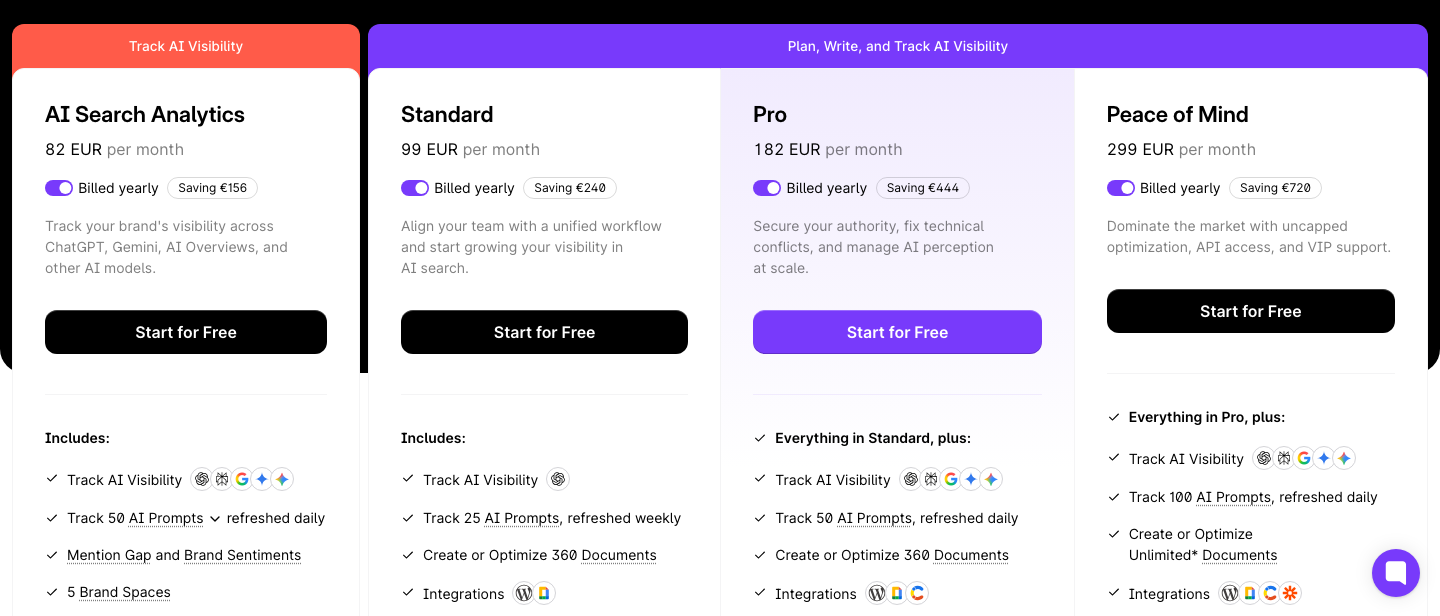
Each plan differs in four things: the document pool, how many AI prompts Surfer tracks and on which AI engines, how many pages, brand workspaces and seats you get, and which planning tools unlock. The plan-by-plan list below comes from Surfer's own comparison table.
Discovery
Discovery is the entry plan at $49 a month billed yearly ($59 monthly). You get 10 documents a month (120 over a yearly term), 10 tracked pages, one brand workspace, one seat, AI SEO optimization guidelines, Surfy (the AI writing assistant) and the humanizer. It doesn't have AI visibility tracking, a plagiarism check or 1-click optimization. It suits someone testing the Content Editor on a handful of articles.
Standard
Standard costs $99 a month billed yearly ($119 monthly). It includes 30 documents a month (360 a year), three seats, one brand workspace, 50 tracked pages, content audit, keyword research, 1-click content optimization, a plagiarism checker, rank drop alerts and the WordPress and Google Docs integrations. Its AI tracking is the narrowest in the lineup: 25 prompts refreshed weekly, on ChatGPT only. For most small content teams it's the plan the rest of this article keeps coming back to.
Pro
Pro costs $182 a month billed yearly ($219 monthly). The document pool stays at 30 a month (360 a year), so the extra money buys capability, not volume. You get 50 prompts refreshed daily across ChatGPT, Perplexity, Google AI Mode, Google AI Overviews and Gemini, five brand workspaces, five seats and 200 tracked pages. Pro is also where 1-click internal linking, the topical map, the cannibalization report, the audit tool, custom voices and 10 custom templates first appear. It's also the plan Surfer gives you during its free trial.
Peace of Mind
Peace of Mind runs $299 a month billed yearly ($359 monthly). It lifts the document, brand-workspace and template caps to unlimited under a fair-usage policy and tracks 100 AI prompts daily on all five engines. It also raises the limits to 500 tracked pages and 10 seats, and it's the only plan with the SERP Analyzer, API access and a dedicated success manager. It's built for agencies and larger in-house teams.
AI Search Analytics
AI Search Analytics is a separate, tracking-only plan: $82 a month billed yearly ($95 monthly) for 50 prompts refreshed daily across all five AI engines, with mention gap and brand sentiment reporting, five brand workspaces, five seats and MCP access. Larger prompt tiers are priced as complete plans: 100 prompts cost $158 yearly or $185 monthly, and 200 prompts cost $308 yearly or $365 monthly. It includes no documents, so it only makes sense if you want to monitor AI visibility without writing inside Surfer.
Enterprise
Enterprise is quoted individually. It's the tier that adds SSO and enterprise-grade security, an advisory program, legal onboarding assistance, white-label options, custom limits and priority support. Surfer doesn't publish a price for it, and you'll need to talk to its team.
Where Each Feature Unlocks
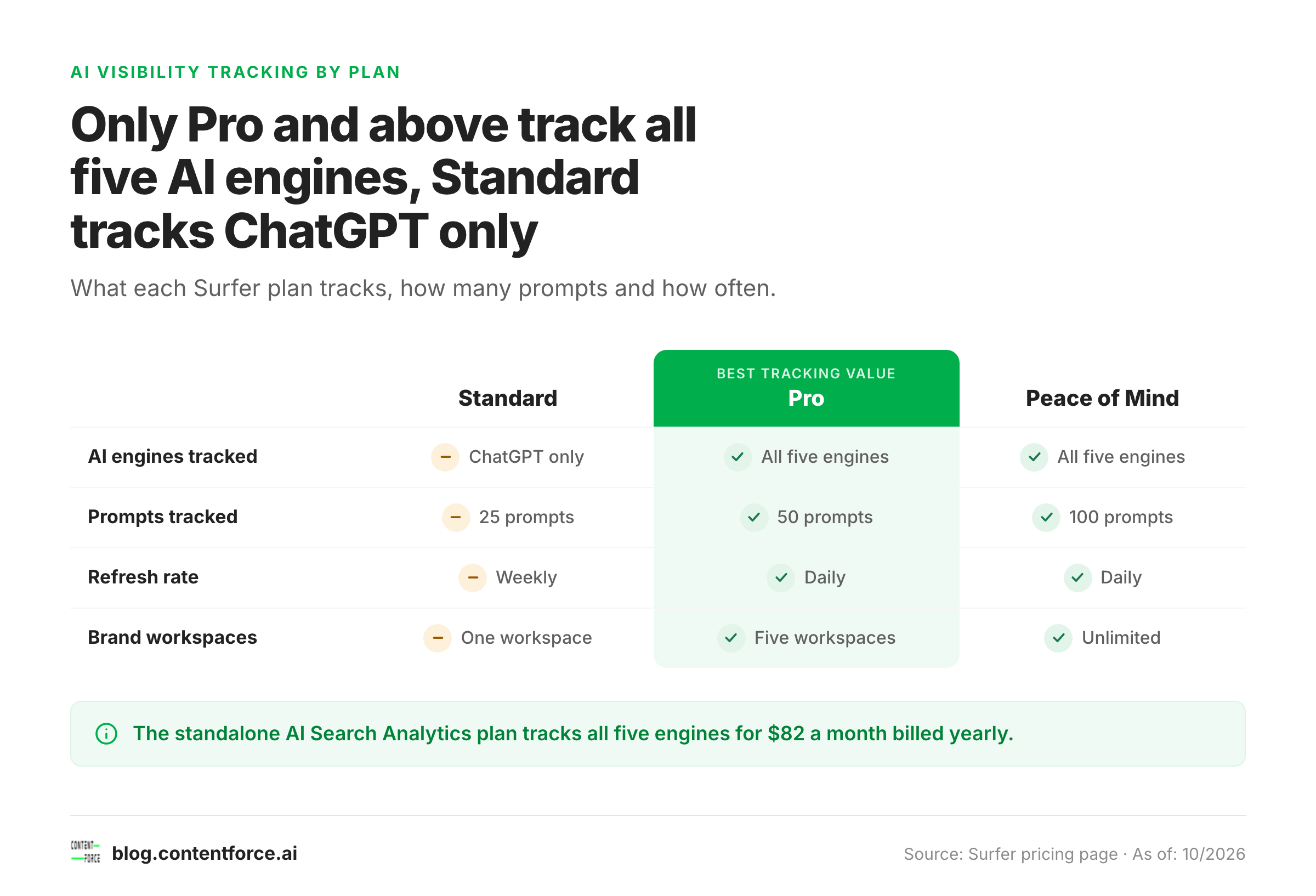
If you only need one specific feature, the table below shows the cheapest plan that includes it.
| Plan | Features that first appear at this price point |
|---|---|
| Standard | AI visibility tracking (ChatGPT only), plagiarism checker, 1-click content optimization, keyword research, rank drop alerts |
| Pro | Tracking on all five AI engines, 1-click internal linking, topical map, cannibalization report, audit, custom voices and templates |
| Peace of Mind | SERP Analyzer, API access, dedicated success manager, unlimited documents and workspaces |
| AI Search Analytics | Tracking on all five AI engines without any documents (Pro-level tracking at a lower price) |
SEO Title Generator: eight title tag variations, sized for the SERP and intent-matched. Free, no signup.
Monthly vs Yearly Billing: What Actually Changes?
Yearly billing lowers the monthly rate by roughly 14% to 17% and pools your documents for the whole term, while monthly billing gives you a smaller pool each month. Surfer itself says annual billing saves "up to 17%."
The gap differs by plan, as the list below shows.
- Discovery costs $10 more a month if you pay monthly, so $120 more over a year.
- Standard costs $20 more a month, or $240 more over a year.
- Pro costs $37 more a month, or $444 more over a year.
- Peace of Mind costs $60 more a month, or $720 more over a year.
- AI Search Analytics with 50 prompts costs $13 more a month, or $156 more over a year.
Billing choice also changes how credits work. Surfer's pricing FAQ says that on an annual plan your credits reset yearly, or when you change plan, not every month. In practice a yearly Standard subscriber gets 360 documents to spend whenever they like, while a monthly subscriber gets 30 documents that reset each month. If your publishing is lumpy, with a big batch in spring and a quiet summer, the yearly pool is more forgiving than the monthly one.
The trade-off is commitment. You'll pay the whole year at checkout, and bank transfer is only available on yearly plans. Cards work for both. PayPal isn't supported.
What Does One Surfer SEO Document Cost?
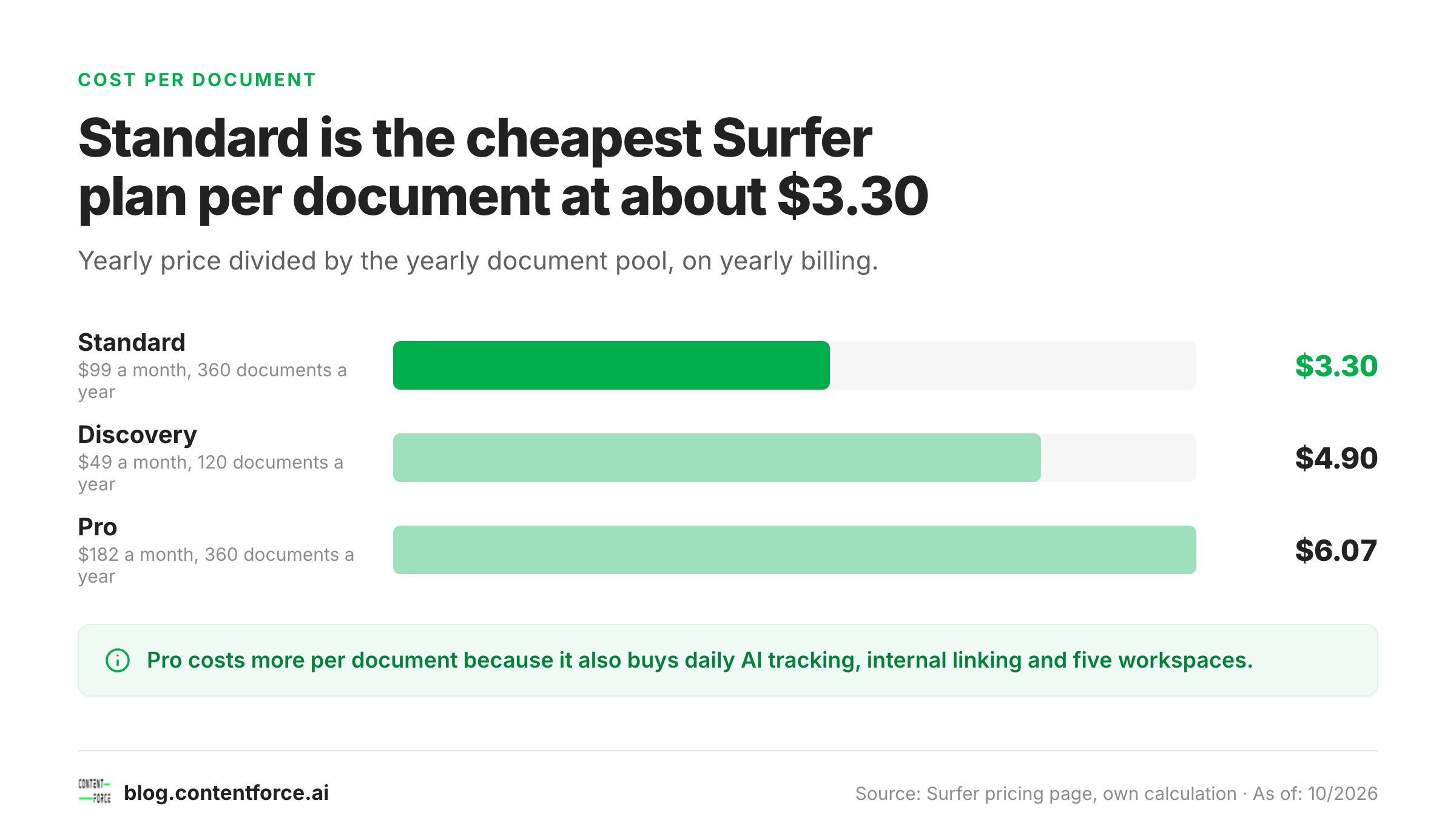
On Standard, one document costs about $3.30 if you pay yearly and about $3.97 if you pay monthly. Pro costs more per document, $6.07 yearly or $7.30 monthly, because you're paying for daily AI tracking, internal linking and workspaces, not just volume. The math is simple: divide what you pay for the term by the documents in the pool.
| Plan | Yearly total (USD) | Documents a year | Cost per document, yearly billing (USD) | Cost per document, monthly billing (USD) |
|---|---|---|---|---|
| Discovery | $588 | 120 | $4.90 | $5.90 |
| Standard | $1,188 | 360 | $3.30 | $3.97 |
| Pro | $2,184 | 360 | $6.07 | $7.30 |
| Peace of Mind | $3,588 | Unlimited | Falls with volume | Falls with volume |
Two points matter when you're reading this table. First, these figures count every created or optimized document, so a cheap refresh of an old post uses the same credit as a brand-new article. Teams that mostly refresh get more value per credit than teams that draft from scratch, which isn't obvious from the sticker price. Second, the numbers ignore everything else in the plan. A Pro subscriber who uses 50 daily AI prompts and the cannibalization report isn't overpaying per document. They're buying a different product than a Standard subscriber who only wants the Content Editor.
Peace of Mind won't beat Standard on cost per document unless your volume is high. At $3,588 a year it costs about three times as much as Standard's $1,188, so it needs to replace roughly 1,000 documents a year before it gets cheaper per piece. That's a realistic number for an agency and an unrealistic one for a single blog, which is why it's the agency plan.
Does Surfer SEO Have a Free Trial?
Yes, but it isn't card-free, and it won't cancel itself. Surfer's help center describes a 7-day trial in which you get full access to the Pro plan. You choose a plan and enter billing details at checkout, and if you don't cancel, your card is charged for the first billing period of the plan you selected.
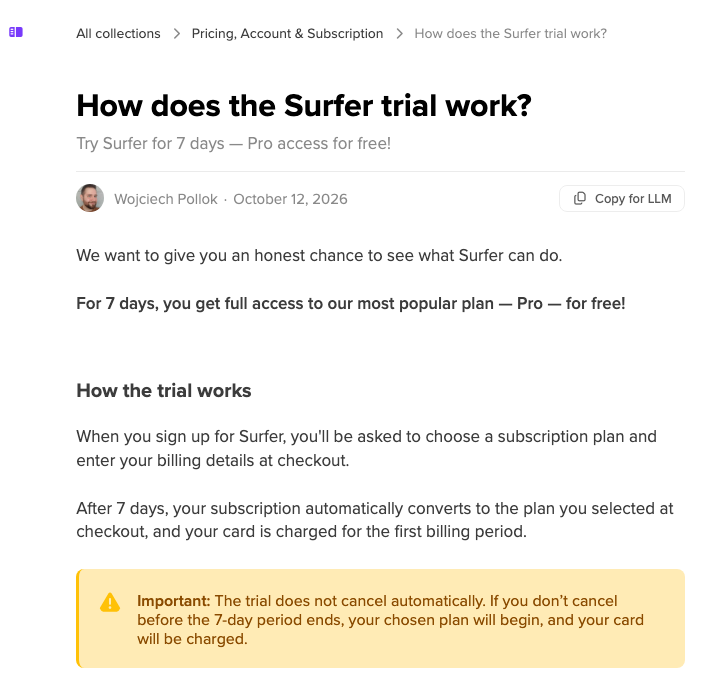
A few rules from Surfer's help article are worth knowing before you start, and the list below covers them.
- The trial is for new accounts only, and a card that was already linked to a Surfer account isn't eligible.
- To cancel, go to Settings, then Billing, then Your subscription, and choose Cancel subscription. You keep access until the trial ends.
- After a cancelled trial, your account expires and you lose access to stored data, so export anything you need first.
Some third-party reviews say Surfer has no free trial at all, and some describe a 7-day money-back guarantee instead. The official help article describes a trial, so that's the version we'd trust. I couldn't confirm refund terms on a primary page, so read the checkout terms before paying for a yearly plan. Surfer doesn't have a permanent free plan either, though the Keyword Surfer Chrome extension is free to install.
What Are the Add-ons and Hidden Costs?
Surfer SEO's hidden costs are limited: extra pages and AI prompts sold as add-on packs, the document pool running out, currency and VAT, and the fact that a yearly plan commits you for twelve months. None of them's a trap, but each one can move your real bill away from the headline number.
- Add-on packs. The pricing page lets you raise the number of tracked pages on Standard, Pro and Peace of Mind, and the number of AI prompts on Pro and Peace of Mind. The extra price is added to the plan, and the calculator on the page shows the exact amount, so check it before you assume the headline price covers your needs.
- Pool limits. Unused documents don't roll over on monthly plans, and upgrades reset your billing date. Surfer's help center says unused limits from your old plan don't carry over when you upgrade.
- Currency and VAT. You can pay in USD or EUR, and switching currency on an existing subscription means contacting support. UK and EU customers are charged VAT, which you can avoid by adding a valid VAT ID.
- Upgrades and downgrades. Upgrades are prorated and take effect immediately. Downgrades take effect at your next billing date. Moving to a more expensive plan counts as an upgrade.
- Auto-renewal. Plans renew automatically. Turning off auto-renewal keeps access until the paid period ends.
- A second tool. Surfer focuses on content optimization and AI visibility. It doesn't replace a backlink index or a full site-audit crawler, so many teams still pay for a separate SEO suite. For a sense of that cost, see our breakdown of Ahrefs pricing.
Which Surfer SEO Plan Should You Choose?
Choose by how many documents you create or optimize each month and whether you need AI visibility tracking. Use the table below as a starting point, then check the pricing page for your own limits.
| Your situation | Best-fit plan | Why |
|---|---|---|
| Testing Surfer on up to 10 articles a month | Discovery | Lowest entry price, no AI tracking you won't use |
| Up to 30 articles a month, small team | Standard | Lowest cost per document, weekly ChatGPT-only tracking |
| Up to 30 articles a month, plus multiple brands or daily tracking on all five AI engines | Pro | Same pool as Standard, with workspaces, internal linking and cannibalization checks |
| Agency with many clients and heavy volume | Peace of Mind | Unlimited documents, API access, success manager |
| You only want to watch AI mentions | AI Search Analytics | Cheapest route to daily prompt tracking |
One comparison is worth making. Standalone AI Search Analytics with 50 daily prompts costs $82 a month billed yearly, while Pro costs $182 and includes the same 50 daily prompts. The $100 difference is what you pay for 360 documents, the Content Editor and Pro's planning tools. The 100-prompt tracker at $158 a month is even cheaper than Pro's $182, with twice the prompts. If you don't write inside Surfer, the tracker alone is clearly the better deal, and if you're on Standard, remember it only tracks ChatGPT. Our roundup of the best AI visibility tools shows what else is available at this price.
Is Surfer SEO Worth the Price?
Surfer SEO is worth it when you publish or refresh content on a regular schedule and you'd like a data-backed editor and AI visibility tracking in one place. It isn't worth it if you publish a few posts a quarter or mainly need backlink and technical audit data.
A fair test is to put the per-document cost next to what a document is worth to you. At roughly $3 to $7 per document, the tool's fee is small beside the writer's or editor's time, so the real question is whether its guidance saves enough editing time or lifts enough rankings to justify the subscription. Surfer's Content Score can also push writers toward stuffing in every suggested term, so it's best treated as guidance, not a target.
If you're still comparing, our Surfer SEO review covers the features in depth, and the list of Surfer SEO alternatives shows cheaper and broader options. For the wider market, see our guide to content optimization tools, and for another pricing breakdown in the same style, read our Similarweb pricing guide.
Frequently Asked Questions
These answers reflect Surfer's pricing as of October 2026.
How much does Surfer SEO cost per month?
Surfer SEO costs $49 a month on Discovery, $99 on Standard, $182 on Pro and $299 on Peace of Mind when billed yearly. Billed monthly, the same plans cost $59, $119, $219 and $359.
Does Surfer SEO have a free plan?
No. Surfer SEO has no permanent free plan. New accounts can start a 7-day trial of the Pro plan, but it requires billing details and converts to a paid plan if you don't cancel.
Is it cheaper to pay for Surfer SEO yearly?
Yearly billing is cheaper. It saves up to 17% and, on Standard, cuts the cost per document from about $3.97 to about $3.30. You pay the full year upfront.
Can I change my Surfer SEO plan later?
You can change your Surfer SEO plan at any time from the Billing section of your account. Upgrades take effect immediately and are prorated, and downgrades take effect on your next billing date.
What payment methods does Surfer SEO accept?
Surfer accepts credit and debit cards on monthly and yearly plans, and bank transfers on yearly plans only. PayPal isn't supported.
Is Surfer SEO better than Semrush?
Surfer and Semrush solve different problems. Surfer is built around on-page content optimization and AI visibility tracking, while Semrush is a broad suite that also covers backlinks, site audits and paid search. Teams that mainly write and refresh content often pick Surfer, and teams that need one platform for everything pick a suite.